EAF063D8E91BA401146D3A48713014D7.gif
71226f8fa4899989b401cdfc85233edd.png
B2F288B0F25FF6B5A8846A718DF3FF6F.webp
Description
Luminotype
Twenty-seven text effects for Minecraft — ten that colour, seventeen that move. Works on item names, lore, tooltips, chat, books, signs, and FTB Quests text.
Minecraft 1.20.1 · Forge 47.4.x · Client-side
What it does
Put a control code in front of any text.
&p流光彩虹 Rainbow
&xsh shaken text
&{grad from=5BCEFA to=F5A9B8}gradient&{/}
No resource pack, no dependencies. Drop the jar in mods/ and the codes work.
Two families
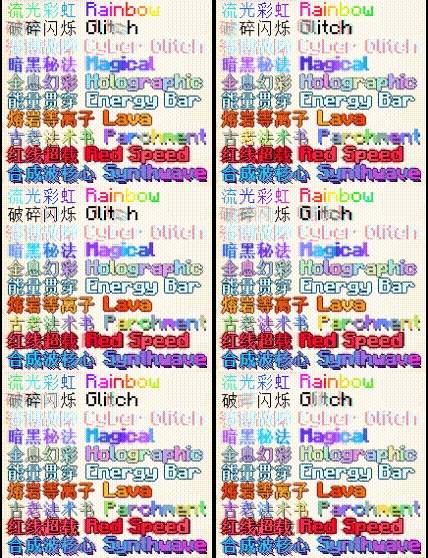
Ten colour codes, one letter each. They recolour, outline and add glow; the letters stay put.
| Code | Effect |
|---|---|
&p |
Rainbow — colour streams across the text |
&g |
Glitch — intermittent fracturing |
&h |
Cyber — red/cyan aberration, pixel ghosting, dark backing |
&q |
Magical Neon — violet-to-cyan, bold, layered glow |
&y |
Holographic — liquid iridescence, metallic edge, white specular |
&s |
Energy Bar — translucent cyan bar sweeping through the glyphs |
&t |
Lava Plasma — flowing core, dark outline, flame halo |
&v |
Parchment — aged spellbook wash, brown drop shadow |
&u |
Red Speed Neon — heavy bloom, speed lines, motion ghosts |
&m |
Synthwave — cyan-to-magenta 3D extrusion, VHS scan glitch |

Seventeen animated effects, &x plus two letters. They move, rotate and reveal.
| Code | Effect | Code | Effect | |
|---|---|---|---|---|
&xsh |
Shake | &xra |
Rainbow cycle | |
&xwa |
Wave | &xgr |
Two-colour gradient | |
&xwi |
Wiggle | &xpu |
Pulse | |
&xsw |
Swing | &xfa |
Fade | |
&xbo |
Bounce | &xsd |
Deepened shadow | |
&xpe |
Pendulum | &xgl |
Glitch jitter | |
&xtu |
Turbulence | &xne |
Neon glow | |
&xsc |
Scroll | &xty |
Typewriter | |
&xsp |
Fixed hue per letter |
Two letters are matched before one, so &xsh is shake rather than &xs followed by an h. One-letter shortcuts exist for the common ones: &xs &xw &xr &xu &xf &xg &xb &xp &xt &xc &xd &xh &xl &xi &xe.
Parameters
&{shake a=3 f=2}violent shake&{/}
&{grad from=ff0000 to=0000ff sp=8}red to blue&{/}
&{pulse base=0.2 f=3}strong pulse&{/}
&{typewriter f=5}fast typing&{/}| Param | Meaning |
|---|---|
a |
Amplitude |
f |
Speed; characters per second for the typewriter |
w |
Phase offset between adjacent letters |
r |
Radius — pendulum orbit, neon glow size |
p |
Passes — neon, default 10 |
from to |
Gradient endpoints, six hex digits |
sp |
How many letters a gradient spans |
uni |
One-way rather than there-and-back |
base |
Floor brightness for pulse |
An unrecognised parameter name is ignored and the default used — a typo should not stop an item name from rendering.
Combining
&q&xsh          arcane shake
&{shake; wave a=0.5}both&{/}
&xsh shaken&r plain again
\&xsh literal code
&{/} closes a long-form scope. &r (or §r) clears every effect and vanilla formatting.
Where it works
Item names and lore, full tooltips, chat, books, signs — anything the game renders as a text component. With FTB Quests installed, quest titles, subtitles, descriptions and reward text too.
Optional compatibility
Detected at runtime, wired up only if present. None are required.
- FTB Quests / FTB Library — codes work in quest text, and a reflective API writes them into quest data from a script
- ModernUI — text keeps its correct font fallback instead of dropping to the default face
Scripting
Mod id luminotype, package cn.blockforge.luminotype.
const DynamicTextApi = Java.loadClass('cn.blockforge.luminotype.api.DynamicTextApi')
const FtbQuestTextApi = Java.loadClass('cn.blockforge.luminotype.compat.FtbQuestTextApi')

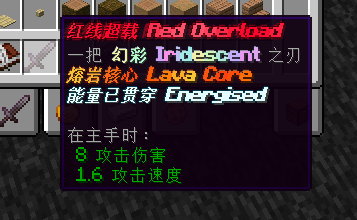
FtbQuestTextApi.setTitle('5A1B2C3D4E5F6071', '&u&xsh Red Overload')
DynamicTextApi.refresh()
Pass quest ids as strings — they are full 64-bit values and JavaScript numbers lose precision on them. Edit quest data during server-side script loading; clients parse the codes when the data syncs.
FtbQuestTextApi is fully reflective: with FTB Quests absent every method returns false rather than throwing, so it can be called unguarded.
Configuration
config/luminotype-client.toml, generated on first run.
| Key | Default | |
|---|---|---|
enabled |
true |
Master switch |
rainbowSpeed |
1.35 |
0.05–8.0 |
glitchFrequency |
16 |
1–60 |
refreshIntervalMs |
40 |
16–1000. Raise to spend less CPU |
maxTextLength |
512 |
Animated characters per run, 16–8192 |
compatibleScreens |
["*"] |
Which screens may animate |
Plus a switch per colour effect. compatibleScreens is a substring match against the lowercased screen class name, so ["inventory"] is enough. * matches everything; hud covers text drawn with no screen open.
Turning an effect off still hides its code — the text falls back to its plain colour rather than showing a literal &p.
Performance
Text with no control codes costs nothing: the parser scans once, finds no code, returns the original.
Of the animated effects, sixteen move or recolour a single glyph and cost about what a colour code does. &xne neon is the exception — it draws each glyph eleven times. Fine on a title, noticeable on a full page of lore.
Three levers: raise refreshIntervalMs, lower maxTextLength, narrow compatibleScreens.
Notes
&m is vanilla's strikethrough code. This mod claims it for Synthwave. Use §m for strikethrough. No other vanilla code conflicts.
&xsc scroll leaves its container — it pushes the whole line left. That is the effect, not a bug, but do not put it on an item name.
&xty typewriter is keyed by the string. The same text drawn in two places shares one reveal; different text keeps separate progress. Progress is forgotten a second after it stops being drawn, so a tooltip retypes on each hover.
Client-side rendering. The animation happens during font rendering, so a server does not need the mod — but control codes live in server-side data such as item NBT and quest files, and a player without the mod sees the literal code. For a modpack, require it on all clients.
Known limitations
&#RRGGBB custom colours are not supported. Writing one renders it literally. For an arbitrary two-colour gradient use &{grad from=… to=…}, which does work.
Luminotype Team