LK: Shop and Market
- By
2026-08-19_02.04.28.png
2026-08-19_02.04.30.png
2026-08-19_02.04.19.png
2026-08-19_02.04.35.png
2026-08-19_02.04.04.png


Description
🇬🇧 ENGLISH · 🇪🇸 Español más abajo
🏪 LK Shop&Market
A player-run marketplace for Minecraft, inspired by how trading works in Albion Online. Open it with /market.
What you get
| 🌍 World Market | Player-to-player order book. Sell orders and buy orders, partial fills, escrow, offline payouts. |
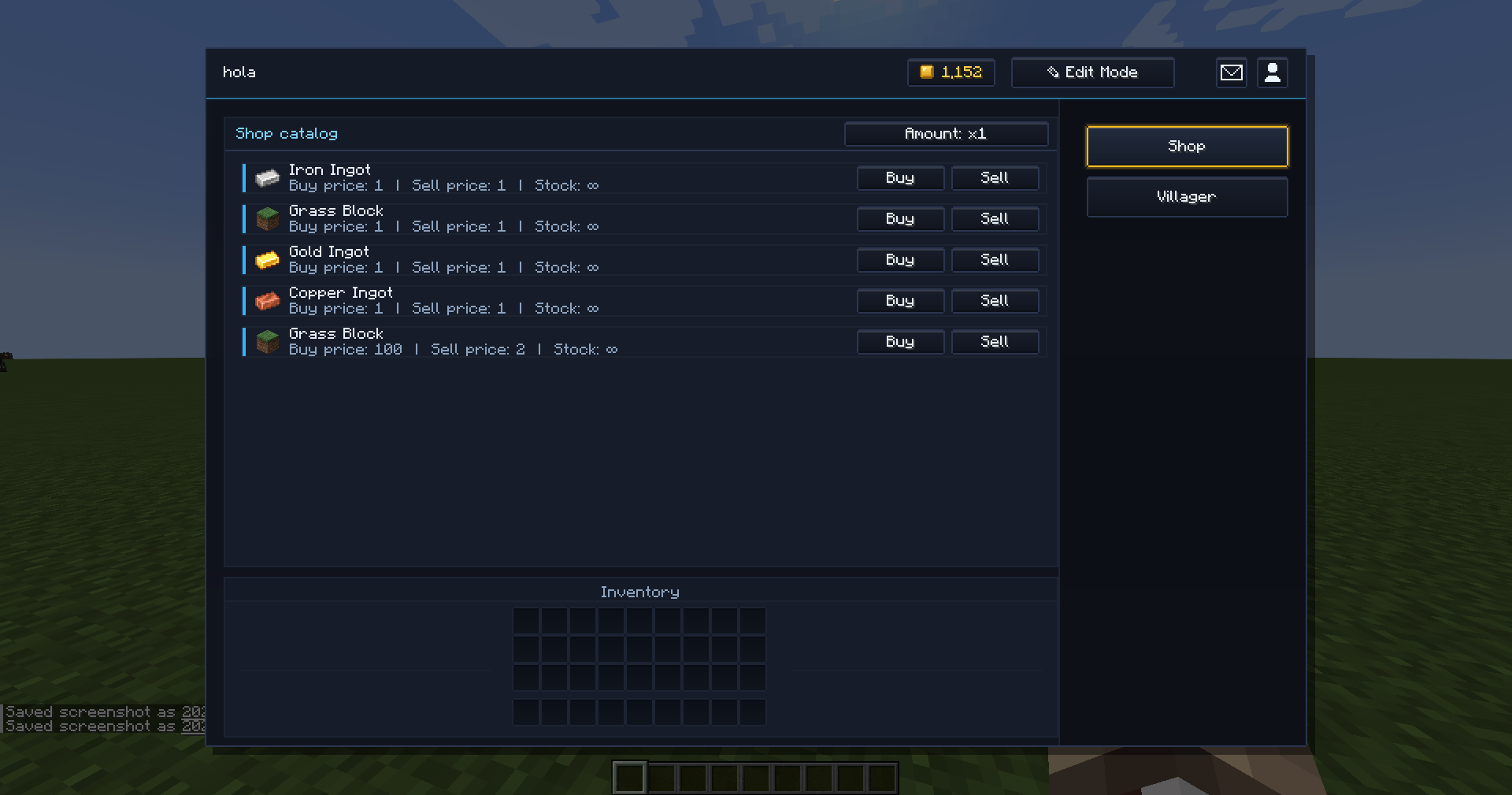
| 🏪 Server Shops | Admin-run shops with a fixed catalog. Attach one to a villager, or define it in a datapack. |
| 🤝 Direct trades | Face-to-face trade window between two players, with escrow and an anti-scam delay. |
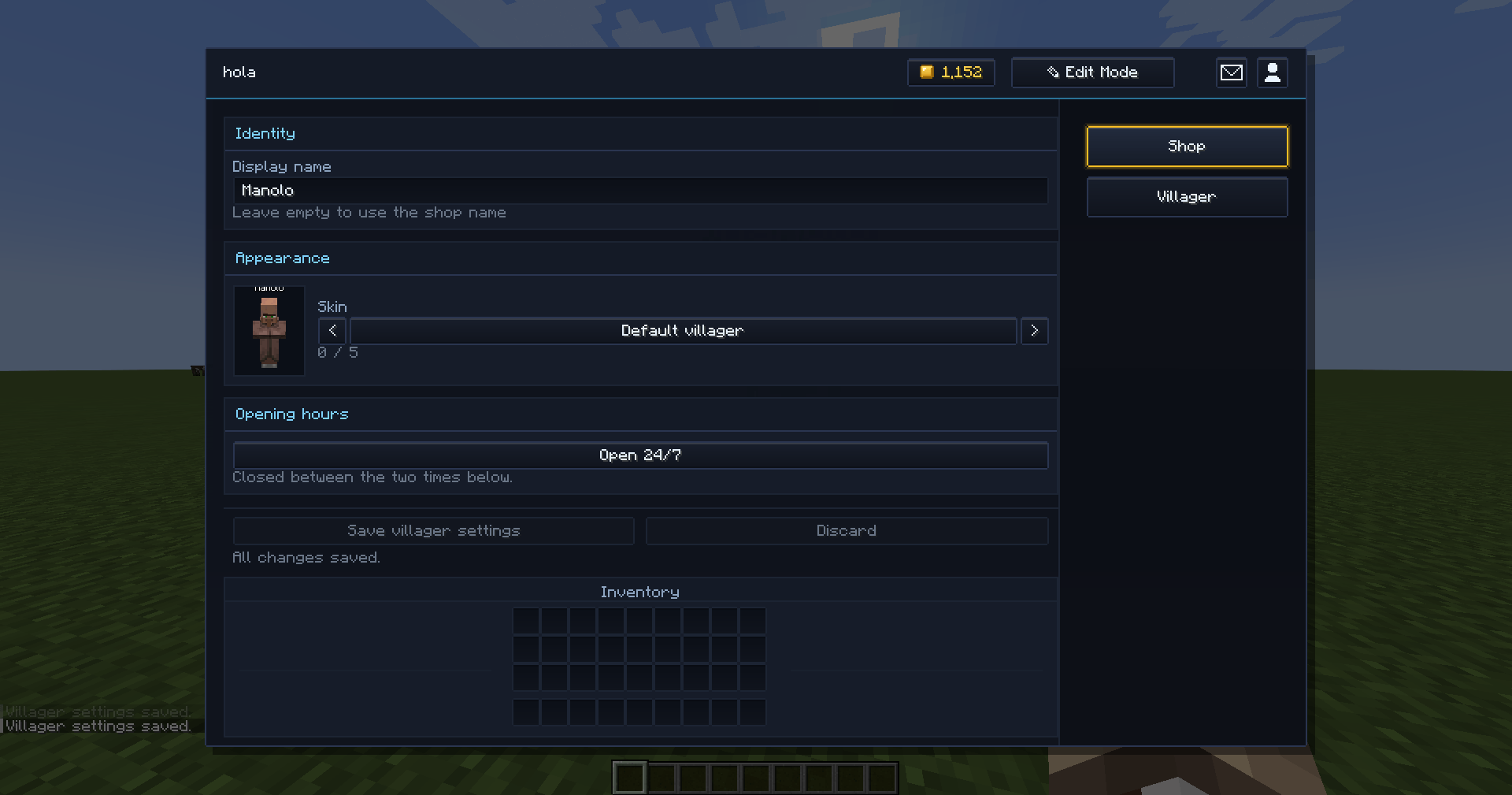
| 🧑🌾 Shop villagers | Custom name, 5 skins, and their own opening hours — they sleep when the shop is shut. |
| 📬 Mailbox | Nothing is ever lost to a full inventory. |
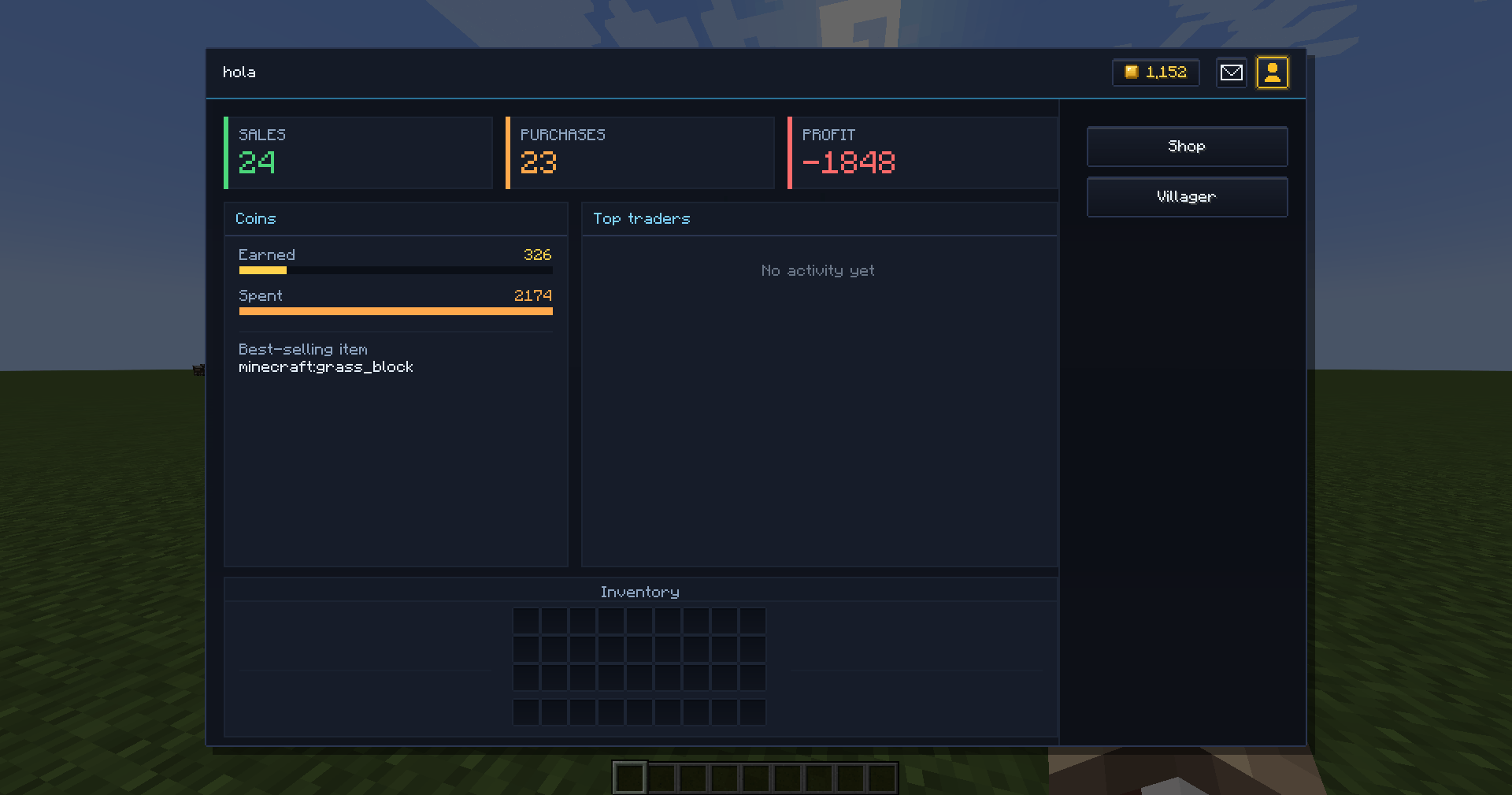
| ⭐ Seller profiles | Star rating, sales, active orders. Balances stay private. |
For players
Buying and selling on the World Market
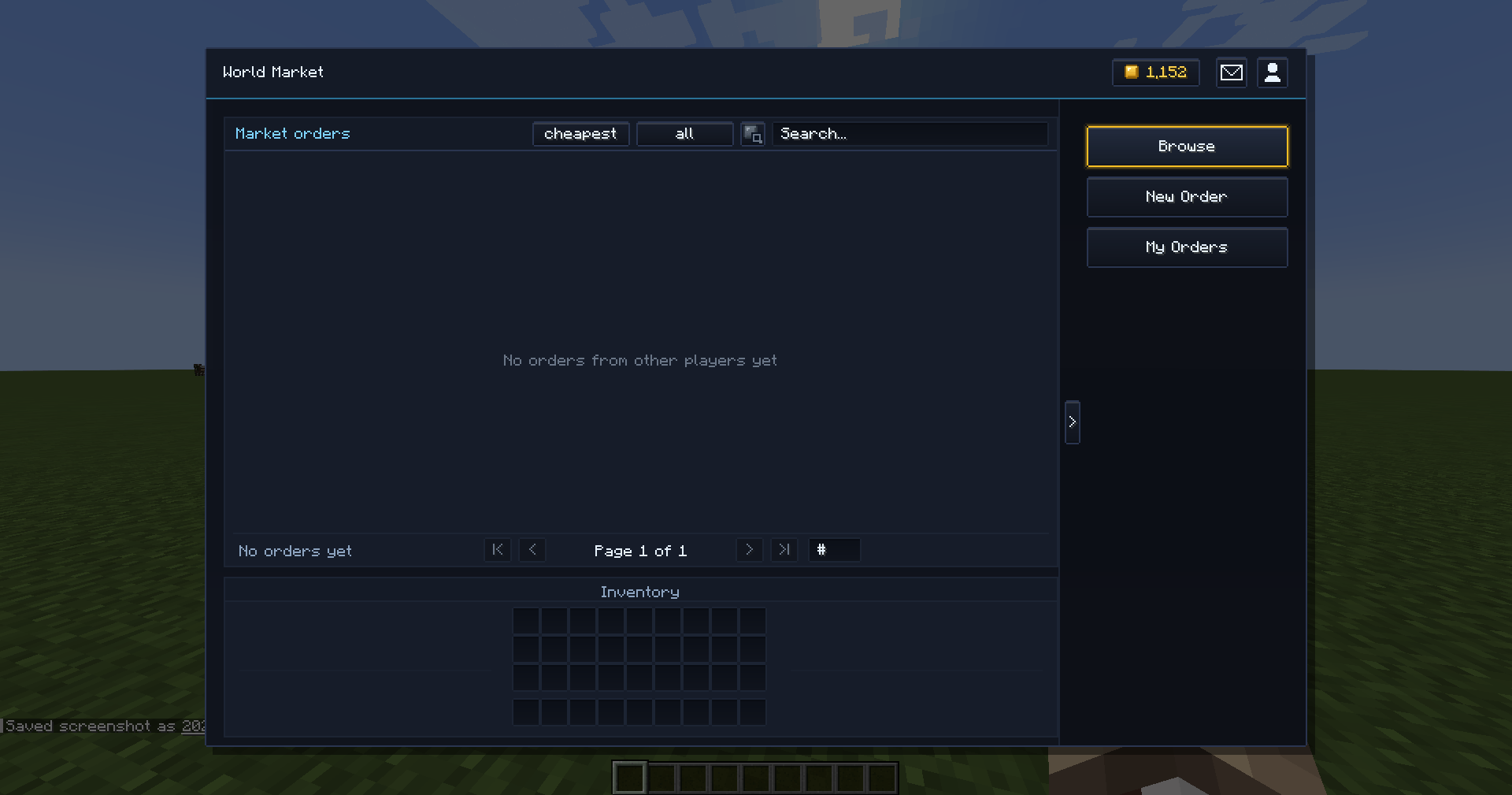
/marketopens it.- Browse is the order book. Click a row to buy — you can buy part of a lot, you don't have to take the whole thing.
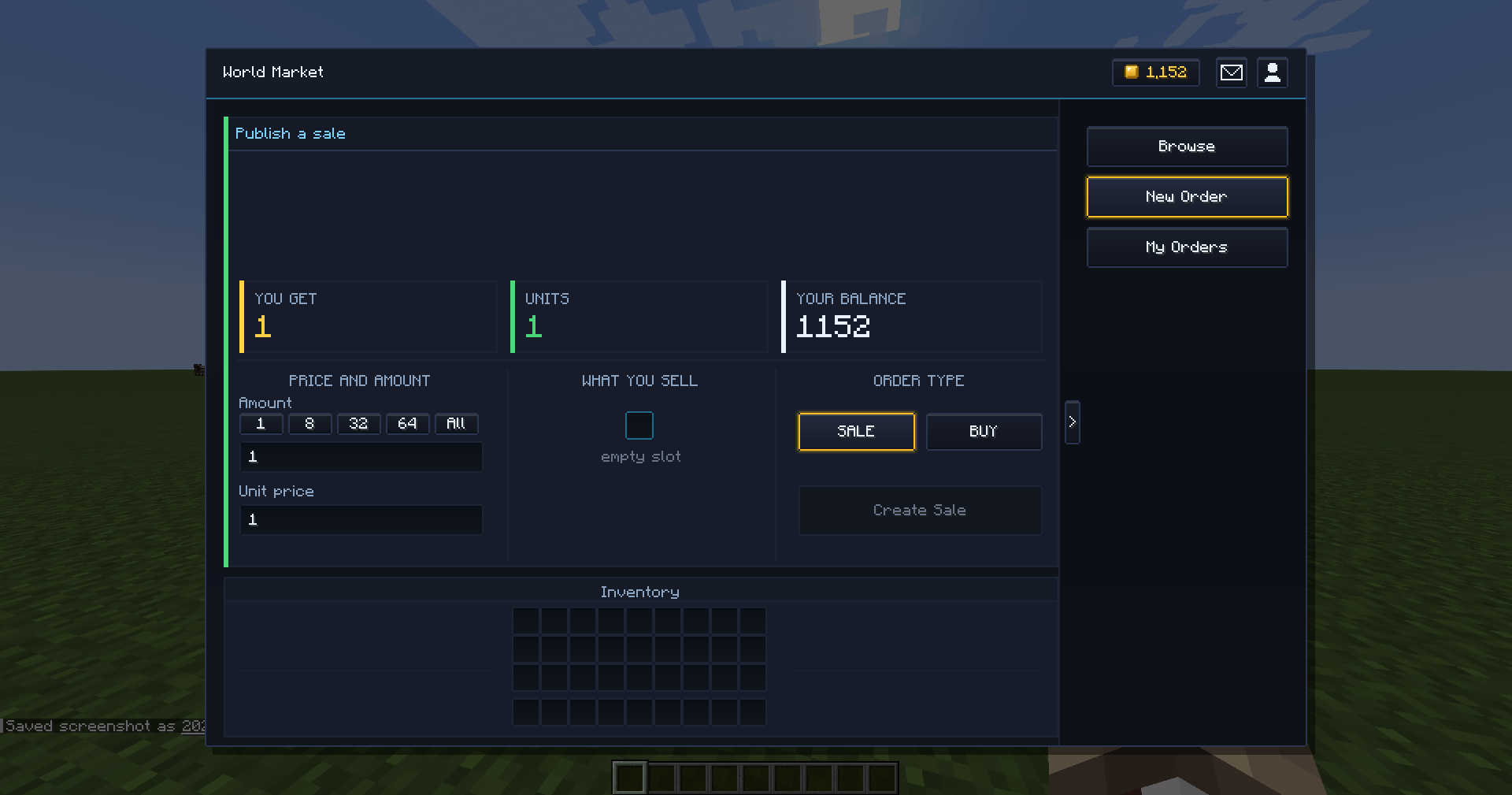
- New Order publishes your own. Drop an item in the slot, set amount and unit price, pick SALE or BUY, and press create.
- My Orders is where you cancel. There's also a short undo window right after publishing.
The server holds your goods and your coins until the deal closes, so you get paid while you're offline. Anything you buy that doesn't fit in your inventory goes to your mailbox, never on the floor.
💡 The
🪙button next to the search box filters to only what you can afford. The bar counts as affordable anything you can buy at least one unit of, because partial buys exist.
Trading with another player
/trade <player>       invite them
/trade accept         accept
/trade decline        refuse
The invitation also arrives as a clickable chat message, so usually nobody has to type anything.
- 12 slots each, plus coins. You see both offers at once. You can't touch their side.
- Everything is held by the server while you negotiate. Your items leave your inventory, so nothing can be duplicated or lost — and if you disconnect mid-trade, your things go to your mailbox.
- Two steps: both press Ready, and only 3 seconds later does Confirm unlock. That pause is there so nobody can swap the offer at the last instant. Any change resets both steps.
- You need to be within 5 blocks to start, and 10 to keep the window open.
Villager shops
Right-click a villager that an admin has linked to a shop. If it's asleep, the shop is closed — come back during its opening hours.
For admins
Everything below needs permission level 2 (op). Type /market admin help in-game for a clickable list of every command.
Create a server shop
1  /market admin shop create <id> [display name]
2  /market admin entry add <id> <buy_price> <sell_price> [stock]
3 /market admin shop linker <id>- Step 2 uses the item in your main hand.
buy_priceis what a player pays you;sell_priceis what you pay a player. Leavestockout for unlimited (or pass-1). - Step 3 gives you a linking item. Right-click a villager with it and that villager becomes the shop. The villager is invulnerable and shows the shop's name.
⚠️
sell_pricemay never exceedbuy_price. If the server paid more than it charges, anyone could buy and resell in a loop to print money — so that entry is rejected with an explanation.
Useful follow-ups:
| Command | What it does |
|---|---|
/market admin shop list |
Every shop, with its origin (world or datapack) |
/market admin entry list <id> |
The catalog, with the index of each row |
/market admin entry remove <id> <index> |
Remove one row |
/market admin entry stock <id> <index> <amount> |
Restock (-1 = unlimited) |
/market admin shop unlink |
Look at a linked villager and free it |
/market admin go <id> |
Open a shop without walking to it |
You can also edit a catalog from inside the GUI: open the shop as an op and press Edit Mode.
👉 Make a Server Shop's items appear in the World Market
This is the one that trips people up, because there are two switches and both must be on:
1. Turn the feature on in serverconfig/lkshopmarket-server.toml:
[serverShops]
    enableAdminItemsInMarket = true
2. Opt that specific shop in:
/market admin shop market <id> trueOr, for a datapack shop, "show_in_market": true in its JSON.
Its items then appear in Browse for everyone, tagged SERVER, with ∞ where stock is unlimited. Buying one pays and delivers instantly.
There's an optional third filter,
allowedAdminShopsInMarket. Leave it empty unless you need it — empty means "no extra filter, every shop that opted in shows up". The moment you put one id in it, only those ids show, even if other shops opted in.
Customise a shop villager and set its hours
Open the villager's shop as an op and use the Villager tab:
- Display name — up to 48 characters.
- Skin — the default villager plus 5 presets. The preview applies to the real villager behind the screen while you cycle.
- Opening hours — pick when it closes and when it opens again, in half-hour steps. The window may cross midnight, so a night shift is a normal setup, not a workaround.
Outside its hours the villager walks to a bed, sleeps with Zzz particles, and its shop won't open. Press Save villager settings to apply.
Shops as datapack files
Put a JSON at data/<namespace>/lkshopmarket/shops/<id>.json — the filename is the shop id.
{
  "title": "Blacksmith",
  "permission_level": 0,
  "show_in_market": false,
  "entries": [
    { "item": "minecraft:iron_ingot", "buy": 12, "sell": 6, "stock": -1 }
  ]
}
Loaded on startup and on every /reload. A working example ships in examples/datapack-shops/ inside the jar's repo.
⚠️ Datapack shops don't persist stock or dynamic price drift across restarts — they're rebuilt from the file every time. If you need stock to survive, create that shop in-game instead. A world shop and a datapack shop with the same id: the world one wins.
⚙️ Config — what to actually touch
There are two files. The one that matters is the server one: <world>/serverconfig/lkshopmarket-server.toml (per world). The client one, lkshopmarket-common.toml, only holds presentation.
Every limit is enforced server-side, so a modified client cannot bend one.
"I want to…"
| Goal | Section → setting |
|---|---|
| Give new players starting money | [economy] startingBalance (default 0) |
| Take a cut of every sale | [economy] salesTaxPercent (default 5.0) |
| Charge for publishing an order | [economy] listingFeePercent, listingFeeFlat |
| Stop 1-coin junk listings | [economy] minPriceDefault, minPricePerItem |
| Cap absurd prices | [economy] maxPriceGlobal |
| Limit how many orders one player can have | [orders] maxActiveOrdersPerPlayer, baseOrderLimit, orderLimitMilestones |
| Stop listing spam | [orders] publishCooldownSeconds |
| Make orders expire | [orders] orderExpiryMinutes (default 0 = never) |
| Change the undo window | [orders] undoWindowSeconds (default 10) |
| Protect the server from a huge book | [orders] maxTotalOrders |
| Get warned about weird prices | [orders] priceAnomalyFactor (warns ops, never blocks) |
| Ban items from player trading | [worldMarket] worldMarketBlacklistedItems — still usable in Server Shops |
| Turn supply-and-demand pricing off | [serverShops] enableDynamicPricing = false |
| Tune how fast prices drift | [serverShops] priceStepPerBuy, priceStepPerSell, priceFloorFactor, priceCeilingFactor, stabilizationRate |
| Show admin shop items in the market | [serverShops] enableAdminItemsInMarket — plus the per-shop command above |
| Exempt ops from fees and limits | [adminBypass] opsBypassFees, opsBypassLimits, opsBypassCooldown, opsBypassBlacklist |
| Close the market every night | [scheduledPause] enabled, fromTick, toTick |
| Keep a paper trail | [audit] auditEnabled, auditRetentionDays |
| Clean up inactive players | [audit] inactivePurgeDays (0 = off; exports before deleting, never touches anyone with active orders or a non-empty mailbox) |
| Ask before expensive purchases | [interface] confirmPurchasesFrom — client file |
[scheduledPause]and the manual/market admin market pauseare independent: the market is closed if either says so, so a schedule can never reopen something you closed on purpose.
Day-to-day admin commands
| Command | What it does |
|---|---|
/market admin market status |
Is it open, how many orders, is anything paused |
/market admin market pause / resume |
Close or reopen the whole market |
/market admin market report |
Economy summary |
/market admin market orders / cancel <order> |
List and force-cancel |
/market admin market hold <order> / release |
Freeze an order while you investigate — its deposit stays put and it can't expire |
/market admin market audit <term> [days] |
Search the audit log |
/market admin money give|remove|set <players> <amount> |
Adjust balances |
/market admin player show|freeze|unfreeze|limit|mailbox <player> |
Player admin (accepts names or UUIDs, offline included) |
/market admin data backup / restore <file> |
Backups. restore previews first and applies on the second run |
/market admin data export csv|json |
Export the market |
Compatibility
- JEI — its ingredient list and bookmarks stay out of the way while the market is open, instead of drawing on top of it.
- Forge events API —
OrderCreated,OrderCancelled,TradeCompleted,PriceChangedfor add-ons. - No external textures or sounds: everything is drawn in code and uses vanilla audio.
Servers & modpacks
Use it in any singleplayer world, modpack or multiplayer server. Complete freedom to include it in your projects.
Found a problem?
If you find a duplication bug or lose an item, tell me and I'll fix it before anything else.
Made by Nek4z.
---
🇪🇸 ESPAÑOL
🏪 LK Shop&Market
Un mercado gestionado por los jugadores para Minecraft, inspirado en cómo funciona el comercio en Albion Online. Se abre con /market.
Qué incluye
| 🌍 Mercado Mundial | Libro de órdenes entre jugadores. Ventas y compras, cierres parciales, custodia y cobro estando desconectado. |
| 🏪 Tiendas de Servidor | Tiendas del administrador con catálogo fijo. Se enganchan a un aldeano o se definen por datapack. |
| 🤝 Tratos directos | Ventana de intercambio cara a cara entre dos jugadores, con custodia y retardo antitimo. |
| 🧑🌾 Aldeanos tenderos | Nombre propio, 5 pieles y horario propio: duermen cuando la tienda está cerrada. |
| 📬 Buzón | No se pierde nada por tener el inventario lleno. |
| ⭐ Perfiles de vendedor | Estrellas, ventas y órdenes activas. El saldo no se comparte. |
Para jugadores
Comprar y vender en el Mercado Mundial
/marketlo abre.- Explorar es el libro de órdenes. Pulsa una fila para comprar — puedes comprar parte de un lote, no hace falta llevártelo entero.
- Nueva orden publica la tuya. Pon un ítem en la ranura, indica cantidad y precio por unidad, elige VENTA o COMPRA y dale a crear.
- Mis órdenes es donde se cancelan. Además hay una ventana breve para deshacer justo después de publicar.
El servidor guarda tus objetos y tus monedas hasta que se cierra el trato, así que cobras aunque estés desconectado. Lo que compres y no te quepa en el inventario va a tu buzón, nunca al suelo.
💡 El botón
🪙junto al buscador filtra solo lo que te puedes permitir. Cuenta como asequible todo aquello de lo que puedas comprar al menos una unidad, porque las compras parciales existen.
Comerciar con otro jugador
/trade <jugador>      invitar
/trade accept         aceptar
/trade decline        rechazar
La invitación llega además como mensaje pulsable en el chat, así que normalmente no hace falta escribir nada.
- 12 ranuras cada uno, más monedas. Ves las dos ofertas a la vez. La suya no la puedes tocar.
- Todo lo guarda el servidor mientras negociáis. Tus objetos salen de tu inventario, así que nada se puede duplicar ni perder — y si te desconectas a mitad, tus cosas van a tu buzón.
- Dos pasos: los dos pulsáis Listo, y Confirmar no se habilita hasta 3 segundos después. Esa pausa está para que nadie pueda cambiar la oferta en el último instante. Cualquier cambio reinicia los dos pasos.
- Hay que estar a 5 bloques para empezar y a 10 para mantener la ventana abierta.
Tiendas de aldeano
Clic derecho a un aldeano que un administrador haya vinculado a una tienda. Si está durmiendo, la tienda está cerrada — vuelve dentro de su horario.
Para administradores
Todo lo de aquí abajo pide nivel de permiso 2 (op). Escribe /market admin help en el juego para tener la lista completa de comandos, pulsables.
Crear una tienda de servidor
1  /market admin shop create <id> [nombre visible]
2  /market admin entry add <id> <precio_compra> <precio_venta> [stock]
3 /market admin shop linker <id>- El paso 2 usa el ítem que tengas en la mano.
precio_compraes lo que te paga el jugador;precio_ventaes lo que le pagas tú. Si omitesstock, es ilimitado (o pon-1). - El paso 3 te da un ítem vinculador. Clic derecho a un aldeano con él y ese aldeano se convierte en la tienda. El aldeano es invulnerable y lleva el nombre de la tienda.
⚠️ El
precio_ventanunca puede superar alprecio_compra. Si el servidor pagara más de lo que cobra, cualquiera podría comprar y revender en bucle para imprimir monedas — así que esa entrada se rechaza explicando por qué.
Comandos que vas a necesitar después:
| Comando | Qué hace |
|---|---|
/market admin shop list |
Todas las tiendas, con su origen (mundo o datapack) |
/market admin entry list <id> |
El catálogo, con el índice de cada fila |
/market admin entry remove <id> <índice> |
Quitar una fila |
/market admin entry stock <id> <índice> <cantidad> |
Reponer stock (-1 = ilimitado) |
/market admin shop unlink |
Mira a un aldeano vinculado y lo libera |
/market admin go <id> |
Abrir una tienda sin ir hasta ella |
También puedes editar el catálogo desde la propia interfaz: abre la tienda siendo op y pulsa Modo edición.
👉 Hacer que los ítems de una Tienda de Servidor salgan en el Mercado Mundial
Esta es la que atasca a todo el mundo, porque son dos interruptores y tienen que estar los dos puestos:
1. Activa la función en serverconfig/lkshopmarket-server.toml:
[serverShops]
    enableAdminItemsInMarket = true
2. Apunta a esa tienda en concreto:
/market admin shop market <id> trueO, si es una tienda de datapack, "show_in_market": true en su JSON.
Sus ítems aparecen entonces en Explorar para todo el mundo, con la etiqueta SERVER y un ∞ donde el stock sea ilimitado. Comprar uno cobra y entrega al instante.
Hay un tercer filtro opcional,
allowedAdminShopsInMarket. Déjalo vacío salvo que lo necesites — vacío significa «sin filtro extra, sale toda tienda que se haya apuntado». En cuanto le metas un id, salen solo esos ids, aunque otras tiendas se hayan apuntado.
Personalizar un aldeano y ponerle horario
Abre la tienda del aldeano siendo op y usa la pestaña Aldeano:
- Nombre visible — hasta 48 caracteres.
- Piel — el aldeano normal más 5 presets. La vista previa se aplica al aldeano real que hay detrás de la pantalla mientras cambias.
- Horario — eliges a qué hora cierra y a qué hora abre, en pasos de media hora. La franja puede cruzar la medianoche, así que un turno de noche es una configuración normal y no un apaño.
Fuera de su horario el aldeano se va a una cama, duerme con partículas Zzz y su tienda no abre. Pulsa Guardar ajustes del aldeano para aplicar.
Tiendas como ficheros de datapack
Pon un JSON en data/<namespace>/lkshopmarket/shops/<id>.json — el nombre del fichero es el id de la tienda.
{
  "title": "Herrería",
  "permission_level": 0,
  "show_in_market": false,
  "entries": [
    { "item": "minecraft:iron_ingot", "buy": 12, "sell": 6, "stock": -1 }
  ]
}
Se cargan al arrancar y en cada /reload. Hay un ejemplo funcionando en examples/datapack-shops/.
⚠️ Las tiendas de datapack no conservan el stock ni la deriva de precios dinámicos entre reinicios: se reconstruyen desde el fichero cada vez. Si necesitas que el stock sobreviva, crea esa tienda desde el juego. Si un mundo y un datapack declaran el mismo id, gana el del mundo.
⚙️ Configuración — qué tocar de verdad
Hay dos ficheros. El que importa es el de servidor: <mundo>/serverconfig/lkshopmarket-server.toml (por mundo). El de cliente, lkshopmarket-common.toml, solo lleva presentación.
Todos los límites los aplica el servidor, así que un cliente modificado no puede saltarse ninguno.
«Quiero que…»
| Objetivo | Sección → ajuste |
|---|---|
| Los nuevos empiecen con dinero | [economy] startingBalance (por defecto 0) |
| Llevarme un porcentaje de cada venta | [economy] salesTaxPercent (por defecto 5.0) |
| Cobrar por publicar una orden | [economy] listingFeePercent, listingFeeFlat |
| Evitar anuncios basura de 1 moneda | [economy] minPriceDefault, minPricePerItem |
| Poner techo a precios absurdos | [economy] maxPriceGlobal |
| Limitar cuántas órdenes puede tener uno | [orders] maxActiveOrdersPerPlayer, baseOrderLimit, orderLimitMilestones |
| Cortar el spam de anuncios | [orders] publishCooldownSeconds |
| Que las órdenes caduquen | [orders] orderExpiryMinutes (por defecto 0 = nunca) |
| Cambiar la ventana de deshacer | [orders] undoWindowSeconds (por defecto 10) |
| Proteger al servidor de un libro enorme | [orders] maxTotalOrders |
| Que me avisen de precios raros | [orders] priceAnomalyFactor (avisa a los ops, nunca bloquea) |
| Prohibir ítems entre jugadores | [worldMarket] worldMarketBlacklistedItems — siguen usándose en Tiendas de Servidor |
| Quitar los precios por oferta y demanda | [serverShops] enableDynamicPricing = false |
| Ajustar cuánto se mueven los precios | [serverShops] priceStepPerBuy, priceStepPerSell, priceFloorFactor, priceCeilingFactor, stabilizationRate |
| Sacar ítems de tienda al mercado | [serverShops] enableAdminItemsInMarket — más el comando por tienda de arriba |
| Eximir a los ops de cuotas y límites | [adminBypass] opsBypassFees, opsBypassLimits, opsBypassCooldown, opsBypassBlacklist |
| Cerrar el mercado cada noche | [scheduledPause] enabled, fromTick, toTick |
| Tener registro de todo | [audit] auditEnabled, auditRetentionDays |
| Limpiar jugadores inactivos | [audit] inactivePurgeDays (0 = apagado; exporta antes de borrar y nunca toca a quien tenga órdenes activas o el buzón lleno) |
| Que pregunte antes de compras caras | [interface] confirmPurchasesFrom — fichero de cliente |
[scheduledPause]y la pausa manual de/market admin market pauseson independientes: el mercado está cerrado si lo dice cualquiera de las dos, así que un horario nunca puede reabrir algo que cerraste a propósito.
Comandos del día a día
| Comando | Qué hace |
|---|---|
/market admin market status |
Si está abierto, cuántas órdenes hay, si algo está en pausa |
/market admin market pause / resume |
Cerrar o reabrir el mercado entero |
/market admin market report |
Resumen de la economía |
/market admin market orders / cancel <orden> |
Listar y cancelar a la fuerza |
/market admin market hold <orden> / release |
Congelar una orden mientras investigas: mantiene su depósito y no caduca |
/market admin market audit <término> [días] |
Buscar en el registro de auditoría |
/market admin money give|remove|set <jugadores> <cantidad> |
Ajustar saldos |
/market admin player show|freeze|unfreeze|limit|mailbox <jugador> |
Administrar jugadores (acepta nombres o UUID, también desconectados) |
/market admin data backup / restore <fichero> |
Copias de seguridad. restore previsualiza primero y aplica en la segunda ejecución |
/market admin data export csv|json |
Exportar el mercado |
Compatibilidad
- JEI — su lista de ingredientes y sus marcadores se apartan mientras el mercado está abierto, en vez de dibujarse encima.
- API de eventos de Forge —
OrderCreated,OrderCancelled,TradeCompleted,PriceChangedpara add-ons. - Sin texturas ni sonidos externos: todo se dibuja por código y usa audio de vanilla.
Servidores y modpacks
Úsalo en cualquier mundo de un jugador, modpack o servidor multijugador. Total libertad para incluirlo en tus proyectos.
¿Has encontrado un problema?
Si encuentras una duplicación o pierdes un ítem, avísame y lo arreglo antes que cualquier otra cosa.
Hecho por Nek4z.
The LK: Shop and Market Team