Live Running Challenge
- By
A single-player Minecraft runner with distance goals, autopilot, giant boosts, and optional TikTok LIVE rewards.
mcrun.png
rainbow mcrun.png
follower mcrun.png
Description
MC Run Challenge
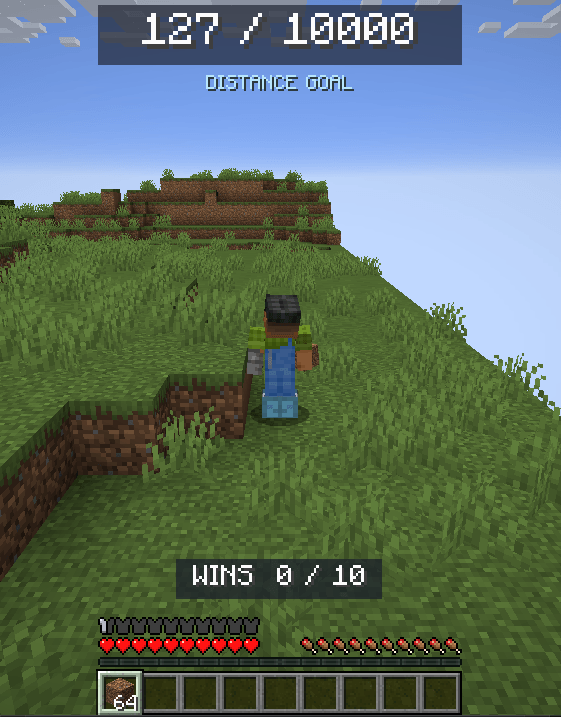
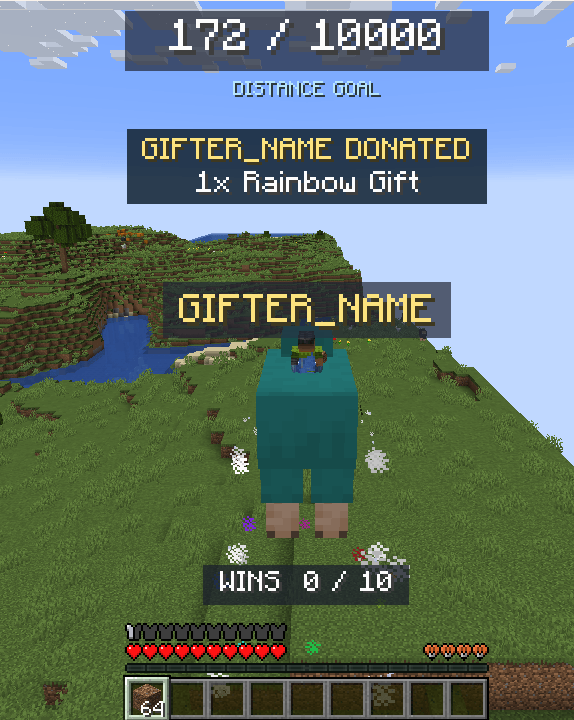
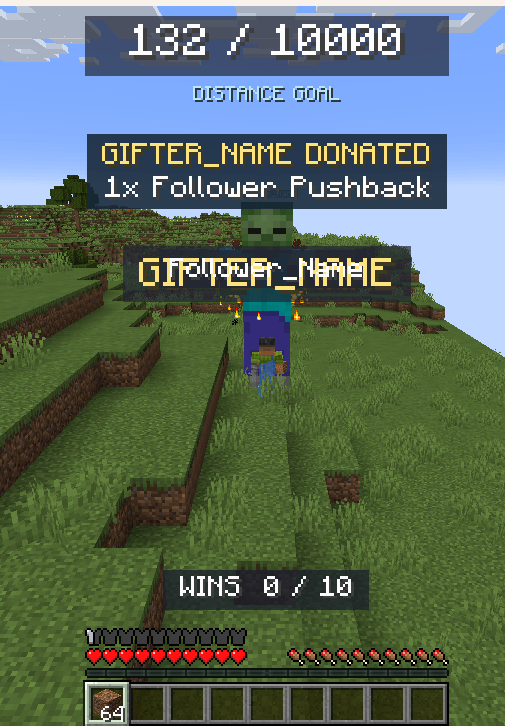
Run through a narrow Amplified Overworld and reach the distance goal. Stay at the finish for 10 seconds to earn a win, then continue onto a new course. Giant sheep carry the player forward, while zombies, hoglins, Wardens, iron golems and ghasts push the player back. Play manually, use Baritone autopilot, or connect TikFinity Desktop so viewers can affect the run.
Features
- A 101-block-wide course with vanilla biomes, mountains, trees, caves and structures.
- Distance goals up to 10,000 blocks, with terrain generated 1,000 blocks ahead and preserved for backward movement during the current course.
- A large distance counter, configurable win target and 10-second finish countdown.
- Giant animal rides and pushback effects with names, particles and sounds.
- A camera that follows the player, adjustable with the scroll wheel.
- Damage protection inside the course, replenishing dirt, enchanted boots and walkable surface water.
- Optional Baritone autopilot and TikFinity Desktop integration.
Requirements
Minecraft Java Edition 1.21.1 · Fabric · Java 21 · Single-player
- Fabric Loader 0.16.5 or newer.
- Fabric API for Minecraft 1.21.1; tested with 0.102.0+1.21.1.
- Optional autopilot: Baritone API Fabric 1.11.2.
- Optional LIVE rewards: TikFinity Desktop and the supplied TikFinity Connector compatibility port for Minecraft 1.21.1.
This release supports Minecraft 1.21.1 only. Minecraft 1.21.2, Forge, NeoForge, Bedrock and multiplayer servers are not supported.
Getting started
- Create a Minecraft 1.21.1 Fabric instance using Java 21.
- Put the MC Run Challenge JAR and Fabric API into its
modsfolder. - Install Baritone API Fabric 1.11.2 if you want autopilot.
- Create a dedicated single-player world. The mod uses a void staging area and sets loaded worlds to daylight, so a separate runner instance is recommended.
- Enter
/run startand let the first terrain buffer prepare. Use/runpilot onfor autopilot, or play manually.
After each win, the next course starts with autopilot enabled when Baritone is available. The next course prepares in the background; an unusually early finish may still need to wait for terrain.
Main commands
| Command | Action |
|---|---|
/run start |
Start or resume a run |
/run goal 1000 |
Set the distance goal and start a fresh run |
/run restart |
Restart from zero |
/run leave |
Leave the course |
/run status |
Show run information |
/run wins goal 10 |
Set the win target |
/run wins reset |
Reset wins |
/runpilot on |
Start autopilot |
/runpilot off |
Stop autopilot |
/run bop 0.8 |
Set the head-bob cycle in seconds; use 0 to disable |
/run reward sheep |
Test the forward sheep boost |
/run bonk preview |
Preview the ban hammer |
/run chat status |
Check chat triggers |
/run stream reset |
Reset the once-per-viewer hammer allowance for a new stream |
Reward keybinds can be changed in Options → Controls → MC Run Stream Rewards. Defaults are F7 for ghast, F8 for Warden, F9 for hoglin, F10 for zombie, F11 for sheep and F12 for rainbow sheep. The iron golem action is unbound by default.
TikFinity Desktop setup
Use the optional Stream Tools download for the connector, importable actions and full setup guide.
- Extract Stream Tools and install
tikfinity-1.1-mcrun-1.21.1.jarinmods. Keep one connector installed. The original TikFinity 1.1 mod targets Minecraft 1.20.1; use the supplied port for this release. - Open TikFinity Desktop and connect to your LIVE.
- In its Minecraft settings, use IP
127.0.0.1, port4567, and leave Player Name blank. The supplied connector does not use the password field. - Join the single-player runner world, enter
/run start, and test the connection. - Import
MC Run TikFinity Actions.json, enable the actions and test a gift event.
| Event | Effect |
|---|---|
| Follow | Zombie pushes back 10 blocks |
| Rose | Sheep carries forward 50 blocks |
| Finger Heart | Rainbow sheep carries forward 500 blocks |
| TikTok | Hoglin carries backward 100 blocks |
| Donut | Warden pushes back 1,000 blocks |
| Heart Me | Iron golem pushes back 250 blocks |
| Other gifts | Ghast pushes back 10 blocks per coin |
Gift quantity is included. Rewards in the same direction queue; one forward and one backward reward can act together, with their remaining distances cancelling each other. A rainbow sheep worth +500 opposed by a 5-coin ghast worth −50 results in +450 blocks. Rewards at course boundaries continue for their remaining duration.
For a single catch-all gift action, use run gift {repeatcount} {coins} {username} {giftname} with an Everyone gift event, a minimum of one coin and Repeat Each disabled. Follows use run viewer follower {username}. The supplied action pack also maps subscribers to Warden; this can be changed or disabled in TikFinity.
For the ban hammer, import the optional hammer-only action and link it to Everyone sending a chat message: run chat {username} {comment}. A message containing exactly Bad, ignoring capitalization and surrounding spaces, triggers a harmless hammer once per viewer per stream. The Desktop chat feed can also trigger it. Use /run stream reset if a new stream is not detected automatically.
Notes
- Keep Minecraft unpaused while terrain prepares.
- Baritone can encounter terrain it cannot route through; manual play remains available.
- A TikFinity command error usually requires checking the active single-player world, connector port and enabled actions.
- Effects use the Players sound category. Check Master and Players volume if they are silent.
- Version 0.9.6 is a beta. LIVE delivery depends on TikFinity Desktop and the configured events.
Local integration and credits
Streaming integrations communicate with services on this computer using localhost. The local reward bridge uses port 8765 with a generated token; optional TikFinity commands use port 4567 and its chat feed uses port 21213. The connector accepts Minecraft commands from TikFinity on localhost. No account login or TikTok password is requested by the mod.
Viewer usernames that trigger the hammer are stored locally to enforce the once-per-stream limit. /run stream reset clears that allowance. The head bob uses a fixed, configurable cycle; it does not record audio.
MC Run Challenge is licensed under MIT. The optional connector is a compatibility port of Jakob Kruse's TikFinity Minecraft Mod, also under MIT. It updates Minecraft integration for 1.21.1, binds the command server to localhost, validates request origins and sizes, and handles command failures. Its original license is included. Baritone is a separate optional dependency. Full setup instructions and the connector license are included in Stream Tools.
Live Running Challenge Team