LiteFilter
- By
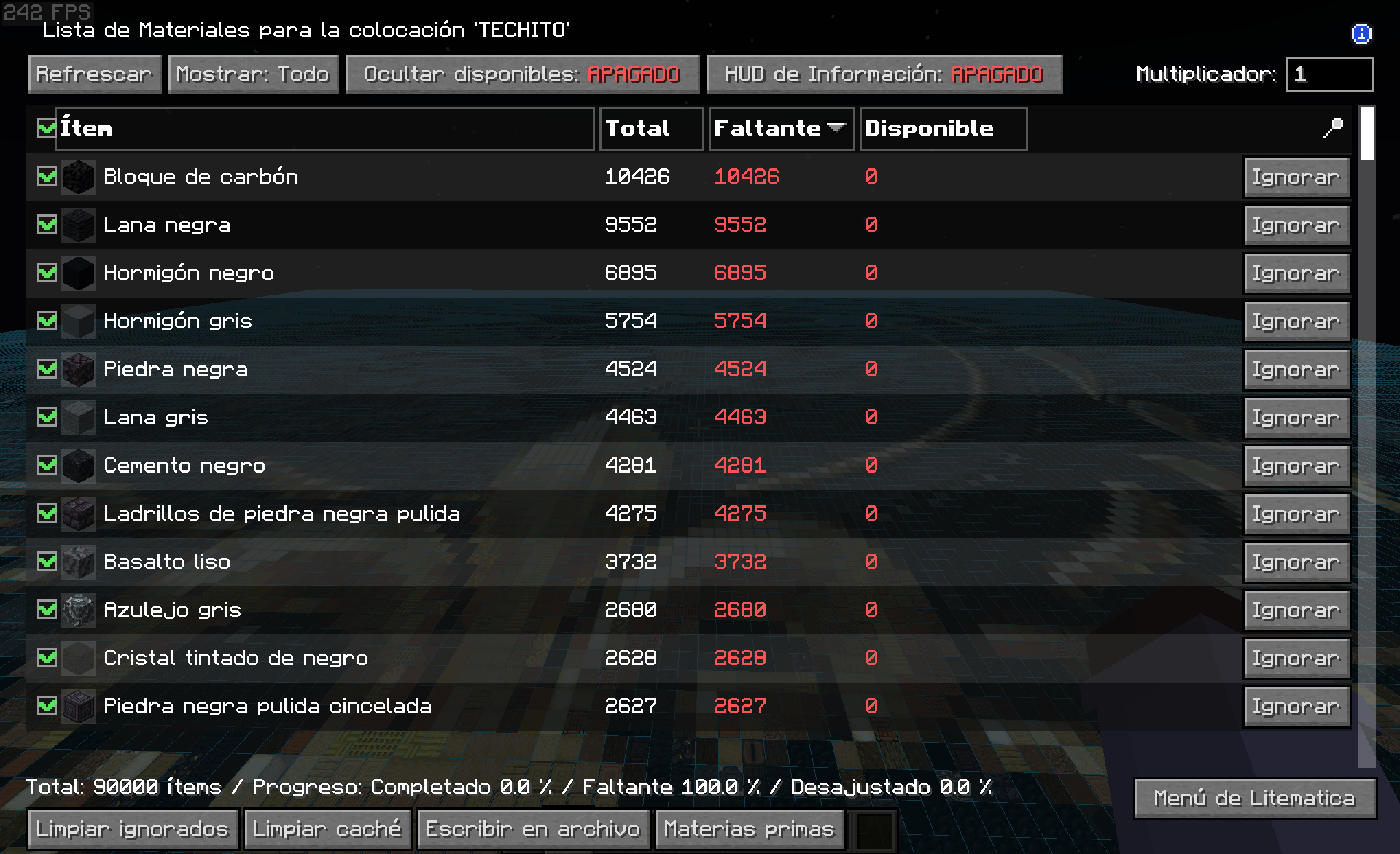
2026-09-14_21.22.17.png
Description
# Litefiltro # FABRIC #
A Litematica add-on that lets you choose which materials the schematic shows.
Every row of Litematica's material list gets a checkbox. All of them start ticked. Untick one and that material stops being drawn in the schematic; tick it again and it comes back.
There is no separate screen and no extra menu. The checkboxes live inside the material list you already use, right where you sort the columns and press the ignore button.
## What it is for ##
A large schematic shows every block at once, and that is not always what you need.
- **Build one material at a time.** Hide everything except the quartz, gather quartz, place it, then move on to the next material.
- **See inside.** Hide the outer walls and the interior is revealed, drawn correctly. The blocks that remain are shown whole, not as hollow shapes with missing faces.
- **Find one material in a big build.** Leave a single material visible and you can see every place it goes.
## How it works ##
- Untick a material and it disappears from the schematic completely: no ghost block and no coloured error highlight for it.
- The blocks still shown are drawn correctly where the hidden ones used to be. Hiding a material does not leave black faces or holes behind.
- The checkbox in the header row hides or shows everything at once.
- The material counts are not touched. Hiding a material changes what you see, not what the list says you need.
- The filter is forgotten when you leave the world, so you never come back to invisible blocks with nothing on screen to explain them.
## Notes ##
- **Client side only.** It changes nothing in the world and nothing on the server, and it does not modify your schematic files.
- **Requires Litematica and malilib.** It does not require Fabric API.
- Download the file that matches your Minecraft version. Each build is compiled against the Litematica release for that version. - Version 1.0 for Minecraft 1.21.8
- Version 2.0 for Minecraft 1.21.10
- Version 3.0 for Minecraft 1.21.11
- IMPORTANT: If litematica is not showing the material list you need to go around the whole bluprint so every chunk is loaded on litematica and then you will be able to see the material list.
## Credits and licence ##
Litematica and malilib are made by masa. This add-on is not affiliated with them.
Released under the GNU General Public License v3 or later, as required by Litematica.
The LiteFilter Team