Lightman's Currency X FTB Chunks

Paid FTB Chunks claims and upkeep via Lightman's Currency — with land/build chunk types and pending protection changes.
manofkott mods
Create a server, get 25% off your first monthaffiliate logo
Create Server
affiliate banner image

LC FTB Hook

LC FTB Hook connects Lightman's Currency with FTB Chunks and FTB Teams, turning chunk claiming and land protection into an economy-driven system. Claiming costs money, protections require ongoing upkeep, and teams can declare war on each other — with upkeep scaling accordingly.

Minecraft: 1.21.1 · Loader: NeoForge · Side: Both (required on server and client)


Features

Paid Chunk Claiming

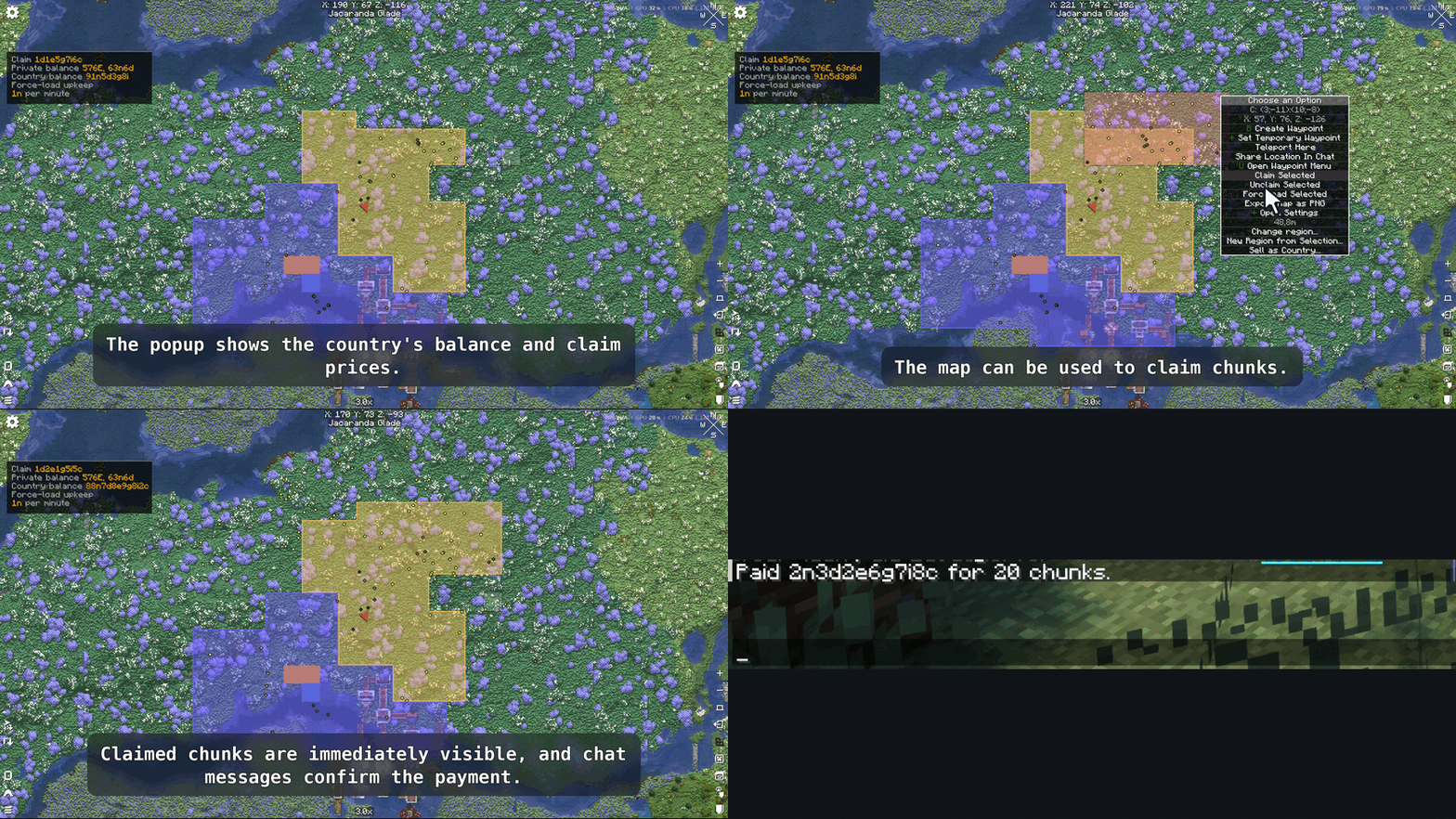
  • Claiming a chunk draws funds from the player's or team's bank account. The price is server-configurable.
  • Unclaiming a chunk refunds a configurable percentage of the claim price.
  • The first N chunks per team or player can be made free (configurable).

Two Chunk Types: Build and Land

Every claimed chunk is either a Build chunk or a Land chunk.

Build chunk Land chunk
Purpose Base, builds, infrastructure Territory, borders, open land
Available protections Mob griefing, explosions, PvP, block interact/edit, entity interact Block interact and block edit only
Upkeep billing Per chunk Per group of N chunks (cheaper for large territories)
Switch Alt + click/drag in the FTB Chunks map Same

Team Bank Accounts

When an FTB party is created, LC FTB Hook automatically creates a linked Lightman's Currency bank account for it. The account mirrors the team hierarchy at all times:

  • Team owner → Account owner
  • Officers → Account admins
  • Members → Account members

The account cannot be deleted while the party is alive. When the party disbands, any remaining balance and chunk refunds are distributed to each member's personal account.

Joining a party dissolves your personal claims and refunds them to your personal account.

Protection Upkeep

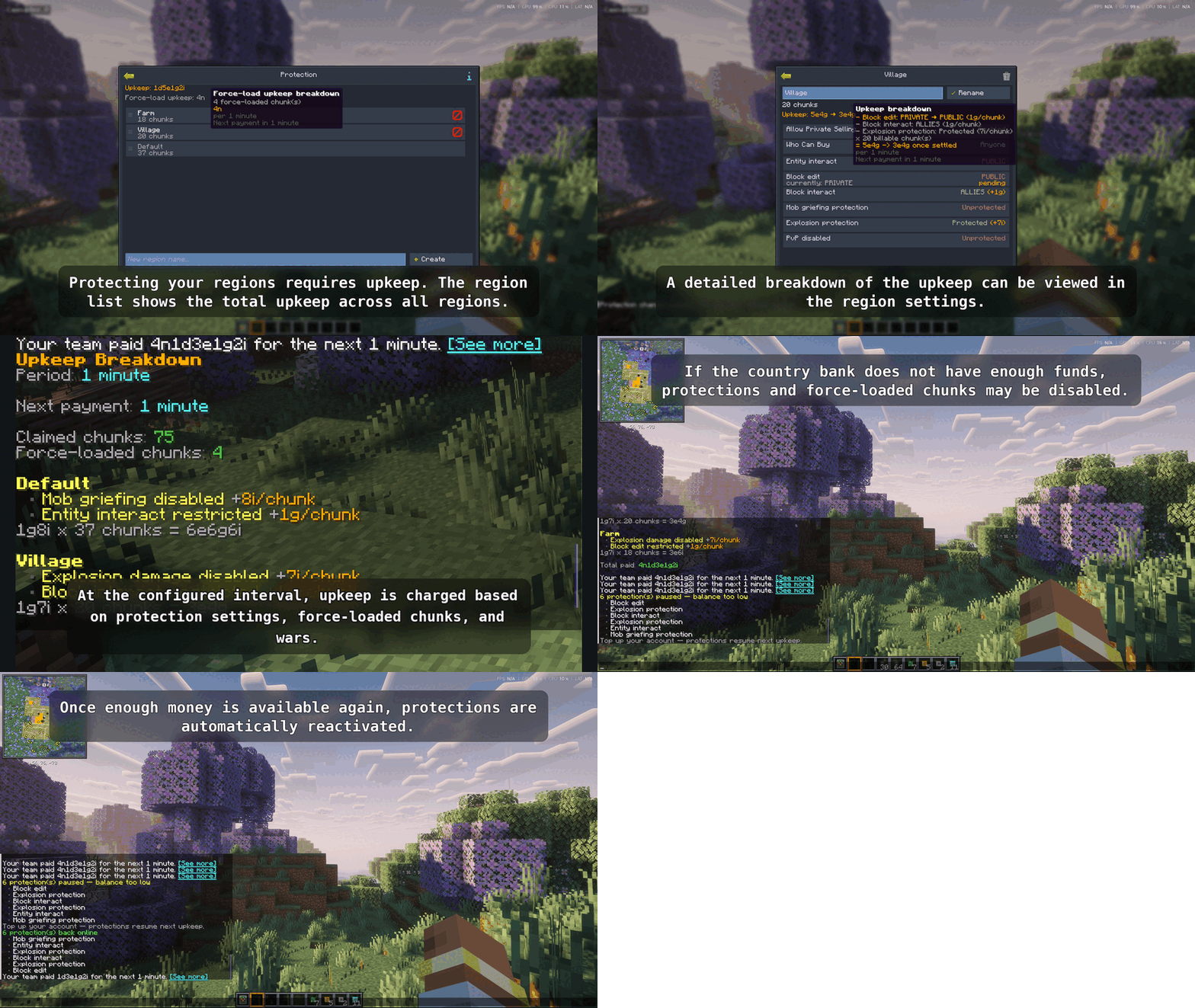
Protecting your land is not free — protections must be paid for periodically (configurable; default: every hour).

Upkeep formula:

cost = base_protection_price × number_of_billable_chunks

Each active protection adds a per-chunk price to the base rate. Prices per protection are independently configurable.

If the account runs out of money:

  • Protections are stripped one by one in a configurable priority order.
  • Once the balance is restored, protections are automatically re-enabled in reverse order.
  • Changing a protection setting that would make upkeep unaffordable is blocked at the UI — the toggle simply does not apply and an alert appears.

Changes to protections and force-loads are queued to the next upkeep period to prevent mid-period exploits.

War System (optional, server-configurable)

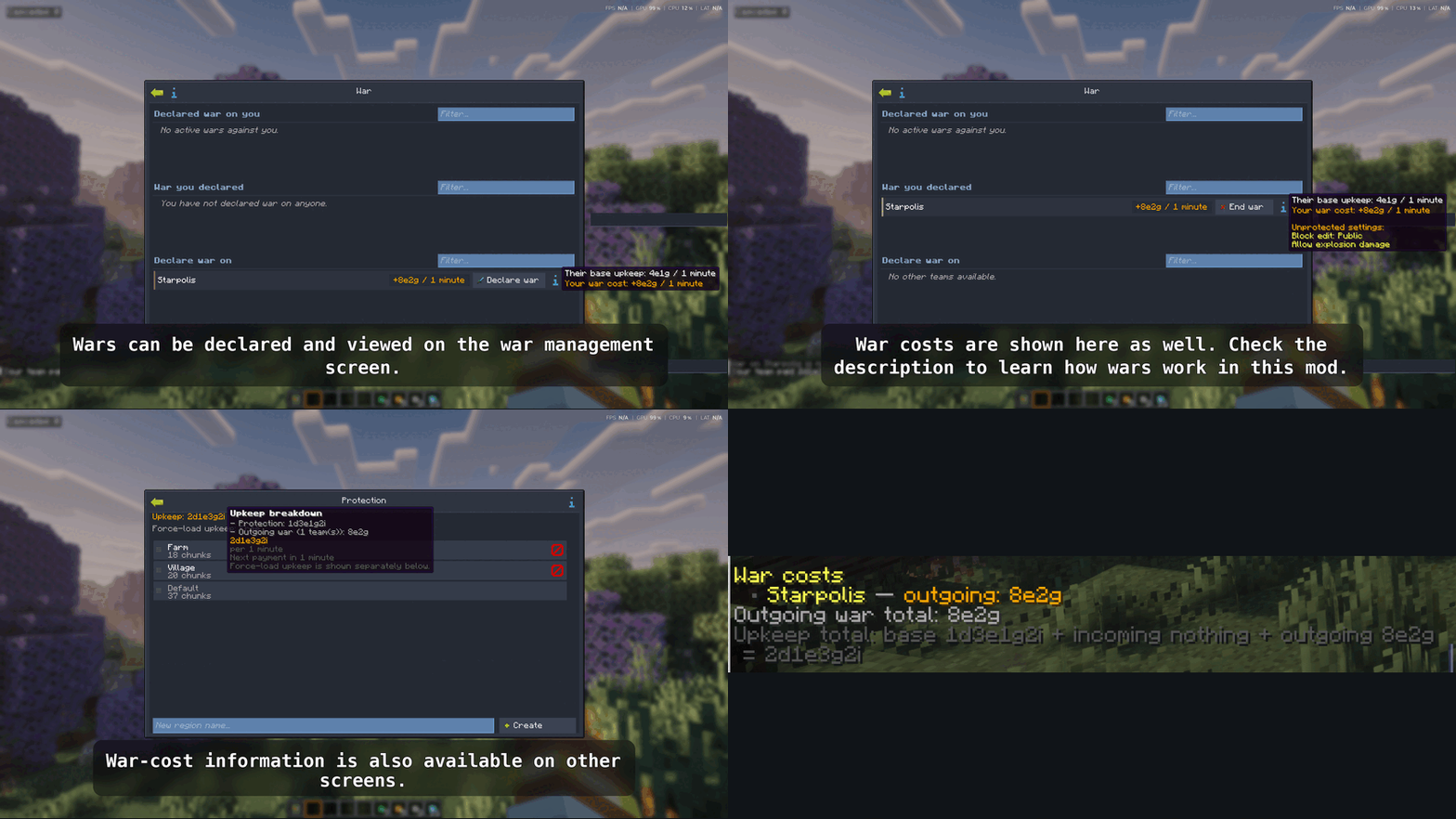
Teams with claimed chunks can declare war on each other. War raises upkeep costs:

  • Incoming wars increase your upkeep exponentially: base × Σ(l^i) for i incoming wars, where l is the configurable war cost multiplier.
  • Outgoing wars cost you the target team's base upkeep scaled by l^n (where n is the ordinal of that war).

War declarations and endings are queued to the next upkeep period. If a team cannot pay full upkeep, outgoing wars are frozen until the balance is restored. The war system can be disabled entirely per server.

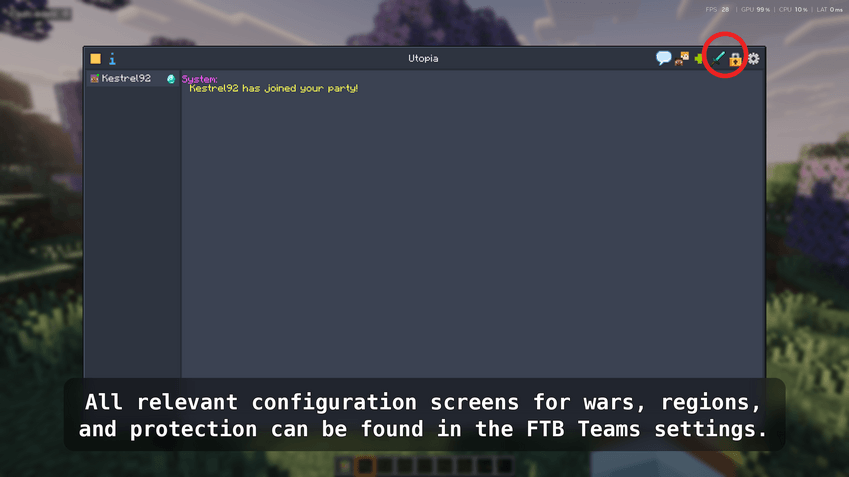
The War screen (accessible from Team Settings) shows active and pending wars, upkeep cost breakdowns, and target vulnerability indicators (unprotected block edit, explosions, PvP).

Force-Load Upkeep

Enabling force-load on a chunk is free, but each force-loaded chunk adds a periodic charge.

In-Game UI Extensions

  • Claim prices and your current balance are displayed directly in the FTB Chunks map UI.
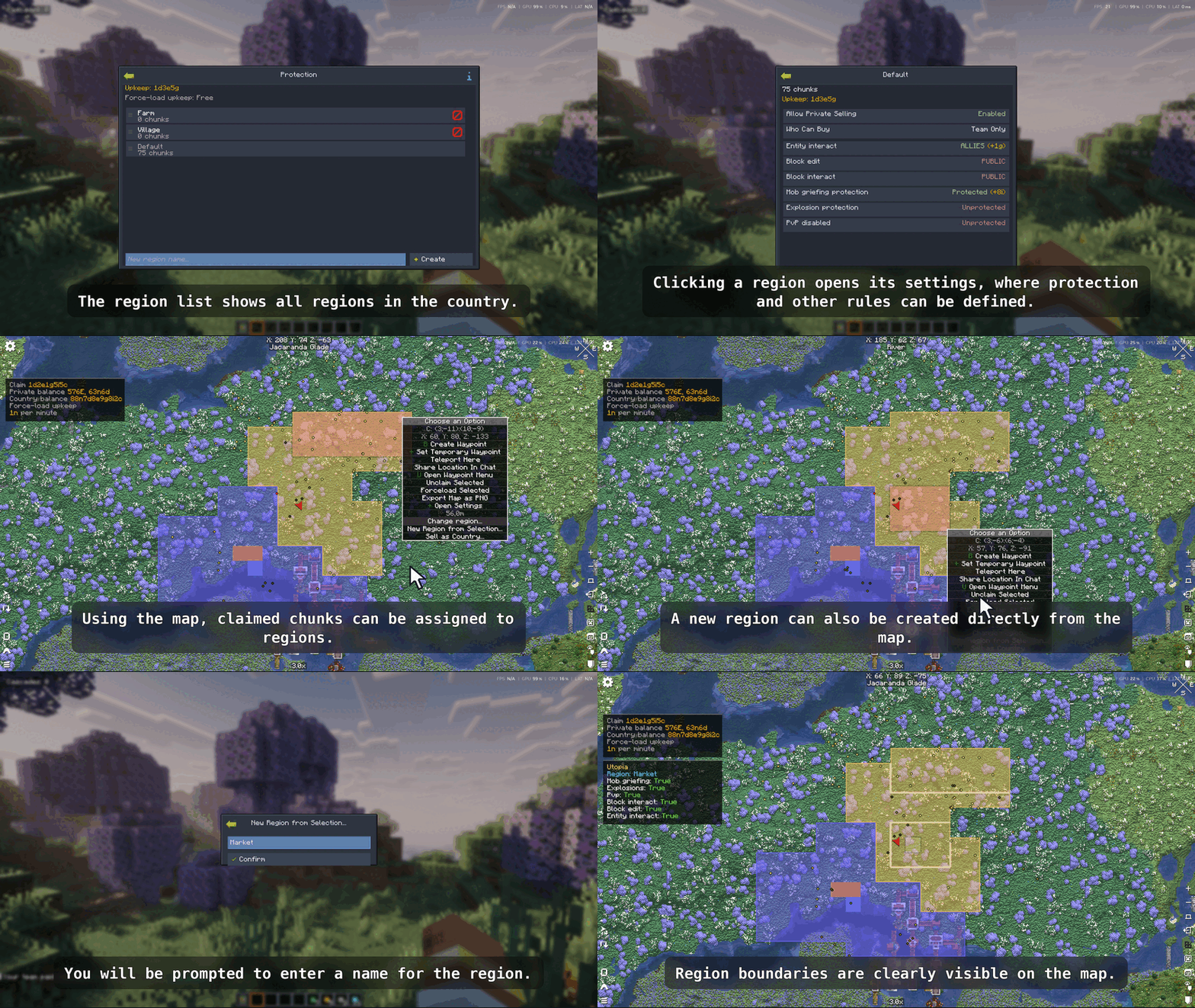
  • Protection prices are shown next to each toggle in the FTB Teams config screen.
  • Pending state indicators show queued changes (e.g. "→ Ally pending").

Requirements

Mod Required
Lightman's Currency
FTB Library
FTB Teams
FTB Chunks
NeoForge 21.1.234+

Installation

  1. Download LC FTB Hook and place the .jar in your mods/ folder.
  2. Install all required mods listed above into the same mods/ folder.
  3. Start the server (or single-player world). The mod generates its config file automatically on first launch.
  4. Configure the mod to your liking (see below).

Important: The mod must be installed on both the server and every client — it registers custom network payloads and client-side UI mixins.


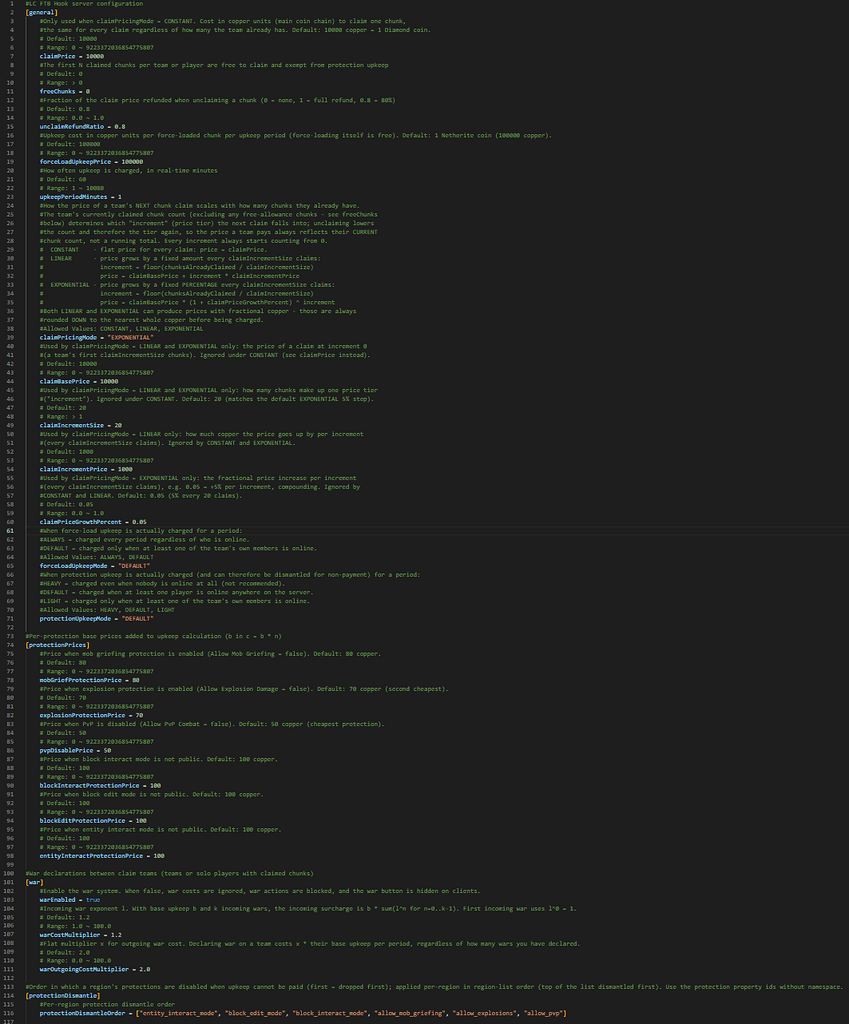
Server Configuration

The config file is generated at:

world/serverconfig/lc_ftb_hook-server.toml

Reload it by restarting the server or using /reload (some values apply immediately).

General settings

Key Default Description
claimPrice 100 Cost in copper units to claim one chunk
freeChunks 0 Number of free chunks each team/player gets before paying
landChunkGroupSize 5 Land chunks are billed once per this many chunks
unclaimRefundRatio 0.6 Fraction of claim price refunded on unclaim (0–1)
forceLoadUpkeepPrice 25 Upkeep cost per force-loaded chunk per period
upkeepPeriodMinutes 60 How often upkeep is charged (real-time minutes)

Per-protection prices (added to upkeep per chunk)

Key Default Triggers when…
mobGriefProtectionPrice 10 Allow Mob Griefing = false
explosionProtectionPrice 10 Allow Explosion Damage = false
pvpDisablePrice 5 Allow PvP Combat = false
blockInteractProtectionPrice 15 Block Interact Mode ≠ Public
blockEditProtectionPrice 15 Block Edit Mode ≠ Public
entityInteractProtectionPrice 15 Entity Interact Mode ≠ Public

War settings

Key Default Description
warEnabled true Enable the war system
warCostMultiplier 2.0 Exponent l for incoming and outgoing war cost scaling

Protection dismantle order

When upkeep cannot be paid, protections are dropped in the order defined by protectionDismantleOrderLand (land chunk protections, stripped first) and protectionDismantleOrderBuild (build chunk protections, stripped second). Use FTB property id paths without namespace.


Getting Started (In-Game Tutorial)

Step 1 — Get some money

Players need a Lightman's Currency bank account with a positive balance. Place an ATM or use your wallet to deposit money. As a server operator, you can give money directly:

/lcbank give players <playername> <amount>

Step 2 — Claim your first chunks

Open the FTB Chunks map (M by default). Click a chunk to claim it. The claim price is deducted from your bank account automatically. If you don't have enough, the claim is rejected with a chat message.

Unclaiming a chunk refunds part of the price (60% by default).

Step 3 — Switch chunks to Land (optional)

By default all claimed chunks are Build chunks. To mark some as Land chunks (cheaper upkeep, restricted protections), hold Alt and click or drag over chunks in the FTB Chunks map. A confirmation message appears in chat.

Land chunks use separate block interact and block edit protection settings, visible in the FTB Teams config under "Land Chunk Protection".

Step 4 — Enable protections

Open your FTB Teams settings and navigate to the protection properties. Each protection shows its per-chunk price next to the toggle. Enable protections you want to pay for. If your balance is too low to afford the new upkeep, the change is blocked and reverted.

Protections take effect immediately; the upkeep for them will be charged at the next billing period.

Step 5 — Set up a party (for teams)

Create a party via FTB Teams. LC FTB Hook automatically creates a linked bank account for the team. Fund the team account through any ATM (select the team account from the account list).

Only owners and officers can claim chunks, force-load them, or manage war for the team.

Step 6 — Force-loading chunks

In the FTB Chunks map, enable force-load on any of your claimed chunks as usual. There is no upfront cost, but each force-loaded chunk adds a charge to the next upkeep bill.

Step 7 — Monitor upkeep

When upkeep is charged, a chat message summarises the payment. Click [See more] in that message to view a full breakdown including which protections were active and what each cost.

Owners and officers can also run:

/upkeep details

to see the most recent breakdown at any time.

To see the order in which protections would be dropped if upkeep fails:

/upkeep priority

Step 8 — War (optional)

If the war system is enabled, open your FTB Teams settings and click the War button (visible to owners and officers). The war screen shows:

  • Declared war on you — incoming wars and the upkeep penalty each adds.
  • War you declared — your active outgoing wars and their costs.
  • Declare war on — all eligible teams you can target.

Click a team row to declare war (pending until the next upkeep period) or to queue an end to an existing war. War costs are shown in the tooltips before confirming.

Declaring war increases your periodic upkeep. Make sure your team account can cover the new total before committing.


Commands

Command Who can use it Description
/upkeep details Team owners & officers Show the latest upkeep cost breakdown
/upkeep priority Team owners & officers Show the protection dismantle order and current active costs

FAQ

Q: Why was my protection disabled?
A: Your team's bank account did not have enough balance to pay upkeep. Top up the account and the protection will be re-enabled at the next billing cycle automatically.

Q: Can members claim chunks?
A: No. Only team owners and officers can claim, unclaim, or force-load chunks on behalf of the team.

Q: What happens when my party disbands?
A: All claimed chunks are unclaimed (with the configured refund), the remaining balance in the team account is distributed to members, and the team account is deleted.

Q: Can I disable the war system?
A: Yes. Set warEnabled = false in the server config. The war button disappears from the client UI automatically.

Q: Where is the config file?
A: world/serverconfig/lc_ftb_hook-server.toml on a dedicated server, or saves/<world>/serverconfig/lc_ftb_hook-server.toml in single-player.

The Lightman's Currency X FTB Chunks Team

profile avatar
  • 3
    Projects
  • 1.4K
    Downloads

More from manofkott

  • Teachings of Zeta project image

    Teachings of Zeta

    • 628
    • Modpacks

    This is a modpack that adds mods resembling the period between stone age and industrial revoloution

    • 628
    • June 28, 2026
    • Modpacks
    • +2
  • Zeta project image

    Zeta

    • 720
    • Modpacks

    A nation based server pack with a whole economy

    • 720
    • July 30, 2023
    • Modpacks
    • +4
  • Teachings of Zeta project image

    Teachings of Zeta

    • 628
    • Modpacks

    This is a modpack that adds mods resembling the period between stone age and industrial revoloution

    • 628
    • June 28, 2026
    • Modpacks
    • +2
  • Zeta project image

    Zeta

    • 720
    • Modpacks

    A nation based server pack with a whole economy

    • 720
    • July 30, 2023
    • Modpacks
    • +4