Killaura - Experimental Neoforge/Forge/Fabric
- By
Killaura : configurable combat automation with single/multi aura, range + CPS/vanilla cooldown, auto-aim rotation, entity filters, hitbox display & GUI. Singleplayer/private servers only.
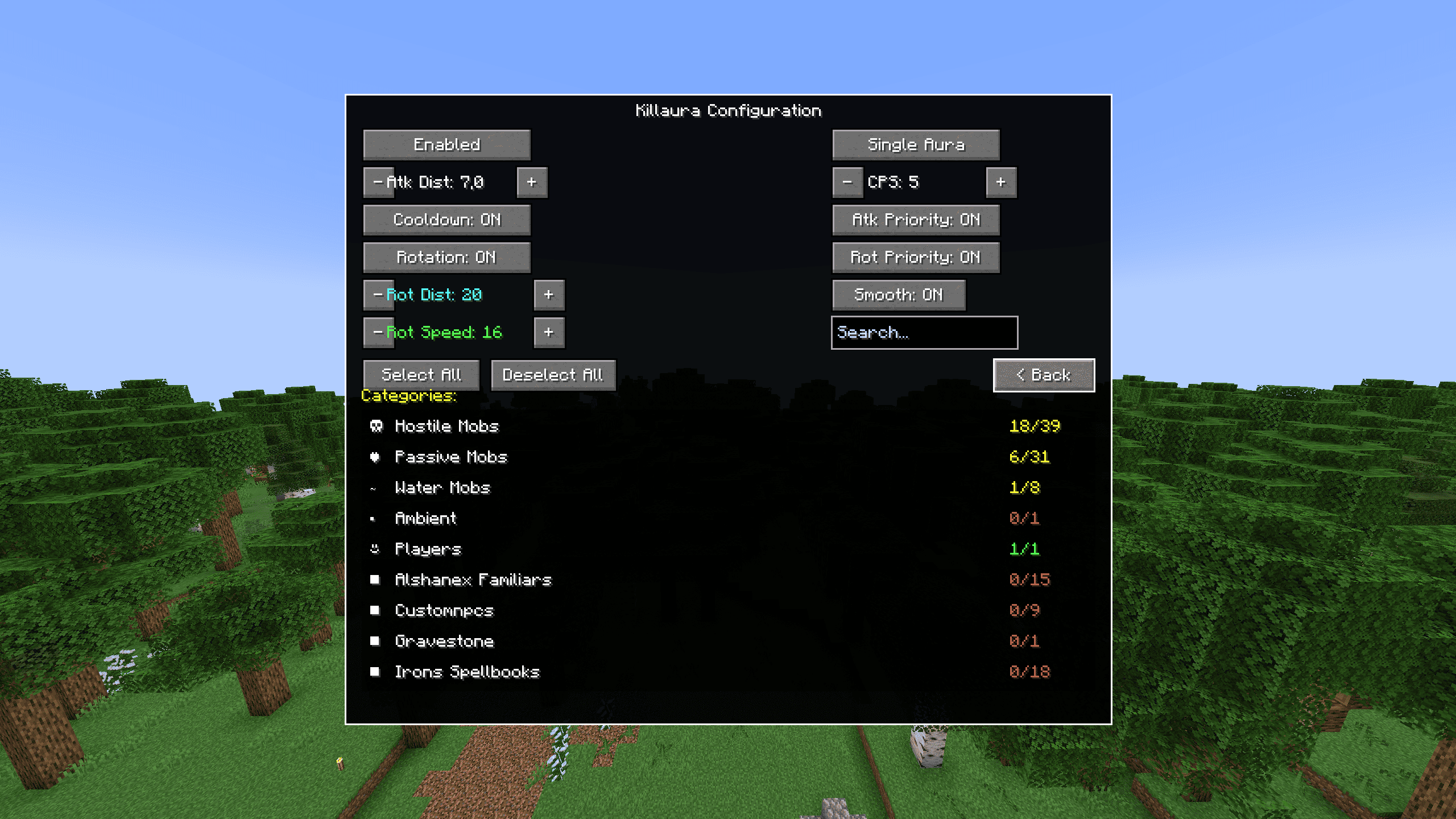
2025-12-30_01.44.20_4.png
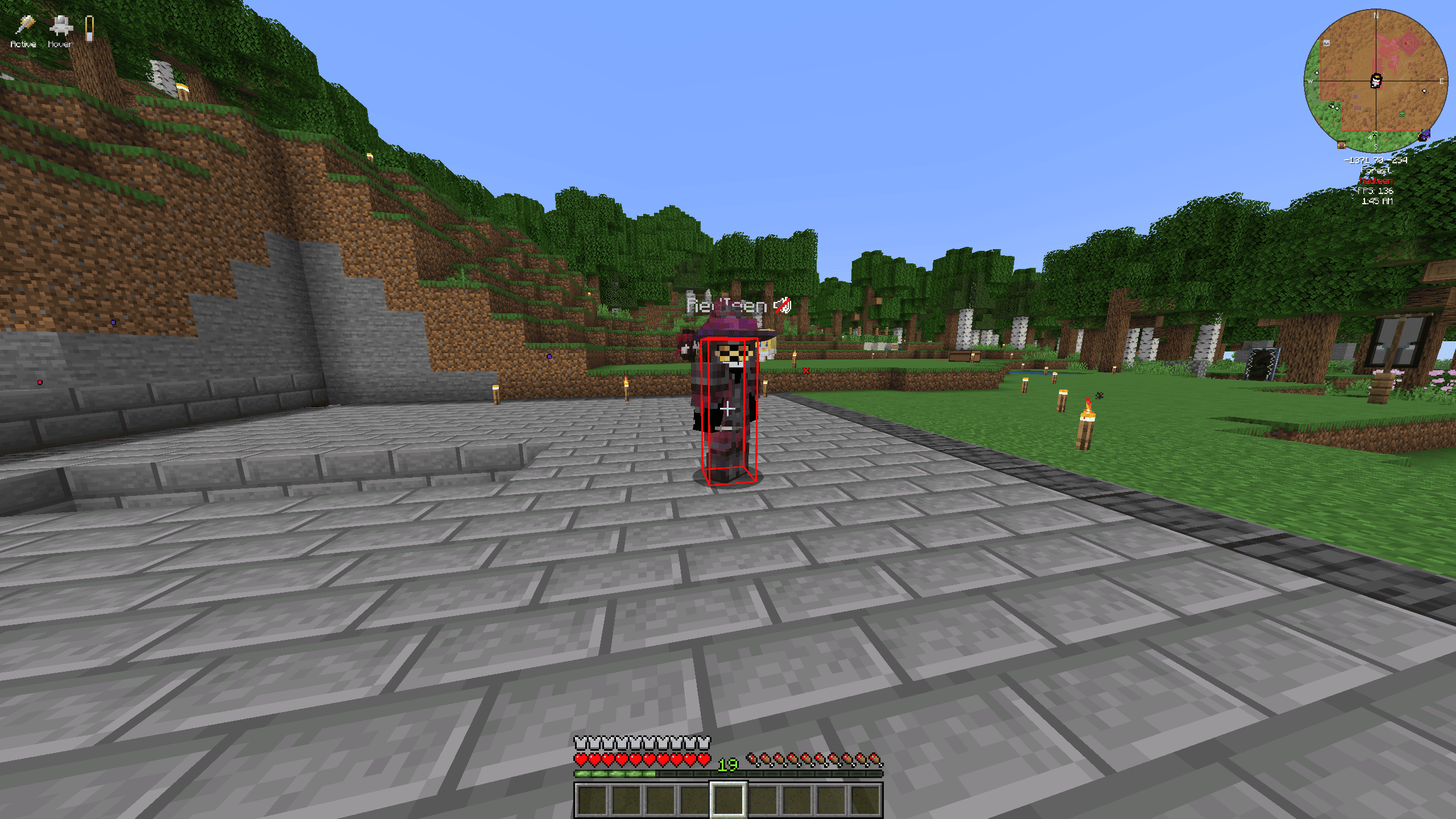
2025-12-30_01.45.05.png
Description
Killaura Mod (NeoForge 1.21.1)
A highly configurable combat automation mod for Minecraft 1.21.1 (NeoForge).
⚠️ WARNING — READ BEFORE USE ⚠️
This mod is intended for Singleplayer or Private Servers only.
Using automated combat on public multiplayer servers will very likely result in a permanent ban. Most servers run anti-cheat systems that detect abnormal attack patterns and rotation behavior.
- The authors are NOT responsible for bans or consequences caused by misuse.
- Only use this mod where you have explicit permission from the server owner.
My Others mods click on text :
✨ Features
🎯 Combat Automation
- Single Aura Mode — attacks one entity at a time
- Multi Aura Mode — attacks all entities within range
- Configurable attack distance — from 0 to 7 blocks
- Cooldown system
- Use vanilla attack cooldown, or
- Set a custom CPS (1–100 clicks/second)
🔄 Smart Head Rotation
- Auto-aim — automatically looks at targets
- Independent rotation distance — track entities up to 50 blocks away
- Priority by distance — always aims at the closest target
📋 Entity Selection
- Entities organized by category:
- Hostile Mobs (Zombies, Skeletons, Creepers…)
- Passive Mobs (Cows, Pigs, Sheep…)
- Water Mobs (Fish, Dolphins, Axolotls…)
- Ambient (Bats)
- Players
- Mod Support: modded entities automatically grouped by mod name
- Search bar to quickly find specific entities
- Select All / Deselect All per category
👁️ Visual Feedback
- Hitbox rendering for entities in range
- 🟢 Green = in range
- 🔴 Red = current target
- On-screen status indicator: “Killaura ON/OFF”
💾 Configuration
- Settings saved automatically
- Per-entity selection saved between sessions
- Tooltips on buttons explaining each option
⌨️ Controls
| Key | Action |
|---|---|
| K | Open configuration GUI |
| J | Toggle Killaura ON/OFF |
All keybinds can be changed in Minecraft’s Controls menu.
📥 Installation
-
Install NeoForge 1.21.1
-
Download the mod .jar
-
Place it into your mods folder
-
Launch Minecraft
❓ FAQ
Q: Does this work on servers?
A: Technically yes, but you will likely be banned on public servers. Use only in singleplayer or private servers with permission.
Q: Why isn’t my head rotating?
A: Make sure Rotation: ON is enabled and you have at least one entity selected in the GUI.
Q: Can I attack players?
A: Yes — enable Players in the entity selection. Use responsibly and only where allowed.
Q: Does it support modded entities?
A: Yes! Modded entities are automatically detected and sorted by mod name.
✅ Compatibility
- Minecraft: 1.21.1
- Mod Loader: NeoForge 21.1.77+
- Side: Client-side
🛠️ Support
Found a bug or have a suggestion? Please open an issue on the project’s GitHub repository.
Version: 1.0.1
Made for educational and private use purposes only.
The Killaura - Experimental Neoforge/Forge/Fabric Team

Owner