KeySwitch
- By
Key Switch is a client-side Minecraft mod for NeoForge that resolves key binding conflicts between mods.
2026-10-03_21.42.23.jpg
2026-10-03_21.43.12.jpg
Description
Key Switch \按键切换
中文描述在下方
Key Switch is a client-side Minecraft mod for NeoForge that resolves key binding conflicts between mods. When several mods assign the same key, Key Switch lets the player decide which binding fires — without opening a configuration panel or interrupting the current action.
Background
In a heavily modded environment, it is common for multiple mods to register the same key. Vanilla Minecraft only allows one binding to receive a given key press, so the remaining mods either fail to respond or behave unexpectedly. Key Switch addresses this problem at the input layer.
Features
Long-press and wheel switching
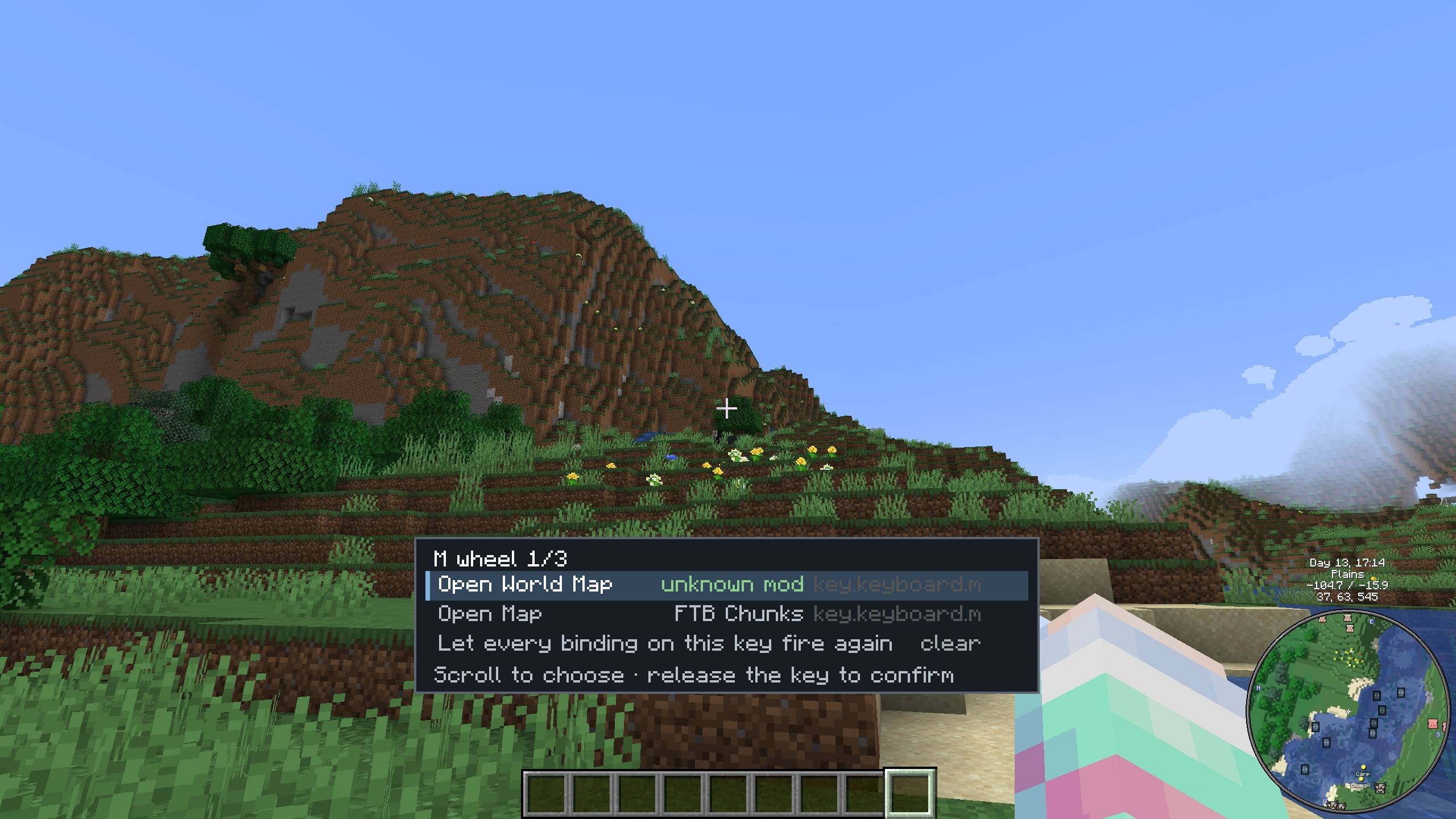
- Hold a shared key (400 ms by default, configurable) and scroll the mouse wheel. A compact card appears above the hotbar, listing every binding currently assigned to that key.
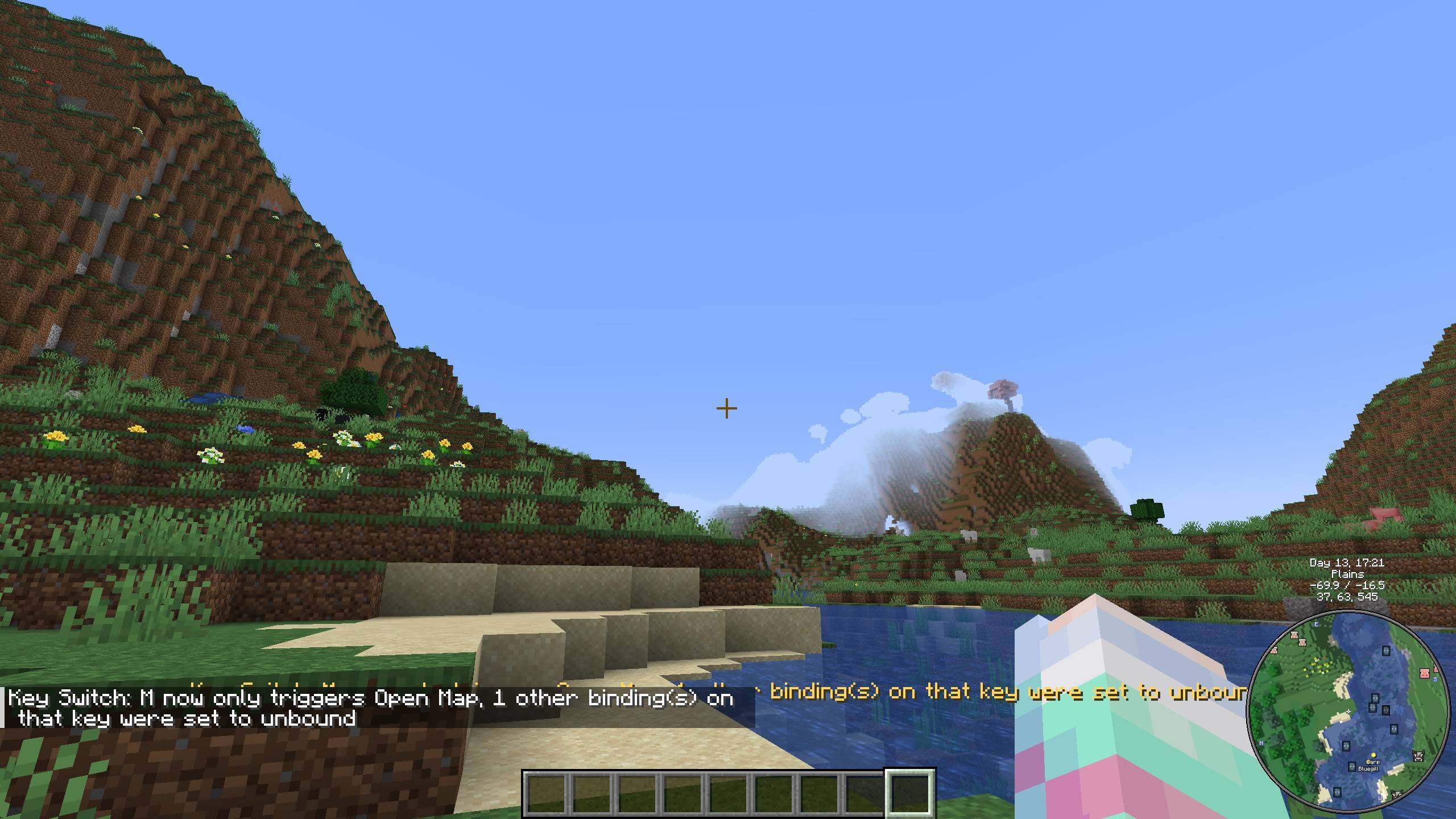
- Scroll the wheel to move the highlight, then release the key to confirm. The selected binding becomes the only one that triggers.
- The other bindings on the same key are replaced with “unbound key”, which is exactly equivalent to unbinding them manually. Mods that poll the key therefore cannot detect the press — regardless of whether they use
consumeClick(),isDown(),matches(), or a key handler running inside a screen. - The switch requires no panel click and does not interrupt the player's operation.
Reliable binding persistence
- Real bindings are recorded in
config/keyswitch/state.json. - Bindings are restored before
options.txtis written, when the Key Binds screen is opened, and on every game restart. - Removing the mod or rebinding keys manually does not cause any binding to be lost.
Control key whitelist
- Movement bindings — WASD, jump, sneak, sprint, and use/attack/pick block — are protected by default.
- Holding a whitelisted key never starts wheel switching, and whitelisted bindings are never replaced with “unbound”.
- Conflicts that involve whitelisted keys can still be managed from the overview screen.
Overview screen
- Press the overview key (default F8) to list every key shared by multiple bindings.
- From the overview, the player can inspect a conflict in detail, allow or block individual bindings, or restore the vanilla behaviour so that every binding on the key triggers again.
Configuration
- All adjustable options are located in
config/keyswitch-client.toml, including the long-press delay, whether switching works inside screens, mouse-button long-press support, whether the game pauses, message toggles, and the whitelist. - The configuration supports hot reload and is also available as a configuration screen in the mod list.
按键切换
按键切换(Key Switch) 是一款面向 NeoForge 的客户端模组,用于解决模组之间的按键绑定冲突。当多个模组为同一个按键注册绑定时,玩家可以自行决定触发其中哪一项——无需打开配置面板,也不会打断当前操作。
背景
在多模组化环境中,多个模组注册同一按键的情况相当常见。原版 Minecraft 只允许一个绑定接收某次按键输入,其余模组要么无法响应,要么产生非预期行为。按键切换在输入层面解决这一问题。
功能特性
长按与滚轮切换
- 按住共用键(默认 400 毫秒,可配置)并滚动鼠标滚轮,快捷栏上方将出现一个紧凑卡片,列出该按键上的全部绑定。
- 滚动滚轮移动高亮,松开按键即确认。选中的绑定将成为唯一触发项。
- 同一按键上的其余绑定会被替换为「无按键」,与手动解绑完全等效。因此,依赖轮询按键的模组无法检测到这次按键——无论其使用
consumeClick()、isDown()、matches(),还是在界面内部自行监听按键。 - 切换过程不弹出界面、无需点击,不会打断玩家的操作。
可靠的绑定持久化
- 真实绑定记录于
config/keyswitch/state.json。 - 绑定会在写入
options.txt之前、进入「按键绑定」界面时,以及每次游戏启动时自动还原。 - 卸载本模组或手动改键均不会丢失绑定。
控制键白名单
- 移动相关绑定——WASD、跳跃、下蹲、疾跑、使用/攻击/选取方块——默认受到保护。
- 长按白名单按键不会进入滚轮切换,白名单内的绑定也永远不会被替换为「无按键」。
- 涉及白名单按键的冲突仍可通过总览界面进行管理。
总览界面
- 按下总览键(默认 F8)可列出所有被多个绑定共用的按键。
- 在总览界面中,玩家可以查看冲突详情、逐项放行或屏蔽单个绑定,或恢复原版行为,使该按键上的全部绑定重新触发。
配置
- 全部可调选项位于
config/keyswitch-client.toml,包括长按判定时间、界面内是否生效、鼠标按键长按支持、是否暂停游戏、提示开关以及白名单。 - 配置支持热重载,并可在模组列表中通过配置界面进行调整。
KeySwitch Team