Keybinds Extended
- By
Extends keybinds with different modes - you can make the keybind work with various press triggers such as "On Press", "On Release", "Hold", "Double-Click". Adds support for mouse wheel keybinds
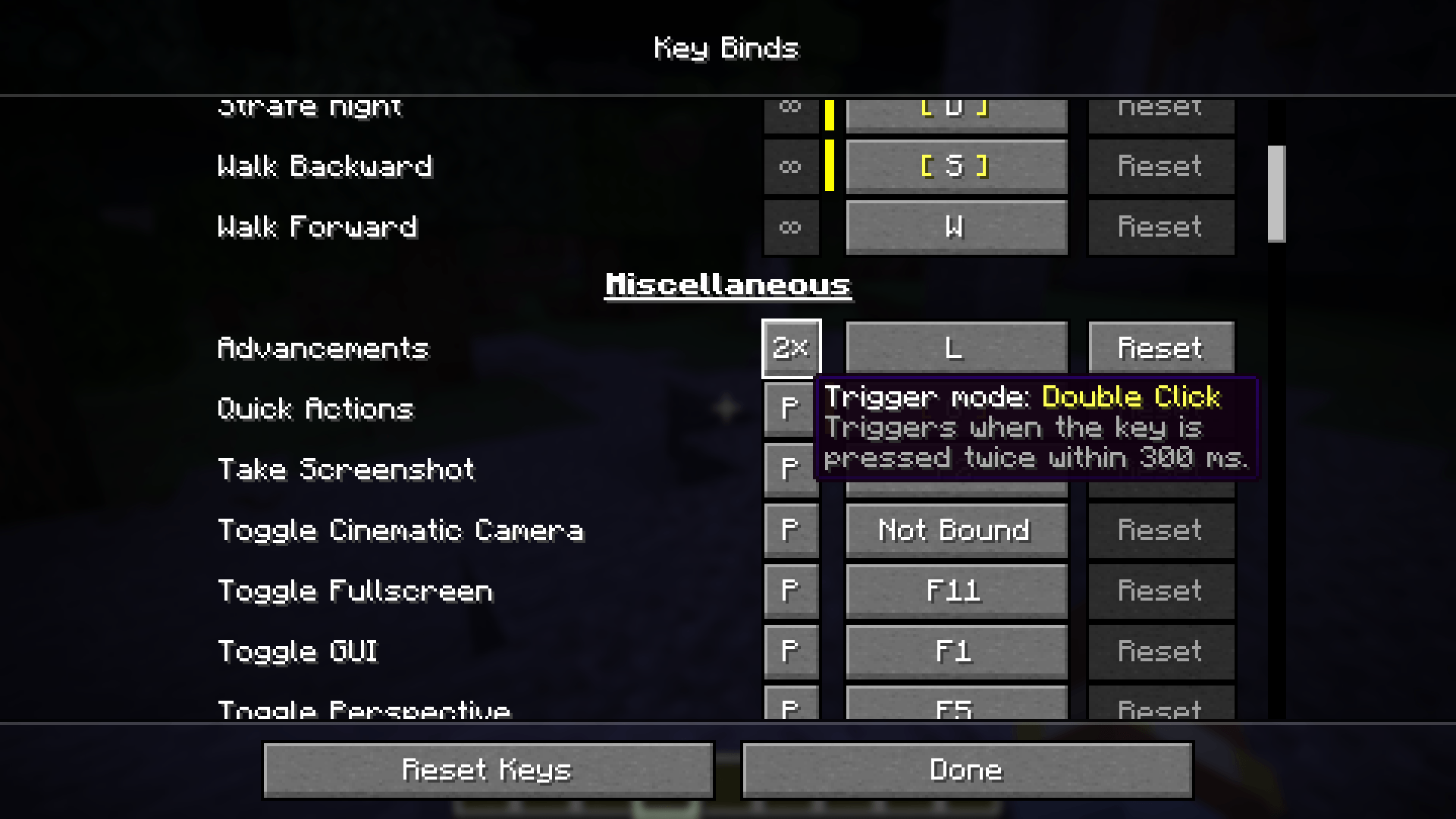
Most keybinds support various trigger modes - Press/Release/Hold/Double-Click/Continuous
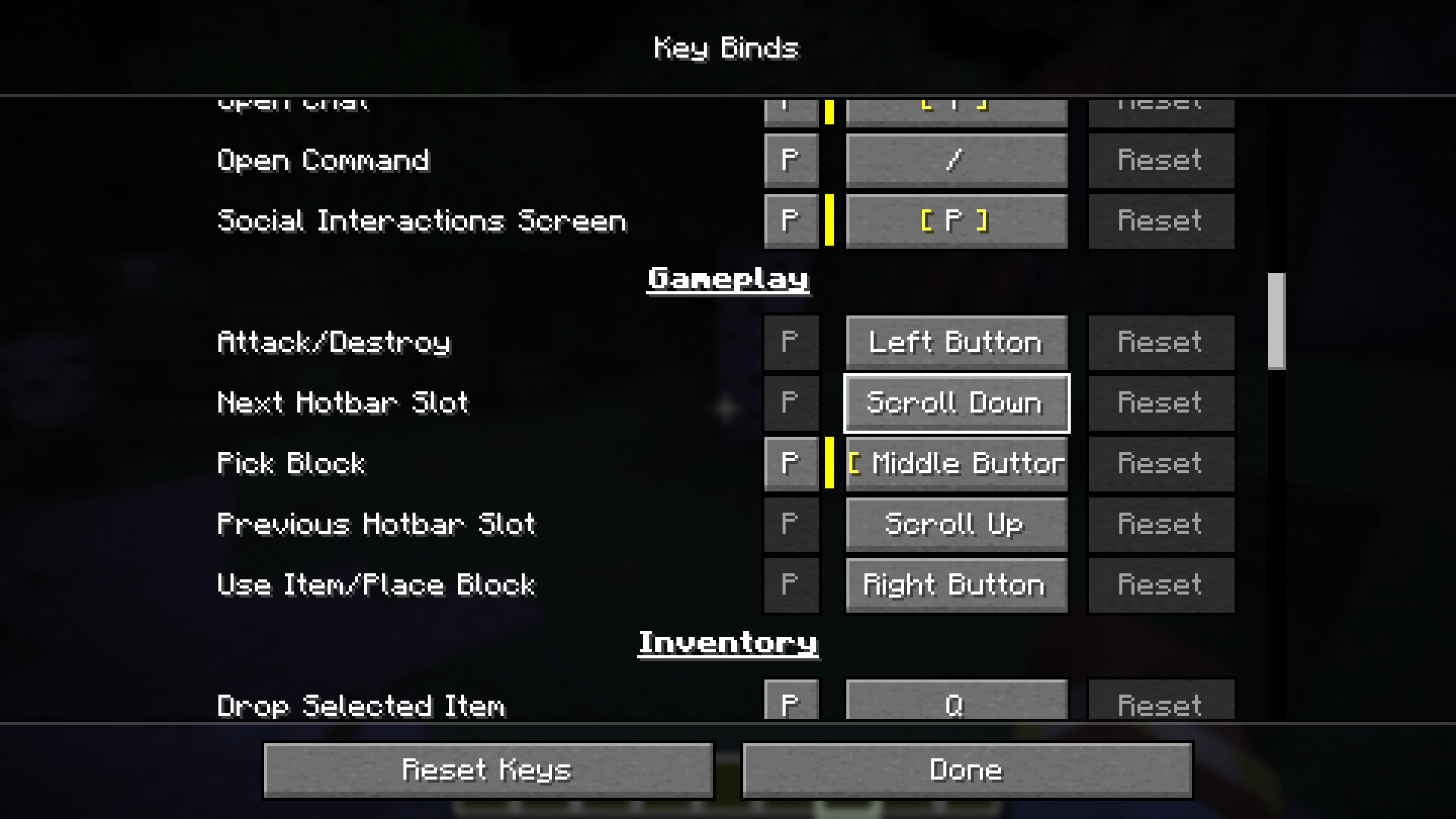
Added Next and Previous hotbar slot keybinds for more customization

Description
Keybinds expanded
Small backstory - while developing my other project I encountered the need to handle more keybind actions such as double-clicks etc. During implementation I decided to separate the logic into new mod which is how this project was born.
Currently the project is made for 26.3 as it is the version where I am developing the mod, but I plan to backport it to 26.1.2 and 1.21.1 (but no 1.20.1). Same applies for mod loaders - right now it is NeoForge only as we utilize a lot of the logic added by NeoForge, but eventually we might add support for Fabric too if enough people are interested
Main features
There are 2 main features:
- Various keybind modes
Press/Release/Hold/Double-Click/Continuous- now you can configure multiple keybinds under the same key with different trigger mechanism
- Added support for mouse wheel keybinds - now you can have custom actions triggered when you scroll your mouse wheel
- Added 2 new keybinds for hotbar scrolling, so now you can unbind it or change it to something else
This mod is completely CLIENT-SIDE so you can use it on vanilla servers too. We also have simple API you can use to integrate your existing keybinds with this mod
Keybind modes
Each normal keybinding now accepts 5 different trigger modes:
Press- Same as vanilla behavior, however with this mod installed the key is triggered ONLY ONCE even when you continue holding the key down for longer period of timeRelease- Same asPressbut triggered once key is actually releasedHold- Requires you to hold down the key for 0.5 seconds (configurable) before it is triggered- Now you can combine for example same keyboard key with Press and Hold for 2 different actions
Double-Click- triggered when you press the key twice within double-click timeout interval which is 0.3 seconds by default (configurable)Continuous- As long as key is held down, action is triggered on each tick. So for example when Jump key is continuous you will continue jumping while you hold the key
Mouse wheel binds
Small quality of life feature which is already supported by most games - now you can bind actions such as mouse wheel up/down for your keybinds (also supports key modifiers such as ALT/SHIFT/CONTROL).
Minecraft previously had some hardcoded logic such as swapping hotbar slots - we have added new keybinds for this action too to preserve original logic, but now you can unbind it/change it to something else
API
Mod developers can utilize the custom modes within their mods using our API. Below is simple guide with description on how this API may be utilized.
First starting with project setup - add repository and dependency.
build.gradle
repositories {
    maven { url 'https://repo.repsy.io/mvn/toma/public/' }
}

dependencies {
    implementation "tnt.tarkovcraft:extendedkeybinds:${extendedkeybinds_version}"
}
gradle.properties
# Dependencies
extendedkeybinds_version=1.0.0+26.3
Version can be found on CurseForge/Modrinth, it always has the suffix with MC version (the +26.3)
Now the following steps depend on how do you want to integrate the mod - either as required/hard dependency or rather just compatibility layer.
Integration as a compatibility
If you do not want to add this mod as required dependency, but still want to offer some compatibility/default keybind modes when the mod is installed you can utilize the tnt.tarkovcraft.extendedkeybinds.api.event.ConfigureDefaultKeybindsEvent event and add the configurations here.
Lets say you have your custom keybind defined like this
public final class ModKeyMappings {

    public static final KeyMapping OPEN_MAP = new KeyMapping("key.modid.open_map", InputConstants.KEY_M, KeyMapping.Category.GAMEPLAY);

    private void register(RegisterKeyMappings event) {
        event.register(OPEN_MAP);
    }
}
And you want to make the keybind work on Double-Click when this mod is installed. For this you will have some class which will be loaded only when the extendedkeybinds mod is loaded, e.g.
public final class ExtendedKeybindsCompatibility {

    @SubscribeEvent
    public static void configureDefaultKeyMappings(ConfigureDefaultKeybindsEvent event) {
        ExtendedKeybindsApi.setDefaultInputMode(ModKeyMappings.OPEN_MAP, InputMode.DOUBLE_CLICK);
    }
}
And thats it. Small side note - all key configurations can be handles via the ExtendedKeybindsApi class
Full integration - required as a dependency
Now lets go back to our previous ModKeyMappings class - now with the mod being hard dependency, we can simplify the key mode registration - and it also allow us to add trigger listener with keybind handler
public final class ModKeyMappings {

    public static final KeyMapping OPEN_MAP = ExtendedKeybindsApi.configure(
            new KeyMapping("key.modid.open_map", InputConstants.KEY_M, KeyMapping.Category.GAMEPLAY)
    ).defaultMode(InputMode.DOUBLE_CLICK) // assign the double-click mode
            .onTrigger(ModKeyMappings::openMap) // action performed on double-click in this case
            .mapping(); // returns KeyMapping instance

    private static void openMap(KeyPressContext ctx) {
        // custom logic when the key is pressed
    }
}
And now you have registered custom keymapping with default mode and trigger action.
Since this mod also allows mouse wheel binding you can utilize the ScrollKeys instead of InputConstants for registering mouse wheel inputs by default
Keybinds Extended Team

Owner