Key Atlas
- By
The Key Binds screen as a picture of your keyboard and mouse. Green does one thing, red does more.
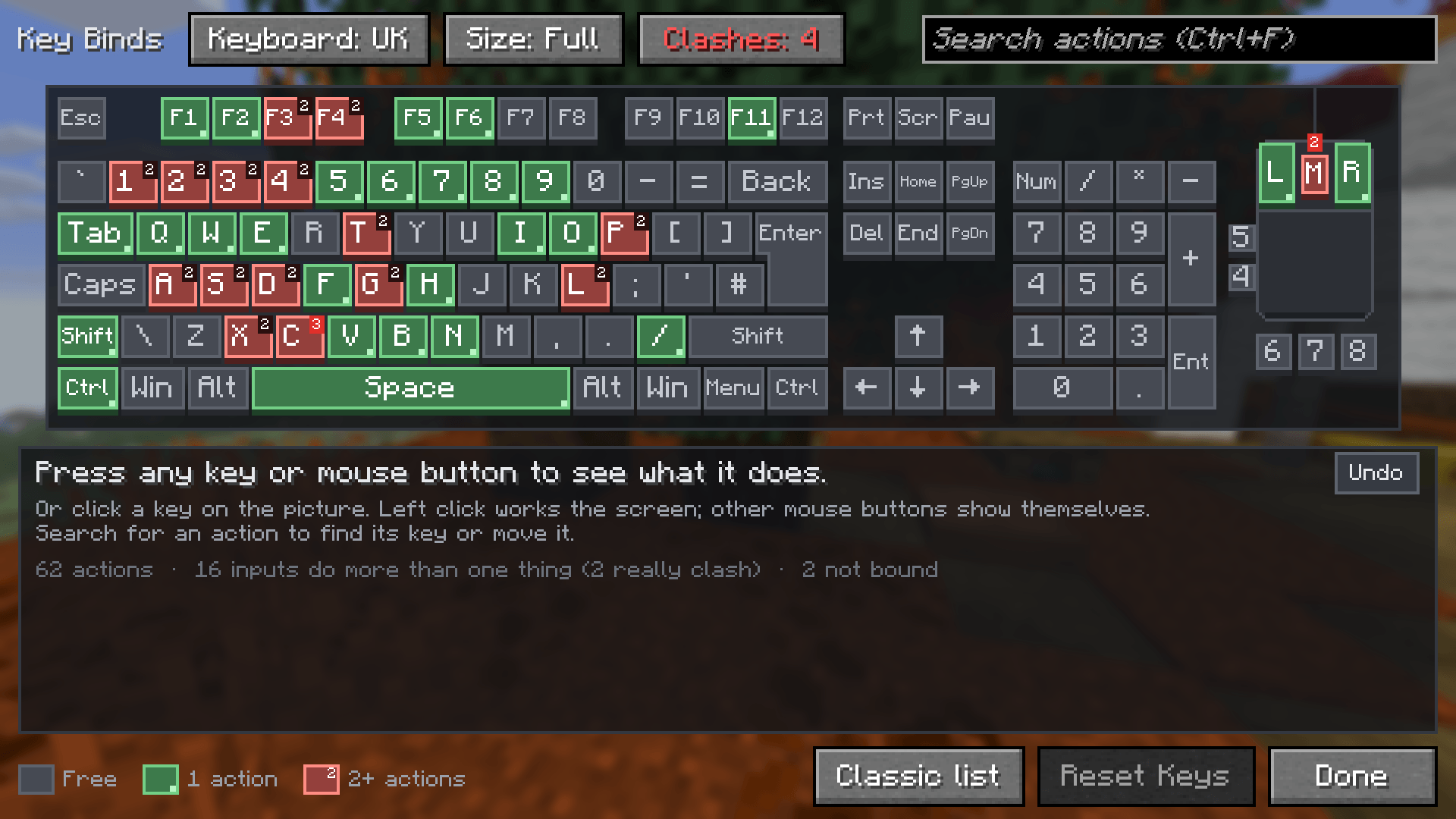
Grey does nothing, green does one thing, red does two or more.
Description
Key Atlas
See your controls instead of reading a list. Key Atlas turns the Key Binds screen into a picture of your keyboard and mouse.
What it is
A client-side mod that replaces Controls > Key Binds. Every key and mouse button is coloured by how many actions it has, so you can see what is free, what is used and what clashes before you read a single word.
- Grey keys do nothing, green keys do one thing, red keys do two or more. Red keys show how many.
- Press any key (or a mouse button) to see everything it does, with the category and the mod that added it.
- Click Change on an action, then press the new key or mouse button, or click one on the picture. Esc cancels.
Fix clashes fast
- The Clashes button lists every action that fires together with another one on the same key, side by side.
- Swap: move an action onto a key that is already used, and one click puts the other action on the key you came from.
- Undo takes back any change (or press Ctrl+Z), even Reset Keys.
- Many F3 shortcuts use letter keys (F3 + L, F3 + B) and only work while F3 is held. Key Atlas knows those don't really clash and says so.
Find any action
- Search by name, category, mod or key ("jump", "inventory", "left shift"). Accents don't matter.
- The keys of the matching actions light up and the rest of the board dims.
- Tabs list changed actions, actions with no key, or all of them, and you can show one mod at a time.
- Add action puts any action on the key you picked, even a free one.
Share your setup
- Copy turns your changed key binds into one line of text. Paste it in a chat, a note or a file.
- Paste reads that line back, on another computer or a new instance. It asks first, and Undo takes it back.
- Actions from mods you don't have are skipped.
Your keyboard
- 32 keyboards: US, UK, German, Swiss, French, Belgian, Spanish, Latin American, Portuguese, Brazilian, Italian, Swedish/Finnish, Danish, Norwegian, Icelandic, Estonian, Polish, Czech, Slovak, Hungarian, Croatian/Slovenian, Romanian, Turkish, Greek, Russian, Ukrainian, Hebrew, Arabic, Japanese, Korean, Dvorak and Colemak.
- Each one is drawn in its real shape (US style, the taller European Enter key, Japanese, Brazilian or Korean) with its own key labels.
- Auto picks the keyboard your computer is set to.
- Choose a compact, no-numpad or full-size keyboard. Bound keys the picture doesn't show get their own row.
- The mouse has all 8 buttons: left, right, wheel, two side buttons and three extra buttons.
Good to know
- Works with key binds from other mods, not just Minecraft's own.
- On NeoForge, key combinations like Ctrl + K or Ctrl + Mouse 4 and "in game" or "in menus" keys are kept and explained.
- Changes are saved straight away, the same way the normal screen saves them.
- The Classic list button opens the normal Key Binds list if you ever want it.
Requirements and install
- Minecraft 26.3 with Fabric Loader or NeoForge (Java 25, like the game).
- No other mods needed. Fabric API is not required.
- Client only: put the jar in your
modsfolder. Servers don't need it, and it works on any server.
FAQ
Does it change how keys work in game? No. It only changes the Key Binds screen. Your key binds are stored by Minecraft as normal.
Can I go back to the normal screen? Yes. Click Classic list, or remove the mod. Your key binds stay as they are.
What does Copy put on the clipboard?
One line that starts with keyatlas1; and lists only the actions you changed, like key.drop=key.keyboard.r.
Feedback and bugs
Found a bug, a crash or something that looks wrong? Leave a comment on this page with the version you play and what happened. A crash log or screenshot helps a lot. Ideas and feedback are welcome too.
Permissions
- You can use Key Atlas in any free modpack, as long as the pack downloads it from this page.
- Resource packs that restyle it (textures, sounds, text) are welcome.
- Videos, streams and reviews are welcome.
- Please don't re-upload it, modify or reuse its code, or make money from it without asking first.
Advert
This is an ad. JustJosh99 makes this mod and also runs Swift Web Design.

A clear map beats a long list. The same goes for your website. Swift Web Design builds websites that show people what you do at a glance: fast, clear and easy to use on any screen. Visit Swift Web Design
Key Atlas Team