JEI unofficial
- By
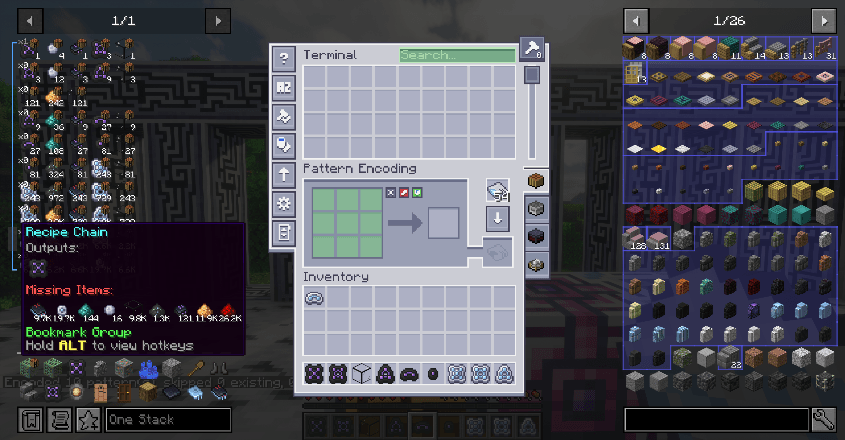
A brief view
Description
JEIunofficial
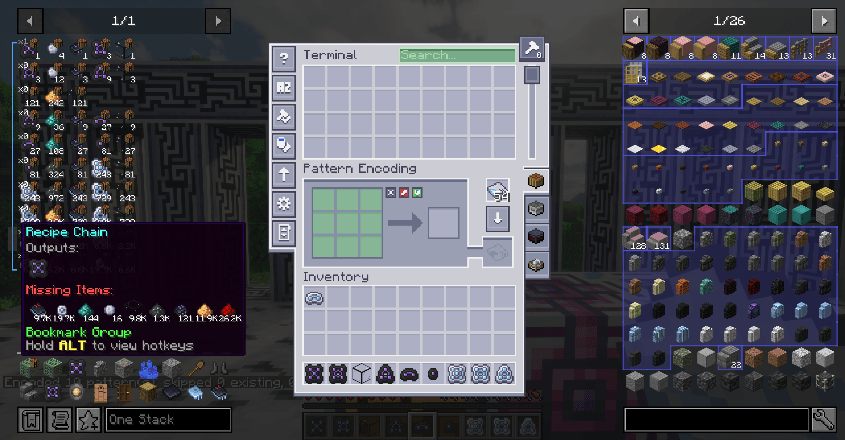
Stuck on the repetitive steps of building a production line—looking up recipes, calculating materials, writing patterns? Tired of memorizing exactly how many of which item an altar ritual needs? This mod takes care of those pains for you. Made for large modpack players, modpack authors, and anyone who finds the official JEI not enough.
An unofficial JEI fork that keeps all of the official JEI's features and interfaces while adding recipe bookmark chains, fast crafting, recipe tree generation, item list folding, quick give, quick rule file import, and integration with mods such as AE2.
Note: for compatibility, this mod keeps the modId jei. Do not install it alongside the official JEI.
New Features
Favorite Recipes & Recipe Trees
Making the same thing over and over? Press
Fto favorite a recipe and jump straight back to it; for complex outputs, pressShift+Fto see the whole production tree instead of clicking through recipe pages one by one.
- Favorite/unfavorite a recipe: hover the recipe output slot + F
- Generate a recipe tree: Shift + F in the recipe view / Shift + A on the favorites page
- Favorites page button: left click toggles the favorites page, Shift + left click switches the display mode (grid results / recipe rows)
- Item bookmark: A (with amount: Ctrl + A)
- Recipe bookmark: Shift + A (with amount: Ctrl + Shift + A)
- Remove a favorite recipe: hover the favorite + A
Recipe tree generation supports custom rules and generation depth. The rule file is located at config/jei/recipe-preferences.txt (auto-created with commented examples the first time you generate a tree). See "Advanced" below for the rule details.
Bookmarks & Recipe Chains
The most convenient part of batch crafting—set a multiplier on a recipe chain and the required materials for the whole chain are calculated automatically. Hover to see the full requirement; no more mental math or handwritten notes.
- Chain recipe bookmarks: left-click drag the brackets to combine/merge them into a group; the output of each recipe automatically feeds into the next one as input.
- Recipe chain multiplier/factor: Ctrl + scroll wheel (step 1) / Ctrl + Alt + scroll wheel (step = quantity box value); the whole chain's material requirements are calculated automatically.
- Cycle candidate materials (bookmark): Shift + scroll wheel
- Switch input/catalyst: Alt + scroll wheel
- Recipe chains appear as blue bracket groups; Alt + left click folds/unfolds them; hover to preview the whole chain's material requirements (hold Ctrl for extended info).
- Remove a recipe chain: Shift + A
- Bookmark groups (grey brackets): left click switches the view mode (default/todo list/folded), right click toggles crafting mode, Alt + left click folds/unfolds, Shift + left click drag moves the group, dragging items creates/joins a group
Candidate Materials in the Recipe View
When an input slot accepts multiple materials, pick one with the scroll wheel; the selected material also affects the recipe tree and AE2 patterns, so you can encode patterns with the exact material you want.
- Switch a single candidate material: scroll wheel
- Switch all candidate materials: Ctrl + scroll wheel
- The currently selected candidates are used when expanding the recipe tree and directly affect the materials written into AE2 patterns.
Item List Folding (Right Side)
With lots of mods, the right-hand item list can stretch to hundreds of pages and thousands of entries. Folding groups similar items into a single slot so you can find things quickly—and you can define your own grouping rules in a plain text file.
- The right-hand item list can fold similar items into a single slot based on custom rules for a cleaner interface; a default folding preset is included and works out of the box.
- Fold groups: Alt + left click to unfold/fold; expanded members stay contiguous with group border highlighting; folded slots show a count badge and a double-item overlay; fold state is remembered.
- Rule file: config/jei/collapsible-items.txt; expressions support item IDs, tags, wildcards, and
!&|()logic combinations.
Quick Rule File Import
Modpack authors or friends can share rules by simply dropping a file into the config folder—no copy-pasting into the main file.
- Drop files named recipe-preferences-.txt / collapsible-items-.txt into the config folder; their contents are appended to the matching rule file automatically and the source files are deleted, so there is no need to merge them manually.
Quantity Box & Quick Give
Handy for creative/single-player debugging: set an amount once, click, and that many items are given—no more click-drag-drop.
- Quantity box: scroll wheel ±1 / Ctrl + scroll wheel ±64 to adjust; right click clears the input (back to "one stack"); direct numeric input is supported.
- Quick give mode: Ctrl + left click the quantity box to enable (only for players with cheat permissions); while enabled, clicking a bookmark/item puts the calculated amount into your inventory; if it does not fit, as many as possible are given.
- The calculated amount supports three sources: plain items, recipe chain multipliers, and the group's calculated amount.
AE2 / GTM
Hands free—writing AE2 patterns and marking materials used to be the most tedious busywork. Now one drag or one key press handles it in bulk; no more manually adding/removing catalysts, which cuts out even more steps.
- AE2 search: drag an item onto the ME terminal search box to enter its name automatically.
- AE2 patterns: press Ctrl + Q in a pattern encoding terminal to write the current recipe (or a whole recipe chain) into AE2 patterns.
- AE2 component marking: drag a bookmark group onto AE2 components (cell workbench, import/export buses, ME interfaces, etc.) to mark them in bulk; only plain items and recipe outputs are marked, not inputs or catalysts.
- GTM / GTCEu: automatically recognizes catalysts in GTCEu recipes (including virtual circuits).
Material Pulling & Auto Crafting
Hands free again—crafting no longer means "memorize the material list → rummage through chests → go back to the crafting table → craft one recipe at a time". Pull materials from the open container or an AE2 network with one key, then auto-fill and auto-craft.
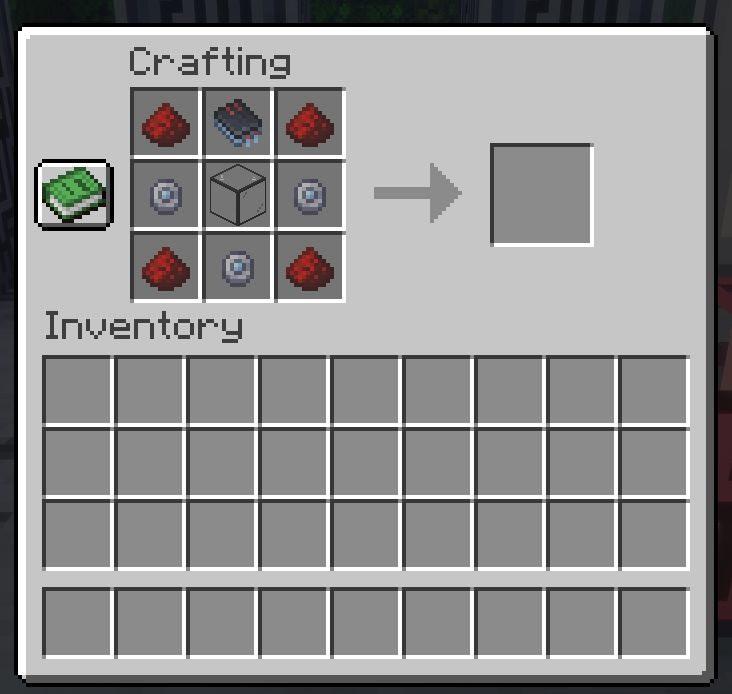
- Show recipe ghost overlay: S; show overlay and fill the crafting grid: Shift + S
- Auto craft: Shift + C; craft missing only: Ctrl + Shift + C
- Pull bookmark items (from the currently open container / AE2 network): V
Copy Tools
When looking things up on the wiki, writing modpacks, or asking in multiplayer "what is this recipe ID/item/tag", you no longer need to open F3, dig through logs, or type every character—and it also helps when writing recipe tree rules and folding rules.
- While hovering an item/recipe:
- Copy item name: Ctrl + C
- Copy item tags: Ctrl + D
- Copy item ID: Ctrl + X
- Copy recipe ID: Ctrl + T
Advanced
Recipe Tree Generation Rules
You can specify recipe type, input materials, tags, and path wildcards for a given output (e.g. gtceu:*_single_wire). Rules support multiple priority levels: outer rows are ordered by priority, inputs match with AND, and recipe entries match with OR.
When expanding a recipe tree, materials are resolved with the priority manual favorites > custom rules > currently scrolled candidates; if a rule matches but cannot narrow down to a single recipe, the node is not expanded.
Rule file location: config/jei/recipe-preferences.txt (with commented examples).
Folding Rule Expressions
In the folding rule file config/jei/collapsible-items.txt, each item = line defines one fold group; ! & | (), item IDs / tags / wildcards are supported, and items belong to the first matching group.
Notes
All keybinds can be rebindable in-game (Options → Controls → JEI); some features require this fork to be installed on the server as well.
FAQ
Can I install this mod alongside the official JEI?
No—they are incompatible.
What is the relationship between this mod and the official JEI?
This mod is an unofficial JEI fork and has no affiliation with the official JEI or mezz. See THIRD_PARTY_NOTICES.md for the license details.
The game crashes while I'm using this mod—who should I report it to?
Please switch to the official JEI first and try to reproduce the crash. Only if you are very sure the same bug reproduces on the official JEI should you open an issue with mezz / the official JEI; otherwise, please open an issue on this mod's issue page.
Note: sorry mezz, if people still end up on your issue tracker asking about this mod, I apologize in advance.
Why only 1.21.1 NeoForge/1.20.1 forge?
Due to limited development resources and time, the Stellar Remnants Team currently only develops for 1.21.1 NeoForge. However, anyone capable is very welcome to open a PR at this link to help port this mod to Fabric, Forge, Quilt, and other versions!
Missing integration with xxx / incompatible with xxx / I want a feature!
Feel free to open an issue on the Git page!
This is a question
Many thanks to mezz and the GTNH Team for their original work! Without them, this mod would never have existed. Thank you again for your excellent work!
JEI unofficial Team