


Inventory ToDo
- By
Description
Inventory ToDo
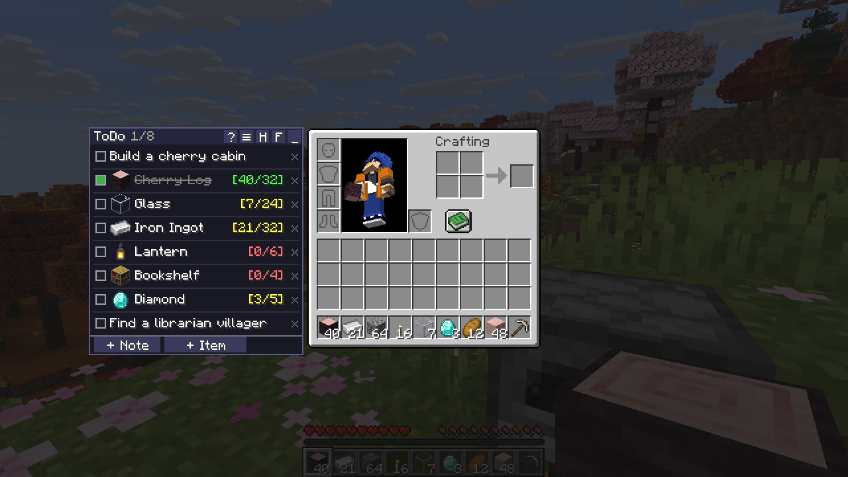
A to-do list right next to your inventory. Write notes, set item goals ("64 Iron Ingots", "4 Diamonds") and watch them count up automatically as you collect things.
Works in any modpack, with any combination of mods — no required dependencies. Drop it into a huge kitchen-sink pack, a tech pack, a vanilla-plus pack or plain Minecraft: it just works. Recipe viewers are optional extras, never requirements.
Features
- Notes and item goals in one list — click "+ Note" to write anything, or add an item and set how many you need.
- Live counting — the list counts what is in your inventory and shows
[32/64]. Rows tick themselves off (with strikethrough) when the goal is reached. - Add items in seconds
- Alt+click any item in your inventory (modifier key configurable)
- Click the panel while holding an item (the held amount becomes the goal; nothing is used up)
- Search by name or ID (
modid:name[:meta]). English names always work, even when you play in another language — handy when following an English wiki or guide. - Drag & drop from your recipe viewer
- Change goals quickly — mouse wheel over the count (Shift ×16, Ctrl ×64), click to type a number, right-click to use what you have now.
- Stays out of your way — follows the inventory, pins to the left edge, or goes anywhere you drag it. Minimize it to a small icon that shows how many tasks are left.
- HUD — show your unfinished tasks on screen while playing, toggled with a key.
- Recipe ingredients — Ctrl+click an item's icon to add the ingredients of its crafting recipe, multiplied by what you still need.
- Counts open containers too — with a chest open, the counts include what is inside it (can be turned off).
- Per-world or shared lists — every world and server has its own list by default; switch to one list for all worlds if you prefer.
- Key bindings — add the hovered item with a key, toggle the HUD, and more.
- Remembers exact items — metadata and NBT are kept, so specific machines, circuits or named items are counted correctly. Lists are saved per world/server and survive mods being added or removed.
- 10 languages — English, 日本語, 简体中文, 繁體中文, 한국어, Русский, Deutsch, Français, Español, Português (Brasil).
Supported languages
The mod follows your Minecraft language setting. 10 languages are included:
| Language | In game |
|---|---|
| English (default) | English |
| Japanese | 日本語 |
| Simplified Chinese | 简体中文 |
| Traditional Chinese | 繁體中文 |
| Korean | 한국어 |
| Russian | Русский |
| German | Deutsch |
| French | Français |
| Spanish | Español |
| Brazilian Portuguese | Português (Brasil) |
Optional integrations
None of these are required. When installed, Inventory ToDo uses them automatically:
| Mod | What you get |
|---|---|
| NEI (original or GTNH fork) | Modifier+click and drag & drop from the item list, recipe/usage on icon click, NEI keys (R / U) work over list items |
| JEI (1.18 and newer) | Hovered-item adding, drag & drop, recipes/usages on icon click |
| EMI | Hovered-item adding, drag & drop, recipes/usages on icon click |
| REI (1.17 and newer) | Hovered-item adding, drag & drop, recipes/usages on icon click |
Supported versions
| Minecraft | Loaders |
|---|---|
| 26.3 | Forge, NeoForge, Fabric |
| 26.2 | Forge, NeoForge, Fabric |
| 26.1.2 | Forge, NeoForge, Fabric |
| 26.1.1 | NeoForge, Fabric |
| 26.1 | NeoForge, Fabric |
| 1.21.11 | Forge, NeoForge, Fabric |
| 1.21.10 | Forge, NeoForge, Fabric |
| 1.21.9 | Forge, Fabric |
| 1.21.8 | Forge, NeoForge, Fabric |
| 1.21.7 | Fabric |
| 1.21.6 | Fabric |
| 1.21.5 | Forge, NeoForge, Fabric |
| 1.21.4 | Forge, NeoForge, Fabric |
| 1.21.3 | Forge, NeoForge, Fabric |
| 1.21.2 | Fabric |
| 1.21.1 | Forge, NeoForge, Fabric |
| 1.21 | NeoForge, Fabric |
| 1.20.6 | Forge, NeoForge, Fabric |
| 1.20.5 | Fabric |
| 1.20.4 | Forge, NeoForge, Fabric |
| 1.20.3 | Forge, Fabric |
| 1.20.2 | Forge, Fabric |
| 1.20.1 | Forge, NeoForge, Fabric |
| 1.20 | Forge, NeoForge, Fabric |
| 1.19.4 | Forge, Fabric |
| 1.19.3 | Forge, Fabric |
| 1.19.2 | Forge, Fabric |
| 1.19.1 | Forge, Fabric |
| 1.19 | Forge, Fabric |
| 1.18.2 | Forge, Fabric |
| 1.18.1 | Forge, Fabric |
| 1.18 | Forge, Fabric |
| 1.17.1 | Forge, Fabric |
| 1.17 | Fabric |
| 1.16.5 | Forge, Fabric |
| 1.16.4 | Forge, Fabric |
| 1.16.3 | Forge, Fabric |
| 1.16.2 | Fabric |
| 1.16.1 | Fabric |
| 1.16 | Fabric |
| 1.15.2 | Forge, Fabric |
| 1.15.1 | Forge, Fabric |
| 1.15 | Fabric |
| 1.14.4 | Forge, Fabric |
| 1.14.3 | Fabric |
| 1.14.2 | Fabric |
| 1.14.1 | Fabric |
| 1.14 | Fabric |
| 1.12.2 | Forge |
| 1.12.1 | Forge |
| 1.12 | Forge |
| 1.11.2 | Forge |
| 1.11 | Forge |
| 1.10.2 | Forge |
| 1.10 | Forge |
| 1.9.4 | Forge |
| 1.9 | Forge |
| 1.8.9 | Forge |
| 1.7.10 | Forge |
Client-side only
Install it on the client only. It is not needed on servers, and you can join servers that don't have it.
FAQ
Do I need to install it on the server? No. It is a client-side mod. Servers don't need it.
Can I use it in my modpack? Yes. It is MIT licensed — include it in any modpack, public or private, no permission needed.
Will it conflict with my other mods? It is designed to work with any mod setup: it only draws on top of inventory screens and doesn't change any game logic, items or recipes. If you ever find a conflict, please open an issue and it will be fixed.
Where is my list saved?
In config/inventorytodo/ inside your game folder — one file per world or server, plus a shared list if you use that option.
I used "GTNH ToDo" before. Your lists and settings are imported automatically on first start.
Links
- Source code & issues: https://github.com/junjun1z/inventory-todo
- License: MIT
Inventory ToDo Team
