Inventory Managment+
- By
Inventory Manager+ is a Fabric inventory-manager mod that adds fast drag transfers, smart deposit and withdraw controls, slot locking, interactive shulker previews, and customizable Inventory Profiles for quickly organizing and restocking your inventory.
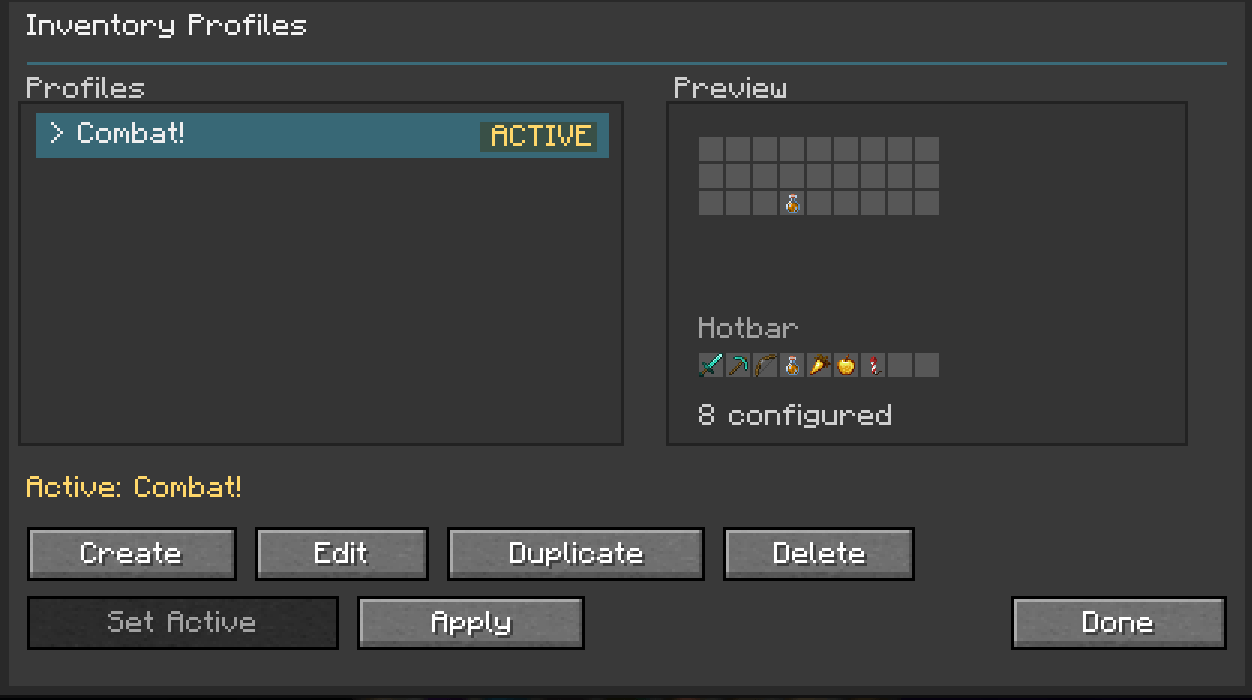
Inventory Profiles GUI
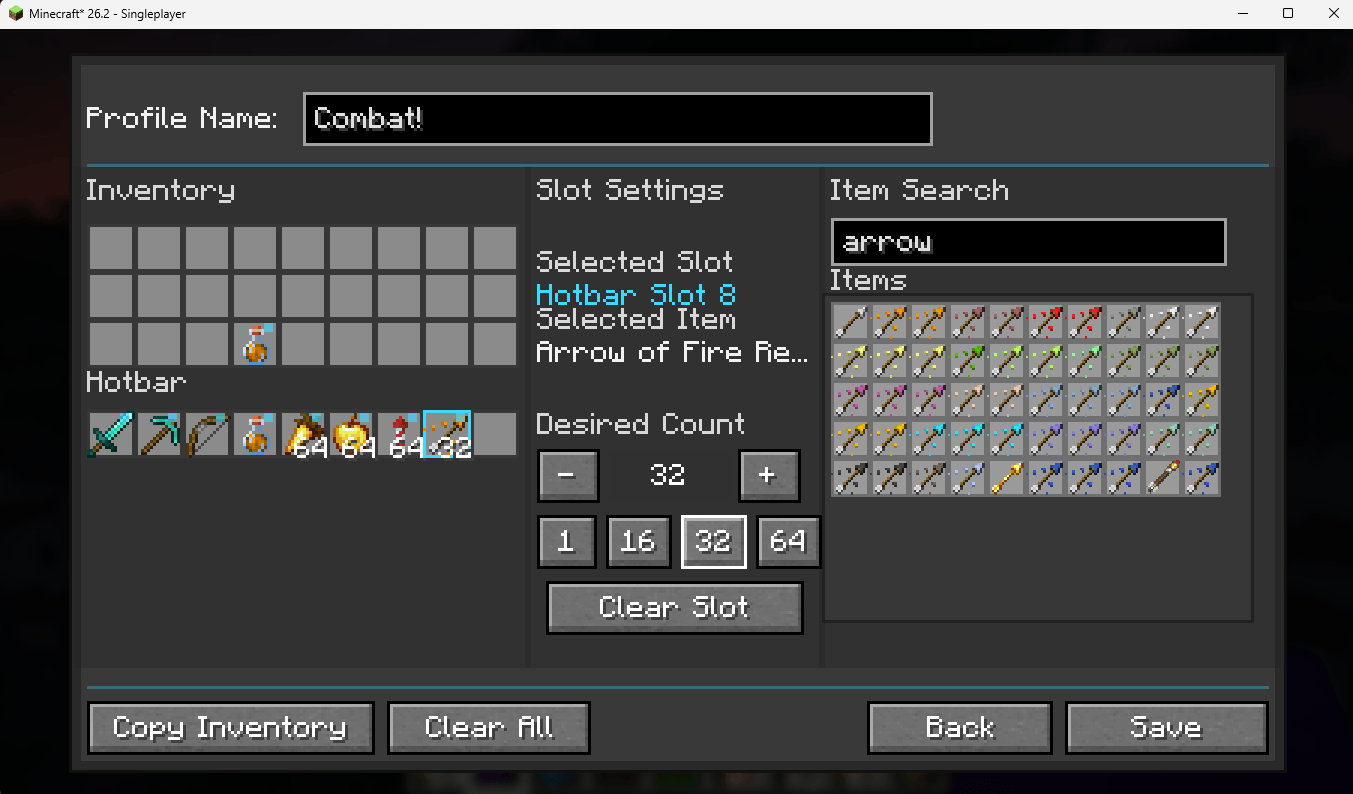
GUI where you create/edit profiles
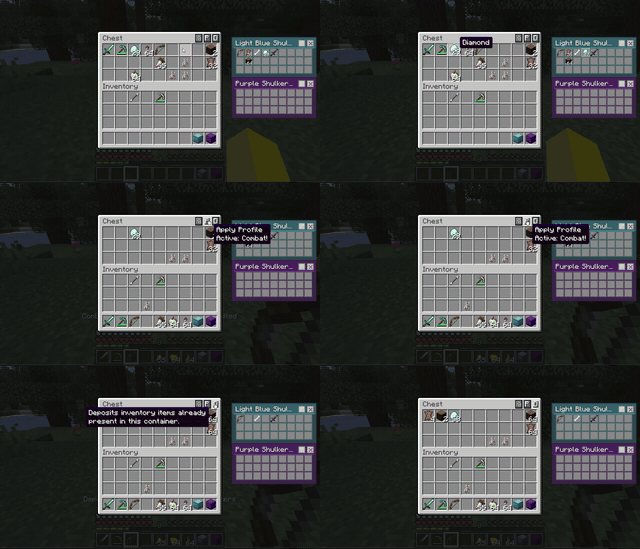
A GIF showcasing shulker boxes pinned, matching deposit feature, applying active profile feature, and reactive matching items feature
Description
Inventory Manager+
Inventory Manager+ is a lightweight but powerful inventory-management mod designed to make moving, organizing, protecting, and restocking items dramatically faster without turning Minecraft inventory management into a complicated automation system.
Instead of replacing the vanilla inventory experience, Inventory Manager+ builds on top of it with practical tools for everyday gameplay.
Quickly sweep items into a chest by dragging across them, deposit only the items that already belong in a container, protect important inventory slots, inspect shulker boxes without constantly placing them down, or create complete reusable inventory layouts with Inventory Profiles.
Whether you're unloading after a mining trip, restocking before an expedition, managing storage, organizing shulkers, or maintaining a carefully arranged hotbar, Inventory Manager+ is designed to reduce repetitive inventory work while keeping you in control.
Feature Overview
Inventory Manager+ includes:
- Shift + drag rapid inventory transfers
- Empty-slot-safe sweep gestures
- Deposit Matching
- Shulker-aware depositing
- Withdraw / stack restocking
- Individual slot locking
- Locked-slot protection
- Shulker inventory previews
- Color-aware shulker presentation
- Internal shulker slot locks
- Inventory Profiles
- Multiple saved profiles
- Profile naming
- Profile duplication
- Active-profile selection
- Exact inventory/hotbar layouts
- Desired item quantities
- Creative-style searchable item picker
- Variant-aware item selection
- Durability-insensitive tool matching
- Exact potion/enchantment/custom-stack matching
- Profile rearrangement from current inventory
- Profile restocking from open containers
- Partial fulfillment when supplies are limited
- Protection against profile overfilling
- Persistent profile data
Features
Sweep / Drag Transfer
Inventory Manager+ makes moving groups of items between inventories much faster.
Hold:
Shift + Left Mouse Button
and drag across inventory slots to rapidly transfer items.
When a container is open:
- Drag across your inventory to move items into the container.
- Drag across the container to move items into your inventory.
- Empty slots are simply ignored.
- Starting the drag over an empty slot does not cancel the sweep.
- Passing across empty spaces does not interrupt the gesture.
This makes unloading or collecting groups of items much faster than individually Shift-clicking every stack.
The feature still uses normal Minecraft inventory transfers—it does not duplicate or generate items.
Deposit Matching
The Deposit Matching button is designed for quickly unloading items into organized storage.
Instead of dumping your entire inventory into a chest, Deposit Matching checks what items are already stored inside the open container.
Only matching items from your inventory are deposited.
For example, if a chest contains:
- Cobblestone
- Stone
- Coal
- Iron Ingots
and your inventory also contains:
- Diamonds
- Food
- Torches
- Tools
- Cobblestone
- Coal
using Deposit Matching transfers the Cobblestone and Coal while leaving unrelated items alone.
This makes the feature especially useful for:
- Organized storage rooms
- Material chests
- Farms
- Mining storage
- Building supplies
- Sorting items after exploration
Shulker-Aware Depositing
Deposit Matching can also work with supported items stored inside shulker boxes carried in your inventory.
This allows matching materials inside your carried shulkers to be deposited into the open container without requiring you to repeatedly:
- Place the shulker.
- Open it.
- Remove the items.
- Break the shulker.
- Deposit them manually.
The system still respects protected/locked content where applicable.
Slot Locking
Important items shouldn't disappear into a chest just because you used a bulk inventory action.
Inventory Manager+ includes a slot-locking system that lets you protect individual inventory slots.
Activate lock mode and select the slots you want protected.
Locked slots are visually marked and respected by inventory-management actions such as Deposit Matching.
This is useful for protecting:
- Tools
- Weapons
- Food
- Torches
- Rockets
- Building supplies
- Utility items
- Carefully arranged hotbar slots
Instead of permanently treating an entire hotbar as untouchable, you decide exactly which slots matter.
Shulker Box Preview
Inventory Manager+ includes shulker-box inventory previews so you can inspect stored contents without constantly placing and opening the box.
Previews display the items stored inside the shulker in an inventory-style layout.
This makes it much easier to identify:
- Building-material shulkers
- Tool boxes
- Redstone supplies
- Mining storage
- Food and expedition supplies
- Mixed storage boxes
Colored shulker boxes are visually themed appropriately to make different boxes easier to distinguish.
Supported preview behavior also includes pinned/interactive functionality where implemented, making shulkers more useful directly from inventory management screens.
Inventory Profiles
One of the largest features in Inventory Manager+ is Inventory Profiles.
Profiles let you design reusable inventory and hotbar layouts.
Instead of repeatedly reorganizing your equipment manually, create a profile describing exactly what you want to carry and where you want it.
For example:
Hotbar Slot 1:
Diamond Pickaxe

Hotbar Slot 2:
Diamond Sword

Hotbar Slot 3:
Bow

Hotbar Slot 4:
Torches ×64

Hotbar Slot 5:
Golden Apples ×16

Inventory Slot:
Fire Resistance Potions ×3
Save the profile and reuse it whenever you need that loadout again.
Profile Creator
The Inventory Profile editor provides a visual representation of your inventory and hotbar.
Select a slot and configure:
- Desired item
- Desired quantity
- Exact inventory position
- Exact hotbar position
Profiles can then be named, saved, edited, duplicated, deleted, and selected as your active profile.
This makes it possible to create different loadouts such as:
- Mining
- Building
- Nether Expedition
- Ancient City
- Combat
- Exploration
- Redstone
- Farming
- Boss Fight
- General Survival
Searchable Item Picker
Inventory Profiles include a Creative-style searchable item picker.
Instead of requiring you to already possess an item while designing a profile, search Minecraft's available item catalog and select what you want.
Search supports actual item-stack variants where possible—not merely basic registry item IDs.
That allows profiles to distinguish items such as:
- Potion of Fire Resistance
- Potion of Healing
- Potion of Strength
- Splash Potions
- Lingering Potions
- Tipped Arrows
- Enchanted Books
- Firework variants
- Named items
- Modded item variants
This is especially important because many Minecraft items share the same base item but contain different meaningful stack data.
Apply Profiles From Your Inventory
When applying a profile from the normal player inventory, Inventory Manager+ rearranges the items you already possess to match the saved layout as closely as possible.
It does not create missing items.
If you have:
Diamond Pickaxe
Diamond Sword
Torches
Food
Bow
scattered throughout your inventory, applying the profile moves the available matching items into their configured positions.
If something is missing, the available parts of the profile are still applied.
Apply Profiles From Containers
Inventory Profiles become even more useful while a chest or other supported container is open.
Applying a profile can pull the items you need directly from the container into the configured inventory slots.
The system checks:
- What the profile requests
- What you already have
- How many more are required
- What matching items exist in the container
It then pulls only what is needed.
For example:
Profile target:
Torches ×64

Already carrying:
Torches ×20

Container:
Torches ×64
Inventory Manager+ needs only 44 more, so it pulls the required amount rather than another full stack.
If the chest only contains 25:
20 already owned
+25 available
=45 total
the profile is filled as closely as possible.
Inventory Manager+ does not intentionally exceed the saved target quantity.
Profiles Never Create Items
Inventory Profiles are organizational tools, not Creative Mode.
Applying a profile:
- Does not spawn items
- Does not duplicate items
- Does not restore missing equipment
- Does not manufacture supplies
- Does not pull more than is actually available
It simply rearranges and transfers real items already available to the player.
Transfer Feedback
Inventory Manager+ includes visual feedback for inventory actions so transfers do not feel completely static.
Depending on the action and current implementation, matching and transferred slots may use subtle highlights, movement effects, or transfer/pop feedback.
The goal is to make inventory actions easy to follow without filling the screen with excessive visual effects.
Designed for Vanilla-Style Gameplay
Inventory Manager+ is intended to improve inventory interaction without replacing Minecraft's storage gameplay.
It does not:
- Automatically sort every chest in the world
- Generate items
- Teleport items across arbitrary distances
- Build storage networks
- Replace vanilla containers
- Require an external inventory server
- Use external AI
It simply gives the player better tools for managing the inventories and containers they are already using.
Multiplayer
Inventory Manager+ is designed to work in multiplayer environments where the required mod components are installed appropriately.
Inventory transfers that affect container or player inventories are handled through normal server-authoritative behavior rather than trusting the client to invent item changes.
For the safest and most consistent experience, install the matching version on both the server and participating clients where required by the release.
Supported Versions
Inventory Manager+ is currently built specifically for:
- Minecraft Fabric 1.20.1
- Minecraft Fabric 1.21.1
- Minecraft Fabric 26.2
Each Minecraft version uses its own separately built JAR.
Install the file made for your exact Minecraft version.
Requirements
The only required dependency is:
- Fabric API
There are currently:
- No required configuration libraries
- No required Mod Menu dependency
- No required Cloth Config dependency
- No optional dependencies required for normal functionality
Inventory Manager+ does not support Forge or NeoForge.
The Inventory Managment+ Team