Interstellar Early Access
- By
Description
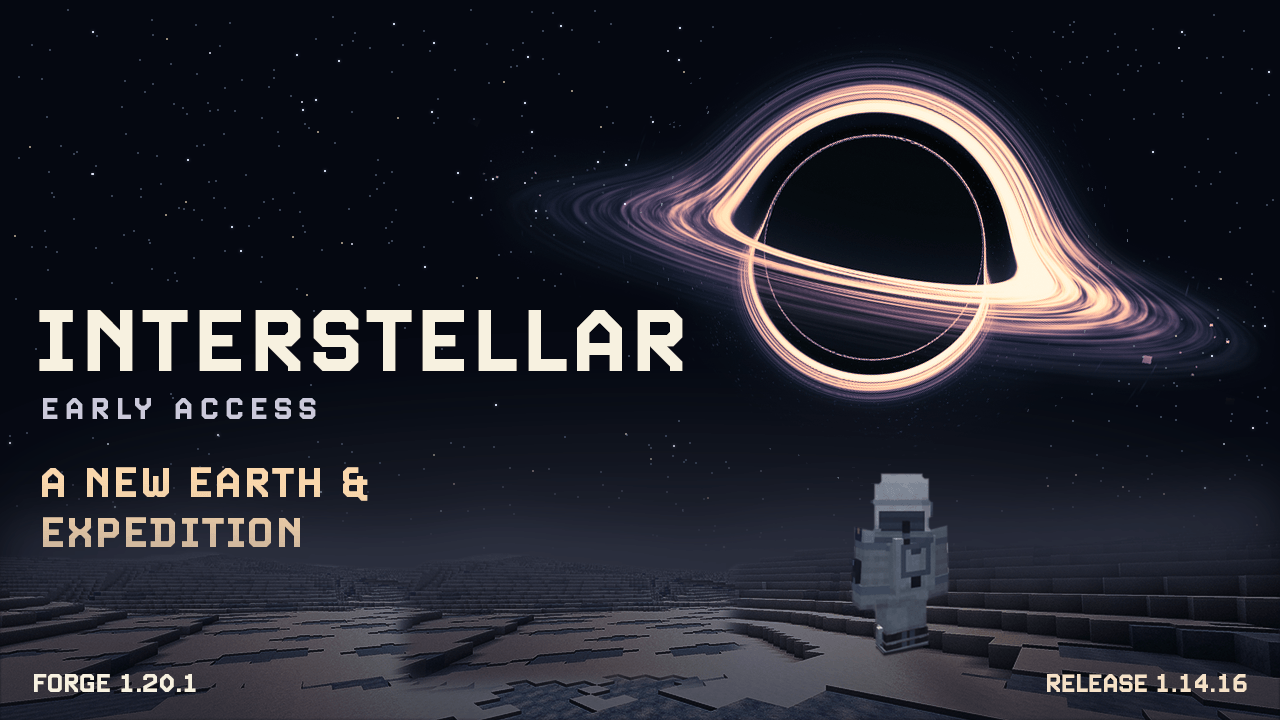
INTERSTELLAR EARLY ACCESS
Minecraft Java 1.20.1
A New Earth & Expedition | Released version 1.14.16
Leave a failing Earth. Find a new home.
Start at Cooper's farm, take the truck down a dusty county road, and prepare for your first flight. Travel with TARS, recover data from dangerous worlds, and turn each successful return into the equipment and knowledge you need for the next expedition.
START ON A DYING EARTH
Choose the Interstellar world type for the farm opening: a farmhouse, barn, cornfields, a starter truck, and roads leading into the surrounding countryside. Dust towns replace villages in this world type, with farmers, mechanics, storekeepers, teachers, preachers, and old-timers to meet and trade with.
Earth changes as time and the campaign advance. Crops fail, dust storms grow more dangerous, and the landscape begins to deteriorate. Townsfolk react to that decline, while transmissions from home make the time spent away matter.
The first Ranger waits in a launch complex with a gantry, control room, and fuel supplies. Follow the introductory messages and compass marker to find it. If a suitable launch site cannot generate, the starter ship uses its town-or-spawn fallback.
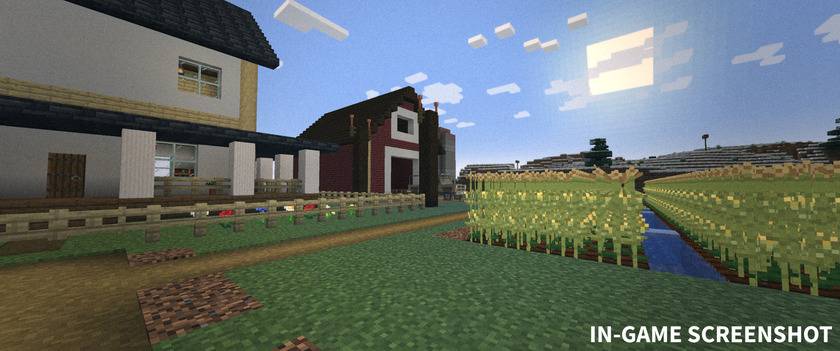
In-game screenshot: Cooper's farm and cornfields in the Interstellar world type.
TRAVEL WITH YOUR CREW
TARS follows, fights, scans, carries equipment, and can lead the way to your current objective. Set his mode, aggression policy, humor, honesty, and chatter level. His mission memories reflect your shared expeditions; critical safety warnings remain accurate.
The Ranger has a walk-in cabin and space for your following TARS units. The Lander carries four crew members and has a cargo hold. The pickup handles local travel, with passenger seats and room in the bed. Spacecraft use assisted launches, destination travel, and landings, with cockpit audio and a launch-abort window.
Make the Endurance your orbital base. Dock, refuel, collect supplies from the lockers, talk to CASE, and bring data to the Mission Computer in the lab. Bring a spacesuit and EVA tether for work outside the station, where vacuum and low gravity are hazards.
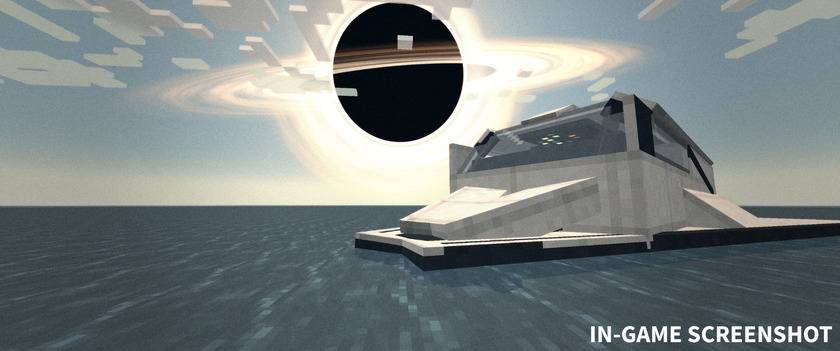
In-game screenshot: The Ranger on Miller's ocean beneath Gargantua.
SURVIVE THE EXPEDITION
- Miller's planet: recover the expedition beacon's data before the giant wave reaches you. Watch the warnings, keep the Ranger ready, and leave time to lift off. The grounded launch countdown does not protect you from the surge.
- Mann's planet: cross frozen terrain and floating ice clouds, investigate the outpost, and meet Dr. Mann and KIPP. A spacesuit helmet supplies breathing protection; the complete suit protects against the cold.
- Edmunds' planet: follow the final route to Dr. Brand's camp and build a viable settlement with shelter, food, water, and communications.
- Cooper Station: visit the rotating habitat, town, museum, and mission debrief after the main campaign.
Recovering data and analysing samples earns research points for fuel efficiency, oxygen reserves, surveying, cargo, suit protection, and route planning. Final expedition preparation combines a lensing reading, suitable core samples, and a three-crate supply manifest.
Gargantua, wormhole travel, themed menus, layered dust storms, and optional film effects support the journey. Helmet HUD panels show real suit and mission information. Visor damage appears on the helmet and HUD, including damage caused during encounters on Mann's planet.
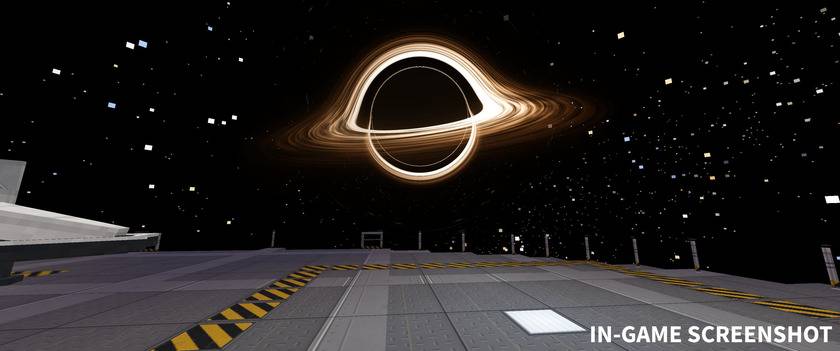
In-game screenshot: Gargantua viewed from the Endurance's docking deck.
EQUIPMENT AND CRAFTING
The Survey Scanner helps with navigation and survey work. The Mission Chronometer tracks mission time and location, while the Tidal Forecaster shows the wave countdown. These instruments have live displays in hand; other held equipment also uses 3D models, while inventory slots retain flat icons.
Prepare a spacesuit, O2 Reserve Canisters, repair kits, a Core Drill, climbing equipment, and an EVA tether for the trip. Fuel Cells refill spacecraft. Five supply-crate choices let you decide what to bring for settlement preparation.
Your first Ranger is supplied. Crafting lets you replace gear and build additional vehicles. The Tidal Forecaster is a research reward for returning Miller's data, not a crafting-table recipe. Data drives and access keys are recovered through gameplay.
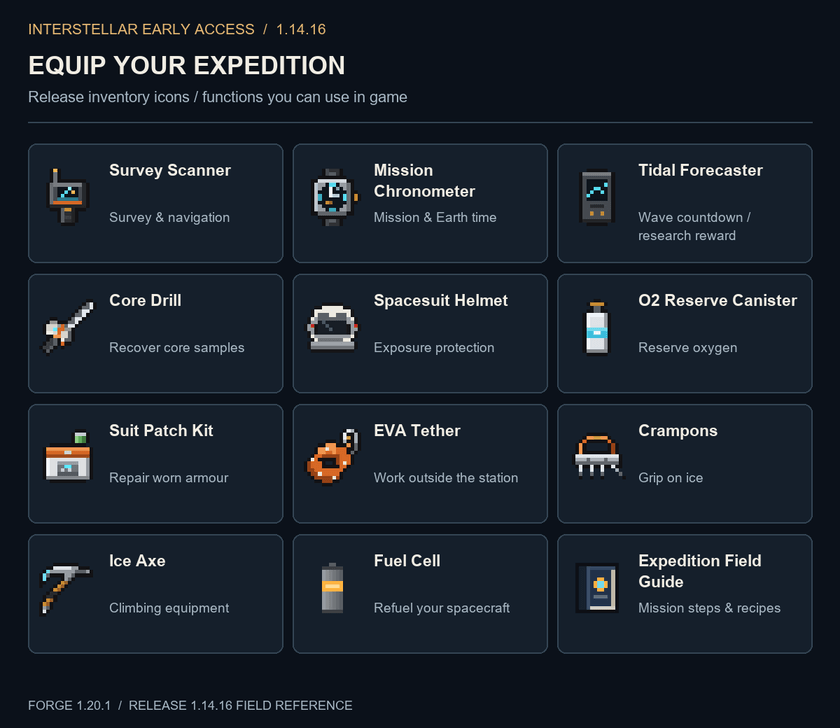
Twelve expedition equipment inventory icons and their uses.
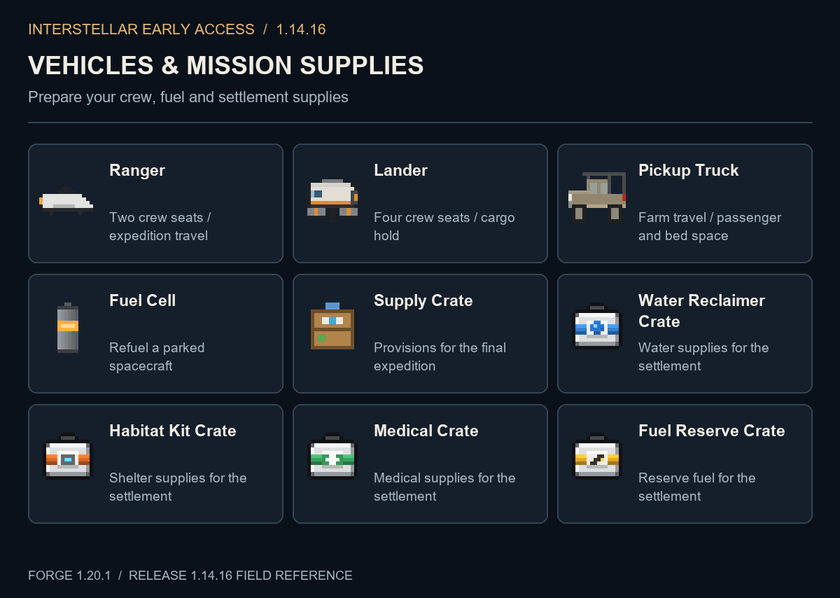
Ranger, Lander, pickup truck, fuel and five settlement supply crates.
CRAFTING RECIPES
The illustrated recipe reference covers all 24 crafting recipes in 1.14.16: suit and life support, field equipment, vehicles and fuel, and settlement supplies. Each card shows the crafting grid, ingredient quantities, output count, and whether the recipe is shaped or shapeless.
Recipes use a normal crafting table. When a recipe accepts a tag such as any sapling or any wooden door, the card labels that choice; the pictured oak item is an example. Datapacks can change recipes. The in-game Expedition Field Guide follows the recipes loaded in your world and remains the reference while playing.
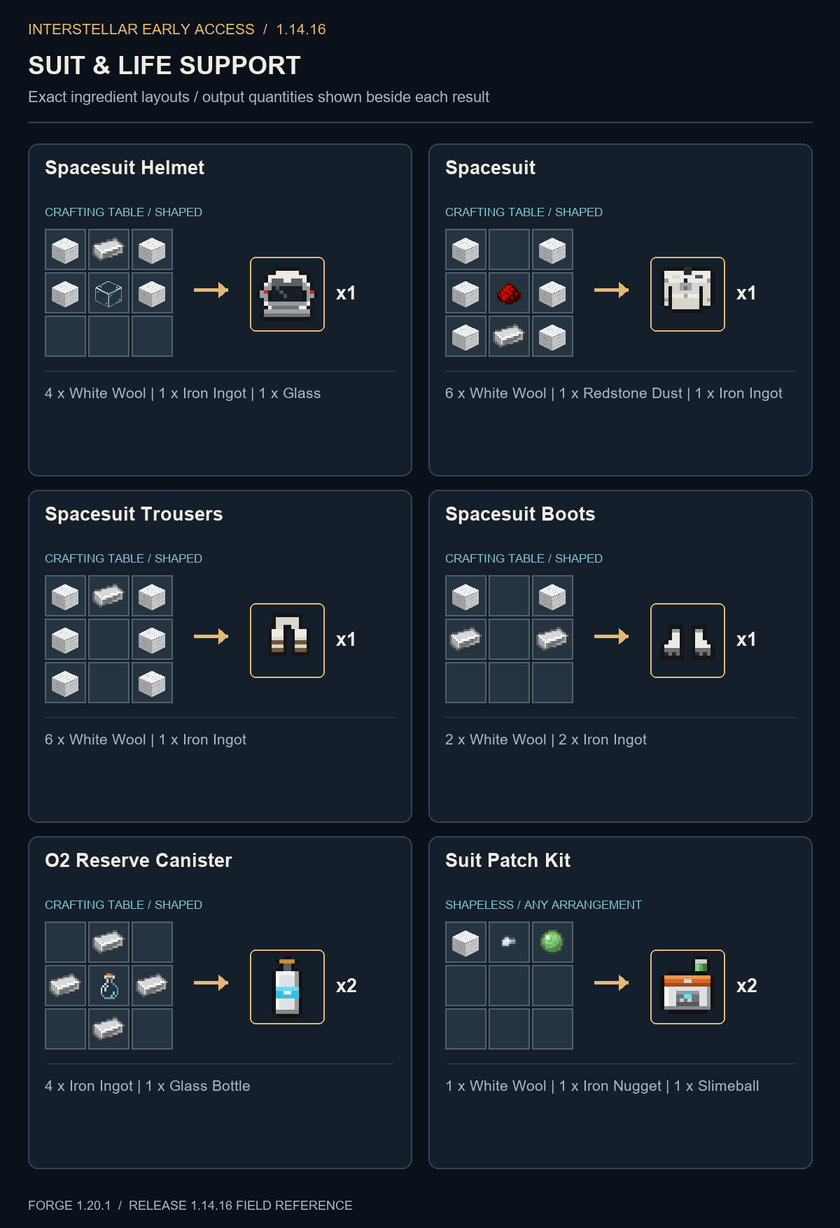
Suit & Life Support: exact crafting grids, output counts and ingredient lists.
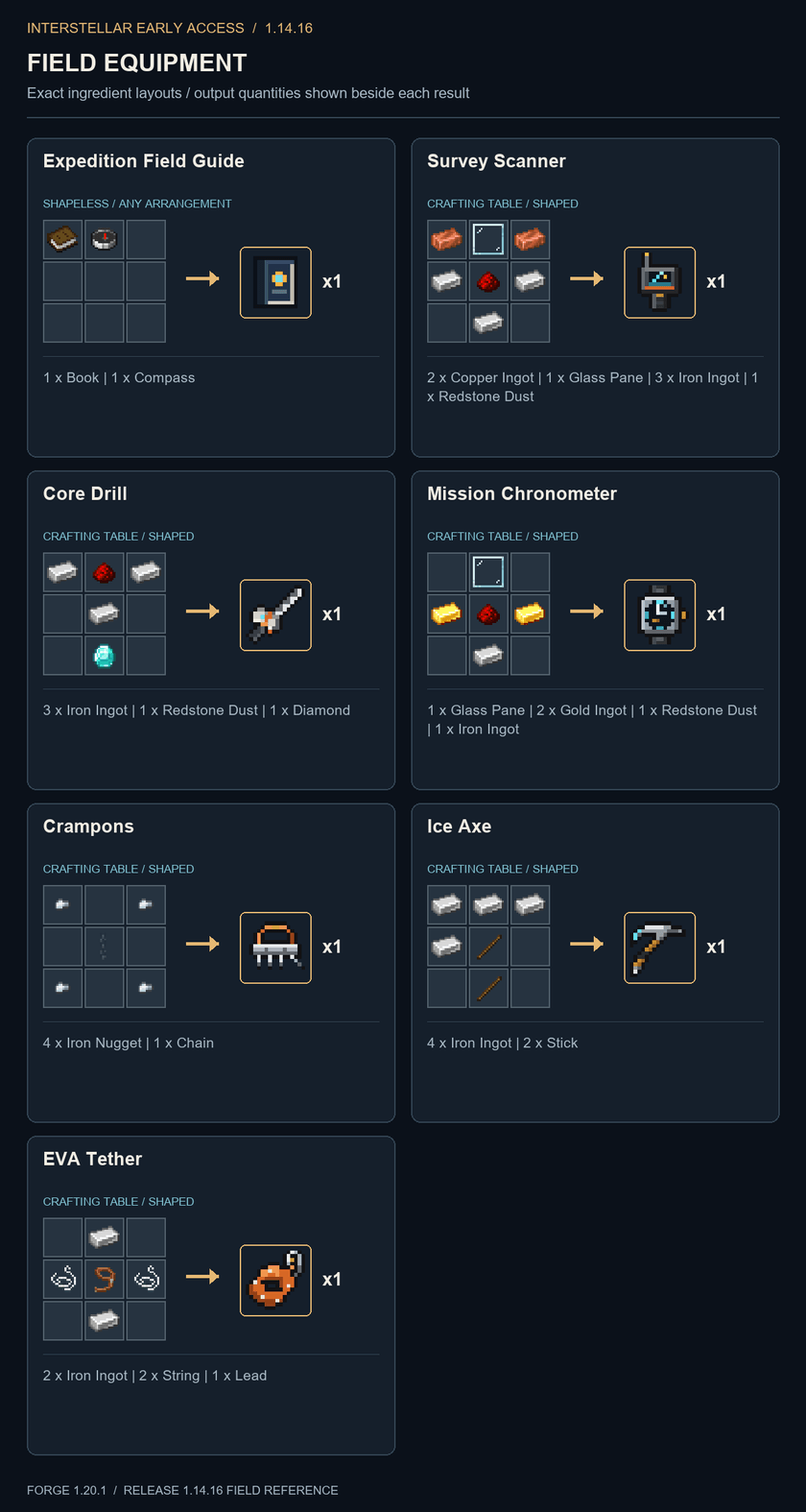
Field Equipment: exact crafting grids, output counts and ingredient lists.
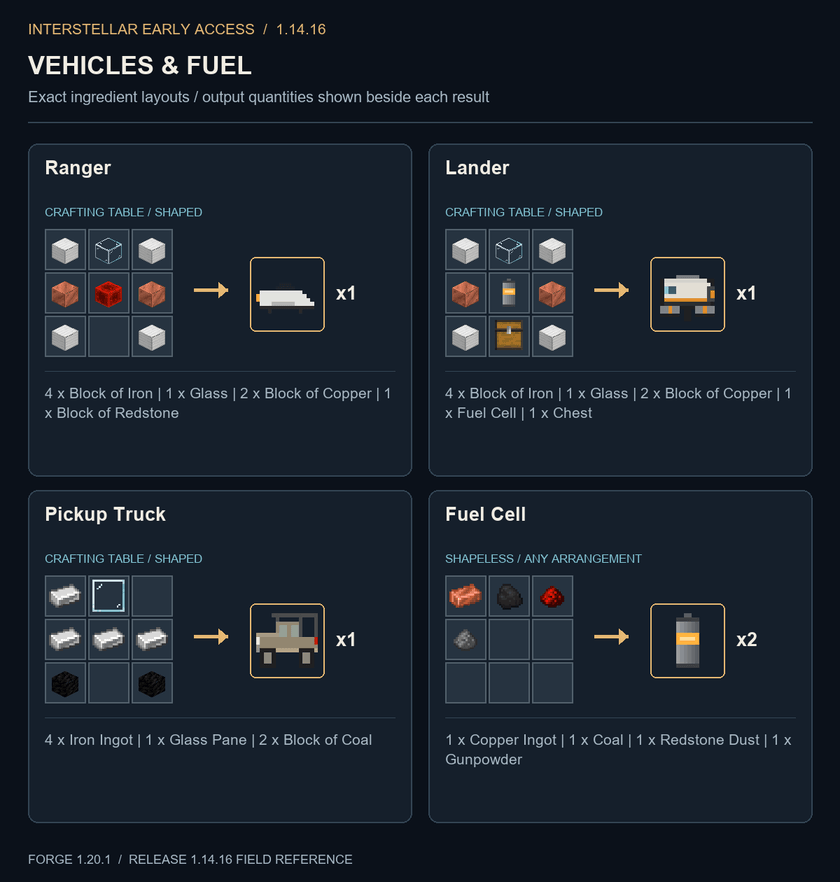
Vehicles & Fuel: exact crafting grids, output counts and ingredient lists.
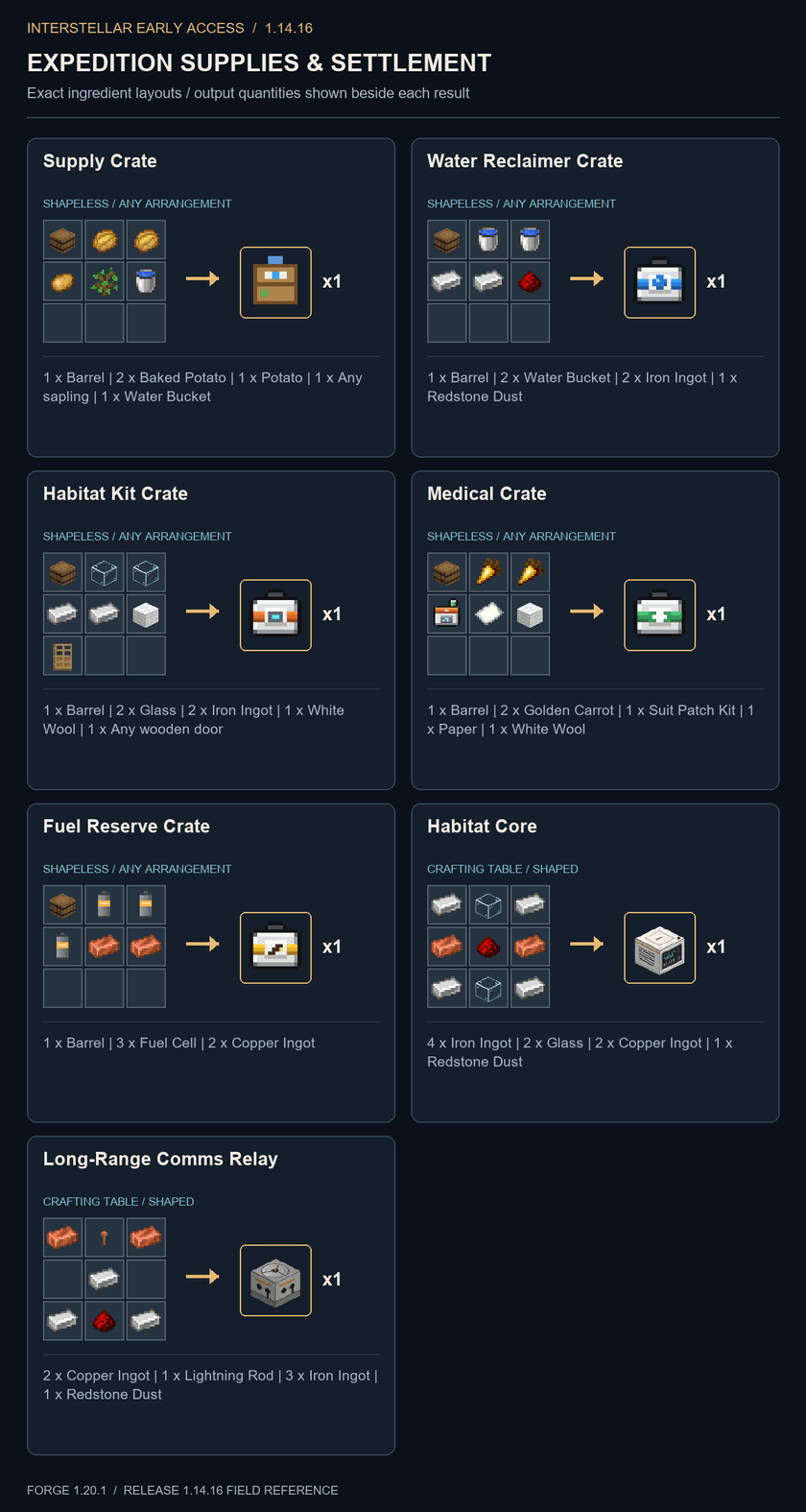
Expedition Supplies & Settlement: exact crafting grids, output counts and ingredient lists.
GETTING STARTED
- Install Minecraft Java 1.20.1, Forge 47.4.29, and Java 17 in a separate profile. Add the 1.14.16 mod JAR. Select the Interstellar world type for the farm opening; other world types support the expedition without that start.
- Meet your starter TARS and open the Expedition Field Guide. Follow the messages and compass marker to the Ranger. Press J if you want the additional objective arrows and hints.
- Bring equipment and fuel, board the Ranger, and press R for its flight computer. Choose a destination and confirm Launch. Nearby following TARS units board with you.
- Recover Miller's beacon drive and escape before the wave. Return data to the Endurance's Mission Computer, then use research upgrades and the mission plan to prepare for Mann's planet.
- Continue the investigation and resolve the final route. The Mission Computer guides the lensing reading, core analysis, and supply manifest. On Edmunds' planet, establish a functioning settlement and activate communications to finish the main campaign.
DEFAULT CONTROLS
- R: spacecraft flight computer. Confirm Launch with a second click or Enter; Backspace aborts before the final second.
- W/S and A/D: truck throttle, brake, reverse, and steering. Sneak exits a parked vehicle.
- Right-click TARS: settings, Cargo, and Scan; choose Lead the way for navigation. Sneak-right-click with an empty hand opens his cargo.
- Sneak-right-click a parked Lander: cargo hold.
- Right-click townsfolk: dialogue and available trades. Sneak-right-click: dialogue only.
- H: mission HUD. J: objective arrows and hints. F1: hide HUD. The Field Guide shows your current key bindings.
- Mods > Interstellar > Config: film effects, flight feel, dust, guidance, wormhole transit, and 3D Gargantua.
BEFORE YOU PLAY
For this expedition, let Interstellar be the only mod aboard. Compatibility with other mods has not been tested. The recommended setup is Forge and Interstellar alone in a separate profile.
For multiplayer, install the same mod version on the server and every player's client. Dedicated servers are supported.
Earth's decline and survival hazards are configurable. Late decline permanently changes exposed natural terrain; set worldConversion=false in the server config to disable that block conversion. Client presentation effects have their own settings.
This is an early-access fan project, unaffiliated with the film or its studios. Feedback and reproducible bug reports are welcome.
ALSO AVAILABLE ON
CONTENT CREATORS
YouTubers and other content creators are welcome to create and publish content featuring this mod, including reviews, tutorials, and playthroughs, without prior written permission, provided that the video description or accompanying post links back to this project page as the mod's download source.
Interstellar Early Access Team