


å±å¹æªå¾ 2026-09-27 224942.png
Description
Infinity What
I. Introduction to the Mod(English Ver.)
This mod introduces two types of “infinite resource” blocks: the Infinite Fluid Generator and the Infinite Item Generator. As long as you connect them to a redstone signal and place the desired fluid or item inside, they will continuously output that resource.
Combined with pipes, storage buses, or other mods, you can build a never-ending resource supply system.
II. List of Blocks
| Blocks | Uses and Features |
|---|---|
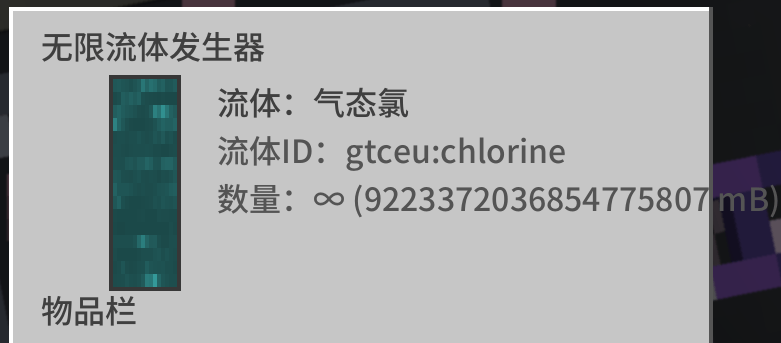
| Infinite Fluid Generator | Once a fluid is stored here, it becomes an infinite fluid source. Right-click to open the interface and view the fluid. It can be drawn through pipes, or manually filled into or emptied from buckets within the interface. |
| Infinite Block Generator | Requires redstone power. Once an item is placed inside, it becomes an infinite source of that item. Items can be extracted via pipes and will automatically be pushed into adjacent containers (such as chests or funnels). |
III. Synthesis Recipies
Both types of blocks are crafted on a crafting table using the following layout (I = iron ingot, D = diamond, B = bucket, C = chest):
Infinite Fluid Generator (Requires 4 iron ingots + 4 diamonds + 1 bucket)
I D I
D B D
I D I
Infinite Item Generator (Requires 4 iron ingots + 4 diamonds + 1 chest)
I D I
D C D
I D I
IV. Instructions
Infinite Fluid Generator
- After placing the block, right-click to open the interface. On the left side of the interface is a vertical fluid slot.
- Adding Fluid: Hold a bucket (or other fluid container) filled with fluid over the cursor, then right-click the fluid slot; the fluid in the container will be poured into the generator. You can also use pipes to directly inject fluid into the block.
- As soon as you pour any type of fluid into it, it instantly becomes an infinite fluid source, and the interface will display “Infinite.” No matter how much you draw from it, the fluid level will never decrease.
- To retrieve fluid: Hover an empty bucket over the cursor and left-click the fluid slot to fill the bucket with fluid from the generator. You can also use pipes to draw fluid from any side of the block.
- A generator can only hold one type of fluid at a time. If it already contains water, you cannot add lava; you must first empty it to switch fluids.
Infinite Item Generator
- After placing the block, right-click to open the interface; there is an item slot in the center.
- First, place the item you want to generate infinitely into the item slot.
- Apply a redstone signal to the block (using a lever, redstone torch, redstone wire, button, etc.—any side works).
- There is a small indicator light below the item slot in the interface: dark green means it hasn’t entered infinite mode yet (not powered), and bright green means it has entered infinite mode and is operating normally.
- Hovering your mouse over the light will display a status tooltip.
Once in infinite mode, you can retrieve this item infinitely:- Left-click the item slot: Take 1 item onto the cursor.
- Shift + Left-click: Take an entire stack (the item’s maximum stack size) directly into your inventory.
- Pipes and storage buses can also be drawn from infinitely from any side.
- The block will also automatically push the item toward an adjacent container every 0.4 seconds (8 ticks), one set at a time, making it convenient for automated production lines.
- After disconnecting the redstone signal, it reverts to a regular single-slot item slot, and items can be retrieved normally.
V. Important Notes
- Both types of blocks must be mined with a pickaxe to drop; otherwise, mining them will not yield any blocks (a wooden pickaxe is sufficient). These blocks have a hardness similar to stone and are blast-resistant.
- Both types of blocks can be stacked up to 1.
- An infinite item generator allows only 1 item to be placed at a time. To replace an item in infinite mode, you must first disconnect the redstone, remove the original item, and then place the new one.
- When you dismantle an infinite item generator, the template item stored in the slot will drop and be returned; it will not be lost.
- To fill or empty a bucket with a fluid in the interface, you must open the interface, hold the bucket over the cursor, and then click the fluid slot; right-clicking directly on the block will only open the interface.
- Due to the game engine’s numerical limits, the “infinite” quantity displayed in pipes or storage buses is not truly infinite: fluids are capped at approximately 2.1 billion mB, and items at approximately 2.1 billion. However, for practical purposes, this is equivalent to infinity, and the count will never decrease when items are withdrawn.
- Infinite item generators automatically push items to adjacent containers. If placed next to a container or pipe that sends items back in the opposite direction, this may create a loop; please avoid this placement.
- Administrators can adjust the balance in the mod’s configuration: there is an “Infinite Mode” toggle (when disabled, both block types revert to standard devices—fluid generators become standard tanks with a capacity of 16,000 mB, and item generators are no longer infinite), as well as settings for “Limited Mode” capacity and a fluid blacklist (fluids on this list cannot be stored).
一、Mod 简介(中文版)
本模组加入两种「无限资源」方块:无限流体发生器和无限物品发生器。只要给它们通上红石信号、再放进想要的流体或物品,它们就能源源不断地向外输出,配合管道、存储总线或其他模组就能搭出取之不尽的资源供应系统。
二、方块列表
| 方块 | 用途与特点 |
|---|---|
| 无限流体发生器 | 存一种流体后变成无限流体源。右键打开界面查看流体。可被管道抽取,也能用桶在界面里手动装/倒。 |
| 无限物品发生器 | 需要红石供能。放入一种物品后变成无限物品源。可被管道抽取,也会自动把物品推给旁边的容器(如箱子、漏斗)。 |
三、合成配方
两种方块都在工作台合成,摆法如下(I = 铁锭,D = 钻石,B = 桶,C = 箱子):
无限流体发生器(共需 4 铁锭 + 4 钻石 + 1 桶)
I D I
D B D
I D I无限物品发生器(共需 4 铁锭 + 4 钻石 + 1 箱子)
I D I
D C D
I D I
四、玩法说明
无限流体发生器
- 放置方块后右键打开界面,界面左侧是一个竖向的流体槽。
- 放入流体:把装好流体的桶(或其他流体容器)拿在光标上,右键点击流体槽,容器里的流体会被倒进发生器。也可以直接用管道往方块里注入流体。
- 只要倒进任意一种流体,它会立刻变成无限流体源,界面显示「无限」,怎么抽都不会减少。
- 取出流体:把空桶拿在光标上,左键点击流体槽,就会用发生器里的流体把桶灌满。管道同样可以从任意一面抽取。
- 一个发生器同时只能存一种流体。已经存了水就不能再存岩浆,必须先抽空更换。
无限物品发生器
- 放置方块后右键打开界面,中间有一个物品槽。
- 先往物品槽里放入你想无限产出的一个物品。
- 给方块通红石信号(拉杆、红石火把、红石线、按钮等,任意一面都行)。
- 界面物品槽下方有一盏小指示灯:暗绿色代表还没进入无限模式(未充能),亮绿色代表已进入无限模式正常运行。鼠标悬停在灯上会弹出状态提示。
- 进入无限模式后,这个物品就可以无限取出:
- 左键点击物品槽:取 1 个到光标上。
- Shift + 左键点击:直接取一整组(该物品的最大堆叠数)放进背包。
- 管道、存储总线也可以从任意一面无限抽取。
- 方块还会每 0.4 秒(8 tick)自动把该物品推向相邻的容器,一份为正常的一组,方便做成自动化产线。
- 断开红石信号后,它变回普通单格物品槽,可以正常取出里面的物品。
五、注意事项
- 两种方块都必须用镐挖掘才会掉落,否则挖了不会获得方块(木镐即可)。方块硬度与石头相近,且抗爆。
- 两种方块最多堆叠 1 个。
- 无限物品发生器任何时候都只允许放 1 个物品。想在无限模式下换别的物品,得先断开红石、取出原物品,再放新的。
- 拆掉无限物品发生器时,槽里存放的那个模板物品会掉落返还,不会丢失。
- 用桶在界面里装/倒流体,必须打开界面并把桶拿在光标上再点击流体槽;直接对着方块右键只会打开界面。
- 受游戏引擎数值上限限制,管道或存储总线看到的「无限」数量并非真正无穷:流体最多约 21 亿 mB,物品最多约 21 亿个。但对实际使用来说等同无限,且抽取时永远不会扣减。
- 无限物品发生器会自动向相邻容器推送物品,如果旁边放的是会反向回传物品的容器/管道,可能形成循环,请避免这种摆放。
- 管理员可在模组配置中调整平衡性:有一个无限模式总开关(关闭后两种方块都退化为普通设备——流体发生器变成容量 16000 mB 的普通储罐,物品发生器不再无限),另有有限模式容量和流体黑名单(被列入的流体无法存入)可设置。