Indexor
- By
Description
What it does
- Container logging Tracks every item taken from or placed into chests and other inventories, including the player name, item, quantity, date, and time.
- Full block history Logs all block interactions across the server. You can see who broke a block, who placed a block, and what a block was replaced with, all timestamped.
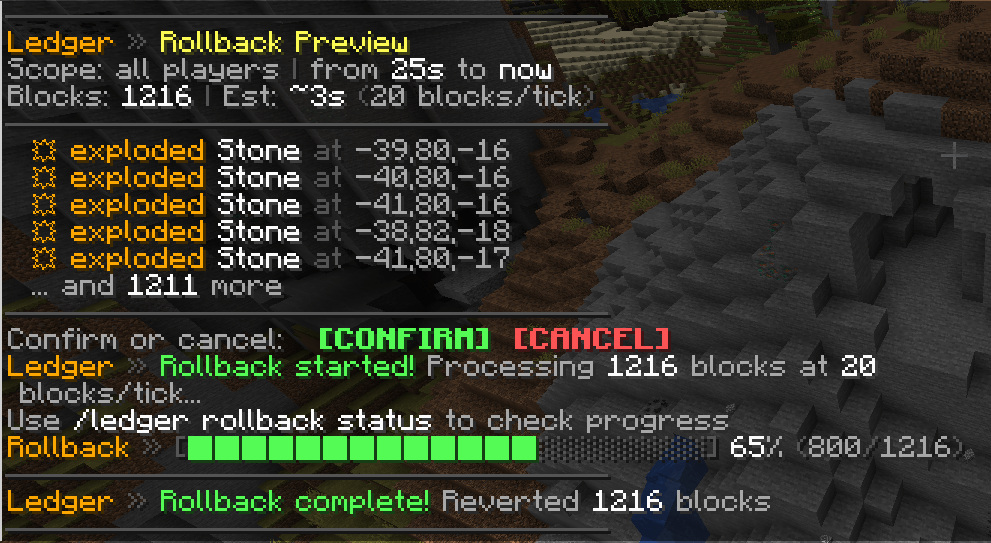
- Explosion tracking Every block destroyed by an explosion is snapshotted before it's removed, so the exact block and position is always accurately recorded and restorable.
- Block inspection Look directly at a block to view its complete interaction history, including the date and time of each action. Page through results directly in chat.
- Radius-based searches Define a custom radius around your position to list all logged block actions within that area. Ideal for investigating large-scale griefing or hidden damage.
- Player-attributed logs Every entry is tied to a specific player. Search any player's full action history and filter by action type or date range.
- Rollback system Roll back any time range of changes globally or per player, with an optional radius limit. Shows a preview before executing, with a live progress bar and background processing so the server never freezes.
- Multiplayer-first design Built for survival and community servers. All heavy operations run asynchronously to keep the server running smoothly under load.
Commands:
/ledger inspect — Toggle inspect mode. Right-click any block to see its full interaction history with page arrows./ledger lookup <radius> <args> — Get all logs listed in a defined radius, up to 500 blocks, with optional filters via args./ledger player <name> <args> — Look up a player's full action history with optional filters./ledger rollback from <time> [to] [radius] — Roll back all block changes in a time range, globally or limited to a radius around you./ledger rollback <player> from <time> [to] [radius] — Roll back a specific player's changes only./ledger rollback confirm / cancel / status — Confirm, cancel, or check the live progress of a rollback./ledger page <n> — Navigate to a specific page in any result list.
Action filters: break, place, explosion, container, kill, death, drop, pickup
Use cases
-
Griefing investigations
-
Theft tracking on survival servers
-
Admin audits and moderation
Indexor Team