


Immersive RPG Interactions
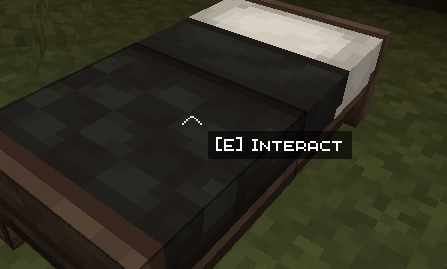
Doors, chests, villagers and other blocks and mobs show an "Interact" prompt near your crosshair, like in RPG games. Press the interaction key to act, without using right click.
What it does
- Crosshair prompt: when you aim at something you can interact with, the text "[key] Interact" appears next to the centre of the screen.
- Dedicated key: the default is E, but you can change it in Options → Controls, under the "Immersive RPG Interactions" category.
- Right click only places: when you aim at an interactable, right click won't open it. Hold Shift to place blocks next to chests and doors, just like in vanilla.
- Interaction priority: when you aim at an interactable, the interaction key takes priority over other commands on the same key (for example, a map opened by another mod).
- Automatic detection: the mod recognises many blocks and mobs with an interaction on its own, including those from other mods, with no configuration.
- Customisable: you can add blocks or entities with a datapack, using the tag
immersiverpginteractions:interactable.
Examples
- Doors and gates.
- Chests, trapped chests and barrels.
- Villagers, to open trades.
- Campfires, to cook food with E.
- Fences, to tie a mob with a lead.
Limitations
- Automatic detection may show the prompt on some decorative blocks from other mods that do nothing. If you notice one, please report it.
- Some mods handle interaction in non-standard ways and may not be recognised.
- While you aim at an interactable, right click is blocked: you can't eat or use a bow while looking at a chest or door.
Immersive RPG Interactions Team


