Ice and Fire CE: Control Ur Dragon
- By
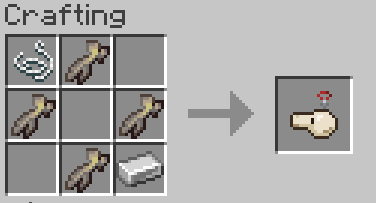
repice.png
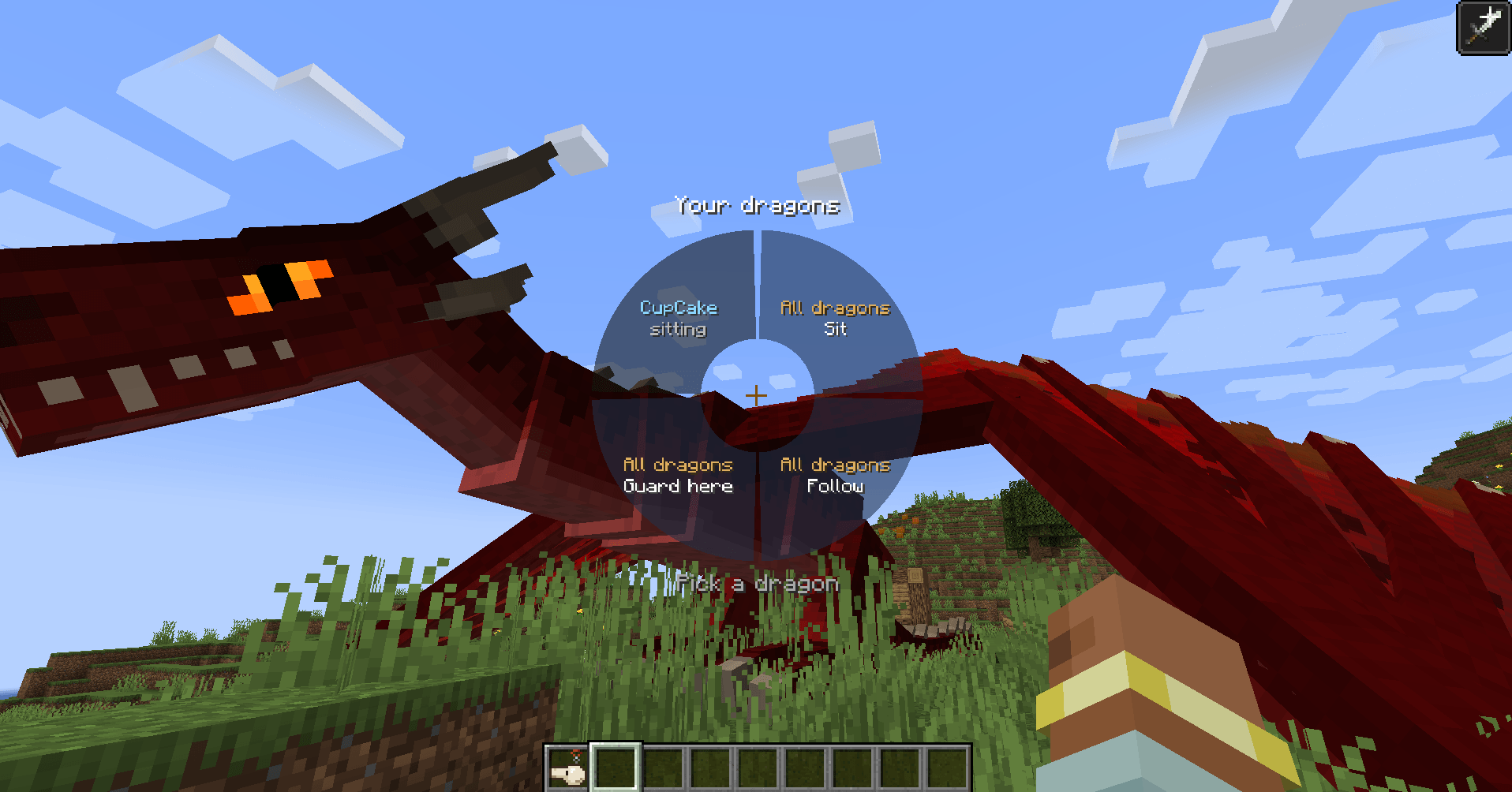
Whell.png
Description
Ice and Fire: Control Ur Dragon
An ARK-style dragon command wheel, advanced dragon controls, and a recovery system for missing dragons — built specifically for Ice and Fire: Community Edition.
Tired of controlling your dragons one by one? Want them to sit, follow, guard an area, or stop destroying your base without constantly editing configuration files?
Control Ur Dragon gives you direct control over your tamed dragons through an in-game radial command wheel.
Minecraft 1.21.1 | NeoForge | Ice and Fire CE 2.1.4+
This mod is currently in beta. Bugs and changes are possible, and feedback is welcome.
🐉 Dragon Command Wheel
Keep a Dragon Whistle anywhere in your inventory and simply press V to open the command wheel. You don't need to hold the whistle in your hand. You can also right-click the whistle to open it.
From the wheel, you can:
- Command multiple dragons at once: Sit, Follow or Guard.
- Control individual dragons: Choose a dragon and give it specific orders.
- Manage combat: Choose attack targets, stop attacks and configure fighting behavior.
- Control block destruction: Enable or disable block breaking separately for each dragon.
- Recover or summon dragons: Bring a dragon back even from another dimension or an unloaded chunk.
The wheel stays open without pausing the game, so you can continue moving while giving orders.
Have more than five dragons? Use the numbered tabs or mouse wheel to switch between pages.
Group commands affect your nearby owned dragons. The default group range is 128 blocks.
⚔️ Advanced Dragon Behavior
Customize how each dragon behaves. Settings are saved separately for every dragon.
Combat Stance
- Normal — Standard combat behavior.
- Defensive — Fight only when you or the dragon are attacked.
- Passive — Avoid starting fights.
- Aggressive — Attack nearby enemies automatically, excluding you and your pets.
Attack Style
- Mixed — Use both breath and melee attacks.
- Breath Only — Focus on elemental breath attacks.
- Bite Only — Focus on melee attacks.
Attack Position
- Automatic — Let the dragon choose.
- Ground — Fight from the ground.
- Air — Circle targets and attack from above.
Emergency Behavior
Choose what your dragon does when badly injured:
- Keep fighting.
- Flee from danger.
- Return to you.
- Retreat into an available Dragon Horn.
Additional Controls
- Make sitting dragons stand up when attacked.
- Enable or disable block breaking for individual dragons.
- Carry and drop creatures, including while riding your dragon.
- Rename your dragons.
🛡️ Missing Dragon Protection & Recovery
Ever had a tamed Ice and Fire dragon suddenly disappear without a death message?
This mod was created to help solve that problem.
Automatic Backups
Tamed dragons are backed up every 30 seconds and whenever their chunk unloads. Backups preserve important data, including equipment, inventory, names and settings.
Disappearance Detection
If a living dragon is unexpectedly removed from the world, the mod can notify you in chat and record diagnostic information in the log.
Restore Missing Dragons
Recover a missing dragon from its last available backup using:
- A clickable chat notification.
- The dragon command wheel.
- The
/cud restorecommand.
The recovery system includes safeguards against creating duplicate dragons.
Bring Dragon
Call your dragon to your location, even if it is in another dimension or an unloaded chunk. This action has a 30-minute cooldown by default.
Recovery uses saved snapshots, so it is still recommended to keep backups of important worlds.
✨ Additional Improvements
- Better Following: Dragons maintain more appropriate distances, catch up more effectively and land closer to their owners.
- Friendly Fire Protection: Your dragons avoid directly damaging your other dragons and pets with breath or melee attacks.
- Dragon Carrying: Pick up and transport creatures using your dragon.
- Silent Kill Fix: Improves how certain unexpected dragon removals are handled.
- Configurable Options: Adjust cooldowns, guard range, group command range and other settings.
⌨️ Default Controls
| Key | Action |
|---|---|
| V | Open Dragon Command Wheel |
| Y | Sit |
| H | Follow |
| J | Guard Area |
| G | Attack Target |
| N | Stop Attacking |
| K | Carry / Drop Creature |
The group shortcuts affect your owned dragons within the configured range.
All keybindings can be customized in Minecraft's Controls menu.
📦 Requirements & Installation
Required:
- Minecraft 1.21.1
- NeoForge 21.1+
- Ice and Fire: Community Edition 2.1.4+
Optional:
- Curios API — Allows the Dragon Whistle to work from the necklace slot.
Install the mod alongside its required dependencies. The mod must be installed on both the client and server for multiplayer use.
This addon is made for Ice and Fire: Community Edition, not the original Ice and Fire mod.
🌍 Languages
English • Türkçe • Русский • Español • Português • Deutsch
💬 Why I Made This Mod
I created Control Ur Dragon after two of my own tamed dragons unexpectedly vanished during a raid. There was no death message, no body, and no reliable way to recover them.
I wanted a way to keep my dragons safe, recover them when something went wrong, and give them proper commands without constantly interacting with each dragon individually.
So I built this mod.
Development transparency: The concept, feature decisions, design and in-game testing are mine. Development also involved AI-assisted coding using Claude by Anthropic.
🔗 Source Code & Feedback
GitHub: https://github.com/0sole/ice-and-fire-control-ur-dragon
Found a bug or have a suggestion? Feel free to open a GitHub issue or leave a comment on CurseForge.
Created by 0Sole.
Ice and Fire CE: Control Ur Dragon Team