High Velocity Streaming
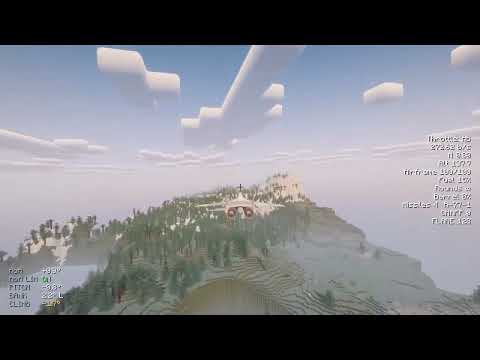
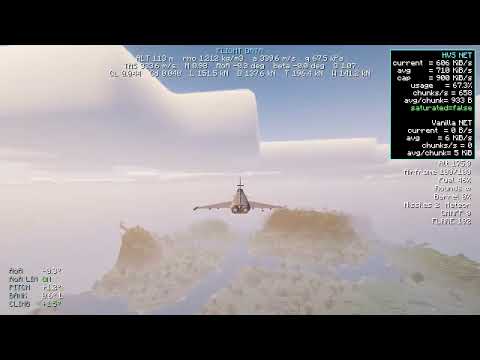
Fly at 400+ blocks/s with a 32-chunk view: no fog wall, no lag spikes.
 |
 |
|---|
Vanilla can't load chunks quickly enough for aircraft or high-speed vehicles. Above 100 blocks/s, HVS stops transmitting full chunks and streams a compact Surface terrain layer instead: terrain, water, biomes, and the trees and buildings above ground. That's about 570 bytes per chunk, rendered with your resource pack and shaders. Below 80 blocks/s, vanilla terrain returns smoothly.
Features
- Terrain loads along your flight path, 2–5 s ahead of time
- About 17x less bandwidth than vanilla chunks
- Three send modes (
/hvs pmode):low(default),mediumandhighuse 34%, 65–77% and 88–94% less bandwidth than the previous version - One per-player cap covers vanilla chunks and HVS together (900 KiB/s by default). Short bursts above it are allowed for up to 4 s, never past 1 MiB/s
- Surface terrain follows vanilla's tints, face shading and texture orientation, with a cleaner seam where it meets vanilla chunks
- Collision remains active: aircraft collide with the ground and buildings
- Most processing runs off the server's main thread
- Two ways to prebake Surface data (
.sfr), now 22.5% smaller:- Direct: the built-in prebaker generates terrain straight to
.sfrand never writes region files, so there are no massive world files (/hvsprebake) - From Chunky: convert a world already pregenerated with Chunky (
/hvs bake)
- Direct: the built-in prebaker generates terrain straight to
- Optional world trim that deletes region files generated solely by fly-overs
- Iris shaders supported, including shadows. Tested with Complementary, BSL and Photon.
- C2ME accelerates prebaking: the prebaker generates terrain through C2ME when it is installed.
- Works with Sodium and Lithium. Any vehicle mod functions without an adapter.
How to use
Install HVS and Fabric API (Only for Fabric version) on both the server and every client, at the same version. Java 25 is required.
Start the server and fly. It works immediately, extracting terrain in the background.
(Recommended) Prebake the play area so initial flights are instant:
- New world:
/hvsprebake here 256 square - Already pregenerated with Chunky:
/hvs bake
- New world:
After large builds, run
/hvs refresh <radius>where you built.(Recommended for multiplayer servers) Set
/hvs pmode mediumorhigh. Typical bandwidth per player in high-speed mode, flying straight at 200–400 blocks/s:low: about 260–520 KiB/smedium: about 140–185 KiB/shigh: about 45 KiB/s
Turning and entering high-speed mode briefly use more.
Commands
| Command | Permission | Function |
|---|---|---|
/hvsprebake here <radius> <square|circle> [mode] |
OP | Prebake around you (/hvsprebake status, cancel) |
/hvs bake [force|status|cancel] |
OP | Convert current region files |
/hvs refresh <radius> |
OP | Refresh terrain after building (max 64 chunks) |
/hvs compact |
OP | Combine refreshed terrain with the prebaked data |
/hvs enable|disable |
OP | Switch high-speed mode on or off, no restart |
/hvs pmode <low|medium|high> |
OP | Send mode: low (default), medium, high |
/hvs bandwidth <KiB/s|default> |
OP | Per-player bandwidth cap (vanilla chunks + HVS) |
/hvs border size <xKm> <zKm> |
OP | Rectangular play area |
/hvs stat enable|disable |
Everyone | Network usage overlay |
/hvs clientcache true|false |
Everyone | Local terrain cache |
| F9 | Everyone | Save a diagnostic report to logs/ |
Prebake modes: terrain (fastest), fast (default), exact (full lighting), legacy.
Prebaked size (exact): 6,400 km² ≈ 17.3 GB, 1,600 km² ≈ 4.3 GB of Surface data
HVS -- High Velocity Streaming Team