AppleStats :timmer+ AppleSkin+ Jade +GUI Clock+Coordinates+Horse Stat
- By
HUD:A lightweight Jade alternative ,effect timmer ,Target Info,Saturation and Coordinates Monitor ,Waila,HWYLA,show Horse speed and jump stats,death location,Death Finder
Lets us try
Create a server, get 25% off your first month

Description
----------------------------------------
🌟 Introduction
AppleStats is a lightweight, all-in-one HUD mod that visualizes hidden game mechanics to improve your survival efficiency—combining the best features of AppleSkin, Jade / WAILA, Effect Timers, Coordinates, and Horse Stat Viewers into one clean, customizable package.
----------------------------------------
🚀 Complete Your Survival & QoL Setup (Companion Mods)
Love having all your stats clearly visible? Pair AppleStats with my other Quality of Life (QoL) mods designed to save your time and clicks:
✨ EnchantStats
Enchantment descriptions, Damage Estimator, Arrow Counter, Potion Labels, and Better Item Borders.The combat & magic sequel to AppleStats
🧑🌾 VillagerStats
Show villager jobsites, teleport villagers, and clear jobs effortlessly.
🎯 Not Trade Cycling, But Pick
Stop rerolling villagers endlessly. Open a villager's trade screen and directly pick the trades you want.
----------------------------------------
📋 Key Features
1. Saturation Monitor
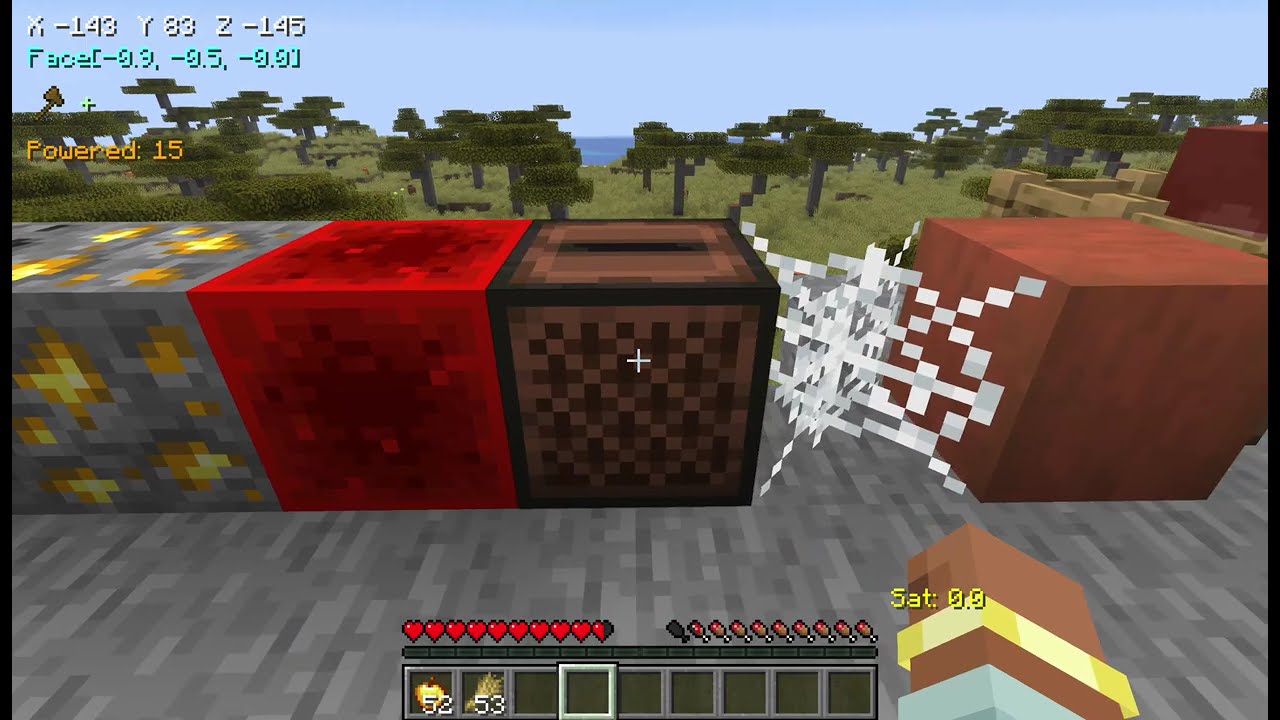
See your hidden saturation level on the screen all the time.
2. Saturation Preview
Hold any food to see how much saturation it will give you.
3. Coordinates (X / Y / Z) [Ver 1.1.0+]
Your exact position is always shown in the top-left corner.
4. Facing Direction [Ver 1.1.0+]
See which direction you are looking at, in real time.
5. Horse Stats [Ver 1.2.1+]
Feed, ride, or right-click a horse with any item. Its speed and jump strength will show above its head.
Example: "3432, 9781" means Speed = 0.3432 and Jump = 0.9781.
works on both tamed and untamed horses.
6. Best Tool Tips [Ver 1.4.0+]
Look at a block to see the best tool to mine it (for example: "Fastest: Shears" or "Needs Silk Touch").
(Ver 1.5.0+: block tips use pictures instead of words.)
7. In-Game Settings [Ver 1.4.0+]
- Turn each feature on or off
- Move each display to where you like
- Fabric players: type /applestats to open the settings screen.
8. Target Info [Ver 1.4.1+]
- Look at a mob -> see its health and armor
- Look at redstone -> see its signal strength
- Look at crops -> see "Growing" or "Ready to Harvest"
9. Animal Info [Ver 1.4.5+]
See the animal's favorite food (Taming, Breeding, Healing, Speed up growth) and whether it can breed:
- "now" – ready to breed
- "later" – resting (it just had a baby or was already fed)
- "to grow" – still a baby (Ver 1.4.6+: shows how many seconds until it grows up)
10. Health on Name Tag [Ver 1.4.12+]
Hit a mob, and its name tag will show how much health it has left (1 heart ♥ = 2 HP, the same as the player's health bar).
(Mobs with a custom name do not change. Villagers, wolves, and some horses are not included, because other features use them.)
11. Death Book [Ver 1.5.2+]
When you die, you get a book that tells you where you died (coordinates and dimension). You can turn this on or off in Settings.
12. Effect Timer [Ver 1.6.2+]
See how much time is left on your potion effects.
13. Powder Snow Warning [Ver 1.7.0+] (Requires Fast Trades Villager, Ver 1.3+)
- How to unlock: Hold 64 Emerald Blocks in your main hand and right-click a Librarian villager. The blocks will be used up and you get this ability.
- What it does: When you look at Powder Snow, a warning will show in the middle of your screen.
- You only need to unlock it once. You keep it forever, even after you die.
----------------------------------------
📝 For Mod Developers – Add Redstone Support
AppleStats can display custom redstone sources or wires from your mod via a simple JSON file.
Step 1: Create the JSON file
Place it in your mod's assets:
assets/<your_mod_id>/applestat/redstone_rules.json
Step 2: Define rules
Each rule can match a block ID or a tag.
{
"rules": [
{
"match": { "block": "yourmod:custom_wire" },
"display": "Redstone",
"property": "power"
},
{
"match": { "tag": "yourmod:redstone_sources" },
"display": "Source",
"fixed": 15
}
]
}
Field meanings:
- match: identify your blocks (block ID or tag)
- display: one of "Redstone", "Source", or "Powered"
- property: (optional) the block state property that holds signal strength (e.g. "power", "signal")
- fixed: (optional) a fixed signal strength if your block has no property
If property is missing, fixed will be used. If both are missing, it defaults to 15.
----------------------------------------
💬 Community & Groups
Discord: https://discord.gg/BwggVVG5P
Telegram Group: https://t.me/ 80Z9COKCOxE0MGVl
WhatsApp Group: https://chat.whatsapp.com/IvxYxGLS2lIC1W4xlSjAFV
----------------------------------------
📜 Credits & Permissions
A lightweight HUD mod inspired by squeek502. This project provides a numerical approach to food data visualization.
Disclaimer: Not affiliated with, nor endorsed by, the original AppleSkin project or squeek502.
Modpacks: You are welcome to include this mod in any modpack hosted on CurseForge. No need to ask for permission.
For modpacks on other platforms, please contact me first.
Please do not re-upload this mod's files to other websites.
AppleStats :timmer+ AppleSkin+ Jade +GUI Clock+Coordinates+Horse Stat Team

Owner