2026-11-07_15.31.15.png
Description
HotBar++ – Customize Your Minecraft Hotbar!
Take control of your Minecraft HUD with HotBar++, a lightweight and easy-to-use client-side mod that lets you customize the size of your in-game hotbar!
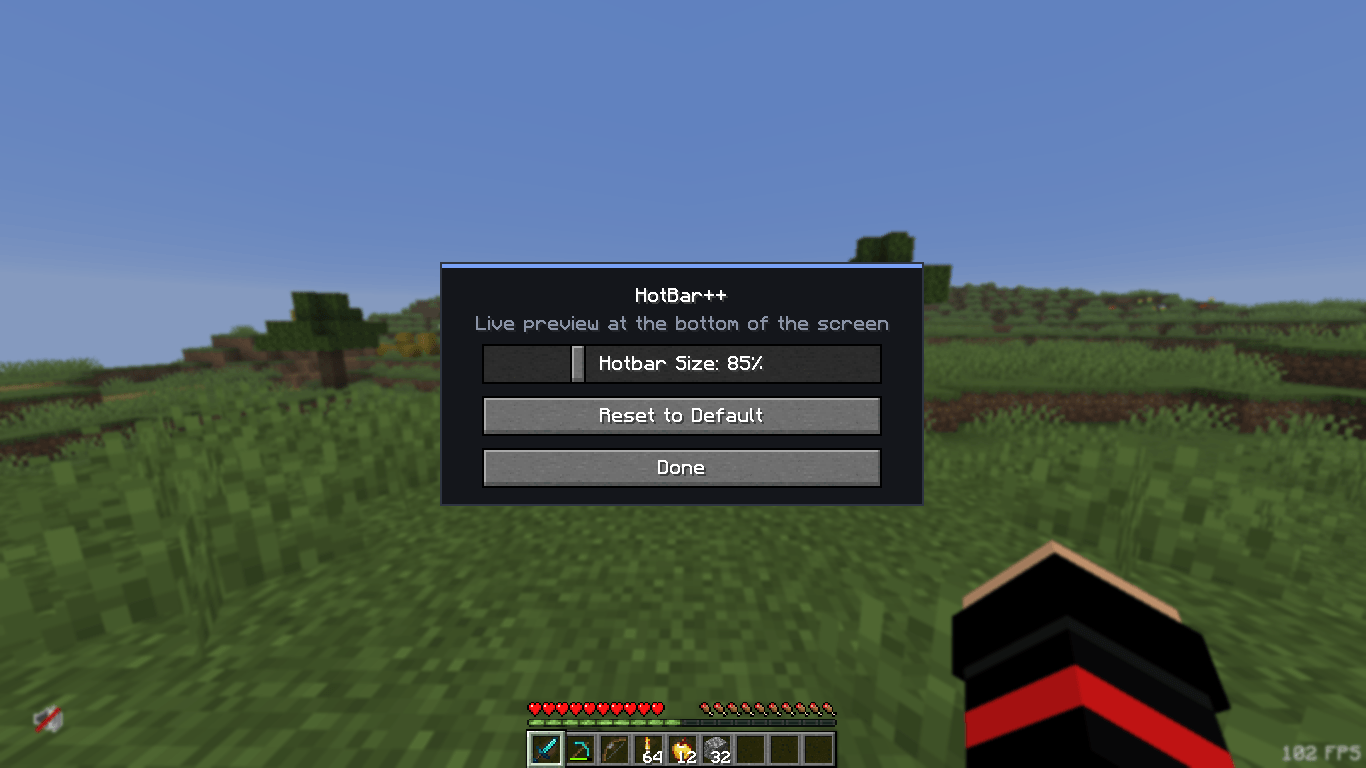
Whether you prefer a smaller, cleaner hotbar or a larger one that's easier to see, HotBar++ gives you the freedom to adjust it according to your preferences. Simply use the /hotb gui command to open the configuration menu and customize your hotbar size using an intuitive slider with a live preview.
✨ Features
-
Custom Hotbar Size: Freely increase or decrease your Minecraft hotbar size.
-
Live Preview: See your changes instantly while adjusting the size.
-
Simple GUI: A clean and easy-to-use configuration interface.
-
Automatic Saving: Your settings are saved and restored automatically.
-
Reset to Default: Restore the original Minecraft hotbar size whenever you want.
-
Lightweight Performance: Designed to consume minimal system resources.
-
Client-Side: No server-side installation required.
🎮 How to Use
-
Install HotBar++.
-
Launch Minecraft.
-
Enter
/hotb guiin chat. -
Adjust your hotbar size using the slider.
-
Enjoy your customized Minecraft HUD!
⚡ Performance & Compatibility
HotBar++ is designed to be lightweight and performance-friendly. It aims to work alongside popular Fabric mods without unnecessarily affecting your FPS or normal gameplay.
Make your hotbar your own with HotBar++!
HotBar++ Team