Hostile Humans Unified
- By
Overview
Hostile Humans Unified is based on Hostile Humans and incorporates content from Human Gunner. It heavily modifies and expands the original mod, adding factions, growth, combat, hiring, settlements, and authoring tools.
The mod targets Minecraft 1.20.1 (Forge). It adds four factions to the world—Crimson, Azure, Verdant, and Ashen—along with the factionless Roamers. Each faction has Tier 1–3 regular humans and tier-specific bosses; tiers differ in base attributes, equipment, growth capacity, and combat performance.
Players can recruit and train soldiers, form squads, issue orders, observe a human in first person, or temporarily take control. In Creative mode, players can also create faction structures, edit loot tables, and export templates in-game.
Faction System
Faction determines origin and baseline relations; tier determines attributes, growth, and equipment level. Members of the same faction are friendly by default; different factions are hostile by default. Roamers belong to none of the four factions and are hostile to one another.
| Faction | Colors and Emblem | Combat Tendencies |
|---|---|---|
| Crimson | Warm red, claw-mark emblem | Excels at melee pressure and heavy strikes. Direct weapon hits have a chance to deal extra damage and apply brief Slowness. |
| Azure | Pale blue, shield emblem | Defense and fire support. Skilled at shield advances, rifle and machine-gun fire; nearby same-faction humans can gain formation resistance. |
| Verdant | Light green, flight-feather emblem | Ranged precision. Core bows and crossbows can fire two shots in succession; guns have longer range and faster reloads; melee hits apply brief Weakness. |
| Ashen | Gray-purple, dagger emblem | Mobility and evasion. Can dual-wield melee weapons; shields carried on the back provide passive protection; has a chance to completely dodge damage. |

Each player has independent standing with each faction, from -500 to 500, in seven tiers: Enemy, Hostile, Wary, Neutral, Liked, Friendly, and Allied. Standing affects whether you can hire, hiring cost, and some settlement permissions. Identity bands temporarily modify effective standing: each faction has four band levels, and higher levels give larger bonuses with the same faction and larger penalties with hostile factions. (This feature is not fully complete.)
Humans can spawn naturally in the wild. When they do, the four factions have equal weight; squads usually contain 2–5 members. Roamers appear alone. Natural spawns are gated by tier and world day; higher tiers are rarer, and exact chances and density are affected by terrain, date, and configuration.
Standing does not decay over time. Attacking or killing members of a faction lowers your standing with it; killing members of hostile factions, completing faction commissions, or fighting legally in front of that faction's members raises it. Positive gains are subject to a daily cap, so repeating the same event cannot raise standing indefinitely. Hiring thresholds and discounts use true standing only; identity bands modify effective standing and do not change true standing. (This feature is not fully complete.)
Each faction has bosses for Tiers 1–3. Bosses use the same growth, hiring, and loot framework as regular humans, but have higher spawn budgets and specialty caps. They do not spawn naturally and must be placed via spawn eggs, structures, or commands. They can also be hired with the contract for their tier and count against that tier's limit.
Human Behavior
Combat Scheduling
Combat scheduling is the core of this human system and the biggest difference from ordinary mobs. Humans do not follow a single fixed pursuit script; they continuously choose between what they can see, whom to attack, what to attack with, and what they can do right now.
Scheduling starts with information. Humans detect targets through sight, sound, and damage history. Sight has range and angle limits; sound only provides clues and cannot directly confirm an enemy behind a wall. Confirmed targets retain a dynamic position for a while. Losing sight does not mean immediately forgetting, but they cannot magically know the target's real-time coordinates.
Default vision is not omnidirectional: wider up close, narrower at distance, up to about 64 blocks. Dynamic position memory lasts about 30 seconds; old enemy identity memory lasts longer, but after it expires only the last position remains, and real-time coordinates can no longer be obtained.
Target selection considers faction relations, owner orders, distance, threat level, and the current weapon. Humans usually keep a stable primary target, but switch when pressured in melee, when the owner is threatened, when a target is low on health, or when they cannot land hits for a long time.
Humans also remember recent attackers. With multiple enemies, they prioritize the closest, highest-pressure, or low-health target.
Weapon selection depends on actual inventory and ammunition: usable guns first, then bows or crossbows with arrows, then melee weapons and tridents. A gun with rounds, spare magazines, or an active reload counts as usable; only when ammunition runs out do they look for alternatives. Players can set a weapon preference in the command panel; preference makes the matching weapon more likely to be selected.
After deciding on an action, humans go through a coordination layer. Shooting and movement can happen together; shielding and shooting cannot; eating normal food does not block main-hand attacks; potions must finish before the next urgent action; retreating cannot continue normal melee counterattacks. Every action has a clear start, end, and cost.
Movement is decided by weapon and tactics. Melee units chase, reposition, and jump-attack; bow and crossbow units keep their preferred distance, strafe, switch to melee when enemies close in, and switch back when distance opens; gun units adjust distance by gun type, switch to melee when empty, and reload in the background. Ranged units also search for firing lanes, reposition when blocked, and temporarily engage another confirmed target when they cannot land shots for a long time.
Humans actively avoid lava; in water they swim, pursue, or look for shore; against creepers they attack first and try to back away before the explosion. Retreat and returning to post are not teleports—they still need a safe path; when blocked by walls they switch candidates or briefly back off.
Defense and recovery are part of scheduling. Humans raise shields at suitable moments and prioritize survival under sustained pressure; at low health they retreat, then use food, potions, or medical supplies once distance is opened. After retreating they return to the owner or original post and do not lose their orders just because they fled.
By default, below 20% health they try to retreat; around 35% they participate in recovery combat. Recovery requires real items and does not heal from nothing.
All four factions layer their own tactics on the same scheduler: Crimson prefers closing in and heavy strikes, Azure excels at shield advances and formations, Verdant favors long-range double shots, and Ashen relies on evasion, dual wielding, and back shields. These faction tactics are modular and can be reused by other factions.
Visual Identity
Visually, the four factions are not simple recolors; they differ in color, bands, equipment, and UI.
Spawn eggs, icons, and UI use the same faction colors and emblems; unknown or custom factions use neutral colors and do not become hostile just because their color differs.
Identity bands are part of faction identification. Each faction has four band levels. Humans display the faction color and tier pattern on both arms and the left leg: Tiers 1–3 use one to three thick bars, and Tier 4 uses four bars plus a gold edge. Formal employment adds a hire clasp; dismissing removes it while keeping the original color and tier. Roamers have no band.
Band level only affects effective standing and friendly-fire tolerance; it does not provide hiring discounts or change true standing. Hiring discounts use true standing only.
Growth and Specialties
Each ordinary human has a fixed personal growth day at birth and a growth stage from 0 to 5; initial experience is 90%–110%, capped at 125%. Tier determines baseline stats; growth stage and experience determine current performance. After being hired, they can continue to improve through combat and training.
Growth takes time. By default it takes about 50 personal online days from the start of the current tier to full growth; higher stages bring health and non-gun damage closer to full values. Hired soldiers continue to grow with personal online time and can gain extra training from combat contributions.
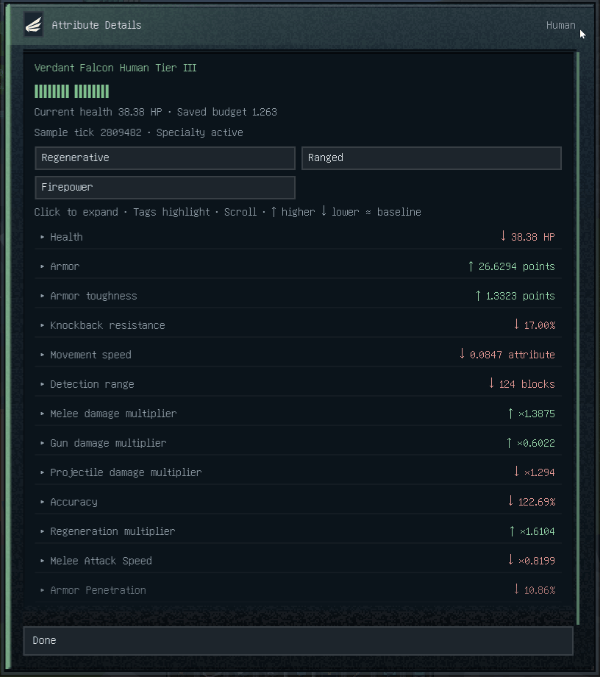
There are 13 specialty dimensions, grouped into three categories.
| Group | Dimensions |
|---|---|
| Survival | Health, Armor, Toughness, Knockback Resistance, Regeneration |
| Mobility and Detection | Movement Speed, Detection Range |
| Offense | Melee Damage, Gun Damage, Projectile Damage, Accuracy, Melee Attack Speed, Armor Penetration |
Each dimension has a regular cap; breakthrough training at the training ground can raise it; bosses have higher specialty caps. Generated individuals are not rerolled when configuration changes, but can be respec'd through training in the mid-to-late game.
The attribute details screen shows the current value of all 13 dimensions, growth stage, and specialty tags, and marks whether they are high or low relative to the same faction and tier.
Players can dynamically assign and modify equipment and combat styles based on each human's strengths.
Hiring and Command
Recruiting requires an employment contract matching the target's tier and payment in the target faction's currency. Contracts are reusable and are not consumed by one recruitment. The target must be in the same dimension, alive, within 8 blocks, and have no formal employer. Creative mode ignores standing requirements and currency costs, but still respects tier, ownership, and population caps.
After hiring, the human becomes a formal follower, following and fighting actively by default. Right-click empty-handed to open the command panel; sneak-right-click empty-handed to open the inventory. The walkie-talkie shows all employees and can locate or recall specific units.
A soldier's inventory has 30 storage slots plus 6 equipment slots, 36 total; main hand, off hand, armor, and backpack items can be changed in the UI. Auto-pickup is a separate toggle: wild humans have it on by default, hired soldiers have it off by default and must be enabled in the command panel.
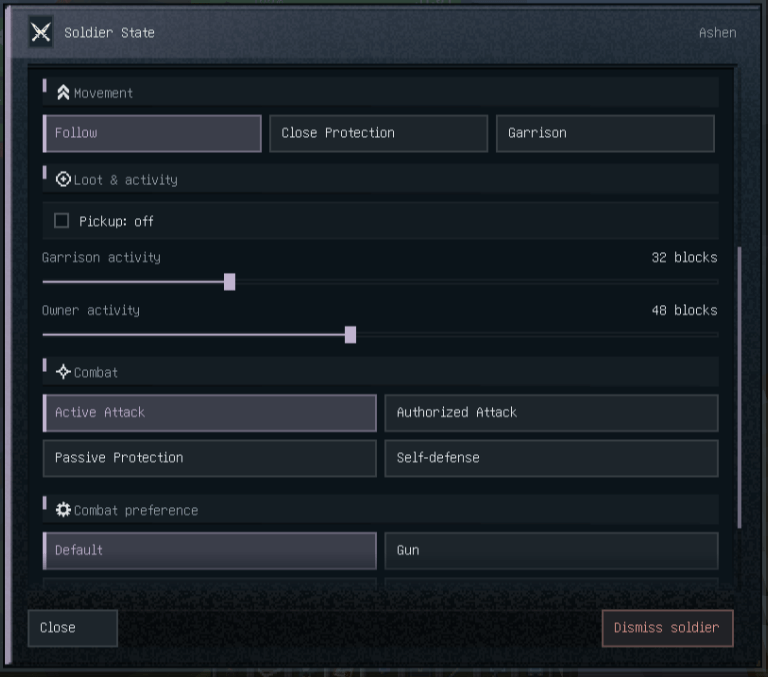
Command is split into two independent lines: action and combat. Action decides where to go:
- Follow: uses the owner as the movement reference and fights within the allowed range;
- Bodyguard: stays close to protect the owner and prioritizes threats near the owner;
- Garrison: saves the current position and dimension as a post; daily radius, hold position, and limited pursuit can be configured.
Combat decides whether to fight:
- Active: seeks enemies independently and also follows the owner's attacks;
- Passive Protection: does not seek enemies, but protects the owner when attacked;
- Self-Defense Only: fights back only when attacked itself;
- Authorized Combat: attacks only explicitly authorized targets while still protecting the owner.
Follow and bodyguard distances default to 48 blocks and can be set from 8 to 96; garrison radius also ranges from 8 to 96. Garrison "hold position" and "allow pursuit" are separate: hold position prevents voluntary leaving, while allow pursuit decides whether limited pursuit is allowed in combat.
Action and combat can be combined freely; for example, "Garrison + Self-Defense Only" holds a point and only fights back when attacked.
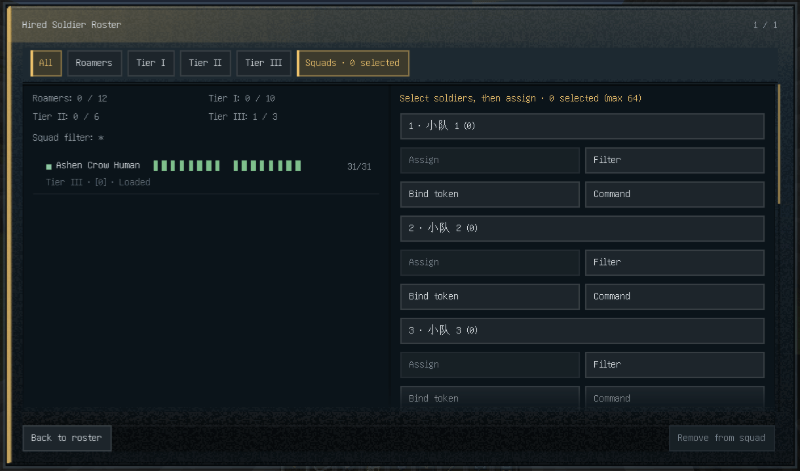
Squads expand command from individuals to formations. By default you can create 8 squads of 32 members each; select multiple formal soldiers in the walkie-talkie to form, rename, and filter squads. Each squad has a quick-command panel for actions, combat, pickup, distance, and garrison parameters. When members differ, the panel shows "Mixed"; changing one field only changes that field and does not flatten others' settings.
In the walkie-talkie, players can recall a single soldier, recall all, dismiss, and reorder soldiers; unloaded members show their last saved record. Recall requires a safe landing spot; if the entity cannot be found or no suitable position exists, it fails.
Monitor and Takeover
The Human Monitor is the core tool for observing and taking control of humans. It has no survival recipe and is obtained from the Creative tab; in Survival you can only monitor your own hired soldiers, while Creative can monitor wild humans and bosses. You can also enter monitoring directly from a soldier's details in the walkie-talkie.
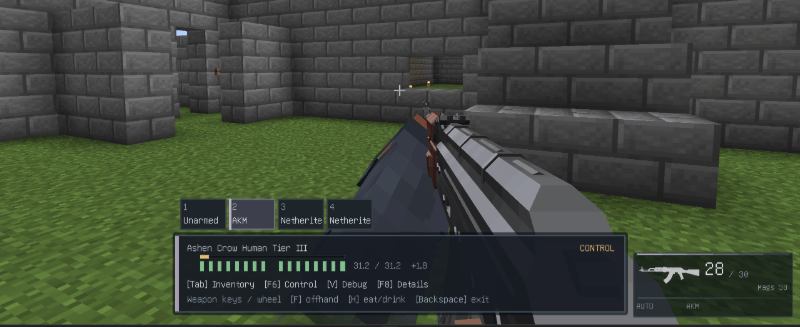
The monitor HUD reads server-confirmed real state: health, current main-hand weapon, ammo, reserve magazines, and reload progress. With TaCZ, Scorched Guns, or Just Enough Guns installed, it uses that gun mod's native UI.
Monitoring defaults to observation mode: the human continues acting autonomously, and the player sees what it sees in first person.
- Press F6 to temporarily take control; use WASD to move, mouse to aim, attack key and the actual gun mod's fire key to fight;
- Press E to open its real inventory;
- Press V to view navigation, vision, and target diagnostics;
- Press Backspace to exit monitoring.
While in control you can use melee, guns, bows and crossbows, shields, and off-hand food, and open the real inventory to manage equipment. Exiting, changing orders, disconnecting, dying, or invalidating the dimension all release control.
Developer Kit
Beyond player gameplay, the mod provides a Developer Kit for regular players and modpack authors. The Developer Kit is another highlight: it turns "build a faction structure, configure a chest of loot, and export it for others" into something you can do in-game, instead of repeatedly editing JSON and NBT.
| Tool | Purpose |
|---|---|
| Building Info Block | Records template identity, regions, facilities, and natural-generation conditions |
| Building Selector | Draws the save bounds, outer and inner regions, and exclusion zones |
| Facility Binding Rod | Binds consoles, contribution boxes, shops, training centers, and commission boards to the building |
| Loot Configurator | Views, edits, saves, and binds container loot tables |
| Patrol Baton | Edits fixed patrol waypoints for an individual human |
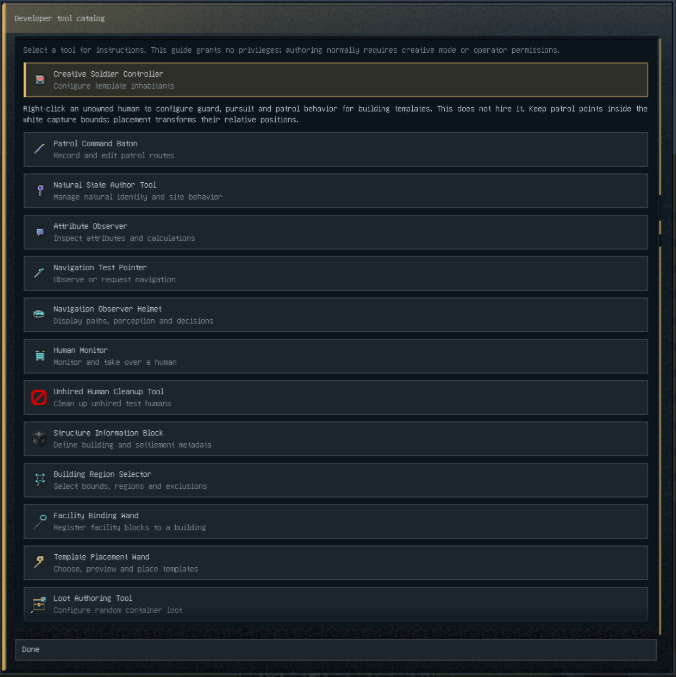
Specific tools and usage can be found in-game via the "Developer Tool List" item.
Building Templates
The Building Info Block is the entry point for templates. Authors can complete the whole workflow in-game:
- Set template ID, faction, tier, and module type in the info block;
- Use the Building Selector to draw the building save bounds, outer region, inner region, and exclusion zones;
- Use the Facility Binding Rod to register the settlement console, contribution box, supply shop, training center, and commission board;
- Save as a structure NBT or register it as a formal settlement;
- To share, fill in dimension, biome, placement height, slope, water, and world day conditions on the Natural Generation page, then export a building share pack.
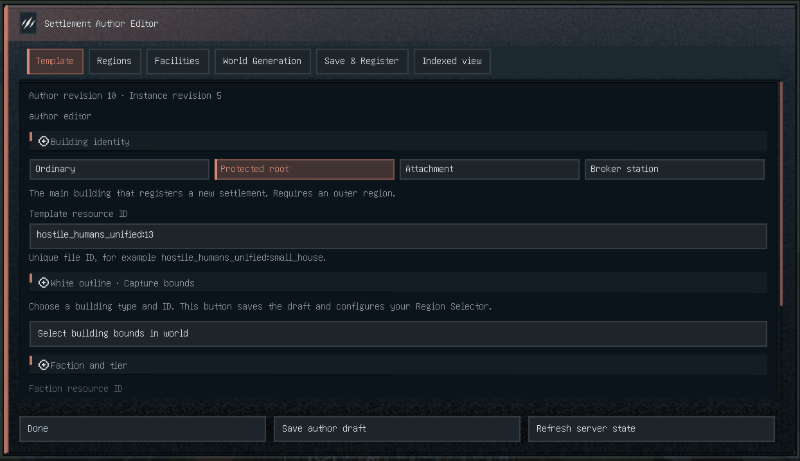
After placing the share pack in the instance directory and enabling it, you can select, preview, and place it by template ID with the placement tool, or let it generate naturally in the world. Templates support rotation, mirroring, and pivot; when placed, regions, facilities, and resident routes transform together.
When saving a template you can choose whether to save entities. Players are not captured by vanilla structure saving; residents keep their faction, garrison or patrol state, and routes, but equipment, growth, and supplies are reinitialized on placement. Natural generation is off by default; configure conditions and export a share pack on the Natural Generation page.
Loot Configuration
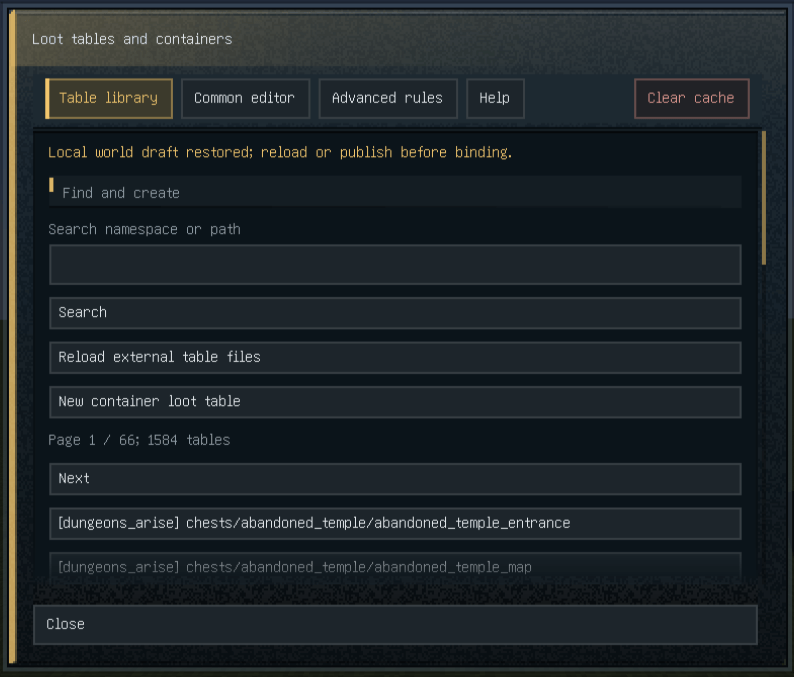
The Loot Configurator edits chest loot directly in-game. Right-click air to open the table library; right-click a chest, barrel, or shulker box to select the container at the same time. You can search vanilla, mod, and data pack loot tables currently loaded by the server, or create your own.
- Search for an existing table in the library, or create a container loot table;
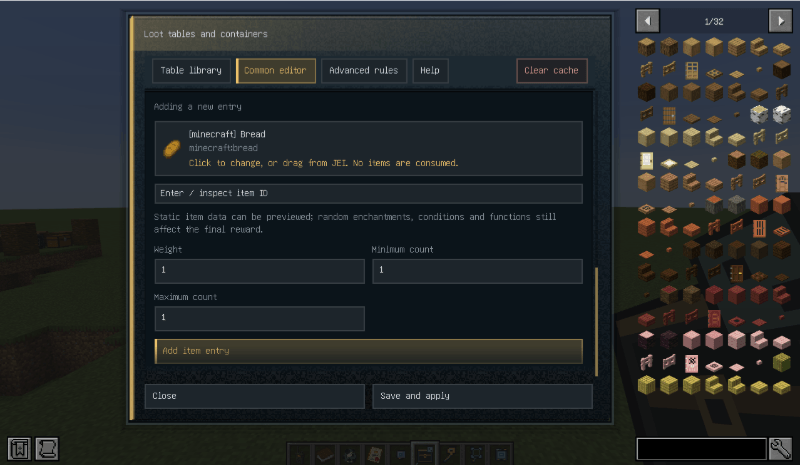
- In Common Editing, search items by Chinese name, English name, registry ID, or @mod, then fill in weight, count, and roll count;
- For tags, nested tables, random numbers, functions, or third-party conditions, enter Advanced Rules and edit the full JSON directly; unknown fields are preserved;
- Click Save and Apply, wait for the server to reload the data pack and confirm the version is loaded;
- Bind the table to the target container, or export it as a standard data pack.
The image below shows the Loot Configurator UI, which dynamically loads loot tables from the When Dungeons Arise mod.
With JEI installed, you can drag item icons from JEI directly into the editor's item selection box and select a specific variant under the same ID, such as a potion, enchanted book, or a specific gun. NBT data carried by some special items is saved as well, so variants of the same item can be distinguished.
Binding supports single chests, trapped chests, barrels, shulker boxes, and double chests; each half of a double chest rolls the full table once. Custom tables are saved to the instance's loot_library directory and can be exported as a standard data pack.
Tables being edited are cached locally per world or server and saved about once per second; accidentally closing the UI does not immediately lose the draft, but only Save and Apply writes to the server. Clearing the cache requires two consecutive clicks to prevent mistakes.
The Loot Configurator reads vanilla, mod, and data pack tables actually loaded by the server; Forge global loot modifiers or other code may still modify the final result, so the source table is not the final drop. Tables requiring a killer, damage source, or other context cannot be bound directly to a normal chest.
Residents and Behavior Distribution
When saving a building you can choose whether to save entities. Place garrison and patrol waypoints inside the white save bounds and the template will save residents with it; on placement, their faction, garrison or patrol state, and routes transform with the building's translation, rotation, and mirroring, while equipment, growth, and supplies are reinitialized for new individuals.
Garrison, patrol, and fixed routes can be set directly in-game: use the Patrol Baton to edit required waypoints for an individual human, then save the resident and route into the template. The author's "behavior distribution" can also control whether they hold position, whether limited pursuit is allowed, daily patrol radius, and fixed-route wait times and loop mode. After formal hiring, player orders take priority over the author state; after dismissal they return to the author-defined state.
Creative mode also has a read-only Developer Item List that shows tool icons, purposes, and operations, helping authors quickly find the info block, selector, facility binding rod, loot configurator, and patrol baton.
Future Plans
The mod is still in development, and many features are incomplete, so the current latest version is not well suited to survival play. However, the overall framework and building-template developer tools are already available for players to create faction settlements and other mod structures. The author is not good at building, so submissions of faction structures from players with ideas are welcome.
The following directions are planned, but not yet implemented in the current version.
- Complete quest system: currently only a minimal commission skeleton; main storyline, ranks, quest-tracking HUD, escort, patrol, and raid objectives are not yet connected;
- Settlement resident operation: buildings can save residents, but automatic population counting and replenishment, identity and route assignment, population control, eviction, and reinforcement are not yet connected;
- More facilities: armory, workshop, special merchants, boss area, facility on/off, dynamic buildings, faction treasury, and war;
- Formal economy balance: trade prices, daily exchange quotas, deposits, and full reward tables are not finalized; formal tables are off by default;
- Training material acquisition: formal recipes, drops, trades, and rare token sources are not yet connected; no temporary cheap recipes will be added;
- New official building content: the template library, share packs, and generation rules are ready; more buildings, art, and generation distribution will follow;
- Non-combat behaviors: farming, tree cutting, and other behavior branches have reserved architecture slots but no gameplay yet;
- UI expansion: continue filling in settlement, quest, and author tool interfaces;
- More faction specialties: specialized units such as cavalry and demolition experts.
These contents are currently proposals; most will be rolled out version by version, and the exact order and scope are subject to actual updates.
Compatibility and Configuration
The mod can be installed standalone and does not require other mods. The following are optional compatibilities:
- TaCZ, Just Enough Guns, Scorched Guns 2: humans can use the corresponding guns and display aiming, firing, and reload animations;
- Better Combat: melee uses the corresponding attack animations and attack modes;
- Curios: identity bands can be placed in a dedicated accessory slot;
- First Aid: humans can use dressings, bandages, and morphine;
- Spartan Weaponry, Spartan Shields, Immersive Armors, LesRaisins Armor, Marbled's Arsenal (Legacy): corresponding weapons, shields, and armor enter the existing equipment system;
- Farmer's Delight: specified foods enter the existing food and recovery system.
Only after installation do the corresponding contents enter the human equipment pool, gun pool, or recovery logic. Generic config can accept item IDs, but that does not mean all player-specific mechanics of that mod have been ported.
The config files are in config/hostile_humans_unified/, split into global, roamer, tier1, tier2, and tier3. Tier attributes, melee cooldowns, ranged spread, damage multipliers, natural generation, combat AI, retreat, hiring caps, and gun lists can be adjusted; in multiplayer the server config is authoritative, and a full restart is required after changes.
Defaults come from the mod's built-in resources; instance configs may have been changed by players or modpacks. Client config does not participate in actual resolution. Birth supplies only affect newly spawned individuals; existing soldiers do not reroll equipment or growth when config changes.
The mod also supports data packs to extend factions, specialty dimensions, buildings, and loot tables; custom content must follow the current data format, and unknown or invalid data will not forcibly overwrite existing saves.
License
The unified source code is released under GNU GPL v2.0. Parts integrated from Human Gunner retain their original MPL-2.0 license notices and are released under GPL terms to the extent permitted by MPL-2.0. Copyright and license notices for third-party components still apply to their respective content. When redistributing or integrating, retain the license notices of both this mod and upstream components.
Hostile Humans Unified Team