promotional bannermobile promotional banner

HexColorText

Adds in custom hexadecimal colors with animated hyper text + DBC elements+ RPG elements
gemshot1.png

gemshot1.png

gemshot3.png

gemshot3.png

gemshot2.png

gemshot2.png

Screenshot 2026-04-15 174045.png

Screenshot 2026-04-15 174045.png

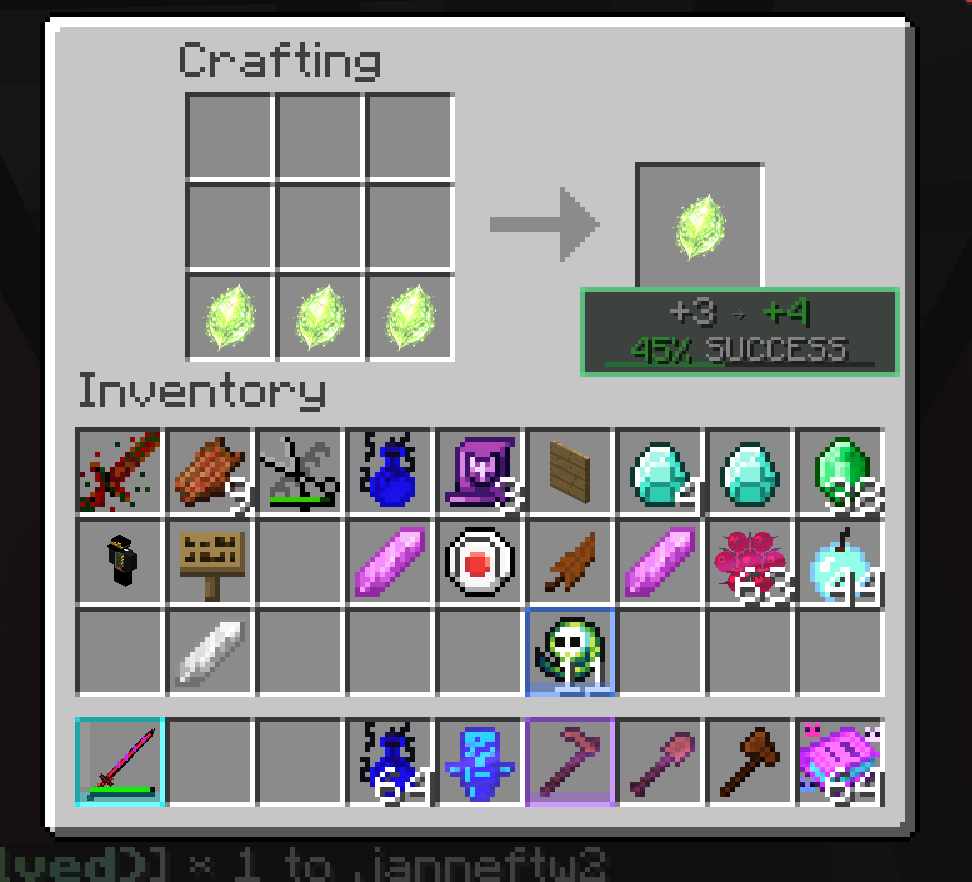
Recipiescisors.png
Recipiescisors.png

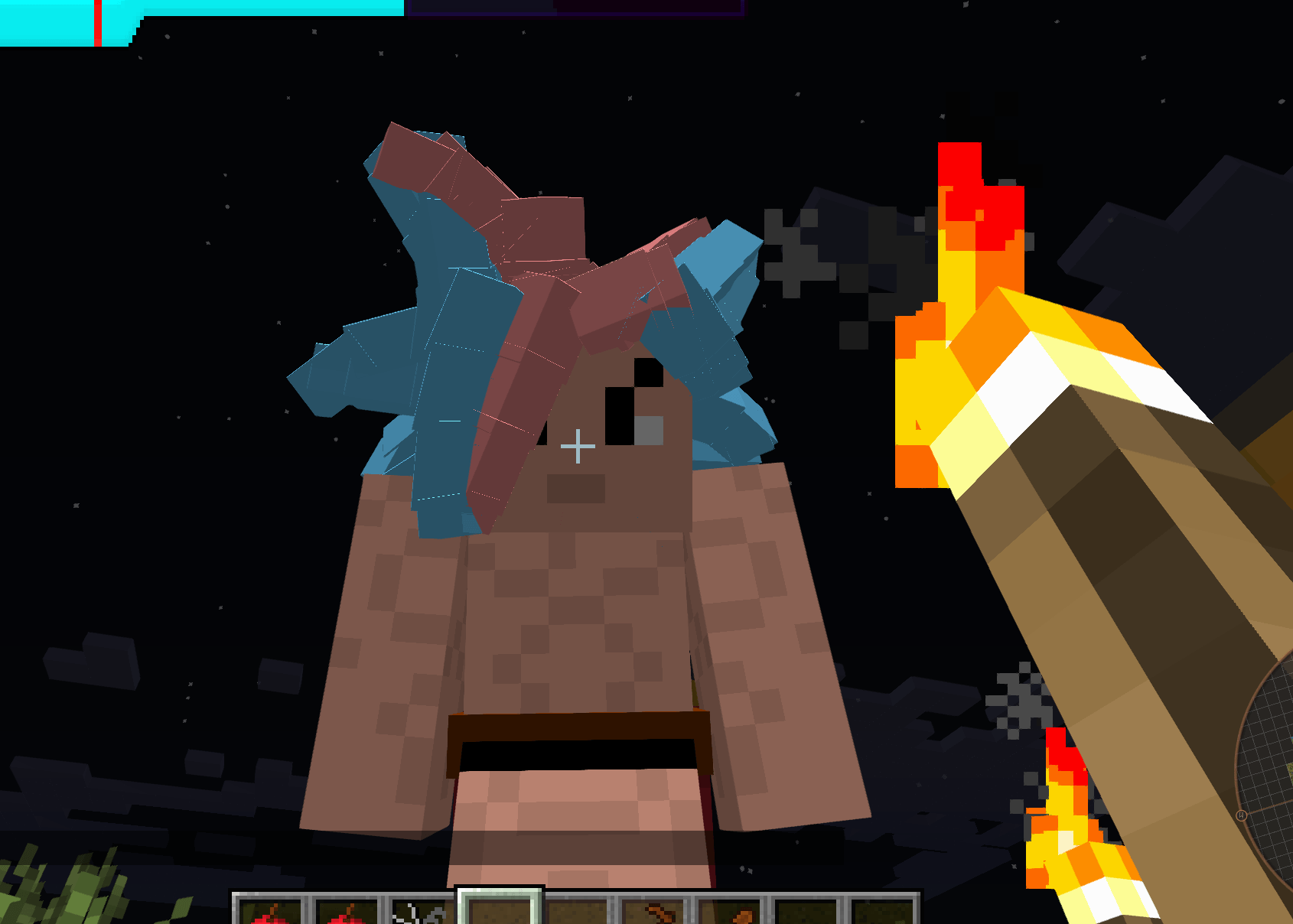
hairtest3.png

hairtest3.png

icon.png

icon.png

Description

Hex Color Text
━━━━━━━━━━━━━━━━━━━━━━━━━━━━━━━━━━━━━━━━━━━━━━━━━━━━━━━━━━━━━━━━━━━━━━━━━━━━━━
<Introduction>

Basically, I wanted custom colors — real hex colors — in Minecraft 1.7.10,
And I was absolutely not about to move to 1.12+ to get them.

So I spent way too much time fighting my mod workspace, breaking things,
fixing them, breaking them again, and questioning every life choice that led
me here.

Not fun.

But somehow, after enough pain, Hex Color Text became more than just a hex
text renderer. It started as a way to render colored text safely, but over time,
it grew into a full utility / RPG-style systems mod for my 1.7.10 setup.

So what does this mod actually do?

At its core, Hex Color Text adds safe, nestable, animated hex text to
Minecraft 1.7.10.

If you understand "hyper text" style formatting, you will probably have a
field day with it. If not, no worries — the mod includes a /hex-help command
with examples that can be clicked and inserted into Chat.

The system is designed to support:

    ✔ Real hex colors
    ✔ Nested tags
    ✔ Gradients
    ✔ Animated text
    ✔ Styled item names
    ✔ Styled item lore
    ✔ Custom GUIs
    ✔ Tooltips
    ✔ NPC/dialogue-style text
    ✔ RPG item systems
    ✔ Skill systems
    ✔ Achievement-style progression systems

━━━━━━━━━━━━━━━━━━━━━━━━━━━━━━━━━━━━━━━━━━━━━━━━━━━━━━━━━━━━━━━━━━━━━━━━━━━━━━
<Basic Hex Colors>

You can color text using real hex values:

    <#FFAA00>Gold Text</#>
    <#55FFFF>Aqua Text</#>
    <#FF3B3B>Red Text</#>

Short hex also works:

    <#FA0>Gold</#>

These are safe. The system renders the color directly instead of injecting
unsafe § color codes into Chat.

━━━━━━━━━━━━━━━━━━━━━━━━━━━━━━━━━━━━━━━━━━━━━━━━━━━━━━━━━━━━━━━━━━━━━━━━━━━━━━
<Text Styles>

Styles can be appended directly to a hex tag:

    l = bold
    o = italic
    n = underline
    m = strikethrough
    k = obfuscated

Examples:

    <#FFAA00l>Bold Gold</#>
    <#55FFFFo>Italic Aqua</#>
    <#FF55FFn>Underlined Pink</#>
    <#FF5555m>Strikethrough Red</#>
    <#AA00AAk>Obfuscated</#>

You can also stack styles:

    <#FFAA00lon>Bold Italic Underline</#>

━━━━━━━━━━━━━━━━━━━━━━━━━━━━━━━━━━━━━━━━━━━━━━━━━━━━━━━━━━━━━━━━━━━━━━━━━━━━━━
<Gradients>

Gradients interpolate colors per character:

    <grad #FF6A00 #FFDD55>Sunset</grad>
    <grad #00C6FF #0072FF>Ocean</grad>

Multiple color stops are supported:

    <grad #00FF88 #FFFFFF #FF00AA>Neon</grad>

Animated gradients are also supported:

    <grad #FF6A00 #FFDD55 scroll=0.22>Shimmer</grad>

Gradients can also use text styles:

    <grad #00C6FF #0072FF scroll=0.20 styles=l>Bold Ocean</grad>

━━━━━━━━━━━━━━━━━━━━━━━━━━━━━━━━━━━━━━━━━━━━━━━━━━━━━━━━━━━━━━━━━━━━━━━━━━━━━━
<Rainbow>

Rainbow text cycles colors per character.

Common aliases include:

    <rb>
    <rbw>
    <rainbow>

Examples:

    <rbw>R A I N B O W</rbw>
    <rbw speed=0.8 cycles=1.2>Slow Rainbow</rbw>

Rainbow works especially well when combined with other layers like outline,
shadow, glow, pulse, wave, or rune-style effects.

━━━━━━━━━━━━━━━━━━━━━━━━━━━━━━━━━━━━━━━━━━━━━━━━━━━━━━━━━━━━━━━━━━━━━━━━━━━━━━
<Motion Effects>

Motion tags animate characters visually.

Depending on the current build, supported effects may include things like:

    <wave>       Sine wave motion
    <shake>      Aggressive jitter
    <jitter>     Subtle jitter
    <wobble>     Smooth wobble
    <zoom>       Scale pulsing
    <scroll>     Horizontal scrolling motion
    <loop>       Looping header/divider motion

Examples:

    <wave amp=2.2 speed=6>Wavy Text</wave>
    <zoom amp=1.35 speed=3.5>Zoom Pop</zoom>

━━━━━━━━━━━━━━━━━━━━━━━━━━━━━━━━━━━━━━━━━━━━━━━━━━━━━━━━━━━━━━━━━━━━━━━━━━━━━━
<FX Layers>

FX tags wrap other text and add visual layers.

Examples of supported or planned FX-style layers include:

    <outline> Border/outline
    <shadow>        Drop shadow
    <glow>          Glow effect
    <snow>          Snow overlay
    <rain>          Rain overlay
    <sparkle>       Sparkle / star effect
    <flicker>       Flickering text
    <glitch>        Glitch distortion
    <shootingstar>  Star-trail sweep
    <rune>          Rune-style animated text
    <runereveal>    Rune reveal effect
    <mirage>        Heat-haze / mirage style
    <shatter>       Broken / cracked text feel
    <constellation> Star-map style text
    <eclipse>       Eclipse sweep style
    <inkbleed>      Ink-drip style text
    <heartbeat> Pulse/heartbeat emphasis

Outer tags wrap inner tags.

Good:

    <outline><grad #FFDD55 #FF6A00>Text</grad></outline>

Usually not recommended:

    <grad #FFDD55 #FF6A00><outline>Text</outline></grad>

For the cleanest result, put structural FX like outline, shadow, or glow on
the outside, then put color tags, gradients, or rainbow tags inside.

━━━━━━━━━━━━━━━━━━━━━━━━━━━━━━━━━━━━━━━━━━━━━━━━━━━━━━━━━━━━━━━━━━━━━━━━━━━━━━
<Shooting Star Note>

Shooting Star effects are usually best wrapped in an FX layer like an outline,
shadow, or glow, so the sweep is easier to see.

Recommended:

    <outline><shootingstar><#FF3B3B>CRIT!</#></shootingstar></outline>

Or:

    <outline><shootingstar><grad #FFDD55 #FF6A00 scroll=0.18>CRIT!</grad></shootingstar></outline>

━━━━━━━━━━━━━━━━━━━━━━━━━━━━━━━━━━━━━━━━━━━━━━━━━━━━━━━━━━━━━━━━━━━━━━━━━━━━━━
<Where Hex Text Works>

Hex text works best in normal rendered text contexts, such as:

    ✔ Chat
    ✔ Item names
    ✔ Item lore
    ✔ Tooltips
    ✔ Custom GUIs
    ✔ NPC dialogue / message-style text
    ✔ HexHub menu entries
    ✔ Custom system messages

Some HUD/overlay contexts may not support full hypertext rendering yet,t unless
That overlay was specifically wired into the Hex Color Text renderer.

So overlays are not impossible — they may need custom support depending
on the system.

━━━━━━━━━━━━━━━━━━━━━━━━━━━━━━━━━━━━━━━━━━━━━━━━━━━━━━━━━━━━━━━━━━━━━━━━━━━━━━
<HexHub>

HexHub is the in-game news/update hub.

It can show local or remote JSON feed entries for things like:

    ✔ Patch notes
    ✔ Feature previews
    ✔ Balance changes
    ✔ Bug fixes
    ✔ Server notices
    ✔ Mod update summaries

Entries can include:

    ✔ Tab/category
    ✔ Tag label
    ✔ Tag color
    ✔ Title
    ✔ Date
    ✔ Banner title
    ✔ Summary
    ✔ Details
    ✔ Optional action title/subtitle
    ✔ Optional pinned/priority behavior

The menu also supports styled fallback rendering, so plain news entries still.
Looks good even when no custom hypertext is used.

━━━━━━━━━━━━━━━━━━━━━━━━━━━━━━━━━━━━━━━━━━━━━━━━━━━━━━━━━━━━━━━━━━━━━━━━━━━━━━
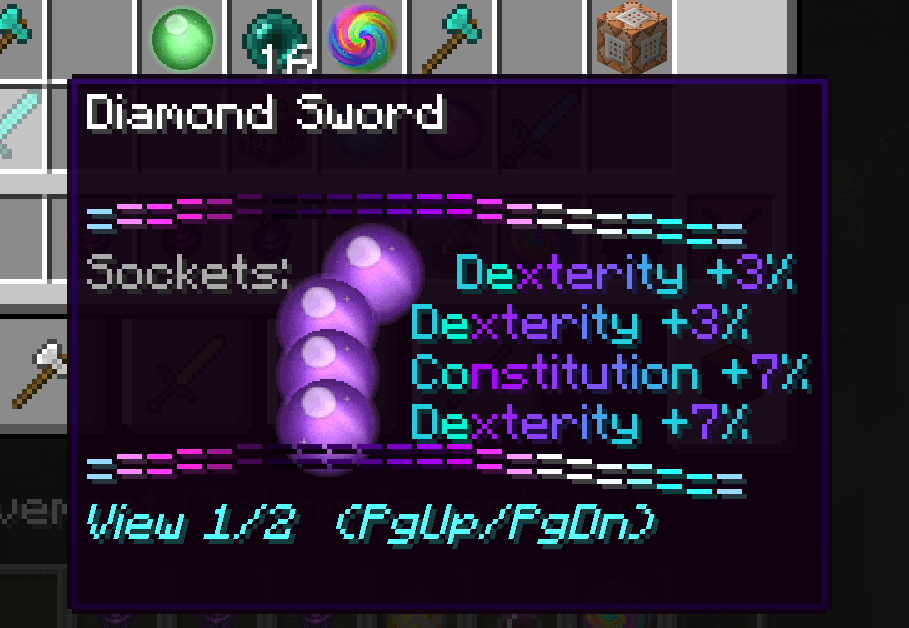
<Item Rarity & Lore>

Hex Color Text also powers custom item rarity visuals.

The item system supports styled rarity names, animated rarity effects, and
custom tooltip/lore formatting.

This is used for things like:

    ✔ Common/rare / legendary-style rarities
    ✔ Artifact-style items
    ✔ Effervescent-style progression
    ✔ Chaotic/black / pseudo-black rarity logic
    ✔ Styled item names
    ✔ Styled item lore
    ✔ Multi-page lore/tooltips
    ✔ Rarity overlays
    ✔ Custom stat lines
    ✔ Special set-bonus text

The goal is to make items feel more like RPG loot instead of plain Minecraft
equipment.

━━━━━━━━━━━━━━━━━━━━━━━━━━━━━━━━━━━━━━━━━━━━━━━━━━━━━━━━━━━━━━━━━━━━━━━━━━━━━━
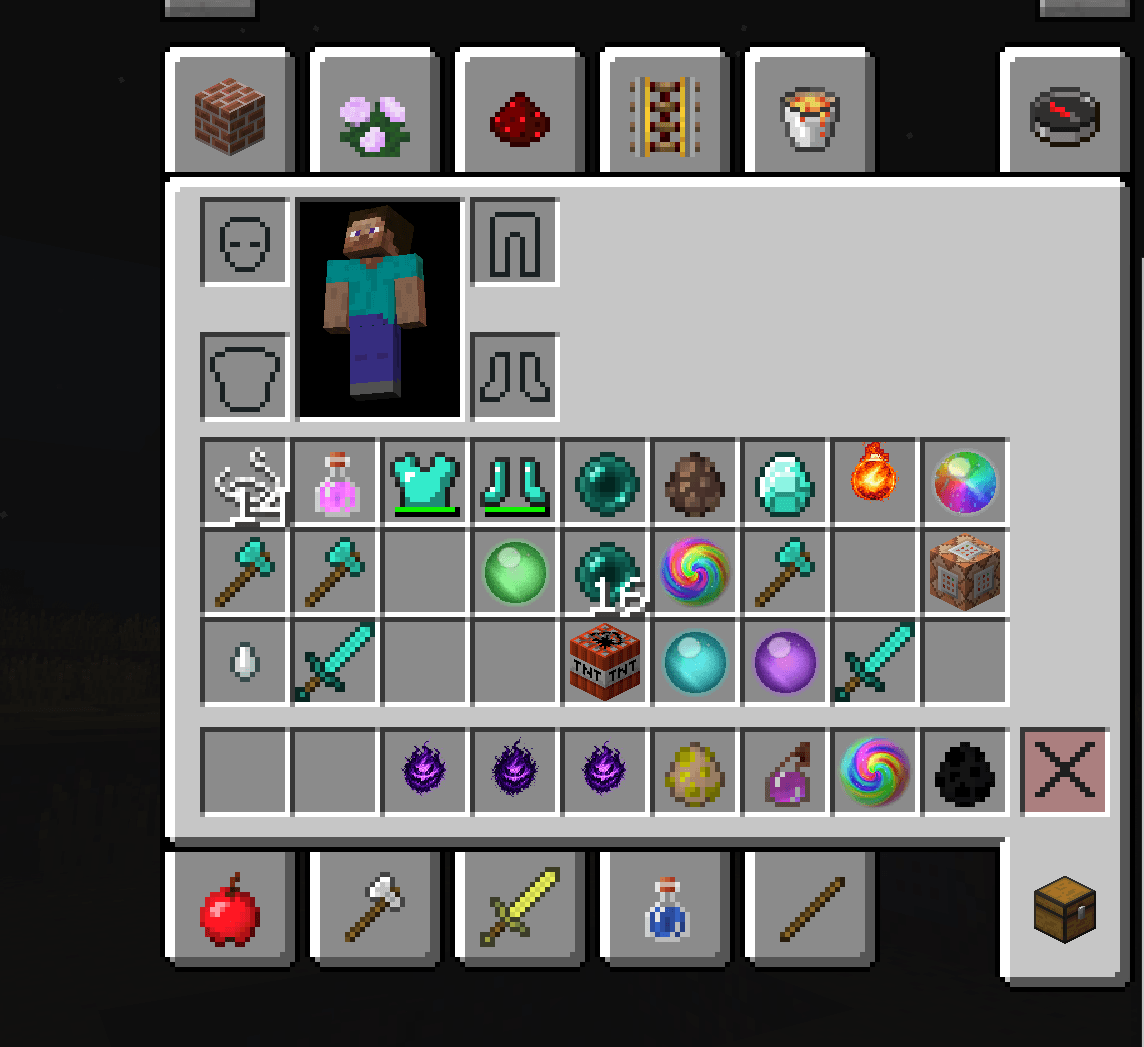
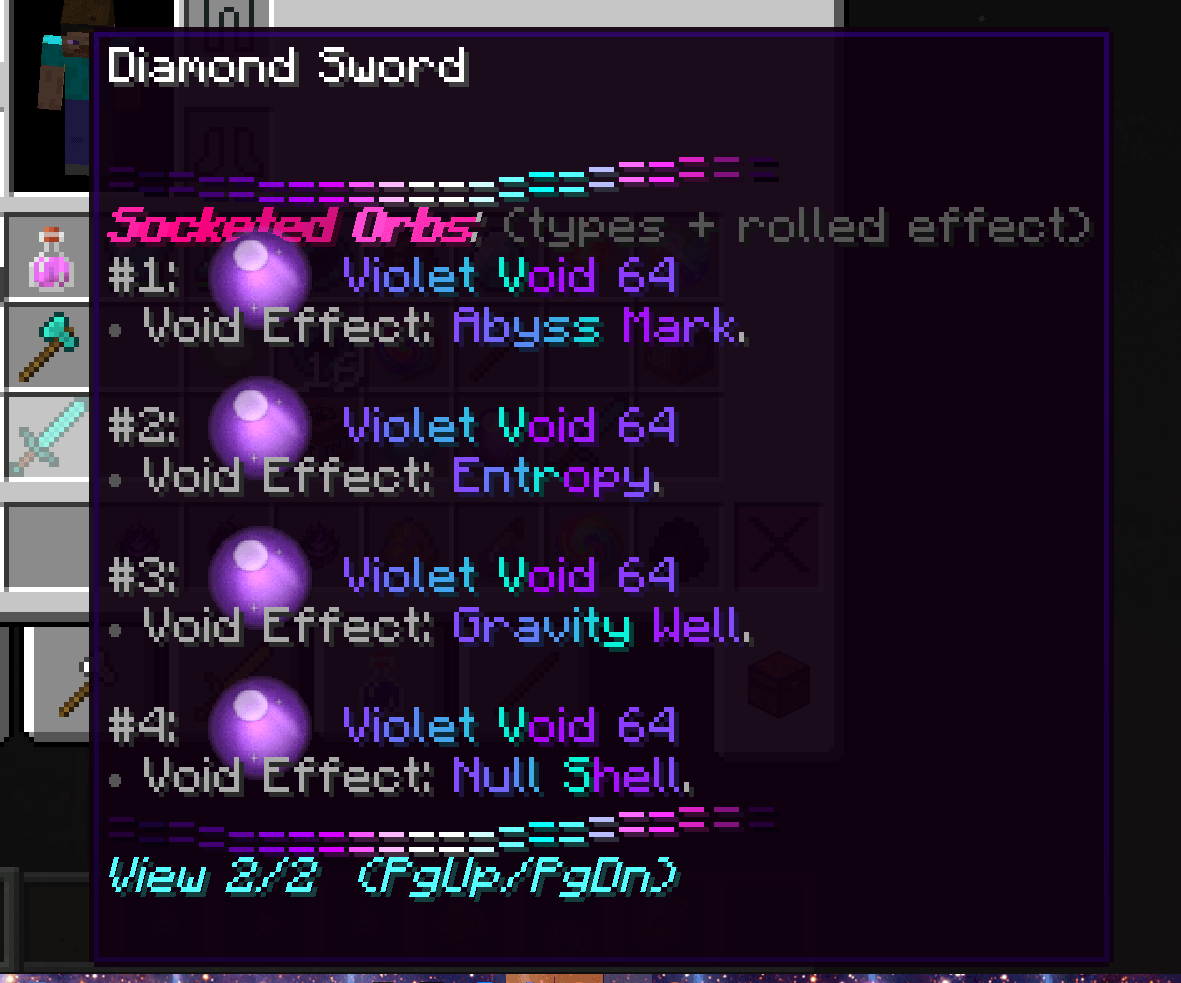
<Socketing / Gems / Orbs / Pills>

The mod includes an RPG-style socketing system.

Certain items can have sockets opened using XP levels and materials. Once the 
socket is open, supported socket items can be inserted, depending on the item
and system setup.

Socket-related systems may include:

    ✔ Opening sockets
    ✔ Filled sockets
    ✔ Max socket display
    ✔ Gems
    ✔ Orbs
    ✔ Pills
    ✔ Unsocketing
    ✔ Socket GUI
    ✔ Styled socket lore
    ✔ Slot-based item upgrades

Useful commands include:

    /hexsocket gui
    /hexsocket open

Other socket commands may exist depending on the current build.

━━━━━━━━━━━━━━━━━━━━━━━━━━━━━━━━━━━━━━━━━━━━━━━━━━━━━━━━━━━━━━━━━━━━━━━━━━━━━━
<Inventory Sorting>

Hex Color Text also includes an inventory sorting button.

The sorter can work in:

    ✔ Player inventory
    ✔ Chests
    ✔ Many modded chest inventories

The button is designed to stay small and out of the way while still being
easy to find.

━━━━━━━━━━━━━━━━━━━━━━━━━━━━━━━━━━━━━━━━━━━━━━━━━━━━━━━━━━━━━━━━━━━━━━━━━━━━━━
<Skills System>

The mod has grown to support custom skill systems, too.

Skill-related work includes systems such as:

    ✔ Black Coffin
    ✔ Dragon Fist
    ✔ Grapple
    ✔ Overcharge
    ✔ Custom cooldown tracking
    ✔ SkilSkillock checks
    ✔ Skill config entries
    ✔ Skill messages
    ✔ Cooldown HUD shelf display
    ✔ Server-side gating

Skills can be checked through custom skill data, such as HexSkills, allowing
scripts or mod-side systems to decide whether a player has unlocked a move.

This allows the mod to support custom abilities without relying entirely on
vanilla Minecraft mechanics.

━━━━━━━━━━━━━━━━━━━━━━━━━━━━━━━━━━━━━━━━━━━━━━━━━━━━━━━━━━━━━━━━━━━━━━━━━━━━━━
<Black Coffin>

Black Coffin is a custom cinematic skill system.

It includes multiple variants, such as:

    ✔ Normal Black Coffin
    ✔ Chant Black Coffin
    ✔ Third Form Black Coffin

The skill uses cinematic charge-up, containment, dark box visuals,
damage timing, cooldowns, and styled messages.

Depending on the build/config, it can use:

    ✔ SkilSkillock checks
    ✔ Ki/resource checks
    ✔ Cooldowns
    ✔ Charge behavior
    ✔ Styled warning messages
    ✔ HUD cooldown display

━━━━━━━━━━━━━━━━━━━━━━━━━━━━━━━━━━━━━━━━━━━━━━━━━━━━━━━━━━━━━━━━━━━━━━━━━━━━━━
<Dragon Fist>

Dragon Fist is a custom combat skill inspired by cinematic rush attacks.

Planned or implemented variants include things like:

    ✔ Normal Dragonfist
    ✔ Knockback / rush-through Dragonfist
    ✔ Looping cinematic Dragonfist
    ✔ Blast-finisher Dragonfist

The system is designed around different attack types sharing skill logic while
having different damage, visuals, hit timing, and cooldown behavior.

Dragon Fist also connects to the cooldown HUD system, so players can see when
The move is ready again.

━━━━━━━━━━━━━━━━━━━━━━━━━━━━━━━━━━━━━━━━━━━━━━━━━━━━━━━━━━━━━━━━━━━━━━━━━━━━━━
<Grapple>

Grapple is a custom combat-control system.

It is designed around close-range target interaction rather than simple damage.

Features include or may include:

    ✔ Single-target grapple checks
    ✔ Grappler / grappled states
    ✔ Movement reduction
    ✔ Tether behavior
    ✔ Throw logic
    ✔ Follow-up combo windows
    ✔ Creative-mode testing support
    ✔ Future DBC/stat scaling support

The goal is to make grabs feel interactive instead of just stunning a target.

━━━━━━━━━━━━━━━━━━━━━━━━━━━━━━━━━━━━━━━━━━━━━━━━━━━━━━━━━━━━━━━━━━━━━━━━━━━━━━
<Overcharge>

Overcharge is a custom skill concept for extending power-release behavior.

Instead of directly patching DBC itself, the idea is to bridge the custom mod-side
logic with scripts and skill checks.

The goal is to support controlled charge behavior beyond the usual DBC limits,
while still keeping the system gated through custom HexSkills data and server
rules.

━━━━━━━━━━━━━━━━━━━━━━━━━━━━━━━━━━━━━━━━━━━━━━━━━━━━━━━━━━━━━━━━━━━━━━━━━━━━━━
<Achievements>

The mod also includes achievement-style progression work.

These systems are meant to reward or track custom milestones tied to the mod's
features.

Achievements may be connected to things like:

    ✔ SkilSkillocks
    ✔ Custom combat systems
    ✔ Item progression
    ✔ Socketing
    ✔ Rarity upgrades
    ✔ Special discoveries
    ✔ Server progression milestones

Since Minecraft 1.7.10 uses the older achievement style rather than the modern
Achievements, these are best thought of as custom achievement-style milestones
rather than 1.12+ advancement trees.

━━━━━━━━━━━━━━━━━━━━━━━━━━━━━━━━━━━━━━━━━━━━━━━━━━━━━━━━━━━━━━━━━━━━━━━━━━━━━━
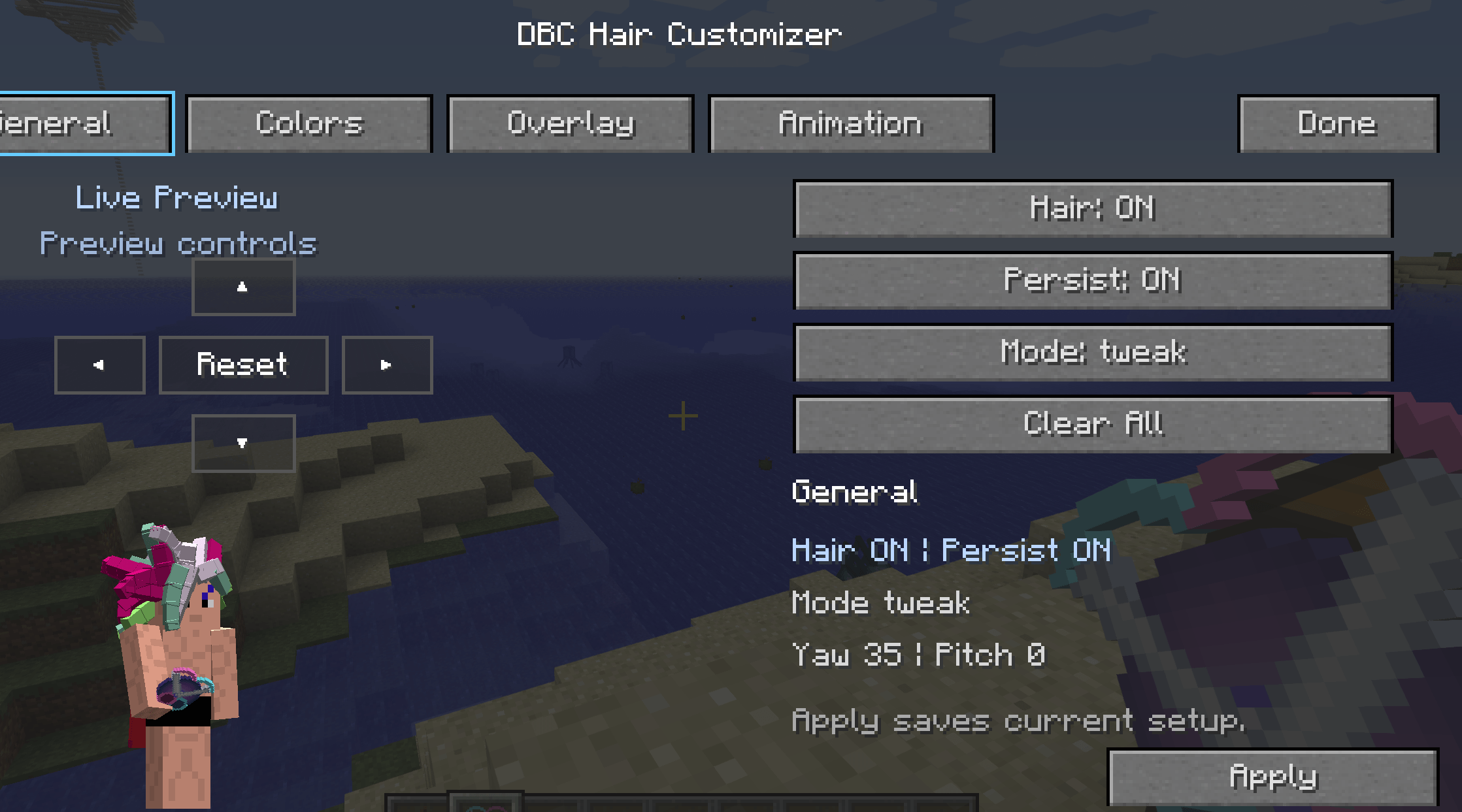
<HexHair / Character Customization>

Hex Color Text also contains character customization work, especially through
HexHair.

HexHair focuses on custom DBC hair coloring and styling features, such as:

    ✔ Custom hair colors
    ✔ Split-color hair
    ✔ Gradient-style hair
    ✔ Multi-color hair
    ✔ Animated hair color modes
    ✔ Base form support
    ✔ SSJ4-style support
    ✔ Hair GUI
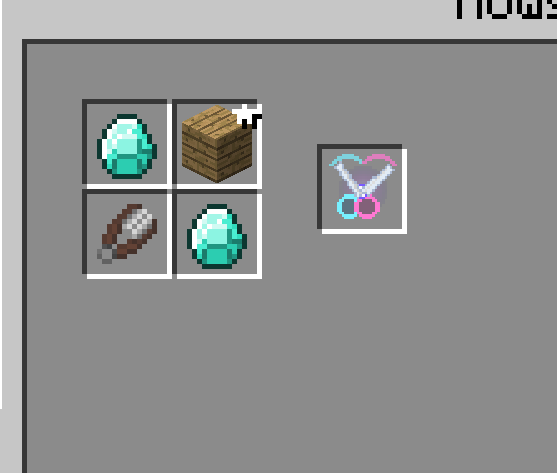
    ✔ Hex Hair Scissors item

Tail coloring and tail customization have also been explored, but that system is 
is more experimental and may depend heavily on DBC/JBRA render behavior.

━━━━━━━━━━━━━━━━━━━━━━━━━━━━━━━━━━━━━━━━━━━━━━━━━━━━━━━━━━━━━━━━━━━━━━━━━━━━━━
<Masters / Friendship System>

The mod also includes a custom Master's/Friendship system.

Mentor progression systems inspire this system and support custom
master data for NPCs, players, or custom mentor entries.

Features include:

    ✔ Current master tracking
    ✔ Friendship values
    ✔ Rank progression
    ✔ Lesson progress
    ✔ Mastered/completed state
    ✔ GUI master cards
    ✔ Master detail panel
    ✔ Completion bars
    ✔ Rank labels
    ✔ Lesson markers
    ✔ Completed/mastered visuals

The newer design moves toward a rank-based friendship system, where each rank
has its own 0–100 friendship bar. Once a rank is filled, the player can be
prompted to complete a rank-up test or quest before advancing.

━━━━━━━━━━━━━━━━━━━━━━━━━━━━━━━━━━━━━━━━━━━━━━━━━━━━━━━━━━━━━━━━━━━━━━━━━━━━━━
<Compatibility Notes>

Hex Color Text was designed for Minecraft 1.7.10 and a heavily modded setup.

It has been tested alongside other text/rendering mods in some setups, but
compatibility can depend on load order, render hooks, and which system is
drawing the text.

Some features may behave differently between:

    ✔ Singleplayer
    ✔ Dev workspace
    ✔ Dedicated server
    ✔ Modpack instance
    ✔ Different GUI/render contexts

━━━━━━━━━━━━━━━━━━━━━━━━━━━━━━━━━━━━━━━━━━━━━━━━━━━━━━━━━━━━━━━━━━━━━━━━━━━━━━
<Useful Commands>

Some useful commands include:

    /hex-help
    /hexsocket gui
    /hexsocket open

Depending on the current build, there may also be commands for systems like:

    /hexhair
    /hexhairgui
    /blackcoffin
    /bc
    /dragonfist
    /overcharge
    /hexmaster

Command availability depends on the installed version/build.

━━━━━━━━━━━━━━━━━━━━━━━━━━━━━━━━━━━━━━━━━━━━━━━━━━━━━━━━━━━━━━━━━━━━━━━━━━━━━━
<Final Notes>

Hex Color Text started as a simple hex color renderer.

Then it got gradients.

Then animations.

Then item lore.

Then rarities.

Then sockets.

Then GUIs.

Then skills.

Then achievements.

Then hair.

Then masters.

At this point, it is less "just a text mod" and more of a visual/RPG system
toolkit for Minecraft 1.7.10.

So, have fun breaking your own text rendering.
━━━━━━━━━━━━━━━━━━━━━━━━━━━━━━━━━━━━━━━━━━━━━━━━━━━━━━━━━━━━━━━━━━━━━━━━━━━━━━
THE ONE PIECE 
THE ONE PIECE IS REEAAAAAAL

The HexColorText Team

profile avatar
  • 1
    Followers
  • 2
    Projects
  • 858
    Downloads

More from vap0uroussynthgamimg

  • DBCHairPlus project image

    DBCHairPlus

    • 519
    • Mods

    Hair for dbc but an addon I also uploaded the wrong class my bad

    • 519
    • May 13, 2026
    • Mods
    • +2
  • DBCHairPlus project image

    DBCHairPlus

    • 519
    • Mods

    Hair for dbc but an addon I also uploaded the wrong class my bad

    • 519
    • May 13, 2026
    • Mods
    • +2