Haven Resource Tokens
- By
Dynamic resource tokens and materializer machines for items and fluids.

Description
Haven Resource Tokens
Haven Resource Tokens is a configurable resource generation mod using tokens.
You make a Resource Token from a Blank Token and an item or fluid, then place that token in a Resource Materializer to generate more of that resource.
This is meant for modpacks that want an alternative resource generation.
How It Works
Craft a Blank Token and place it in the Token Machine.
The Token Machine needs:
- A Blank Token
- RF
- An item or fluid set in the resources jsonc file
When the token has enough of the resource and enough RF has been used, it becomes a Resource Token.
Example:
Blank Token + Cobblestone + RF = Cobblestone Resource Token
Place that Resource Token in a Resource Materializer, and it will generate the resource from the token.
Cobblestone Resource Token + RF = Cobblestone
Fluid tokens work the same way, but use fluid tanks instead of items.
Resource Tokens
Resource Tokens are one item, but they store what they were made from.
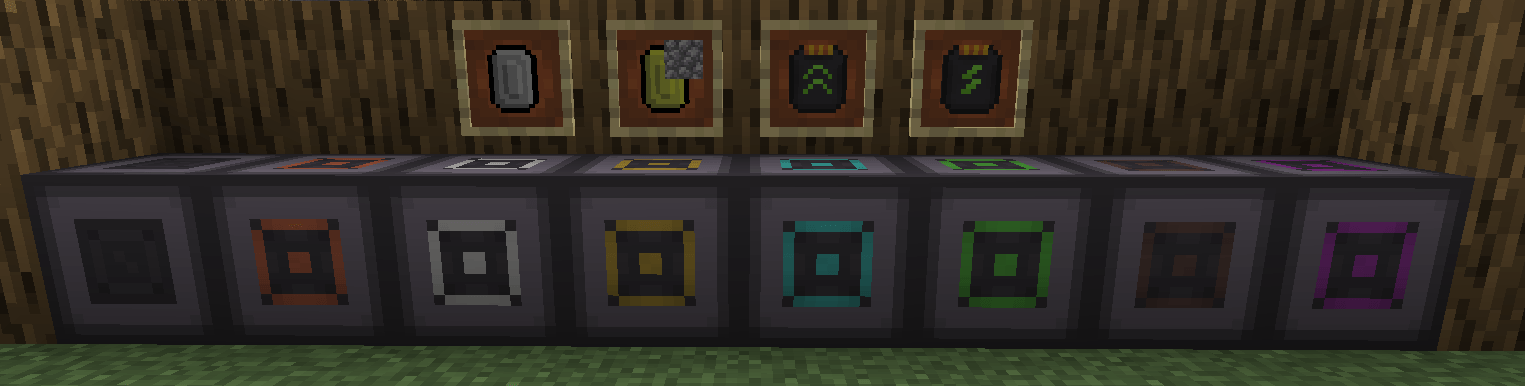
A Cobblestone Resource Token, Water Resource Token, and Diamond Resource Token are all the same Resource Token item with different saved data.
The token icon shows the token together with the assigned resource, so players can see what the token is for without opening anything.
Tokens only work while their resource is still listed in the resources config. If a resource is removed from the config, old tokens for that resource will no longer be usable.
Token Machine
The Token Machine turns Blank Tokens into Resource Tokens.
For item tokens, add the required item in the input slot.
For fluid tokens, fill the machine tank with the required fluid.
Token progress is saved on the Blank Token. If a token is halfway done, it keeps that progress, but it is locked and must be completed using the same resource.
If fluid flushing is enabled in the config, Shift+Click the fluid bar in the Token Machine to empty the tank.
Speed Upgrade
Speed Upgrades make token creation faster, but also increase RF usage.
1 Speed Upgrade = 2x speed, 2x RF usage2 Speed Upgrades = 4x speed, 4x RF usage3 Speed Upgrades = 8x speed, 8x RF usage4 Speed Upgrades = 16x speed, 16x RF usage
Energy Upgrade
Energy Upgrades lower the RF cost.
1 Energy Upgrade = 1.5x RF reduction2 Energy Upgrades = 3x RF reduction3 Energy Upgrades = 6x RF reduction4 Energy Upgrades = 12x RF reduction
Resource Materializers
Resource Materializers generate items or fluids from Resource Tokens.
Tiers:
- Copper
- Iron
- Gold
- Diamond
- Emerald
- Netherite
- Creative
Higher tiers can run faster and use less RF depending on the config.
Item tokens output items into the output slots.
Fluid tokens output fluid into the output tank.
The Creative Resource Materializer does not need RF and can have its output multiplied in the config.
Config Files
The mod creates two config files:
config/HavenResourceTokens-Config.tomlconfig/HavenResourceTokens-Resources.jsonc
HavenResourceTokens-Config.toml is for machine settings.
HavenResourceTokens-Resources.jsonc is for the resources that can become tokens.
Most modpack devs will mainly edit the resources jsonc file.
PS: Configs are server synced. When playing on a server, the server config is used, not the client one.
Resources Config
File:
config/HavenResourceTokens-Resources.jsonc
HavenResourceTokens-Resources.jsonc decides which items and fluids can be turned into Resource Tokens.
Each entry should use either item or fluid, not both.
Item Example
{
  "item": "minecraft:cobblestone",
  "input_amount": 512,
  "creation_rf": 5000,
  "output_amount": 1,
  "output_rf": 1000
}
This makes a Cobblestone Resource Token.
The Token Machine needs 512 cobblestone and 5000 RF to make the token.
The Resource Materializer then creates 1 cobblestone per cycle.
output_rf is the Copper Materializer RF cost before tier scaling.
Fluid Example
{
  "fluid": "minecraft:water",
  "input_amount": 100000,
  "creation_rf": 5000,
  "output_amount": 1000,
  "output_rf": 250
}
Fluid amounts use mB.
1000 mB = 1 bucket
This example uses 100 buckets of water to make the token and outputs 1 bucket per cycle.
NBT Item Example - 1.20.1
{
  "item": "minecraft:potion",
  "input_amount": 1,
  "creation_rf": 5000,
  "output_amount": 1,
  "output_rf": 10000,
  "nbt": "{Potion:\"minecraft:healing\"}"
}
Use nbt in Minecraft 1.20.1 when the item needs exact stored data, like potions.
NBT is ignored for fluids.
Data Component Item Example - 1.21.1
{
  "item": "minecraft:potion",
  "input_amount": 512,
  "creation_rf": 5000,
  "output_amount": 1,
  "output_rf": 10000,
  "dataComp": "potion_contents={potion:\"minecraft:strong_healing\"}"
}
Use dataComp in NeoForge 1.21.1 when the item needs exact stored data, like potions.
In 1.21.1, potion data is stored as a data component instead of old item NBT.
dataComp is ignored for fluids.
Resource Entry Values
item- Item ID for an item tokenfluid- Fluid ID for a fluid tokeninput_amount- Item count or fluid amount needed to make the tokencreation_rf- RF needed to make the tokenoutput_amount- Item count or fluid amount made per materializer cycleoutput_rf- Copper Materializer RF cost per cyclenbt- Optional item NBT for 1.20.1dataComp- Optional item data component for 1.21.1
Machine Config
File:
config/HavenResourceTokens-Config.toml
HavenResourceTokens-Config controls the Token Machine and Resource Materializers.
Token Machine Settings
energy_capacity- RF storageenergy_receive- Max RF input per tickticks_to_create- Base time for one token filling stepfluid_capacity- Tank size in mBfluid_per_cycle- Fluid added to a token each stepallow_fluid_flush- Allows Shift+Click tank flushing
Materializer Settings
ticks_to_materialize- Time per output cycleenergy_capacity- RF storageenergy_receive- Max RF input per tickfluid_capacity- Tank size in mBrf_percent- RF cost scaling for that tier
Creative Materializer Settings
ticks_to_materialize- Time per output cyclefluid_capacity- Tank size in mBoutput_multiplier- Multiplies item and fluid output
Command
Admin command:
/havenrt reload
Reloads the resources jsonc file and syncs the resource list to players logged in.
After changing the resources jsonc file you must either use /havenrt reload, restart the server, or re-enter the singleplayer world.
Good To Know
- Resource Tokens do not stack.
- The server resource list is synced to clients when they join.
- Invalid resource entries are skipped and written to the log.
- The Creative Resource Materializer does not use RF.
- If an item has a max stack size lower than
output_amount, that resource entry is skipped.
Haven Resource Tokens Team

Owner