
GPUcraft




Client-side rendering optimization mod for Fabric that eliminates CPU draw overhead and stabilizes framerates in entity-heavy scenes.
Key Features
- Vulkan-Style State Caching: Skips redundant OpenGL driver state switches (
glBindTexture,glDepthMask,glBlendFunc), cutting CPU-to-GPU overhead. - Occlusion Culling: Fast raycast culling with zero per-frame heap allocations; stops rendering mobs hidden behind solid blocks.
- Frustum Culling: Bypasses rendering for entities outside the camera view cone.
- Distance Limits: Independent render distance limits for entities and block entities (chests, signs, banners).
- Particle & Drop Budgets: Caps spawned particles and dropped items to prevent freezes during explosions and mob farm operations.
- Weather Toggle: Option to disable rain/snow rendering to save GPU fillrate.
- FPS Throttling: Configurable in-game FPS cap and background throttling when unfocused.
- Live Diagnostics HUD: Real-time FPS, active GPU, and culling statistics.
Controls
F9: Toggle Diagnostics HUDF10: Cycle Presets (Quality→Balanced→Performance)
(Customizable via Mod Menu or vanilla Controls settings)
Presets
| Preset | Entity Dist | Block Entities | Particles | Max Items | Occlusion | Weather | Target |
|---|---|---|---|---|---|---|---|
| Quality | 128 | 96 | 96 | Unlimited | Off | On | High-end PCs, shaders |
| Balanced | 64 | 48 | 48 | Unlimited | On | On | Default gameplay |
| Performance | 28 | 20 | 20 | 96 | On | Off | Mob farms, low-end GPUs |
Requirements
- Fabric Loader
>= 0.16.0 - Fabric API
- Java 21+ (Java 17 for 1.20.1)
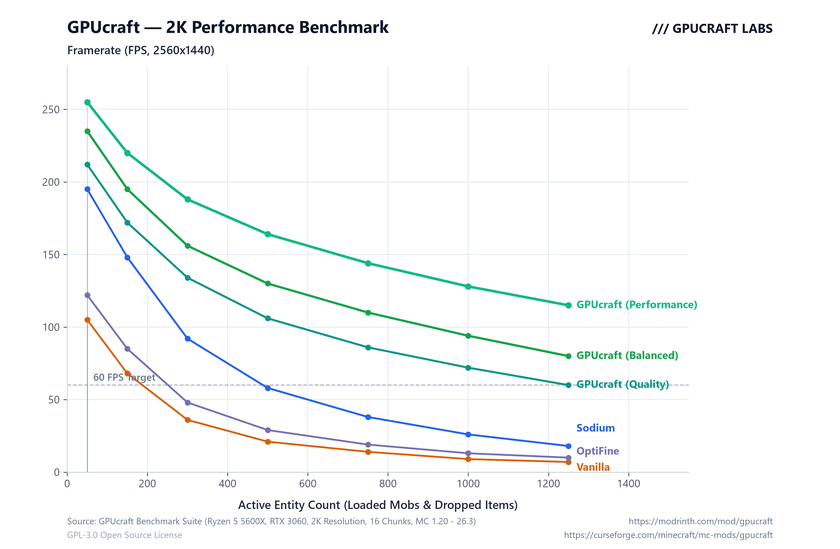
Benchmark
Links & License
- Source Code: https://github.com/kors-developer/GPUcraft
- Developer: https://github.com/kors-developer
- CurseForge: https://curseforge.com/minecraft/mc-mods/gpucraft
- Modrinth: Coming Soon (https://modrinth.com/mod/gpucraft)
This project is licensed under the GNU General Public License v3.0 (GPLv3).
Copyright (C) 2026 kors228.
GPUCraft Team
