Gugle | Gugle Carpet Addition
Create your game server with 

Gugle's Carpet Addition




GCA
Note:
To run GCA on NeoForge with Sinytra Connector, download the required compatibility plugin from the NeoForge Sinytra compatibility release.
If you need GCA for Minecraft 1.13, please click here.
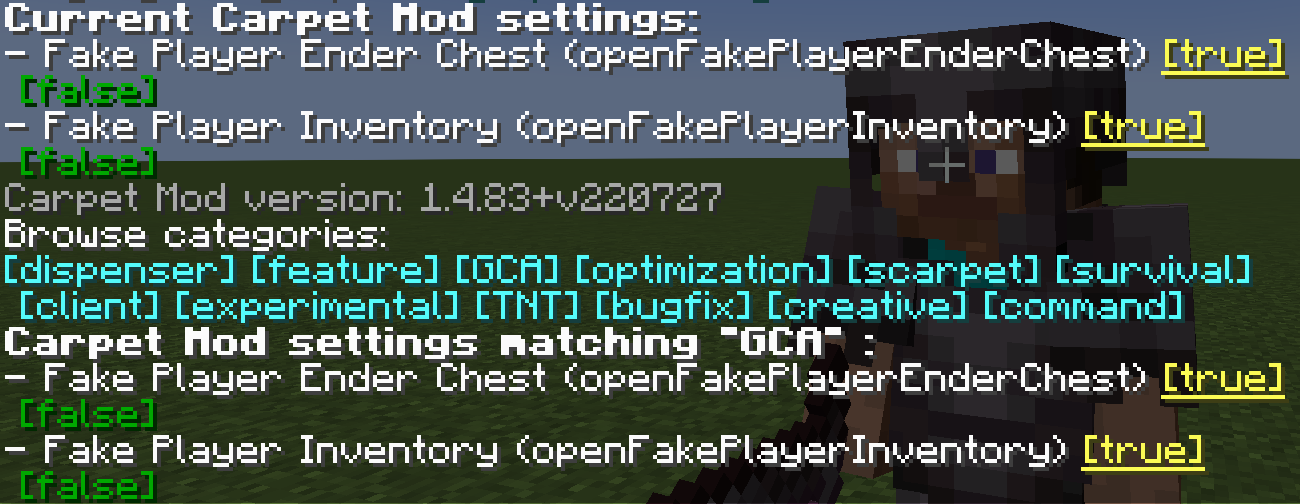
gcaPageSize
Set the number of entries per page on GCA list pages
- Type:
int - Default:
8 - Options: Any positive integer
- Categories:
GCA
/carpet [setDefault] gcaPageSize 10openFakePlayerInventory
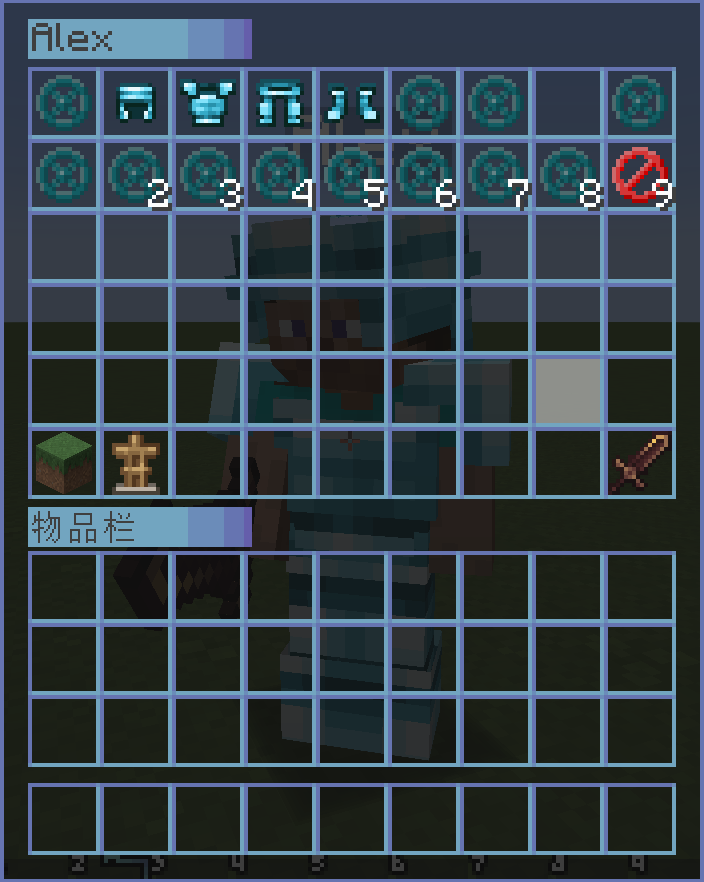
Allow player to open the fake player's inventory
- Type:
boolean - Default:
false - Options:
true,false - Categories:
GCA,BOT
/carpet [setDefault] openFakePlayerInventory trueUsage: Right-click on a fake player to open their inventory
openRealPlayerInventory
Allow player to open the real player's inventory
- Type:
String - Default:
false - Options:
true,false,ops,0,1,2,3,4 - Categories:
GCA,experimental
/carpet [setDefault] openRealPlayerInventory true
/carpet [setDefault] openRealPlayerInventory opsUsage: Right-click on other real players to open their inventory, requires appropriate permission level
openFakePlayerEnderChest
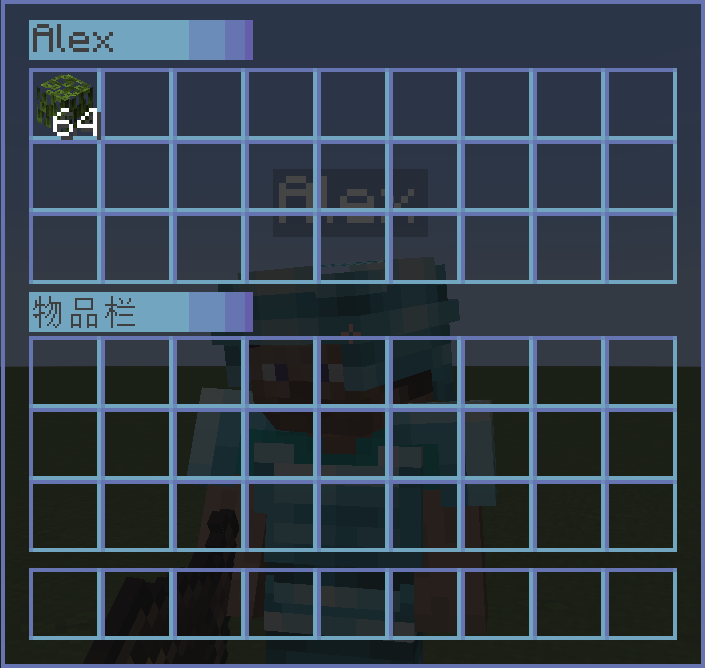
Allow player to open the fake player's ender chest
- Type:
String - Default:
false - Options:
ender_chest,true,false - Categories:
GCA,BOT
/carpet [setDefault] openFakePlayerEnderChest true
/carpet [setDefault] openFakePlayerEnderChest ender_chestUsage: Sneak (hold Shift) + right-click on a fake player to open their ender chest
fakePlayerResident
Keep the fake player when exiting the level
- Type:
boolean - Default:
false - Options:
true,false - Categories:
GCA,BOT
/carpet [setDefault] fakePlayerResident truefakePlayerReloadAction
Keep the fake player action when exiting the level
- Type:
boolean - Default:
true - Options:
true,false - Categories:
GCA,BOT
/carpet [setDefault] fakePlayerReloadAction falsefakePlayerAutoRespawn
Make the fake player automatically respawn after death
- Type:
String - Default:
false - Options:
spawn,death,setting,false - Categories:
GCA,BOT,experimental
spawn: Respawning at the spawn point.
death: Respawning at the death location.
setting: Respawning at the location stored in the bot list. If the fake player is not in the bot list, thedeathmode will be used.
/carpet [setDefault] fakePlayerAutoRespawn <spawn|death|setting>fakePlayerAutoReplenishment
Make fake player to auto replenishment
- Type:
boolean - Default:
false - Options:
true,false - Categories:
GCA,BOT
/carpet [setDefault] fakePlayerAutoReplenishment truefakePlayerAutoReplenishmentFormShulkerBox
Make fake player to auto replenishment from shulker box
- Type:
boolean - Default:
false - Options:
true,false - Categories:
GCA,BOT
/carpet [setDefault] fakePlayerAutoReplenishmentFormShulkerBox truefakePlayerAutoFish
Make fake player to auto fish. When the fishing hook catches a fish, it will automatically reel in and cast again.
- Type:
boolean - Default:
false - Options:
true,false - Categories:
GCA,BOT
/carpet [setDefault] fakePlayerAutoFish trueUsage: Let the fake player hold a fishing rod and use /player <name> use to start fishing. The fake player will automatically complete the reel-in and cast operations.
fakePlayerAutoReplaceTool
Make fake player to auto replace almost damaged tool
- Type:
String - Default:
false - Options:
true,false,keep - Categories:
GCA,BOT
true: Tools with Mending will keep 10 durability; other tools will automatically be replaced after they break.
keep: All tools will keep 10 durability.
/carpet [setDefault] fakePlayerAutoReplaceTool <true|keep>fakePlayerToolDamagedNotification
Broadcast a server-wide message when a fake player's tool breaks or when restocking fails (May cause message spam)
- Type:
boolean - Default:
false - Options:
true,false - Categories:
GCA,BOT
/carpet [setDefault] fakePlayerToolDamagedNotification truefakePlayerPrefixName
Fake Player Prefix Name
- Type:
String - Default:
#none - Options:
#none,bot_ - Categories:
GCA,BOT
/carpet [setDefault] fakePlayerPrefixName bot_
/carpet [setDefault] fakePlayerPrefixName #none
fakePlayerSuffixName
Fake Player Suffix Name
- Type:
String - Default:
#none - Options:
#none,_fake - Categories:
GCA,BOT
/carpet [setDefault] fakePlayerSuffixName _fake
/carpet [setDefault] fakePlayerSuffixName #none
fakePlayerForceOfflineUUID
Force fake players to use offline UUIDs (requires allowSpawningOfflinePlayers enabled)
- Type:
boolean - Default:
false - Options:
true,false - Categories:
GCA,BOT
/carpet [setDefault] fakePlayerForceOfflineUUID trueDisabling this feature requires clearing usercache.json and restarting the server/client to switch back to online UUIDs.
commandBot
A Bot Management Menu for saving, loading, and grouping fake players
- Type:
String - Default:
ops - Options:
ops,0,1,2,3,4,true,false - Categories:
GCA,BOT,command
/carpet [setDefault] commandBot opsCommand Usage:
/bot                                    # Show saved bot list
/bot list [page]                        # Show bot list with pagination
/bot add <player> <desc>                # Save current online fake player (including position, actions, etc.)
/bot load <player>                      # Load saved fake player
/bot remove <player>                    # Delete saved fake player
/bot group                              # Show bot group list
/bot group create <name>                # Create bot group
/bot group remove <name>                # Delete bot group
/bot group add <bot> <group>            # Add bot to group
/bot group load <group>                 # Load all bots in group
/bot group unload <group>               # Unload all bots in group
/bot group info <group>                 # View group details
/bot group generated <name> <count> [load]  # Batch generate bots and group them
Bot Controller
Use /bot controller to customize buttons on a fake player's extra control panel. Buttons can be configured globally or for an individual fake player. An individual setting overrides the global setting when both use the same slot.
Slots 3 through 26 are available. Clicking a button runs the configured /player <player> <action> command using the target fake player's name, so <action> should contain only the part after the player name. For example, attack continuous runs /player <player> attack continuous.
Command Usage:
/bot controller                                             # Show the global button list
/bot controller list [player]                               # Show global buttons or the effective buttons for a player
/bot controller global set <slot> <desc> <action>           # Set a global button
/bot controller global clear <slot>                         # Clear a global button from a slot
/bot controller global clear all                            # Clear all global buttons
/bot controller player <player> set <slot> <desc> <action>  # Set a button for one fake player
/bot controller player <player> clear <slot>                # Clear one button for a fake player
/bot controller player <player> clear all # Clear all buttons for a fake playerExamples:
/bot controller global set 3 "Continuous Attack" attack continuous
/bot controller player Steve set 4 "Continuous Use" use continuous
Enable openFakePlayerInventory or openFakePlayerEnderChest, then sneak and right-click a fake player to open the extra control panel. When the fake player's ender chest is enabled, the control buttons appear above its contents. Button descriptions containing spaces must be enclosed in double quotes.
commandBotAction
A Bot Action Management Menu for adding/removing actions and setting startup actions for bots
- Type:
String - Default:
ops - Options:
ops,0,1,2,3,4,true,false - Categories:
GCA,BOT,command
/carpet [setDefault] commandBotAction opsCommand Usage:
/bot action <bot>                       # View bot's action list
/bot action <bot> add <action>          # Add action to bot
/bot action <bot> remove <id>           # Remove action from bot
/bot action <bot> startup set <action>  # Set bot's startup action
/bot action <bot> startup clear         # Clear bot's startup actions
commandTodo
A Todo Management Menu with support for adding, removing, and marking completion
- Type:
String - Default:
ops - Options:
ops,0,1,2,3,4,true,false - Categories:
GCA,command
/carpet [setDefault] commandTodo opsCommand Usage:
/todo                           # Show todo list
/todo list [page]               # Show todo list with pagination
/todo add <desc>                # Add new todo item
/todo remove <id>               # Remove todo item
/todo success <id> [true/false] # Mark todo as done/undone
commandHere
Quickly broadcast your current position to all players and add glowing effect to yourself
- Type:
String - Default:
ops - Options:
ops,0,1,2,3,4,true,false - Categories:
GCA,command - Conditions: Only works when CarpetAmsAddition is NOT loaded
/carpet [setDefault] commandHere opsCommand Usage:
/here   # Broadcast your coordinates, showing current dimension and converted coordinates
        # Also outputs Xaero's Minimap compatible waypoint format
commandWhereis
Quickly locate players and add glowing effect to target
- Type:
String - Default:
ops - Options:
ops,0,1,2,3,4,true,false - Categories:
GCA,command
/carpet [setDefault] commandWhereis opsCommand Usage:
/whereis <player>   # Query specified player's location
/vris <player>      # Alias, same function
commandLoc
A Location Management Menu for saving, viewing, and deleting location points
- Type:
String - Default:
ops - Options:
ops,0,1,2,3,4,true,false - Categories:
GCA,command
/carpet [setDefault] commandLoc opsCommand Usage:
/loc                    # Show location list
/loc list [page]        # Show locations with pagination
/loc add <desc>         # Add location at current position
/loc remove <id>        # Remove specified location
/loc info <id>          # View location details (including dimension converted coordinates)
commandWlist
Whitelist Management, allows authorized regular players to manage the whitelist
- Type:
boolean - Default:
false - Options:
true,false - Categories:
GCA,command
/carpet [setDefault] commandWlist trueCommand Usage:
/wlist                              # Show current whitelist
/wlist add <player>                 # Add player to whitelist
/wlist remove <player>              # Remove player from whitelist
/wlist permission add <player>      # Grant player whitelist management permission (OP only)
/wlist permission remove <player>   # Revoke player's whitelist management permission (OP only)
commandBlist
Banned List Management
- Type:
boolean - Default:
false - Options:
true,false - Categories:
GCA,command
/carpet [setDefault] commandBlist true
/blist
commandSop
Simple op get
- Type:
boolean - Default:
false - Options:
true,false - Categories:
GCA,command
/carpet [setDefault] commandSop true
/sop
commandSeed
Sets the required permission level for the /seed command
- Type:
String - Default:
vanilla - Options:
vanilla,true,false,ops,0,1,2,3,4 - Categories:
GCA,command
/carpet [setDefault] commandSeed ops
/carpet [setDefault] commandSeed 0
betterFenceGatePlacement
Make the placed fence gate have the same block status as the fence gate you clicked
- Type:
boolean - Default:
false - Options:
true,false - Categories:
GCA
/carpet [setDefault] betterFenceGatePlacement truebetterWoodStrip
Only the axe with "Strip" in its name is allowed to peel logs
- Type:
boolean - Default:
false - Options:
true,false - Categories:
GCA
/carpet [setDefault] betterWoodStrip truebetterSignInteraction
Make the block attached to the sign interact when you right-click it
- Type:
boolean - Default:
false - Options:
true,false - Categories:
GCA
/carpet [setDefault] betterSignInteraction truebetterItemFrameInteraction
Make the block attached to the ItemFrame interact when you right-click it
- Type:
boolean - Default:
false - Options:
true,false - Categories:
GCA
/carpet [setDefault] betterItemFrameInteraction truebetterQuickCrafting
Keep an item in the inventory during quick crafting
- Type:
boolean - Default:
false - Options:
true,false - Categories:
GCA,experimental
/carpet [setDefault] betterQuickCrafting truesimpleInGameCalculator
Simple In-Game Calculator
- Type:
boolean - Default:
false - Options:
true,false - Categories:
GCA
/carpet [setDefault] simpleInGameCalculator truefastPingFriend
Fast ping friend
- Type:
boolean - Default:
false - Options:
true,false - Categories:
GCA
/carpet [setDefault] fastPingFriend trueqnmdLC
What is the height value for setting the LC value
- Type:
int - Default:
-1 - Categories:
GCA,experimental
/carpet [setDefault] qnmdLC 64
/carpet [setDefault] qnmdLC -1
fixedEndCrystalSync
Fixed End Crystal Sync
- Type:
boolean - Default:
false - Options:
true,false - Categories:
GCA,experimental
/carpet [setDefault] fixedEndCrystalSync truewelcomePlayer
Welcome Player
- Type:
boolean - Default:
false - Options:
true,false - Categories:
GCA
/carpet [setDefault] welcomePlayer trueDetailed welcome message configuration guide
wanderingTraderSpawnFailedWarning
Wandering Trader Spawn Failed Warning
- Type:
boolean - Default:
false - Options:
true,false - Categories:
GCA,experimental
/carpet [setDefault] wanderingTraderSpawnFailedWarning truewanderingTraderSpawnRemind
Wandering Trader Spawn Remind
- Type:
boolean - Default:
false - Options:
true,false - Categories:
GCA,experimental
/carpet [setDefault] wanderingTraderSpawnRemind truecommandTransfer
/transfer command
- Type:
boolean - Default:
false - Options:
true,false - Categories:
GCA,command - Conditions: Requires Minecraft >= 1.21
/carpet [setDefault] commandTransfer true
/transfer <server> [port]
commandTick
Fix Carpet's /tick command permission
- Type:
String - Default:
3 - Options:
true,false,ops,0,1,2,3,4 - Categories:
GCA,command,experimental - Conditions: Requires Minecraft >= 1.20.3
/carpet [setDefault] commandTick 3fakePlayerLocatorBar
Display Fake Player Positions On The Locator Bar
- Type:
boolean - Default:
true - Options:
true,false - Categories:
GCA,command,BOT - Conditions: Requires Minecraft >= 1.21.6
/carpet [setDefault] fakePlayerLocatorBar trueGugleCarpetAddition Team


Owner