
INFORMATION:
GAX is a new Anti Cheat I made for a modpack but decided to make it public. It was developed specifically for 1.19.2 but in the future I will update its version. This is meant for use on SERVERS not just on a modpack.
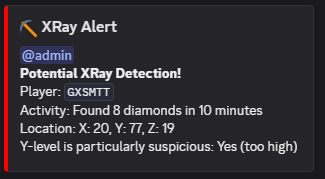
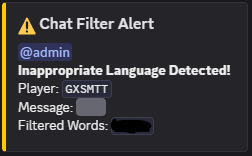
This is capable of xray detection, griefing detection, chat filtering, executing admin commands while not being in the server.
PREREQUISITES:
- You need to own a seperate discord server to your main discord
- You need to make a webhook in that server
- You need to also make a discord bot through the discord applications website
INSTALLATION GUIDE (For Server):
1. Download the JAR File and put it in the "mods" section in your server distrubters file manager.
2. When thats complete, shutdown the server, play minecraft and open the server.
3. Exit minecraft and go back to your servers file directory, go into the folder "config" and you'll see "gaxanticheat".
4. Open that file in notepad or any other editing software
5. Get your webhooks URL and stick it in the section where it asks for it, get your admin role ID (from discord) and put that where it asks for it, then if you want the bot to be integrated change the "false" to "true" then input the bots token.
6. Change any filters / add words to chat filters as you see fit.
7. SAVE the changes after you make them and close the text editor.
8. Open your minecraft server again and the webhook will display that the server has initialised.
WEBHOOK / BOT GUIDE
(Webhook is not interactive with commands, only the bot has commands)
First you need to make a webhook in your seperate discord server, name it whatever you want and set any channel, then save the changes, copy the URL and put that somewhere safe.
Next, make an admin role in the seperate discord server, once its made, copy its ID (if your putting these commands in a private channel make sure the bot also has the admin role). then save the ID somewhere safe
Then to make the discord bot, go to: https://discord.com/developers and set up your bot, if you get stuck search up tutorials on youtube.
Next, copy the bots token and save it somewhere too.
Finally, put all the information into the config file where it tells you too and enjoy.
BOT COMMANDS:
When your server is loaded and the bot is online you can do "!help" to display the commands and what they do.
These are the commands the bot is currently capable off:
!ban <username> [reason] - Ban a player from the server
!kick <username> [reason] - Kick a player from the server
!whitelist <add|remove|list> [username] - Manage the server whitelist
!checkinv <username> - Check a player's inventory contents
!mutechat - Mute the server chat
!unmutechat - Unmute the server chat
!broadcast <message> - Broadcast a message to the server
!lockdown - Instantly kick non-admins and disable joins
!unlock - Lift the lockdown and allow players to join again
!botdetection scan - Scan for bot accounts based on join patterns
!altcheck <player> - Check if a player is using alternate accounts
!status - Show server status information
!list - List online players
!spychat <on|off> - Monitor private messages or commands
!logcommands <on|off> - Log all executed commands silently
!giveitem <player> <item> [amount] [nbt] [advancements] [enchantments] - Give an item to a player
!help - Show this help message
!kick <username> [reason] - Kick a player from the server
!whitelist <add|remove|list> [username] - Manage the server whitelist
!checkinv <username> - Check a player's inventory contents
!mutechat - Mute the server chat
!unmutechat - Unmute the server chat
!broadcast <message> - Broadcast a message to the server
!lockdown - Instantly kick non-admins and disable joins
!unlock - Lift the lockdown and allow players to join again
!botdetection scan - Scan for bot accounts based on join patterns
!altcheck <player> - Check if a player is using alternate accounts
!status - Show server status information
!list - List online players
!spychat <on|off> - Monitor private messages or commands
!logcommands <on|off> - Log all executed commands silently
!giveitem <player> <item> [amount] [nbt] [advancements] [enchantments] - Give an item to a player
!help - Show this help message
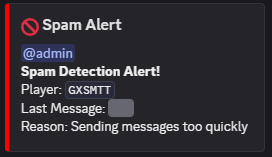
EXAMPLES OF WEBHOOKS OUTPUTS:
Made by GXSMTT
GAX AntiCheat Team