A more intuitive indicator for FTB Ultimine. This mod is the NeoForge port of FTB Ultimine Indicator.
About FTB Ultimine & Original mod
FTB Ultimine, made by FTB Team, is a mod that provides effective modes for harvesting multiple blocks at once.
Official website | Github | CurseForge (Forge) | CurseForge (Fabric)
FTB Ultimine Indicator: https://github.com/Tidy-Bear/FTB-Ultimine-Indicator
Features
Ultimine Indicator
Client side only
The core functionality of the mod.
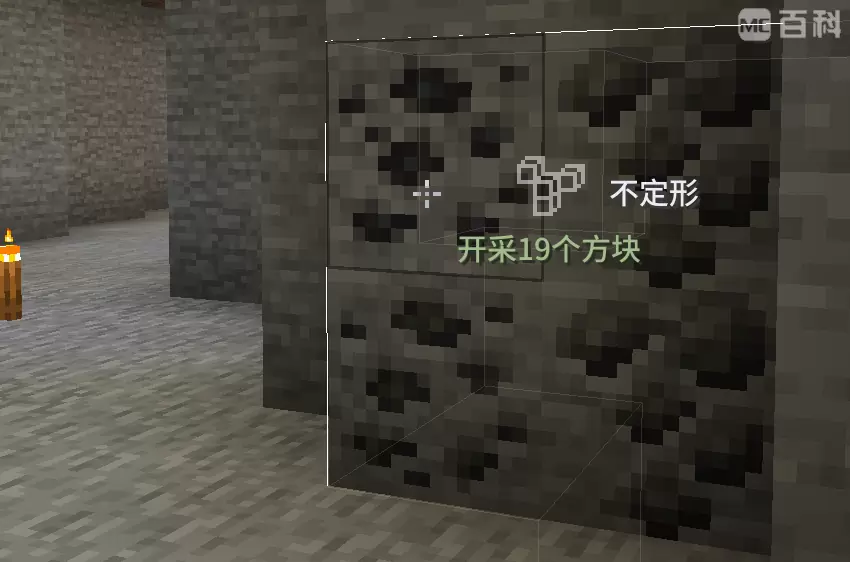
After pressing the Ultimine key (Default: ~), the Ultimine information, including the name, shape, and status of the current shape, is shown at the right of the cross-hair instead of the original plain text menu.
Will hide the original plain text menu by default.
Resourcepacks support
You can customize shape icons below the path assets/<namespace>/textures/ftbultimine_indicator/shape_icon. The filename is the internal ID of each shape, listed below:
| Shape | Id |
|---|---|
| Shapeless | shapeless |
| Small Tunne | small_tunnel |
| Small Squar (3x3) | small_square |
| Large Tunnel (3x3) | large_tunnel |
| Mining Tunnel | mining_tunnel |
| Escape Tunnel | escape_tunnel |
| Layer (A custom shape added by a certain modpack) | layer |
# Configuration
Adds a few configs to the existing config file ftbultimine-client.snbt, detailed below.
You can also adjust these by /ftbultimine config.
{
    # Original config by FTB Ultimine.
    # When holding the Ultimine key, must the player also be sneaking to show the shapes menu?
    # Default: true
    # Recommended to set to false with my mod.
    require_sneak_for_menu: false

    # Whether show the plain text menu
    # Default: false
    show_plain_text_menu: false

    # Whether to change the trigger mode of the Ultimine key to toggle instead of holding
    # Default: false
    # I prefer setting to true _(:з)∠)_
    toggle: false

    # Indicator settings by FTB Ultimine Indicator
    indicator: {
        # Whether to enable the indicator at the right of crosshair
        # Default: true
        enable: true

        # Whether to show the shape name at the right of the indicator icon (require be sneaking or require_sneak_for_menu to be false)
        # Default: true
        show_shape_name: true

        # Whether to show the current status (64 blocks, on cooldown, etc) below the indicator icon
        # Default: true
        show_status: true
    }
}
Permission
The FTB Ultimine Indicator Unofficial Team

Owner