


Frametrace
- By
A configurable, client-side performance HUD for NeoForge 1.21.1. FPS, 1% lows, frame graph, CPU, GPU, RAM, ping and TPS. Hidden by default, works with Sodium and Iris.
frametrace (1).png
frametrace1.png

frametrace2.png
kleft | Frametrace
Create a server, get 25% off your first month

Description
Frametrace
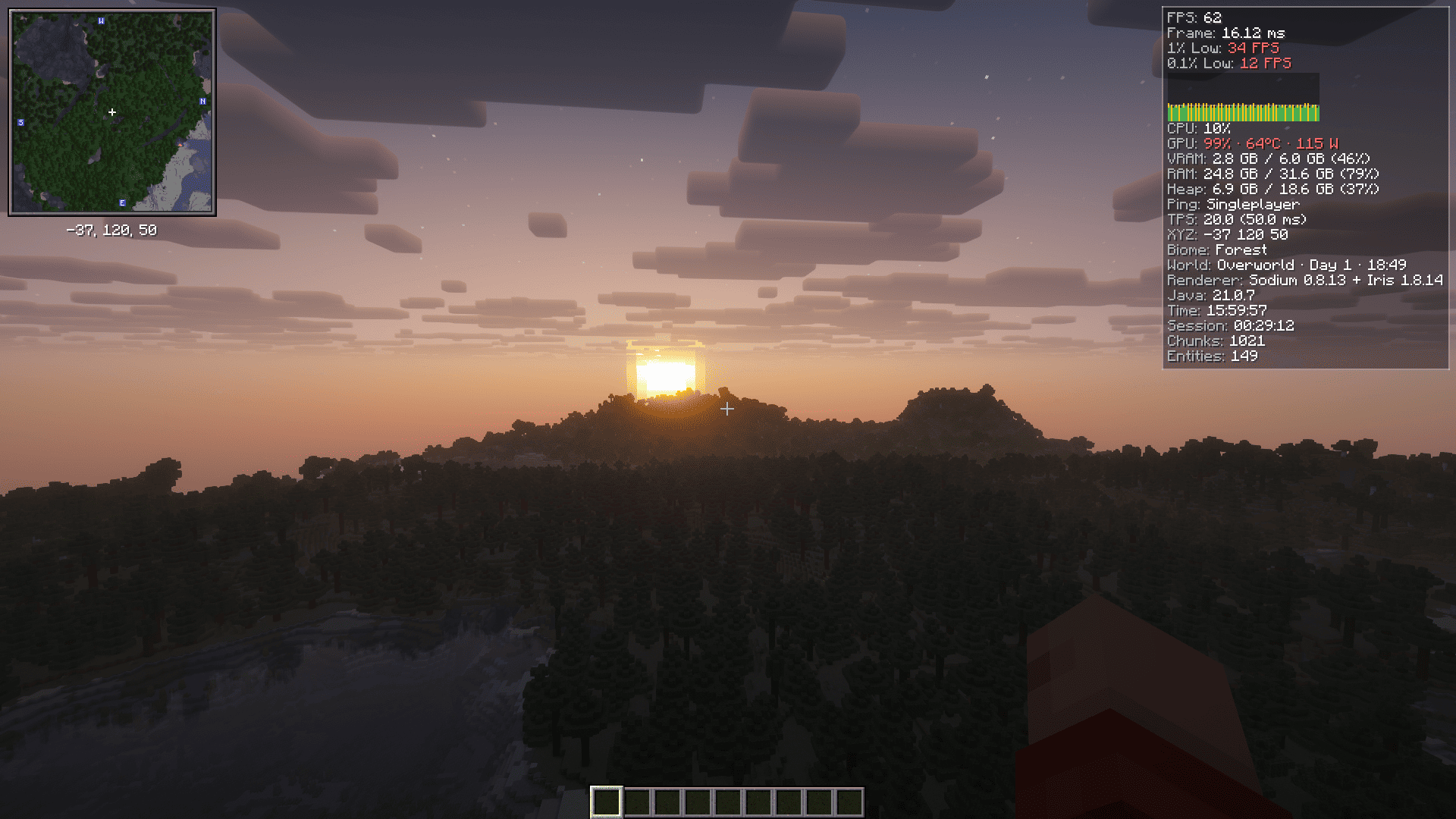
Frametrace is a lightweight, fully client-side HUD that shows how your game and your PC are actually performing. It is hidden by default, sits in the top-right corner when you turn it on, and its settings live right inside Video Settings, next to Sodium.
Features
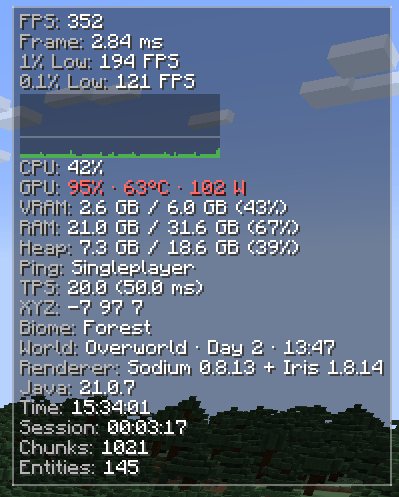
- Frame stats: smoothed FPS, frame time, 1% / 0.1% lows (calculated from a rolling window of up to 4096 frames) and a live frame-time graph.
- Hardware: CPU load and temperature, GPU load, temperature and power draw, VRAM, system RAM and JVM heap.
- Network and world: ping, TPS and MSPT (integrated server), coordinates, biome, dimension, in-game day and time, loaded chunks and entities.
- Extras: detected Sodium and Iris versions, Java version, system clock and session time.
- Modules: turn each line on or off and reorder them freely.
- Appearance: 4 corner anchors, 1-4 columns, scale, background, border and text shadow.
- Live editor: drag the HUD where you want it, scroll to resize, use the arrow keys for fine placement.
- Sodium and Iris friendly: shaders do not affect the HUD.
- Client-side only: nothing to install on the server.
- Translations: English and Russian.
Controls
| Action | How |
|---|---|
| Show / hide the HUD | F8 (rebindable in Controls) |
| Open settings | Options → Video Settings → Frametrace (Sodium 0.8+) or Mods → Frametrace → Config |
| Move and resize the HUD | Settings → Appearance → Edit position |
Commands
/frametrace help · toggle · on · off · editor · config · reset · reload · status · anchor <corner> · columns <1-4> · scale <0.5-3.0>
The config file is config/frametrace.json.
Notes
- CPU temperature on Windows needs LibreHardwareMonitor or OpenHardwareMonitor running with its WMI provider.
- GPU data is read through NVIDIA NVML where available, and through Windows performance counters or Linux sysfs otherwise. Not every value exists on every GPU, and unavailable values show as N/A.
- TPS is available in singleplayer and LAN worlds (integrated server).
- The settings tab inside Video Settings uses the Sodium 0.8+ Config API. Without it, use the Mods menu or
/frametrace config.
Requirements
- Minecraft 1.21.1
- NeoForge 21.1.0 or newer
- Java 21
- Sodium and Iris are optional
FAQ
Does it work on servers? Yes. It runs only on your client, and no server-side installation is needed.
Will it hurt my FPS? Frametrace is built to be light. Hardware sensors refresh once per second by default, and you can switch off any module you do not need.
Why is the HUD not showing? It is hidden by default. Press F8 to turn it on.
Does it work with shaders? Yes. The HUD is drawn on top of the shader output.
License
MIT.
Русский
Frametrace
Frametrace — лёгкий клиентский HUD, который показывает, как на самом деле работают игра и ваш ПК. По умолчанию он скрыт, после включения находится в правом верхнем углу, а его настройки встроены прямо в Настройки видео, рядом с Sodium.
Возможности
- Статистика кадров: сглаженный FPS, время кадра, 1% / 0,1% low (считаются по скользящему окну до 4096 кадров) и живой график frame time.
- Железо: загрузка и температура CPU, загрузка, температура и энергопотребление GPU, VRAM, оперативная память и куча JVM.
- Сеть и мир: пинг, TPS и MSPT (встроенный сервер), координаты, биом, измерение, день и время в игре, загруженные чанки и сущности.
- Дополнительно: версии Sodium и Iris, версия Java, системное время и время сессии.
- Модули: каждую строку можно включить или выключить и переставить в любом порядке.
- Внешний вид: 4 угла привязки, от 1 до 4 столбцов, масштаб, фон, рамка и тень текста.
- Живой редактор: перетащите HUD куда нужно, колесо мыши меняет размер, стрелки двигают HUD для точной подгонки.
- Дружит с Sodium и Iris: шейдеры на HUD не влияют.
- Только клиент: на сервер ничего ставить не нужно.
- Переводы: английский и русский.
Управление
| Действие | Как |
|---|---|
| Показать / скрыть HUD | F8 (можно переназначить в настройках управления) |
| Открыть настройки | Параметры → Настройки видео → Frametrace (Sodium 0.8+) или Моды → Frametrace → Настроить |
| Переместить и изменить размер HUD | Настройки → Appearance → Edit position |
Команды
/frametrace help · toggle · on · off · editor · config · reset · reload · status · anchor <угол> · columns <1-4> · scale <0.5-3.0>
Файл конфигурации: config/frametrace.json.
Примечания
- Температура CPU в Windows требует запущенной программы LibreHardwareMonitor или OpenHardwareMonitor с включённым WMI-провайдером.
- Данные GPU читаются через NVIDIA NVML, если он доступен, а иначе через счётчики производительности Windows или sysfs в Linux. Не все значения есть у каждой видеокарты, недоступные показываются как N/A.
- TPS доступен в одиночной игре и в локальных мирах (встроенный сервер).
- Вкладка в настройках видео использует Config API из Sodium 0.8+. Без него пользуйтесь меню модов или командой
/frametrace config.
Требования
- Minecraft 1.21.1
- NeoForge 21.1.0 или новее
- Java 21
- Sodium и Iris необязательны
Частые вопросы
Работает ли на серверах? Да. Мод работает только на клиенте, ставить его на сервер не нужно.
Просядет ли FPS? Frametrace сделан лёгким. Датчики железа по умолчанию обновляются раз в секунду, а любой ненужный модуль можно отключить.
Почему HUD не виден? По умолчанию он скрыт. Нажмите F8, чтобы включить его.
Работает ли с шейдерами? Да. HUD рисуется поверх картинки шейдеров.
Лицензия
MIT.
Frametrace Team


