Description
Why FPS Tune?
Compatible with other mods like Sodium, Sodium Extra, ImmediatelyFast, etc
Compatible with servers like DonutSMP, Hypixel, etc.
FPS Tune is a lightweight, client-side Fabric performance mod focused on smoother frame times and better stability during unusually demanding rendering situations.
Rather than trying to modify every part of Minecraft's renderer or promising a universal FPS boost, FPS Tune targets specific optional client-side workloads that can cause sudden performance drops — particularly large amounts of particles and heavy weather rendering.
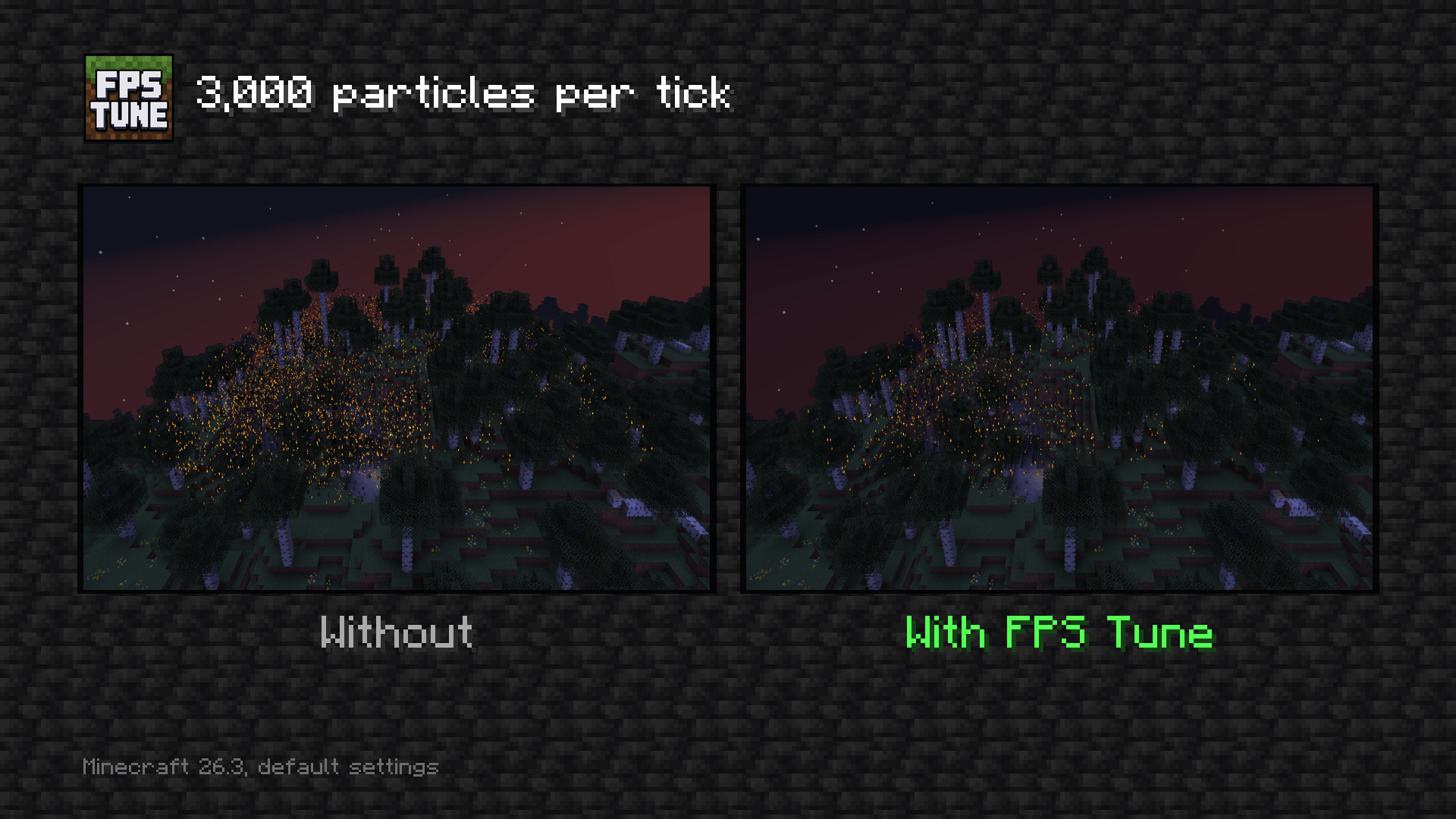
FPS Tune reduces particle workload to improve frame-time consistency. It limits how many new particle effects enter Minecraft’s client particle engine each tick, so excess effects are skipped instead of being tracked and rendered.
When Automatic adjustment is enabled, FPS Tune monitors recent local frame times. If performance remains slow, it gradually lowers the particle limit; when frames remain healthy, it slowly raises the limit again. Adjustments stay within the configured minimum and maximum and include cooldowns to avoid rapid oscillation.
The goal is simple: reduce the severity of frame drops when Minecraft suddenly has much more to render.
✨ Features
Particle workload control
FPS Tune can limit how many new particles are admitted by the client during each tick.
This can be especially useful in situations involving:
-
Large particle effects
-
PvP or combat effects
-
Explosions
-
Farms producing many particles
-
Command-generated particle effects
-
Servers or maps with unusually particle-heavy scenes
The default limit is:
300 particles per client tick
You can change this value in the configuration.
Weather rendering control
FPS Tune can optionally skip Minecraft's local rain and snow rendering pass.
This can reduce rendering work in weather-heavy scenes while leaving the actual world and server state untouched.
Weather rendering is enabled by default, so nothing changes unless you choose to disable it.
🎛️ Configuration
FPS Tune currently provides the following controls:
| Setting | Default | Description |
|---|---|---|
| FPS Tune enabled | Off | Master switch for FPS Tune |
| Particle admission control | On | Enables the particle limiter while FPS Tune is active |
| Maximum particles per tick | 300 | Maximum number of particle admissions allowed each client tick |
| Weather rendering | On | Controls whether vanilla rain and snow are rendered |
The particle limit can be configured from 0 to 10,000 particles per tick.
Configuration is stored locally in:
config/fpstune.properties
Using Mod Menu is completely optional.
📊 Performance
FPS Tune is designed for situations where optional visual workloads are already putting significant pressure on the renderer.
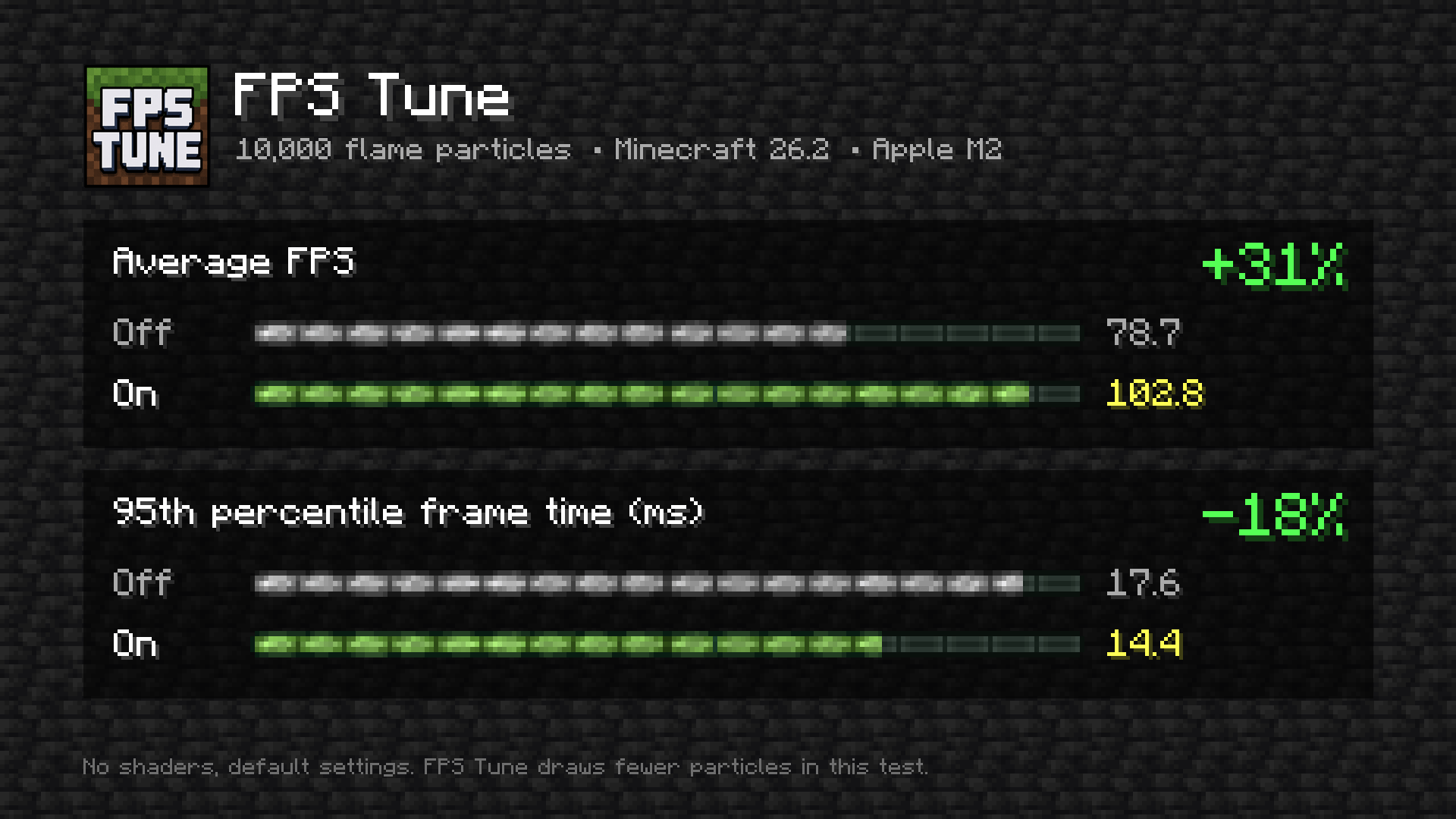
In local stress testing on an Apple M2, FPS Tune improved both average performance and longer frame times under deliberately demanding workloads.
Minecraft 1.21.11
| FPS Tune Off | FPS Tune On | |
|---|---|---|
| Average FPS | 210.10 | 215.17 |
| p95 frame time | 6.65 ms | 5.63 ms |
That test produced approximately:
+2.4% average FPS
and
15.3% lower p95 frame time
Minecraft 26.2
| FPS Tune Off | FPS Tune On | |
|---|---|---|
| Average FPS | 78.69 | 102.78 |
| p95 frame time | 17.61 ms | 14.39 ms |
That test produced approximately:
+30.6% average FPS
and
18.3% lower p95 frame time
Extreme particle test
A separate Minecraft 26.2 test repeatedly generated 4,000 flame particles.
The observed F3 readings were:
FPS Tune disabled: 38 FPS
FPS Tune enabled: 58 FPS
The enabled test intentionally displayed fewer particles because the particle controller was doing exactly what it is designed to do.
These results are workload- and hardware-specific and are not a promise that FPS Tune will increase FPS by the same amount on every system.
FPS Tune deliberately trades some optional visual workload for better performance when those controls are enabled.
🧩 Compatibility
FPS Tune is a client-side Fabric mod.
Minecraft 1.21.11
-
Fabric
-
Fabric Loader 0.18.6+
-
Java 21+
-
Fabric API required
Minecraft 26.2
-
Fabric
-
Fabric Loader 0.19.3+
-
Java 25+
-
Fabric API required
A separate FPS Tune JAR is provided for each supported Minecraft version.
Do not install both versions of FPS Tune into the same Minecraft instance.
📦 Requirements
Required
Fabric Loader
Fabric API
Optional
Mod Menu
Mod Menu provides a graphical configuration screen, but FPS Tune works without it.
🔒 Client-side only
FPS Tune only controls local rendering behavior.
It does not modify:
-
Player movement
-
Combat
-
Inventory behavior
-
Targeting
-
Player rotation
-
Clicking
-
World simulation
-
Entity behavior
-
Farms
-
Server state
-
Server packets
-
Anti-cheat behavior
FPS Tune also contains no telemetry, analytics, custom networking, remote configuration, or automatic update checker.
Everything FPS Tune controls happens locally on your Minecraft client.
🌐 Multiplayer
FPS Tune does not require installation on the server.
However, client-side does not automatically mean allowed on every server.
Some multiplayer servers have their own rules regarding client modifications, visual changes, or performance mods.
Always check the rules of the server you are playing on before enabling FPS Tune.
FPS Tune is not affiliated with any Minecraft server, Mojang, or Microsoft.
🚀 Installation
-
Install Fabric Loader for your Minecraft version.
-
Install the matching version of Fabric API.
-
Download the FPS Tune JAR matching your Minecraft version.
-
Place the JAR inside your Minecraft instance's
modsfolder. -
Start Minecraft.
-
Press
F6to enable FPS Tune.
For graphical configuration, install Mod Menu and open the FPS Tune configuration screen.
💡 Who is FPS Tune for?
FPS Tune may be useful if you experience sudden performance drops during:
-
Particle-heavy scenes
-
Large combat effects
-
Explosions
-
Heavy rain or snow
-
Busy multiplayer environments
-
Maps using large numbers of particles
-
Other unusually demanding visual situations
It is especially focused on improving the worst frames, where rendering workloads suddenly become much heavier than normal.
❓ What FPS Tune is not
FPS Tune is not intended to replace large general-purpose optimization mods.
It does not attempt to rewrite Minecraft's entire renderer, chunk system, lighting engine, or memory management.
Instead, it has a deliberately narrow scope:
Control optional rendering workloads that can cause avoidable frame-time spikes.
Because of that, FPS Tune can also be used alongside broader performance solutions where compatible.
🔧 Updates
FPS Tune does not silently update itself or contact an external update server.
When a new version is released, simply replace the old FPS Tune JAR with the new version intended for your Minecraft version.
Keep only one FPS Tune JAR installed in each Minecraft instance.
🔗 Links
Source Code:
https://github.com/imCinq/fps-tune
Issues / Bug Reports:
https://github.com/imCinq/fps-tune/issues
Configuration Documentation:
https://github.com/imCinq/fps-tune/blob/main/docs/CONFIGURATION.md
Compatibility Information:
https://github.com/imCinq/fps-tune/blob/main/docs/COMPATIBILITY.md
Benchmarking Methodology:
https://github.com/imCinq/fps-tune/blob/main/docs/BENCHMARKING.md
📜 License
FPS Tune is open source and distributed under the MIT License.