


Fixed Simple VC Port
- By
2502691f9456095ca57019c99451ce09398a30fe.png

91e9ac4599bedae1f564e14e318cfce4407a72d4_0.png
Description
About
When using Simple Voice Chat mod, the port for Voice Chat is generated randomly every time you open a LAN connection for your Single Player world. This mod lets you choose your own Voice Chat port that will be saved in the config file of the mod.
How to use
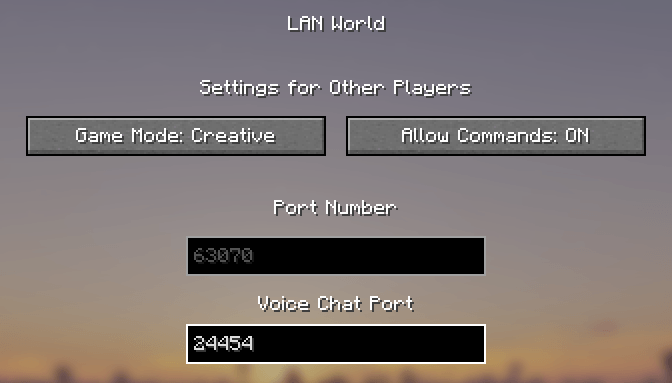
For choosing your own Voice Chat port, you need to open the Open to LAN menu, and then you will see a new Voice Chat Port field. The default port is 24454, but you can choose your own port between 1–65535.
After choosing your port, you need to click Start LAN World, and in chat you will see your current Voice Chat port under the world port.
Your selected Voice Chat port will be saved in the config file of the mod, and it will be updated when you choose another port in the Open to LAN menu.
Make sure you have configured port forwarding on your router for your selected Single Player World port and Voice Chat port. The port for opening your Single Player World requires the TCP protocol, and the Voice Chat port requires the UDP protocol.
Installation Requirements
Minecraft 1.21.1, NeoForge, Simple Voice Chat 2.6.22.
This mod only needs to be installed by the host of the Single Player World. Other players don't need to download this mod.
Future Updates
I plan to update this mod for other Minecraft versions and for Fabric and Forge. This mod is currently in Beta.
Fixed Simple VC Port Team
