The horizon, up close. Hold C and the view springs in on whatever is out there: a creeper on the far hill, a village across the valley, a friend's base on the horizon. Scroll to zoom further, up to 64x, with aim that stays steady and far mobs that stay visible. Client-side only, for Fabric, Quilt, NeoForge and Forge on Minecraft 26.2 and 26.3.
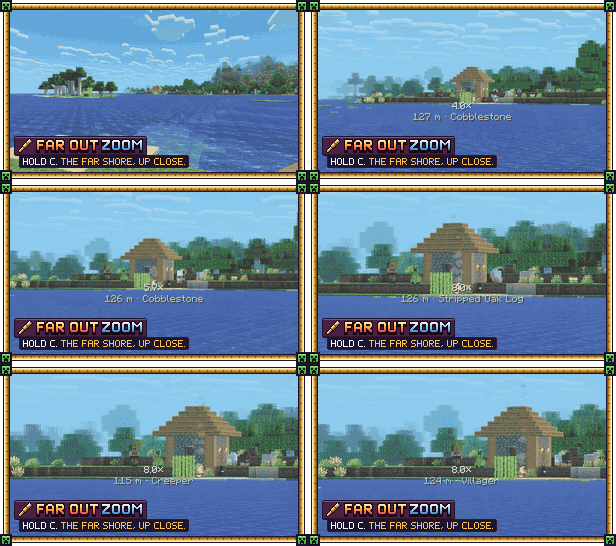
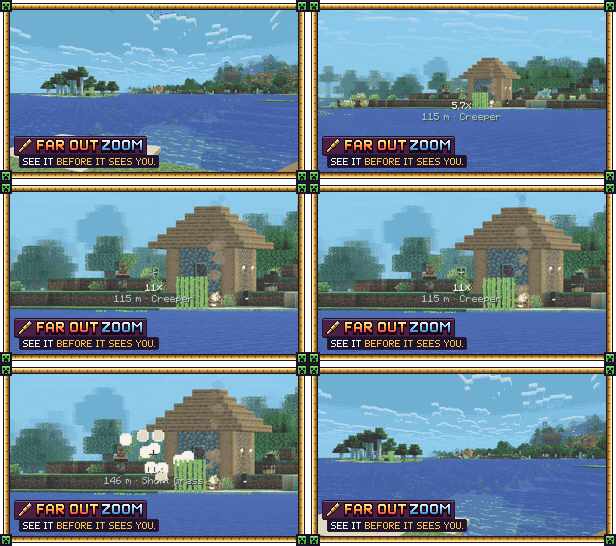
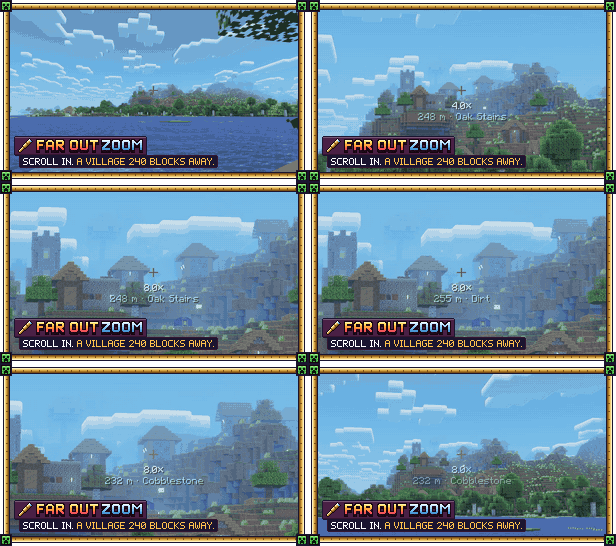

- Springy zoom: glides in with a small, satisfying overshoot, and smooth at any frame rate.
- Scroll to zoom from 1.25x to 64x, one clean step per notch.
- Steady aim: mouse sensitivity follows the zoom, so tiny movements stay tiny at 32x.
- See far: mobs, players, signs and chests stay visible as far as the zoom reaches, and distance haze thins out.
- Rangefinder: the distance and name of what you're looking at, far beyond your reach. With Distant Horizons it reads its terrain too.
- A clean view: your hand slides away, and view bobbing, sprinting and a drawn bow don't shake the zoom.
- Hold, toggle or hybrid mode, an optional spyglass or vignette overlay, and soft zoom sounds.

Hold C to zoom in and let go to zoom out. Scroll while zoomed to go further in or back out.
C is also vanilla's "Save Hotbar Activator" (creative only). While both share C, Far Out Zoom turns that one off so a zoom never overwrites a saved hotbar. Rebind either in Controls to get it back.

Open the settings from Mod Menu (Fabric), the Mods list (NeoForge and Forge), or bind the "Zoom settings" key in Controls. You can change the starting zoom, the most zoom, the speed, the springiness, the zoomed sensitivity, the mode, the overlay, the sounds, and switch each of the far-seeing features on or off.

- Client-side only. Works on any server, including vanilla servers and Realms.
- Works with Sodium, Iris shaders and Distant Horizons (zoom into its far terrain, and the rangefinder measures it, in singleplayer and on servers).
- Use one zoom mod at a time: others on C (Zoomify, Ok Zoomer, …) would fight over the key.

Put the jar for your loader and Minecraft version in your mods folder:
- Fabric or Quilt (no Fabric API needed)
- NeoForge
- Forge
To uninstall, remove the jar. Its settings live in config/far_out_zoom.json.

- Far mobs are only visible as far as the server sends them (its entity range). The zoom can't show what your game doesn't know about.
- The zoom only changes what you see: other players can't tell you're zooming.

All rights reserved, with permissions: you can use it anywhere, include it in modpacks with credit, and show it in videos. Full terms: LICENSE.
Not an official Minecraft product. Not approved by or associated with Mojang or Microsoft.

Far Out Zoom is free. If it helped you spot something far out, a coffee helps fund the next update.

Want your own server to play on with friends? My BisectHosting affiliate link gives you 25% off the first month, and I get a small commission.

More from Profet: GitHub (source and issues) · Modrinth · Ko-fi