gallery-3.webp
gallery-4.webp
gallery-5.webp
gallery-1.webp
gallery-2.webp
Description
FALLEN DIMENSIONS
COMPLETE PLAYER GUIDE
====================
This guide is written for the Fallen Dimensions source project supplied with this conversation. It describes the items, blocks, recipes, portal frames, portal activation sequences, dimension travel, and armor behavior that are actually present in that project. Minecraft/Fabric versions can change how some interfaces look, but the recipes and portal dimensions below come from the included mod files.
IMPORTANT RECIPE NOTE
---------------------
The Desolate Portal Igniter recipe in the supplied source is shapeless: one vanilla Flint and Steel plus two Ashen Shards makes one Desolate Portal Igniter. If a separately edited ZIP changes this recipe, use the recipe displayed in your installed version's recipe book or inspect its recipe JSON. This guide documents the supplied source ZIP.
CONTENTS
--------
1. What the mod adds
2. Before you play
3. The intended progression
4. Portal construction: how to read the diagrams
5. Desolate Portal: exact structure
6. Desolate Portal Igniter: crafting and use
7. The Desolate dimension
8. Desolate materials and blocks
9. Abyss Portal: exact structure
10. Abyss Dimension Button and Dark Sheath
11. The orbital laser sequence
12. The Abyss dimension
13. All items explained
14. All blocks explained
15. All crafting and processing recipes
16. Astral Upgrade Smithing Template
17. Astral armor and its powers
18. How dimension travel works
19. Portal damage, breaking, and rebuilding
20. Survival strategy and preparation lists
21. Troubleshooting
22. Complete quick-reference tables
23. Technical item identifiers
24. What is not currently implemented
1. WHAT THE MOD ADDS
--------------------
Fallen Dimensions adds two custom dimensions:
DESOLATE
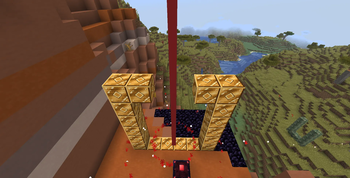
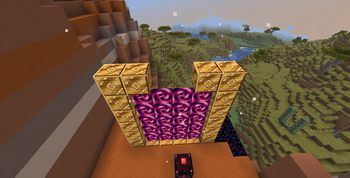
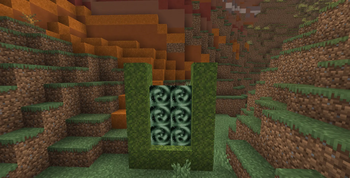
A dimension reached through a portal made from vanilla Moss Blocks. The portal is called down from above through a two-block gap at the top of the frame. Its opening sequence uses a glowing falling portal seed, sounds, and particles. Desolate-related content includes Corroded Moss, Ashen Ore, Gloom Ore, and Duskite Ore.
THE ABYSS
A separate dimension reached through a larger portal made from Duskite Blocks. Its activation method is different: craft an Abyss Dimension Button, place it on Dark Sheath near the frame, and press it. An orbital laser sequence plays before the portal opens. The Abyss-related content includes Shadowstone, Astral Ore, and Abyssal Blocks.
ASTRAL EQUIPMENT
The mod adds Astral Ingots, an Astral Upgrade Smithing Template, and four Astral armor pieces. Astral armor is made by upgrading Netherite armor at a Smithing Table. The complete four-piece set grants flight in Survival/Adventure, blocks many kinds of damage up to the configured threshold, and repairs itself automatically.
The mod also adds custom portal travel logic. If there is no suitable portal at the destination, the mod can search for a safe location and build a platform and portal for you. This is intended to make travel possible even when you have not built a matching portal at the destination yourself.
2. BEFORE YOU PLAY
------------------
- Install the mod in the matching Minecraft and Fabric environment for which it was built.
- Keep a backup of worlds that matter to you, especially before testing a new build.
- Use newly generated terrain when searching for ores. Ore generation does not normally rewrite chunks that were already generated before the mod was installed.
- Read the chat messages when portal activation fails. The igniter and button provide messages for common problems such as an incorrect frame, an already-active portal, or a blocked sky opening.
- The mod's creative inventory group is named “Fallen Dimensions.” It includes the mod's craftable content and armor for testing.
This guide describes survival crafting first. Creative mode can be used to inspect blocks or test portal dimensions without gathering all the materials.
3. THE INTENDED PROGRESSION
---------------------------
A practical route through the mod is:
1. Gather the materials for the Desolate Portal Igniter: Flint and Steel and two Ashen Shards.
2. Build the small Desolate frame from vanilla Moss Blocks.
3. Leave the two center blocks in the top row open and make sure the sky above that gap is clear.
4. Use the igniter near the frame and wait for the falling-seed animation to finish.
5. Enter the Desolate Portal and search the dimension for the mod's ores and resources.
6. Gather Gloom Crystals and Raw Duskite as you find them. These are important for the Abyss activation system and frame.
7. Smelt Raw Duskite into Duskite Ingots and craft Duskite Blocks.
8. Craft a Dark Sheath and an Abyss Dimension Button.
9. Build the larger Abyss frame out of Duskite Blocks, mount the button on Dark Sheath nearby, and press it.
10. Explore the Abyss for Astral Ore and other Abyss-related blocks.
11. Smelt Raw Astral into Astral Ingots, craft the upgrade template, and upgrade Netherite armor at a Smithing Table.
12. Complete the Astral set to gain its full-set powers.
Some materials may be encountered in different orders depending on world generation. The important dependencies are that the Desolate igniter requires Ashen Shards, the Abyss button requires a Gloom Crystal and Duskite Ingot, the Abyss frame uses Duskite Blocks, and Astral armor requires Astral Ingots plus Netherite armor.
4. PORTAL CONSTRUCTION: HOW TO READ THE DIAGRAMS
------------------------------------------------
The portal sizes listed in this guide count the outside frame blocks. The interior opening is smaller than the outside dimensions because the frame itself occupies the edges.
Both portal frames have two missing blocks at the center of the top row. Those positions are intentional. They must be empty; do not fill them with the frame material. The Desolate portal's falling seed comes down through this gap. The Abyss frame uses the same top-gap arrangement.
The diagrams below show the frame straight-on. They are schematic grid diagrams. Every letter shown is a block; a dot is an empty space. Build the rectangle upright, not flat on the ground.
A portal can be oriented along either the X axis or Z axis. In ordinary play, that means it can face either of the two horizontal directions. The structure's dimensions do not change when rotated.
5. DESOLATE PORTAL: EXACT STRUCTURE
-----------------------------------
REQUIRED FRAME MATERIAL: vanilla Moss Blocks
OUTSIDE DIMENSIONS: 4 blocks wide by 5 blocks tall
INTERIOR OPENING: 2 blocks wide by 3 blocks tall
TOP GAP: two empty positions in the middle of the top row
Front view (M = Moss Block, . = empty space):
M . . M
M . . M
M . . M
M . . M
M M M M
The top row above has the two middle positions omitted. The diagram is 4 columns wide and 5 rows tall. The four side columns and bottom row make the frame; the top row has only its two outside corner blocks. There are no blocks across the two middle positions at the top.
COUNT THE BLOCKS:
- Left side: 5 Moss Blocks
- Right side: 5 Moss Blocks
- Bottom middle: 2 Moss Blocks (the corners are already counted in the sides)
- Top corners: already counted in the sides
- Total frame blocks: 12 Moss Blocks
This is a four-wide by five-tall outer rectangle. Since the top row has its middle gap, the frame itself uses 12 Moss Blocks. You can bring a few extra in case you place one incorrectly.
INSIDE THE FRAME
The inner opening is two blocks wide and three blocks tall. Leave all six interior positions empty until the portal is activated. Also leave the two top-gap positions empty. No water, leaves, signs, torches, or other blocks should occupy the interior or the gap.
SKY CLEARANCE
The mod checks the sky above both positions in the top gap. If a roof, overhang, leaves, or terrain blocks the sky at either gap column, activation fails with a sky-blocked message. Build outdoors with a clear line to the sky above the gap.
ACTIVATION RANGE
The igniter searches for a matching frame within a 10-block radius of the position where you use it. Stand close to the frame rather than trying to activate it from far away. If several frames are nearby, move right next to the one you want.
HOW TO ACTIVATE
1. Check that the frame is 4 blocks wide and 5 blocks tall.
2. Confirm that it is made from vanilla Moss Blocks, not Corroded Moss.
3. Confirm that the top-middle two blocks are missing.
4. Confirm that the inside is completely empty.
5. Confirm that the sky above the two-block gap is clear.
6. Hold the Desolate Portal Igniter.
7. Right-click the frame or right-click in the air near it.
8. Watch for the glowing falling portal seed and wait for the portal to finish forming.
9. Walk into the completed portal to travel to Desolate.
The portal animation is not instant. The mod summons glowing falling seed blocks from high above the frame, plays a beacon-like activation sound, then fills the interior with Desolate Portal blocks after a short delay. Do not break the frame during this sequence.
6. DESOLATE PORTAL IGNITER: CRAFTING AND USE
--------------------------------------------
ITEM NAME: Desolate Portal Igniter
DURABILITY: 16 successful uses under normal Survival conditions
PURPOSE: Activates a valid Desolate Portal frame
RECIPE (SHAPELESS):
- 1 vanilla Flint and Steel
- 2 Ashen Shards
- Result: 1 Desolate Portal Igniter
Because the recipe is shapeless, place the Flint and Steel and two Ashen Shards anywhere in the crafting grid. Their positions do not matter.
This recipe uses the vanilla Flint and Steel item, not a single Flint and not an Iron Ingot. The Flint and Steel is an ingredient consumed by the recipe, so make sure you are using the intended recipe from the installed mod version.
HOW THE TOOL WORKS
- It can be used by right-clicking a block or by right-clicking in the air.
- It looks for a valid Desolate frame close to the clicked/used position.
- It checks the frame and the empty portal opening.
- It checks that the sky above the top gap is unobstructed.
- If the portal is successfully summoned, one point of durability is used.
- If activation fails, durability is not consumed.
- When the 16 durability points are exhausted, the item breaks in Survival.
- Creative-mode use does not consume durability.
The igniter is not the activation item for the Abyss Portal. The Abyss requires the Abyss Dimension Button mounted on Dark Sheath.
7. THE DESOLATE DIMENSION
-------------------------
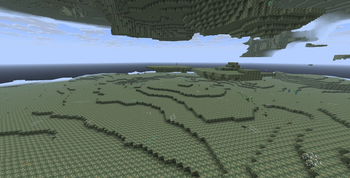
Desolate is the destination of the Moss Block portal. Its dimension data uses the mod's Desolate world-generation settings and a biome named Desolate Caves. The dimension is designed around its own terrain and resources rather than being a reskinned Overworld.
KNOWN DESOLATE-RELATED BLOCKS AND MATERIALS
- Corroded Moss
- Ashen Ore
- Gloom Ore
- Duskite Ore
- Ashen Shard
- Gloom Crystal
- Raw Duskite
- Duskite Ingot
- Duskite Block
The mod's ore generation files define configured and placed features for Ashen, Gloom, Duskite, Astral, and Shadowstone. Exact ore placement is controlled by the feature and dimension settings, so there is no single guaranteed coordinate where every player will find a deposit. Explore caves and newly generated areas rather than expecting every vein near the portal.
Gloom Ore is configured to emit light, making it easier to notice in dark areas. Duskite Ore is a source of Raw Duskite, which can be processed into Duskite Ingots. Ashen Shards are important because they are needed to craft the Desolate Portal Igniter.
The supplied source does not include a full bestiary, quest chain, boss fight, or written campaign. Do not assume a particular boss or mob must be defeated to progress; the documented progression is based on resources, portals, and armor crafting.
8. DESOLATE MATERIALS AND BLOCKS
--------------------------------
CORRODED MOSS
A modded block associated with Desolate. It is a normal placeable block item in the creative tab. It is not the correct material for building the Desolate portal frame. Use vanilla Moss Blocks for that frame.
ASHEN ORE
A modded ore block associated with Ashen Shards. The shards are used in the Desolate Portal Igniter recipe. Use an appropriate pickaxe; the mod marks its ore blocks as requiring the correct tool for drops.
ASHEN SHARD
A crafting ingredient. The supplied igniter recipe uses two Ashen Shards plus Flint and Steel. Keep a spare supply if you expect to build or replace igniters.
GLOOM ORE
A modded ore block that emits a small amount of light. Its light emission is subtle, so do not expect it to light a large cave like a torch.
GLOOM CRYSTAL
A crafting ingredient used by the Abyss Dimension Button and Dark Sheath recipes. It is one of the most important resources to keep for Abyss progression. The Desolate Portal Igniter recipe in the supplied source does not use Gloom Crystals.
DUSKITE ORE
A modded ore block associated with Raw Duskite. The block requires the correct tool to drop its resource. Mine deposits, collect the raw material, and process it in a furnace or blast furnace.
RAW DUSKITE
The unprocessed material obtained from Duskite Ore. It is not the same as a Duskite Ingot and cannot be used interchangeably in recipes that specifically ask for an ingot. Smelt it in a Furnace or Blast Furnace.
DUSKITE INGOT
The processed Duskite material. It is used to craft Duskite Blocks and the Abyss Dimension Button. Nine ingots make one Duskite Block.
DUSKITE BLOCK / BLOCK OF DUSKITE
A metal-like building block crafted from nine Duskite Ingots. It is the required frame block for the Abyss Portal. Do not substitute Duskite Ore or Raw Duskite in the portal frame.
9. ABYSS PORTAL: EXACT STRUCTURE
--------------------------------
REQUIRED FRAME MATERIAL: Duskite Blocks
OUTSIDE DIMENSIONS: 6 blocks wide by 7 blocks tall
INTERIOR OPENING: 4 blocks wide by 5 blocks tall
TOP GAP: two empty positions in the middle of the top row
Front view (D = Duskite Block, . = empty space):
D . . . . D
D . . . . D
D . . . . D
D . . . . D
D . . . . D
D . . . . D
D D D D D D
This diagram shows the two top-middle blocks omitted. The outer rectangle is six columns wide and seven rows tall. The top row contains only its two outer corner blocks. The four columns inside the left and right sides form a four-wide opening; there are five rows of interior space above the bottom frame.
COUNT THE BLOCKS:
- Left side: 7 Duskite Blocks
- Right side: 7 Duskite Blocks
- Bottom middle: 4 Duskite Blocks (corners are already counted in the sides)
- Top corners: already counted in the sides
- Total frame blocks: 18 Duskite Blocks
The recipe for a Duskite Block costs nine Duskite Ingots, so a new frame made from scratch takes 18 blocks, or 162 Duskite Ingots, before accounting for any mistakes or other crafting needs. This is an expensive frame, so gather a good supply of Raw Duskite before starting.
INTERIOR AND GAP
All 20 interior positions must be empty before activation. The two top-middle positions must also be empty. The frame cannot activate if blocks are placed in the opening.
ACTIVATION RANGE
The Abyss button searches for a valid frame within a 14-block radius. Place Dark Sheath and the button close to the frame so the frame is detected reliably.
HOW TO ACTIVATE
1. Craft 18 Duskite Blocks or gather the equivalent blocks from another source.
2. Build the 6-wide by 7-tall frame with the top-middle two positions empty.
3. Keep the four-wide by five-tall interior empty.
4. Craft Dark Sheath.
5. Craft an Abyss Dimension Button.
6. Place the button so that it is attached to a Dark Sheath block. The sheath may be next to the frame; it does not need to replace a frame block.
7. Press the button.
8. Watch the orbital strike sequence and wait for the portal to open.
9. Walk into the completed Abyss Portal to travel.
The Abyss Portal is not activated by Flint and Steel, the Desolate Portal Igniter, or an ordinary Stone Button. Use the custom Abyss Dimension Button and its Dark Sheath support block.
10. ABYSS DIMENSION BUTTON AND DARK SHEATH
------------------------------------------
ABYSS DIMENSION BUTTON RECIPE (SHAPELESS)
- 1 Gloom Crystal
- 1 Duskite Ingot
- 1 vanilla Stone Button
- Result: 1 Abyss Dimension Button
The recipe is shapeless. The three ingredients can be placed in any arrangement in the crafting grid.
The Abyss Dimension Button is a custom button block. When pressed, it first checks whether one of its neighboring blocks is Dark Sheath. If it is not mounted on or directly next to Dark Sheath, it displays a message explaining that the button must be placed on Dark Sheath. It then looks for a valid Abyss frame nearby. If it finds one, it begins the orbital strike sequence.
The button uses stone-button timing behavior, with a longer press duration than a standard short tap. You can press it normally; there is no special key combination.
DARK SHEATH RECIPE (SHAPED)
O G O
G E G
O G O
O = Obsidian
G = Gloom Crystal
E = Ender Pearl
Result: 1 Dark Sheath
Dark Sheath is a solid modded block that emits a small amount of light. Its key gameplay function is serving as the required support for the Abyss Dimension Button. Craft it before trying to activate the Abyss frame. The recipe is shaped, so the ingredients must follow the shown pattern.
11. THE ORBITAL LASER SEQUENCE
------------------------------
The Abyss portal does not open immediately after the button is pressed. It plays a staged orbital strike made from display entities, particles, light effects, screen overlays, and sounds.
Approximate sequence after the button press:
- Start: a satellite-like object appears high above the portal location. Targeting rings begin to close in, red warning flashes appear, and charge-up sounds play.
- Around tick 20: a thin aiming beam sweeps downward.
- Around tick 50: the main laser fires. Multiple colored layers form a wide beam, with red outer layers and a bright white core.
- Around tick 58: the beam impacts the ground. The sequence creates a bright flash, an energy-ball effect, an expanding blast bubble, shockwaves, particles, and impact sounds.
- Around ticks 62–104: the beam remains active, spins and pulses, while rings and sparks travel along it.
- Around tick 78: the portal is opened if the frame remains valid.
- Around tick 106: the beam collapses.
- Around ticks 118–124: temporary lights and visual entities are cleaned up.
The sequence lasts roughly six seconds at normal 20-tick-per-second game timing. The portal opens during the sustained beam, before the final cleanup. Do not break the frame while the sequence is playing; the callback checks the frame again before filling the portal. If the frame is no longer valid, the portal may not open.
The sequence is a visual effect, not a mining laser that you can pick up as an item. Its colored beam layers are temporary entities made for the animation. The actual persistent result is the Abyss Portal filling the frame interior.
12. THE ABYSS DIMENSION
-----------------------
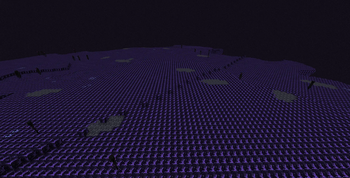
The Abyss has its own dimension definition, noise settings, and biome data. It includes Abyssal Block, Shadowstone, and Astral Ore. The mod's placed-feature data includes ore features for Astral and Shadowstone, among others.
ABYSSAL BLOCK
A solid block associated with the Abyss. It is also the native platform material the portal travel system uses when it must construct a destination platform in the Abyss. The source defines it as a block item, but does not provide a crafting recipe for it.
SHADOWSTONE
A sturdy modded block associated with Abyss world generation. It can be placed as a block item. The supplied recipe folder does not define a crafting recipe for Shadowstone.
ASTRAL ORE
A modded ore that emits more light than Gloom Ore. It is a key resource for obtaining Raw Astral, which is smelted into Astral Ingots. Astral Ore is marked as requiring the correct tool for drops and has higher block strength than the basic ores.
RAW ASTRAL
The unprocessed material used in the Astral Ingot smelting and blasting recipes.
ASTRAL INGOT
A rare crafting material. It is used to craft the Astral Upgrade Smithing Template and to upgrade each Netherite armor piece into Astral armor. Save enough ingots for the template and the four armor upgrades if your goal is a full set.
The dimension's world-generation configuration controls where these blocks appear. There is no guaranteed fixed coordinate for every deposit. If you are not finding Astral Ore, explore more of the dimension and search additional terrain.
13. ALL ITEMS EXPLAINED
-----------------------
ASHEN SHARD
A crafting ingredient associated with Ashen Ore. Two Ashen Shards are required for the Desolate Portal Igniter recipe.
GLOOM CRYSTAL
A crafting ingredient associated with Gloom Ore. It is used for the Abyss Dimension Button and Dark Sheath. Keep these crystals for portal progression.
RAW DUSKITE
An unprocessed ore material. Smelt it or blast it to make Duskite Ingots.
DUSKITE INGOT
Processed Duskite. Used for Duskite Blocks and the Abyss Dimension Button.
RAW ASTRAL
An unprocessed Astral material. Smelt or blast it into Astral Ingots.
ASTRAL INGOT
A rare material used for the Astral Upgrade Smithing Template and as the smithing addition for Astral armor.
DESOLATE PORTAL IGNITER
A 16-durability tool for activating the Desolate Portal. Successful activations use durability; failed attempts do not. It does not activate the Abyss Portal.
ASTRAL UPGRADE SMITHING TEMPLATE
A rare, high-rarity smithing template. It is used in the Smithing Table's template slot to convert matching Netherite armor into Astral armor. It is not an armor-trim template and is not used to apply decorative trims.
ASTRAL HELMET
The helmet slot item in the Astral set. It is obtained by smithing a Netherite Helmet with the Astral template and an Astral Ingot.
ASTRAL CHESTPLATE
The chest slot item in the Astral set. It is obtained by smithing a Netherite Chestplate with the Astral template and an Astral Ingot.
ASTRAL LEGGINGS
The leg slot item in the Astral set. It is obtained by smithing Netherite Leggings with the Astral template and an Astral Ingot.
ASTRAL BOOTS
The feet slot item in the Astral set. It is obtained by smithing Netherite Boots with the Astral template and an Astral Ingot.
The four armor items are marked with a permanent enchantment glint. This glint is visual and does not mean you need to enchant the armor to activate its set powers.
14. ALL BLOCKS EXPLAINED
------------------------
CORRODED MOSS
Decorative/building block associated with Desolate. Not valid for the Desolate frame; use vanilla Moss Blocks.
ASHEN ORE
Ore block associated with Ashen Shards. Correct tool required for drops.
GLOOM ORE
Light-emitting ore block associated with Gloom Crystals. Its configured light level is 4.
DUSKITE ORE
Ore block associated with Raw Duskite. Correct tool required for drops.
DUSKITE BLOCK
Crafted from nine Duskite Ingots. Required Abyss portal frame material. It is stronger than the basic ore blocks and uses a metal-like sound profile.
ABYSSAL BLOCK
A solid Abyss-related block. The travel system may use it to make a native arrival platform in the Abyss. No survival crafting recipe is included in the supplied recipe data.
SHADOWSTONE
A sturdy Abyss-related block that can be found through the mod's world-generation content. No survival crafting recipe is included in the supplied recipe data.
ASTRAL ORE
Light-emitting ore associated with Raw Astral. Correct tool required for drops.
DARK SHEATH
Crafted block that emits a small amount of light. Required as the support block for the Abyss Dimension Button.
ABYSS DIMENSION BUTTON
Custom button block. Must be placed on/against Dark Sheath and near a valid Abyss frame. Pressing it starts the orbital strike and attempts to open the portal.
DESOLATE PORTAL
The active portal block filling the Desolate frame. It emits light, has no collision, and is generated by successful igniter activation. It is not a normal survival crafting ingredient.
ABYSS PORTAL
The active portal block filling the Abyss frame. It emits light and is generated by the orbital strike sequence after the button succeeds. It is not a normal survival crafting ingredient.
FALLING PORTAL / DESOLATE PORTAL SEED
A glowing temporary block used in the Desolate activation animation. The igniter summons it from above the frame. It is a visual/sequence component, not a separate portal you need to craft.
15. ALL CRAFTING AND PROCESSING RECIPES
---------------------------------------
A. DESOLATE PORTAL IGNITER — SHAPELESS
Ingredients:
- 1 Flint and Steel
- 2 Ashen Shards
Output: 1 Desolate Portal Igniter
Any ingredient arrangement works.
B. ABYSS DIMENSION BUTTON — SHAPELESS
Ingredients:
- 1 Gloom Crystal
- 1 Duskite Ingot
- 1 Stone Button
Output: 1 Abyss Dimension Button
Any ingredient arrangement works.
C. DARK SHEATH — SHAPED
O G O
G E G
O G O
O = Obsidian, G = Gloom Crystal, E = Ender Pearl
Output: 1 Dark Sheath
The pattern must match exactly.
D. DUSKITE BLOCK — SHAPED
Fill every slot of a 3-by-3 crafting grid with Duskite Ingots:
D D D
D D D
D D D
D = Duskite Ingot
Output: 1 Duskite Block
Cost: 9 Duskite Ingots.
E. DUSKITE INGOTS FROM A DUSKITE BLOCK — SHAPELESS
Ingredient: 1 Duskite Block
Output: 9 Duskite Ingots
This lets you unpack a block if you need ingots again.
F. DUSKITE INGOT — FURNACE
Input: 1 Raw Duskite
Device: Furnace
Output: 1 Duskite Ingot
Cooking time in recipe data: 200 ticks (10 seconds at 20 ticks per second)
Experience value in recipe data: 1.0
G. DUSKITE INGOT — BLAST FURNACE
Input: 1 Raw Duskite
Device: Blast Furnace
Output: 1 Duskite Ingot
Cooking time in recipe data: 100 ticks (5 seconds at 20 ticks per second)
Experience value in recipe data: 1.0
H. ASTRAL INGOT — FURNACE
Input: 1 Raw Astral
Device: Furnace
Output: 1 Astral Ingot
Cooking time: 200 ticks (10 seconds)
Experience value in recipe data: 2.0
I. ASTRAL INGOT — BLAST FURNACE
Input: 1 Raw Astral
Device: Blast Furnace
Output: 1 Astral Ingot
Cooking time: 100 ticks (5 seconds)
Experience value in recipe data: 2.0
J. ASTRAL UPGRADE SMITHING TEMPLATE — SHAPED
. A .
A N A
. A .
A = Astral Ingot
N = Netherite Ingot
. = empty slot
Output: 2 Astral Upgrade Smithing Templates
Cost: 4 Astral Ingots and 1 Netherite Ingot.
K. ASTRAL HELMET — SMITHING TABLE
Template slot: Astral Upgrade Smithing Template
Base slot: Netherite Helmet
Addition slot: Astral Ingot
Output: Astral Helmet
L. ASTRAL CHESTPLATE — SMITHING TABLE
Template slot: Astral Upgrade Smithing Template
Base slot: Netherite Chestplate
Addition slot: Astral Ingot
Output: Astral Chestplate
M. ASTRAL LEGGINGS — SMITHING TABLE
Template slot: Astral Upgrade Smithing Template
Base slot: Netherite Leggings
Addition slot: Astral Ingot
Output: Astral Leggings
N. ASTRAL BOOTS — SMITHING TABLE
Template slot: Astral Upgrade Smithing Template
Base slot: Netherite Boots
Addition slot: Astral Ingot
Output: Astral Boots
The supplied source contains recipes for these four smithing upgrades. It does not contain crafting recipes for every block that appears in the Creative tab. If a block has no recipe listed above, do not assume it is craftable in Survival.
16. ASTRAL UPGRADE SMITHING TEMPLATE
------------------------------------
The template is a special upgrade template, not a trim template. It upgrades Netherite armor into Astral armor. It is crafted from four Astral Ingots and one Netherite Ingot, and the recipe gives two templates.
To craft it, use the 3-by-3 arrangement shown in section 15:
- Top-middle: Astral Ingot
- Middle-left: Astral Ingot
- Center: Netherite Ingot
- Middle-right: Astral Ingot
- Bottom-middle: Astral Ingot
- Four corners: empty
Each armor upgrade consumes a template, one matching Netherite armor piece, and one Astral Ingot. A complete set therefore needs four templates and four Astral Ingots for the armor upgrades, plus the materials for the templates themselves. Since each template craft produces two templates, craft the recipe twice to get four templates. The template recipe consumes eight Astral Ingots and two Netherite Ingots total for four templates; the four armor upgrades then require another four Astral Ingots. Total Astral Ingot requirement for a full set and its four templates is 12 Astral Ingots, assuming no templates are already available.
The Smithing Table has three input slots: template, base item, and addition. Put the Astral Upgrade Smithing Template in the template slot, the Netherite armor in the base slot, and the Astral Ingot in the addition slot. The result appears in the output slot.
If the template does not work, double-check that it is named Astral Upgrade Smithing Template. A vanilla armor-trim template is not a substitute. Astral armor is a smithing transformation, not a normal crafting-table recipe.
17. ASTRAL ARMOR AND ITS POWERS
-------------------------------
The full set contains:
- Astral Helmet
- Astral Chestplate
- Astral Leggings
- Astral Boots
ARMOR VALUES
The material definition assigns protection values of 5 to the helmet, 12 to the chestplate, 9 to the leggings, and 5 to the boots. The armor material also has high toughness and knockback resistance settings. Exact in-game presentation may depend on the target Minecraft version's armor interface.
DURABILITY AND REPAIR
Astral armor has an extremely high configured durability. In addition, the mod automatically repairs worn Astral armor pieces every server tick while equipped, returning their damage value to zero. In normal use, Astral armor therefore does not wear down while worn.
FULL-SET FLIGHT
You must wear all four Astral pieces at the same time. The mod grants creative-style flight capability in Survival and Adventure. If you remove any one piece, the full-set check fails and the mod removes the extra flight capability, also stopping flight if you were flying. Creative and Spectator players are handled by their normal game-mode abilities.
DAMAGE PROTECTION
With all four pieces equipped, the mod cancels incoming damage to the player when the damage amount is at most 50,000 and the damage source does not bypass invulnerability. Damage types explicitly tagged as bypassing invulnerability are excluded from this protection. Do not interpret this as absolute immunity to every possible custom damage source; the implementation checks the damage amount and the bypass-invulnerability tag.
RARITY AND GLINT
Astral armor is marked with very high rarity and a forced enchantment glint. The glint is a visual feature and does not mean the armor needs a normal enchantment to work.
RECOMMENDED ORDER
1. Obtain Raw Astral.
2. Smelt or blast it into Astral Ingots.
3. Craft enough Astral Upgrade Smithing Templates.
4. Obtain Netherite armor.
5. Use the Smithing Table to upgrade each of the four pieces.
6. Equip the complete set and confirm the flight ability is available.
18. HOW DIMENSION TRAVEL WORKS
------------------------------
The portal blocks detect players entering them and tell Minecraft to begin a portal transition. Survival players have a longer transition than players with invulnerability/creative-style abilities. Once travel begins, the mod selects the destination dimension and searches for a portal near the calculated destination coordinates.
IF A DESTINATION PORTAL EXISTS
The mod searches for an existing portal of the matching type near the target coordinates. If one is found, it places the player at a safe standing position beside that portal rather than necessarily inside the portal block.
IF NO DESTINATION PORTAL EXISTS
The mod searches for a safe floor. If it cannot use an existing portal, it builds a platform, frame, and active portal. In the Overworld it uses Moss Blocks as the Desolate-style frame/platform material or Obsidian as the Abyss-style platform material, depending on which portal type is being traveled through. In the native custom dimension it uses Corroded Moss for the Desolate travel platform or Abyssal Block for the Abyss travel platform. The exact placement is handled automatically.
COORDINATE SCALING
Desolate uses a scale of 1.0 relative to the Overworld, meaning horizontal coordinates are transferred at a 1:1 scale before safe-location adjustments.
The Abyss uses a scale of 0.125 when traveling from the Overworld into the Abyss. This compresses horizontal coordinates by a factor of eight. Returning reverses the scale. Because the mod also searches for a safe floor and nearby portal, your final standing position may not be exactly the raw scaled coordinate.
SAFE ARRIVAL
In the custom dimension, the travel system scans for a suitable floor with several clear blocks above it. If it cannot find a suitable existing portal, it may build a platform around a safe spot or fall back to a configured Y level. This automatic construction is meant to reduce the chance of arriving inside solid terrain.
RETURNING HOME
Enter the active portal at the destination to travel back. The destination search may reuse an existing Overworld portal or create a new return structure if no suitable portal is found. Keep the portal area accessible and avoid enclosing the opening with blocks.
19. PORTAL DAMAGE, BREAKING, AND REBUILDING
------------------------------------------
A portal is only valid while its frame remains intact and the interior is completely filled with the matching portal blocks. The mod periodically revalidates portals near players. If a portal block is broken, connected portal blocks are removed. If a frame block is broken and the frame no longer matches, the portal is cleaned up rather than left as a broken, nonfunctional opening.
DESOLATE FRAME DAMAGE
If a Moss Block in the frame is removed, the portal may close. Replace the missing Moss Block, ensure the top gap and interior are still correct, and activate the frame again with the igniter.
ABYSS FRAME DAMAGE
If a Duskite Block is removed from the frame, the portal may close. Repair the frame with Duskite Blocks and press the Abyss Dimension Button again after confirming Dark Sheath support.
BREAKING THE PORTAL INTERIOR
Portal blocks are not ordinary solid blocks. Breaking one portal block causes the connected portal area to be removed. Rebuild and reactivate the portal rather than expecting the remaining pieces to keep working.
DURING ACTIVATION
Avoid changing the frame while the Desolate falling-seed animation or the Abyss orbital strike is running. Both sequences check that the frame still exists before completing. If the frame is damaged during the sequence, activation can fail.
20. SURVIVAL STRATEGY AND PREPARATION LISTS
-------------------------------------------
BEFORE ENTERING DESOLATE
- Bring ordinary survival gear, food, tools, blocks, and torches.
- Keep the Desolate Portal Igniter safe; it has 16 successful uses.
- Gather Ashen Shards to make additional igniters if necessary.
- Keep Gloom Crystals for Dark Sheath and the Abyss button.
- Gather Raw Duskite for the Abyss frame.
- Keep spare blocks for bridging, shelter, and marking the route home.
BEFORE BUILDING THE ABYSS PORTAL
- Prepare 18 Duskite Blocks for the minimum 6-by-7 frame shown in this guide.
- Remember that 18 Duskite Blocks require 162 Duskite Ingots if all blocks are crafted from ingots.
- Prepare one Gloom Crystal, one Duskite Ingot, and one Stone Button for the Abyss Dimension Button.
- Prepare four Obsidian, four Gloom Crystals, and one Ender Pearl for one Dark Sheath.
- Keep the frame interior and the top gap empty.
- Place the button directly on/against Dark Sheath and within 14 blocks of the frame.
BEFORE MAKING ASTRAL ARMOR
- Gather Raw Astral and process it into Astral Ingots.
- Obtain a Netherite Helmet, Chestplate, Leggings, and Boots.
- For four templates, craft the template recipe twice: this costs eight Astral Ingots and two Netherite Ingots.
- For the four armor upgrades, reserve another four Astral Ingots.
- Total Astral Ingots for a new full set plus four templates: 12.
- Use a Smithing Table, not a crafting table.
RESOURCE MANAGEMENT
- Do not use all Gloom Crystals on decorative builds if you still need Dark Sheath and the Abyss button.
- Do not confuse Raw Duskite with Duskite Ingots; process raw materials before crafting blocks or buttons.
- Keep enough Duskite Ingots aside for the button before converting every ingot into Duskite Blocks.
- Astral Ingots are used both for template crafting and armor upgrades, so calculate the total requirement before spending them.
21. TROUBLESHOOTING
-------------------
MESSAGE: “No valid Desolate frame nearby”
- Check the outside dimensions: 4 wide by 5 tall.
- Use vanilla Moss Blocks for the frame.
- Ensure the two top-middle positions are empty.
- Ensure the interior is two blocks wide by three blocks tall and all air.
- Move within 10 blocks of the frame before using the igniter.
- Check that you have not accidentally used Corroded Moss or another modded block instead of vanilla Moss Blocks.
MESSAGE: “The sky must be open above the gap in the frame”
- Remove any roof or overhang above the top gap.
- Check both top-gap columns; both must have open sky.
- Retry after the area is clear.
MESSAGE: “That portal is already open”
- The frame already contains an active portal. Enter it instead of trying to activate it again.
IGNITER FAILS WITHOUT OPENING A PORTAL
- Confirm that the item is the Desolate Portal Igniter.
- Right-click close to the frame, either on a block or in the air.
- Confirm that the frame is valid and not already active.
- Failed attempts should not consume durability. If the tool breaks after repeated successful uses, remember its durability is 16.
ABYSS BUTTON SAYS IT NEEDS DARK SHEATH
- Place Dark Sheath directly beneath or against the button so that the button's neighboring-block check can detect it.
- Do not mount the button on ordinary stone, Obsidian, or Duskite and expect it to work without Dark Sheath.
MESSAGE: “No valid Abyss frame nearby”
- Check the outside dimensions: 6 wide by 7 tall.
- Use Duskite Blocks for the frame.
- Leave the two top-middle positions empty.
- Leave the four-wide by five-tall interior empty.
- Move the button within 14 blocks of the frame.
- Make sure the frame has not been damaged.
ABYSS BUTTON PRESSES BUT THE PORTAL DOES NOT OPEN
- Check for a valid frame before pressing it again.
- Ensure the button is on Dark Sheath.
- Allow the full laser sequence to run; it is not instantaneous.
- Do not break the frame while the sequence is playing.
- If the frame becomes invalid during the sequence, repair it and press the button again.
I CANNOT CRAFT THE DESOLATE IGNITER
- The supplied source recipe uses one Flint and Steel plus two Ashen Shards.
- It is shapeless, so ingredient placement does not matter.
- If your installed version has a different recipe, verify that you installed the intended mod build and check the recipe book.
I CANNOT CRAFT THE ABYSS BUTTON
- Use one Gloom Crystal, one Duskite Ingot, and one vanilla Stone Button.
- It is shapeless.
- Make sure you have an ingot, not Raw Duskite or a Duskite Block.
I CANNOT CRAFT DARK SHEATH
- Use the exact 3-by-3 shaped recipe: Obsidian in all four corners, Gloom Crystals in the four edge-middle slots, and an Ender Pearl in the center.
- The recipe is shaped; rearranging the ingredients will not work.
I CANNOT CRAFT A DUSKITE BLOCK
- Smelt Raw Duskite into Duskite Ingots.
- Fill all nine crafting grid slots with Duskite Ingots.
- One block requires nine ingots.
I CANNOT MAKE ASTRAL INGOTS
- Smelt or blast Raw Astral in the matching furnace type.
- The recipe input is Raw Astral, not Astral Ore itself. Mine the ore and obtain the raw material according to the installed version's drops.
ASTRAL ARMOR DOES NOT APPEAR IN THE CRAFTING TABLE
- It is not a crafting-table recipe.
- Use a Smithing Table.
- Put the Astral Upgrade Smithing Template in the template slot, matching Netherite armor in the base slot, and Astral Ingot in the addition slot.
THE TEMPLATE DOES NOT WORK
- Use the mod's Astral Upgrade Smithing Template, not a vanilla trim template.
- Ensure the base item is the matching Netherite armor piece.
- Ensure an Astral Ingot is in the addition slot.
I HAVE ONLY PART OF THE ASTRAL SET AND CANNOT FLY
- Flight is granted only when the helmet, chestplate, leggings, and boots are all equipped at once.
- Equip the missing Astral piece and check again.
THE PORTAL DISAPPEARED
- The mod removes connected portal blocks when the frame or portal is no longer valid.
- Repair the entire frame and reactivate it with the correct method.
I CANNOT FIND ORES
- Ore distribution is generated into terrain and is not guaranteed at a specific coordinate.
- Search more of the custom dimension.
- If you installed the mod after generating the world, explore new chunks.
- Confirm the mod loaded successfully and that you are using the correct version.
22. COMPLETE QUICK-REFERENCE TABLES
-----------------------------------
PORTALS
Desolate frame: 4 wide x 5 tall; Moss Blocks; top-center two blocks omitted; interior 2 x 3; activate with Desolate Portal Igniter; igniter range 10 blocks; clear sky above top gap required.
Abyss frame: 6 wide x 7 tall; Duskite Blocks; top-center two blocks omitted; interior 4 x 5; activate with Abyss Dimension Button on Dark Sheath; button range 14 blocks; wait for orbital laser sequence.
ITEM PURPOSES
Ashen Shard: ingredient for Desolate Portal Igniter.
Gloom Crystal: ingredient for Abyss Dimension Button and Dark Sheath.
Raw Duskite: smelt/blast into Duskite Ingot.
Duskite Ingot: Abyss button and Duskite Block crafting.
Raw Astral: smelt/blast into Astral Ingot.
Astral Ingot: template crafting and armor upgrades.
Desolate Portal Igniter: activates Desolate portal; 16 durability.
Astral Upgrade Smithing Template: smithing upgrade for Netherite armor.
BLOCK PURPOSES
Corroded Moss: Desolate-related building block; not a Desolate frame block.
Ashen Ore: Ashen Shard-related ore.
Gloom Ore: light-emitting ore associated with Gloom Crystals.
Duskite Ore: ore associated with Raw Duskite.
Duskite Block: Abyss portal frame material.
Abyssal Block: Abyss-related block and native Abyss platform material.
Shadowstone: Abyss-related world-generation block.
Astral Ore: light-emitting ore associated with Raw Astral.
Dark Sheath: support block required by Abyss Dimension Button.
Desolate Portal: active Desolate travel block.
Abyss Portal: active Abyss travel block.
Falling Portal: temporary Desolate opening animation block.
Abyss Dimension Button: activates Abyss portal when correctly placed.
23. TECHNICAL ITEM IDENTIFIERS
------------------------------
The mod namespace is “fallendimensions”. These identifiers can be useful for commands, logs, and identifying items in technical tools. Use the exact identifiers supported by the Minecraft version and command syntax you run.
ITEMS
fallendimensions:ashenshard
fallendimensions:gloomcrystal
fallendimensions:rawduskite
fallendimensions:duskiteingot
fallendimensions:rawastral
fallendimensions:astralingot
fallendimensions:desolateportaligniter
fallendimensions:astralupgradetemplate
fallendimensions:astralhelmet
fallendimensions:astralchestplate
fallendimensions:astralleggings
fallendimensions:astralboots
BLOCKS
fallendimensions:corrodedmoss
fallendimensions:ashenore
fallendimensions:gloomore
fallendimensions:duskiteore
fallendimensions:duskiteblock
fallendimensions:abyssalblock
fallendimensions:shadowstone
fallendimensions:astralore
fallendimensions:darksheath
fallendimensions:abyssdimensionbutton
fallendimensions:desolateportal
fallendimensions:abyssportal
fallendimensions:desolateportalseed
The portal blocks and falling seed are sequence blocks rather than ordinary survival-crafted items. Their appearance in technical registries does not mean there is a normal crafting recipe for them.
24. WHAT IS NOT CURRENTLY IMPLEMENTED
------------------------------------
The supplied source contains two dimensions, their portal systems, several ores and blocks, crafting/processing recipes, Astral armor, and the orbital laser animation. The source does not define a complete custom mob roster, boss encounters, a quest book, or a full lore campaign. It also does not provide survival crafting recipes for every block shown in the Creative tab. Do not rely on undocumented boss drops or recipes when progressing.
The portal frames are the central progression mechanics:
- Moss Block frame + Desolate Portal Igniter = Desolate Portal.
- Duskite Block frame + Abyss Dimension Button on Dark Sheath = Abyss Portal.
- Astral Ingots + Netherite armor + Astral Upgrade Smithing Template = Astral armor.
If your installed version differs from this guide, the in-game recipe book and the files in that exact version take precedence. The recipe JSON is the authoritative definition for crafting, and the portal definition files specify frame dimensions and frame materials.
end
Fallen Dimensions Team