Eye of Ender
- By
A minimalist 3D HUD that shows what you’re looking at: blocks, fluids, mobs, container contents and right-click actions.
An eye that sees what you see. A quiet whisper beside the crosshair: what it is, where it came from, and how to touch it. Nothing more.

Eye of Ender is a client-side HUD that tells you what you’re looking at the moment you look at it: blocks, fluids, mobs and what’s inside containers, plus what right-clicking will do. It’s built to be minimalist and fit the vanilla look, with a subtle 3D sway that makes the HUD feel part of the world instead of pasted over it. Inspired by Jade/WTHIT and by the nameplates of AAA games, all redesigned in its own style.

- Jade, WTHIT, The One Probe, HWYLA: they show what you're looking at, and so does Eye of Ender. Use one, or hide the other's tooltip.
- Neat, ToroHealth Damage Indicators and other mob health bar mods: Eye of Ender draws its own health line above mobs. Keep one, or turn off *Mob health lines*.
- Held Item Tooltips: replaced by Eye of Ender's held item name. Keep one, or turn off *Held item name*.
- Pick Up Notifier: replaced by the Pickups widget. Keep one, or turn off *Pickups*.
- Chat Impressive Animation and other chat animation mods: both animate the chat and the typing bar. Keep one, or turn off *New messages slide in* and *Chat slide animation*.
- Typing Animation: both animate the text in text fields. Keep one, or turn off *Typing animation*.
- GUI Compass, GUI Clock, GUI Followers: same widgets. Keep one set, or hide Eye of Ender's in the config.
- Spatial GUI and other 3D HUD mods: both tilt the HUD. Keep one, or turn off *3D widgets*.
- Block outline mods: Eye of Ender replaces the vanilla block outline. Keep one, or turn off the outline.
- Mods that move the chat or the hotbar: Eye of Ender already lifts the chat above your HUD. Turn off *Chat above the HUD* if another mod is moving it.
- Click Advancements: redundant on the client, but compatible. Its server-side clickable advancements are understood too.
- Showcase Item: item shares from servers running it show up with icons. If you see two icons on the same item, turn off *Item icons in chat*.

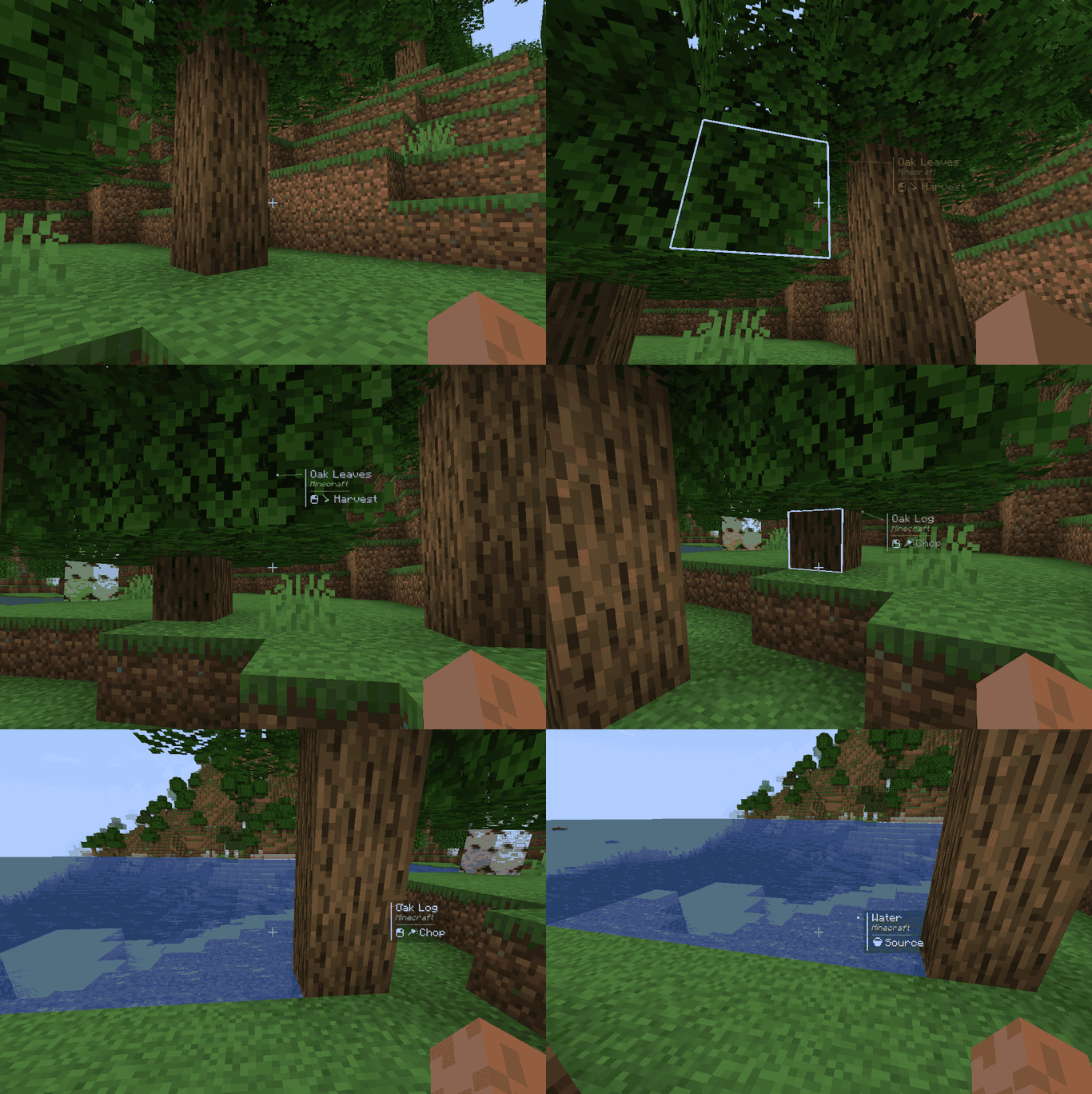
Some of the features: container previews (chests, shulkers, chest boats/minecarts and modded containers), fluid and cauldron info, brewing stand, furnace, campfire, jukebox, note block, composter, item frames, armor stands and dropped items, trading indicator including modded ones like Goblin Traders), right-click action hints, wrong-tool warning, compass/clock/companions HUD, drag-and-drop layout editor.
Pretty much anything can be turned off and changed!

;)
Eye of Ender Team