

EV-Gunpowder-Recipe
- By
gun20_1.png
gun20_2.png
Description
💥 EV Gunpowder Recipe
🧱 Mortar Update – Version 2.0.0
EV Gunpowder Recipe is a lightweight, vanilla-friendly NeoForge mod that adds a new and immersive way to produce your own Gunpowder in Minecraft.
With Version 2.0.0 – Mortar Update, the mod has received a major overhaul.
Gunpowder is no longer crafted directly in the standard crafting grid. Instead, the mod introduces the new EV Mortar – a custom processing block with its own interface, progress system and grinding mechanic.
🪨 The EV Mortar
The EV Mortar is the main feature of Version 2.0.0.
Once crafted and placed, simply right-click the block to open its interface.
The Mortar contains three slots:
⚫ Coal or Charcoal
🪨 Flint
💥 Gunpowder Output
Once the correct ingredients are inserted, processing starts automatically.
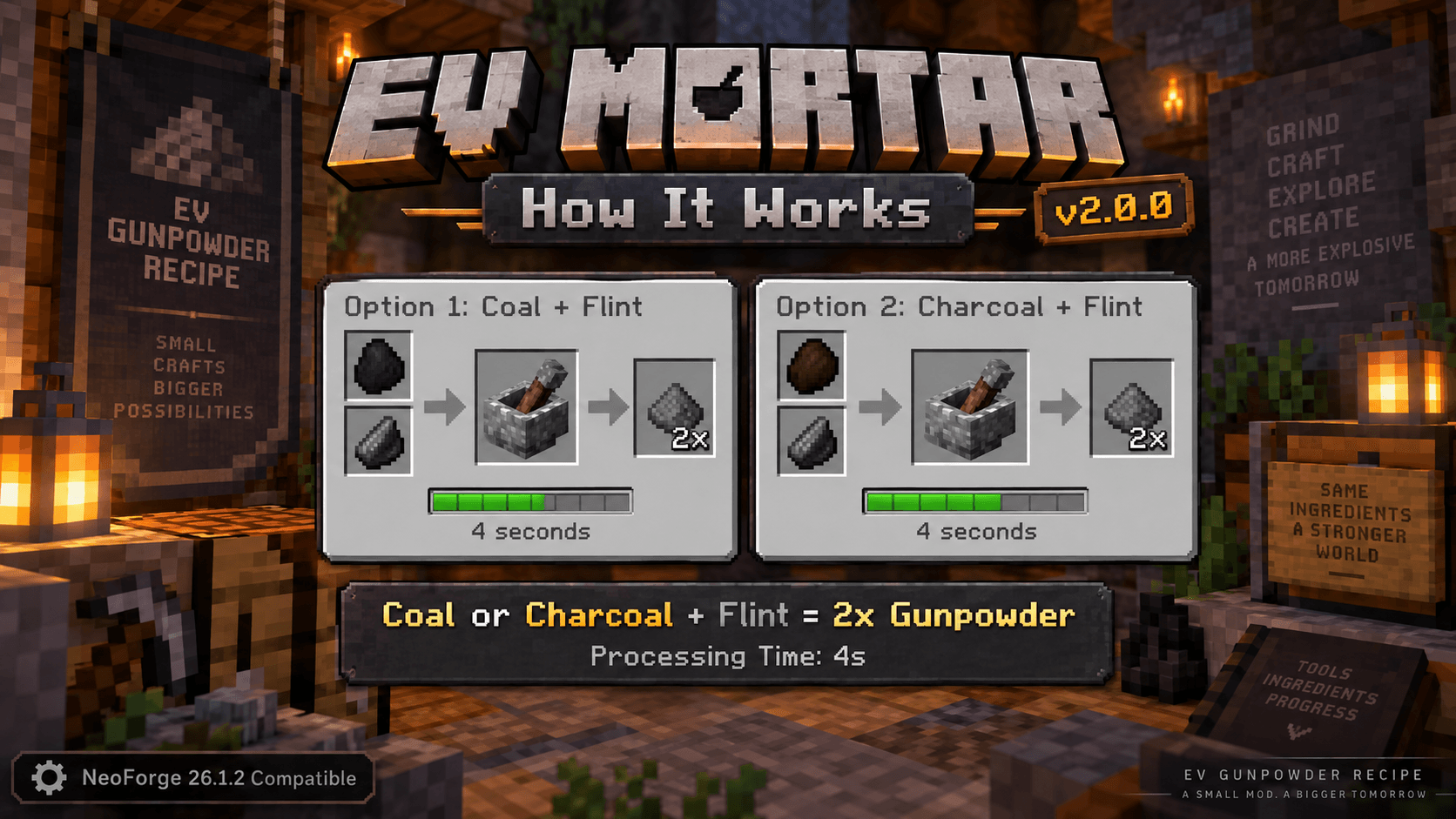
💥 Producing Gunpowder
There are two available recipes.
⚫ Option 1
1× Coal
➕
1× Flint
⬇️
💥 2× Gunpowder
🟤 Option 2
1× Charcoal
➕
1× Flint
⬇️
💥 2× Gunpowder
⏱️ Processing Time
Gunpowder is not produced instantly.
The EV Mortar requires:
⏱️ 4 Seconds per Process
During processing:
✅ A progress bar is displayed
✅ The grinding process is shown in the interface
✅ A matching grinding sound is played
✅ The pestle is animated inside the GUI
This makes producing Gunpowder feel much more immersive than using a standard crafting recipe.
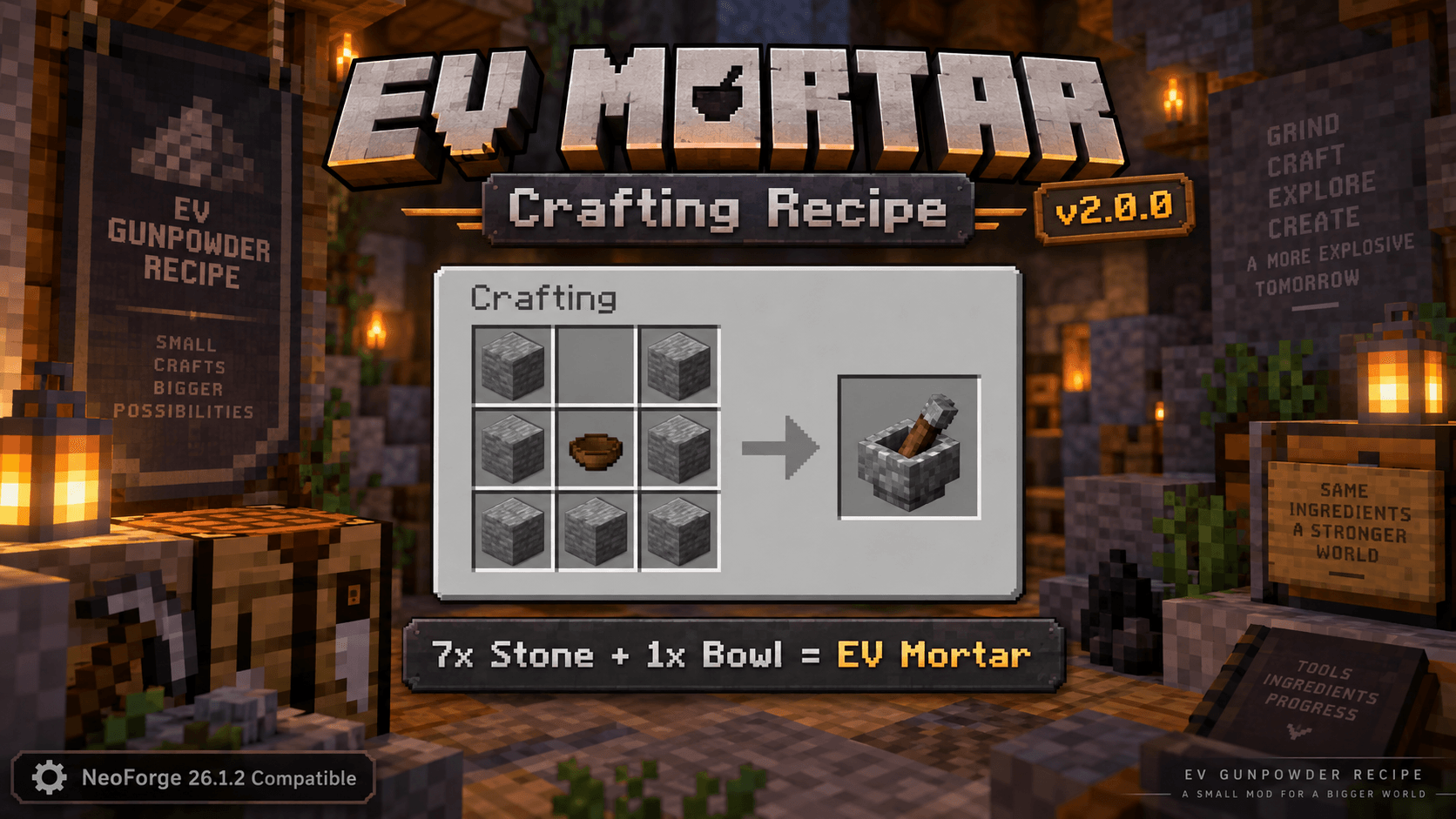
🛠️ Crafting the EV Mortar
To craft the EV Mortar you need:
🪨 7× Stone
🥣 1× Bowl
Crafting layout:
Top Row:
Stone | Empty | Stone
Middle Row:
Stone | Bowl | Stone
Bottom Row:
Stone | Stone | Stone
After crafting it, the EV Mortar can be placed like a normal block.
✨ Features
✅ Custom EV Mortar block
✅ Custom 3D mortar and pestle model
✅ Custom user interface
✅ Three inventory slots
✅ Supports Coal and Charcoal
✅ Produces 2× Gunpowder per process
✅ 4-second processing time
✅ Progress indicator
✅ Grinding sounds
✅ Animated pestle inside the GUI
✅ Mortar inventory contents are saved
✅ Stored items are returned when the Mortar is broken
✅ Vanilla-friendly gameplay
✅ Survival-friendly
✅ Multiplayer compatible
✅ Modpack friendly
✅ No additional mods required
🌍 Made for Survival, Servers & Modpacks
EV Gunpowder Recipe is designed to provide an alternative way of obtaining Gunpowder without completely removing the traditional Minecraft Survival experience.
Instead of making Gunpowder freely or instantly available, players still need to gather resources and process them using the EV Mortar.
The mod is especially suitable for:
⚔️ Survival worlds
🌐 Multiplayer servers
📦 Modpacks
🏕️ Vanilla-style servers
⚙️ Lightweight QoL and technology modpacks
🔄 What's New in Version 2.0.0?
Version 2.0.0 is the biggest EV Gunpowder Recipe update so far.
In Versions 1.0.0 and 1.1.0, Gunpowder could be produced directly through the standard crafting grid.
With the Mortar Update, these direct crafting recipes have been removed.
Starting with Version 2.0.0, Gunpowder is produced using the new EV Mortar.
The mod has therefore evolved from a simple recipe addition into a complete NeoForge mod featuring:
🧱 A custom block
🎨 A custom model
🖥️ A custom GUI
⚙️ A dedicated processing system
🎮 What Can the Gunpowder Be Used For?
The produced Gunpowder is regular Minecraft Gunpowder and works exactly like the vanilla item.
It can be used for things such as:
🧨 TNT
🚀 Firework Rockets
⭐ Firework Stars
🧪 Splash Potions
⚙️ Other vanilla recipes
📦 Compatibility
Mod Version: 2.0.0
Minecraft: 26.1.2
Modloader: NeoForge
NeoForge: 26.1.2
🛠️ Installation
-
Install NeoForge
-
Download
EV-Gunpowder-Recipe-2.0.0-NeoForge-26.1.2.jar -
Copy the JAR file into your:
mods
folder.
4. Restart Minecraft or your server.
⚠️ If Version 1.0.0 or 1.1.0 is still installed, remove the old version from your mods folder first.
❤️ EV Mods
EV Mods focuses on small, useful and vanilla-friendly additions for Minecraft.
The goal is to add practical features that improve and expand gameplay without making Minecraft unnecessarily complicated.
💥 EV Gunpowder Recipe
Small Recipes – Bigger Possibilities
💥 EV Gunpowder Recipe
🧱 Mortar Update – Version 2.0.0
EV Gunpowder Recipe ist eine kleine, Vanilla-nahe NeoForge-Mod, die Minecraft um eine neue und immersive Möglichkeit erweitert, Schwarzpulver selbst herzustellen.
Mit Version 2.0.0 – Mortar Update wurde die Mod grundlegend erweitert.
Schwarzpulver wird nicht mehr einfach über das normale Craftingfeld hergestellt. Stattdessen führt die Mod den neuen EV Mörser ein – einen eigenen Verarbeitungsblock mit eigener Oberfläche, Fortschrittsanzeige und Mahlmechanik.
🪨 Der EV Mörser
Der EV Mörser ist das Herzstück der Version 2.0.0.
Nachdem du ihn hergestellt und platziert hast, kannst du ihn per Rechtsklick öffnen.
Der Mörser verfügt über drei Slots:
⚫ Kohle oder Holzkohle
🪨 Feuerstein
💥 Schwarzpulver-Ausgabe
Sobald die richtigen Zutaten eingelegt wurden, beginnt die Verarbeitung automatisch.
💥 Schwarzpulver herstellen
Es stehen zwei Rezepte zur Verfügung.
⚫ Variante 1
1× Kohle
➕
1× Feuerstein
⬇️
💥 2× Schwarzpulver
🟤 Variante 2
1× Holzkohle
➕
1× Feuerstein
⬇️
💥 2× Schwarzpulver
⏱️ Verarbeitungszeit
Schwarzpulver entsteht nicht sofort.
Der EV Mörser benötigt:
⏱️ 4 Sekunden pro Verarbeitung
Während der Verarbeitung:
✅ läuft ein Fortschrittsbalken
✅ wird der Mahlvorgang im Interface dargestellt
✅ ist ein passendes Mahlgeräusch zu hören
✅ wird der Stößel im GUI animiert
Dadurch fühlt sich die Herstellung deutlich immersiver an als ein normales Crafting-Rezept.
🛠️ EV Mörser herstellen
Für die Herstellung des EV Mörsers benötigst du:
🪨 7× Stein
🥣 1× Schüssel
Das Crafting-Rezept:
Obere Reihe:
Stein | Leer | Stein
Mittlere Reihe:
Stein | Schüssel | Stein
Untere Reihe:
Stein | Stein | Stein
Nach dem Craften kannst du den EV Mörser wie einen normalen Block platzieren.
✨ Features
✅ Eigener EV Mörser
✅ Eigenes 3D-Modell mit Mörser und Stößel
✅ Eigene Benutzeroberfläche
✅ Drei Inventar-Slots
✅ Kohle und Holzkohle verwendbar
✅ 2× Schwarzpulver pro Verarbeitung
✅ 4 Sekunden Verarbeitungszeit
✅ Fortschrittsanzeige
✅ Mahlgeräusche
✅ Animierter Stößel im GUI
✅ Inventarinhalte werden gespeichert
✅ Inhalte werden beim Abbauen wieder ausgegeben
✅ Vanilla-nahe Spielmechanik
✅ Survival-freundlich
✅ Multiplayer-geeignet
✅ Modpack-geeignet
✅ Keine zusätzlichen Mods erforderlich
🌍 Für Survival, Server & Modpacks
EV Gunpowder Recipe wurde entwickelt, um eine zusätzliche Möglichkeit zur Herstellung von Schwarzpulver anzubieten, ohne das typische Minecraft-Survival-Gefühl zu verlieren.
Statt Schwarzpulver kostenlos oder direkt verfügbar zu machen, musst du weiterhin Materialien sammeln und diese anschließend im EV Mörser verarbeiten.
Die Mod eignet sich besonders für:
⚔️ Survival-Welten
🌐 Multiplayer-Server
📦 Modpacks
🏕️ Vanilla-nahe Server
⚙️ kleine QoL- und Technik-Modpacks
🔄 Was ist neu in Version 2.0.0?
Die Version 2.0.0 ist das bisher größte Update für EV Gunpowder Recipe.
In den Versionen 1.0.0 und 1.1.0 konnte Schwarzpulver direkt über das normale Craftingfeld hergestellt werden.
Mit dem Mortar Update wurden diese direkten Rezepte entfernt.
Ab Version 2.0.0 erfolgt die Herstellung über den neuen EV Mörser.
Damit wurde die Mod von einer einfachen Rezept-Erweiterung zu einer vollständigen NeoForge-Mod mit:
🧱 eigenem Block
🎨 eigenem Modell
🖥️ eigener GUI
⚙️ eigener Verarbeitungslogik
erweitert.
🎮 Wofür kann das Schwarzpulver verwendet werden?
Das produzierte Schwarzpulver ist ganz normales Minecraft-Schwarzpulver.
Du kannst es beispielsweise verwenden für:
🧨 TNT
🚀 Feuerwerksraketen
⭐ Feuerwerkssterne
🧪 Wurftränke
⚙️ andere Vanilla-Rezepte
📦 Kompatibilität
Mod-Version: 2.0.0
Minecraft: 26.1.2
Modloader: NeoForge
NeoForge: 26.1.2
🛠️ Installation
-
NeoForge installieren
-
EV-Gunpowder-Recipe-2.0.0-NeoForge-26.1.2.jarherunterladen -
Die JAR-Datei in deinen:
mods
Ordner kopieren.
4. Minecraft oder den Server neu starten.
⚠️ Wenn noch Version 1.0.0 oder 1.1.0 installiert ist, sollte diese vorher aus dem Mods-Ordner entfernt werden.
❤️ EV Mods
EV Mods konzentriert sich auf kleine, nützliche und Vanilla-nahe Erweiterungen für Minecraft.
Unser Ziel sind praktische Features, die das Gameplay erweitern, ohne Minecraft unnötig kompliziert zu machen.
💥 EV Gunpowder Recipe
Small Recipes – Bigger Possibilities
The EV-Gunpowder-Recipe Team

