Epic Fight - Animation Studio
- By
This is an animation mod designed for developers working on the Epic Fight mod.
efas-advanced-group-drag.jpg
efas-advanced-pose-compact.jpg
efas-guard-authored-single-pose.jpg
Description
Epic Fight - Animation Studio
Create, preview and edit Epic Fight combat animations directly inside Minecraft.
Epic Fight - Animation Studio (EFAS) is a standalone addon for Epic Fight that provides bone editing, a keyframe timeline, 3D preview and animation export tools. You can directly manipulate the player skeleton, save motions as projects, and progressively create your own sword swings, attacks and dodge animations.
Basic motion editing requires no Java programming and no prior knowledge of Blender.
Creating Moves from a Pose
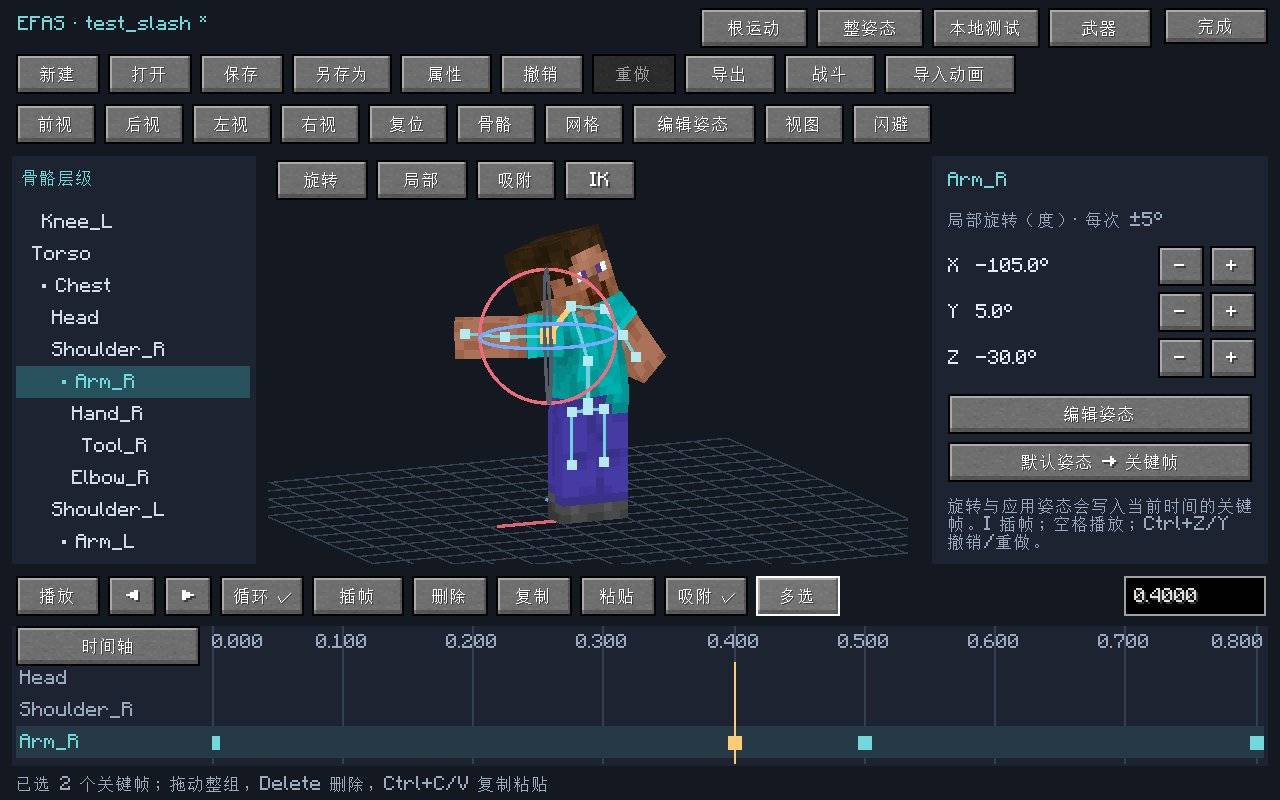
Open the editor, select a bone, drag the rotation rings to adjust the pose, insert keyframes on the timeline, then play back to check the motion transitions. Projects can be saved, reopened and edited at any time.
Basic workflow:
Create project → Edit bones → Insert keyframes → Preview motion → Configure supported combat parameters → Export resource pack and data pack → Test in Epic Fight.
Main Features
In-Game 3D Animation Editing
- Independent player model preview; editing does not directly alter the real player pose.
- Free camera rotation, panning and zooming; supports orthographic and perspective views.
- Bone hierarchy list and viewport picking for easy bone selection and adjustment.
- 3D rotation manipulators, Root displacement tools and precise numerical input.
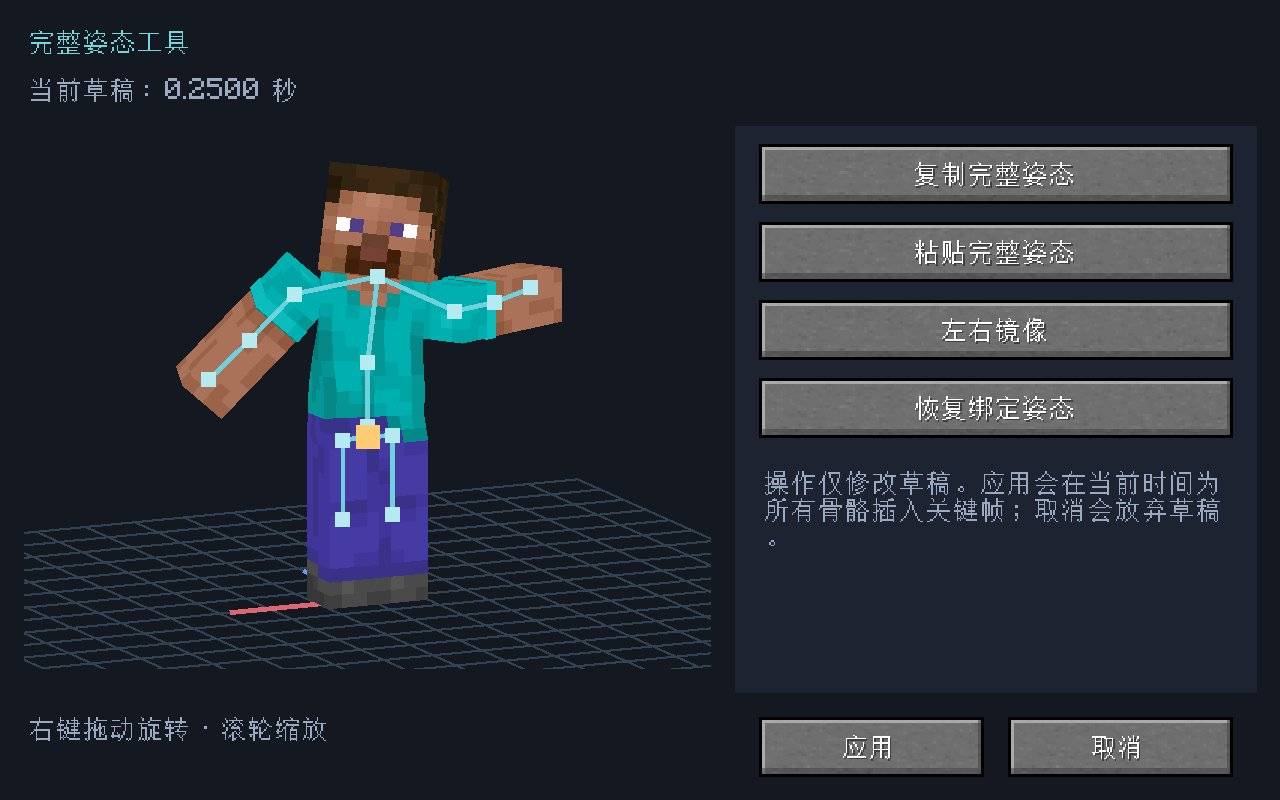
- Local-axis and model-axis switching; supports pose copy, restore and supported mirror operations.
- Ground grid, coordinate axes and skeleton display toggles.
Keyframes and Timeline
- Keyframe tracks displayed per bone.
- Play, pause, loop, frame-by-frame viewing and scrubbing the playhead.
- Multi-select, move, copy, paste, delete and snap keyframes.
- Timeline zoom, pan, box selection and track filtering.
- Adjustable animation duration, FPS and preview speed.
- Undo and redo for convenient iterative adjustment.
Hand and Foot IK Assistance
Adjust limbs via hand/foot targets and bend points, reducing the need to rotate individual bones. Supports hand orientation, contact ranges and dual-foot locking assistance. IK results can also be baked into ordinary FK keyframes.
Weapon Preview and Animation Reference
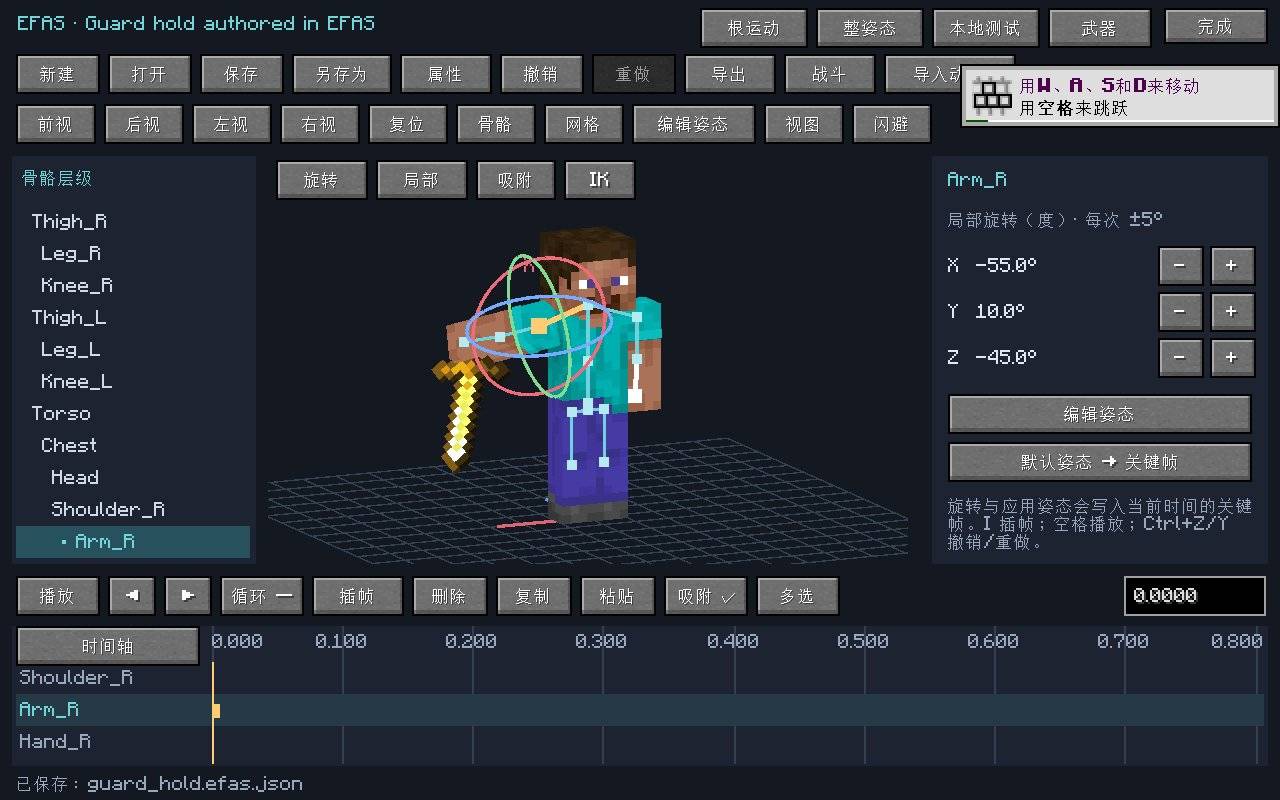
- Load test weapons to observe grip effects during motion.
- Supports adapted Avalon high-precision weapon meshes and emissive textures.
- Select animation JSON files from loaded addons or resource packs and play them independently as reference.
- Import supported standard humanoid pose curves as a new project for further editing, saving and export.
Epic Fight Combat Configuration and Export
- Single-phase attack timing parameter editing.
- Attack collider size, offset and bone configuration.
- Hit window, collision range and weapon trail preview.
- Currently supported damage multiplier, armour-piercing, impact and hit count configuration.
- Limited horizontal motion displacement.
- Weapon basic combo sequence, dash attack and aerial attack binding.
- Currently supported guard hold and forward/backward dodge configuration.
- Export Epic Fight animation resources and corresponding data pack content.
Colliders in the preview are for observation and debugging only. Actual attacks and damage continue to be handled by Epic Fight’s server-side combat logic.
Opening the Editor
- Default hotkey:
Ctrl + Alt + A - Client command:
/efas editor - Also accessible via the EFAS configuration entry in the mods list.
- Animation import and reference: “Import Animation” in the editor or
Ctrl + I.
The interface supports Simplified Chinese and English.
Project and Export Files
| File | Purpose |
|---|---|
.efas.json |
Animation project that can be reopened and further edited |
| Exported ZIP | Resource pack and data pack content for use with Epic Fight |
Projects are saved by default in the game instance’s efas/projects/ folder; export files are located in efas/exports/.
Project files must be exported before they can be used with Epic Fight. Follow the export instructions to install the client resource pack and world data pack separately. Successful preview in the editor alone does not mean the animation has been registered in-game or possesses combat detection.
Runtime Environment and Required Dependencies
The current version has been developed and verified against the following combination:
| Component | Version |
|---|---|
| Minecraft Java Edition | 1.20.1 |
| Forge | 47.4.10 |
| Java | 17 |
| Epic Fight | 20.14.17 |
| Epic Fight - Avalon | 20.12.6.4 |
| Epic Fight - Invincible Lib | 20.14.8.2 |
Please install matching versions of EFAS and the three dependencies listed above on both client and server. Compatibility with other dependency versions is not currently guaranteed.
Beta Version Notes
EFAS is currently in the Beta stage and prioritises support for the Epic Fight standard humanoid skeleton.
- Attack editing is currently single-phase only and does not include arbitrary multi-phase attacks or event editing.
- Animation import retains supported bone pose curves; it does not automatically copy the original mod’s skills, damage events, sounds, particles, runtime IK or
Coorddisplacement. - Unknown animation bones are rejected by default; you may explicitly choose to keep only matching humanoid tracks. This does not constitute automatic retargeting of other skeletons.
- Extra bones on adapted weapons currently move with the player skeleton in bind pose and cannot yet have their dedicated animations edited.
- Arbitrary custom weapon renderers, entity-conditioned model swapping or inherited meshes are not supported.
- IK is a limb assistance tool only; there is as yet no automatic terrain adaptation or full-body centre-of-mass solving.
- Invincible Lib is a required dependency, but its complex keybinds, conditional combos and JSON skills do not yet have a dedicated visual editing interface.
- Full end-to-end verification on dedicated servers and remote multiplayer environments has not yet been completed.
It is recommended to first verify exported motions and combat configurations in a separate single-player test world.
Open Source and Feedback
The original EFAS source code and documentation are released under the MIT Licence. Dependent mods and their models, textures and animations retain their respective licences and copyrights.
When reporting issues, please provide the mod version, dependency versions, reproduction steps, and relevant logs with personal information removed.
Epic Fight - Animation Studio
在 Minecraft 游戏内制作、预览和编辑 Epic Fight 战斗动画。
Epic Fight - Animation Studio(EFAS)是一款独立的 Epic Fight 附属模组,提供骨骼编辑、关键帧时间轴、3D 预览和动画导出工具。你可以直接操作玩家骨架,把动作保存为工程,逐步制作自己的挥剑、攻击与闪避动画。
基础动作编辑无需 Java 编程,也无需先学习 Blender。
从一个姿态开始制作招式
打开编辑器,选择骨骼,拖动旋转环调整姿态,在时间轴上插入关键帧,再播放检查动作衔接。工程可以随时保存、重新打开和继续修改。
基本流程:
创建工程 → 编辑骨骼 → 插入关键帧 → 预览动作 → 配置支持的战斗参数 → 导出资源包与数据包 → 在 Epic Fight 中测试。
主要功能
游戏内 3D 动画编辑
- 独立玩家模型预览,编辑过程不直接改变真实玩家姿态。
- 自由旋转、平移和缩放镜头,支持正交与透视视图。
- 骨骼层级列表与预览区拾取,方便选择和调整骨骼。
- 3D 旋转操纵器、Root 位移工具与精确数值输入。
- 局部轴与模型轴切换,支持姿态复制、恢复和受支持的镜像操作。
- 地面网格、坐标轴和骨架显示开关。
关键帧与时间轴
- 按骨骼显示关键帧轨道。
- 播放、暂停、循环、逐帧查看和拖动播放指针。
- 关键帧多选、移动、复制、粘贴、删除与吸附。
- 时间轴缩放、平移、框选及轨道筛选。
- 可调整动画时长、FPS 和预览速度。
- 撤销与重做,方便反复调整动作。
手脚 IK 辅助
通过手脚目标和弯曲点调整肢体,减少逐根旋转骨骼的操作。支持手部朝向、接触区间与双脚固定辅助,也可以将 IK 结果烘焙为普通 FK 关键帧。
武器预览与动画参考
- 加载测试武器,观察动作中的持握效果。
- 支持已适配的 Avalon 高精度武器网格与发光贴图。
- 从已加载的附属模组或资源包中选择动画 JSON,独立播放作为参考。
- 将支持的标准人形姿态曲线导入为新工程,继续编辑、保存和导出。
Epic Fight 战斗配置与导出
- 单阶段攻击的时间参数编辑。
- 攻击碰撞器的尺寸、偏移与骨骼配置。
- 命中窗口、碰撞范围和武器轨迹预览。
- 当前支持的伤害倍率、破甲、冲击力与命中数量配置。
- 限定的水平动作位移。
- 武器普通连击顺序、冲刺攻击与空中攻击绑定。
- 当前支持的防御保持与前后闪避配置。
- 导出 Epic Fight 动画资源及相应数据包内容。
预览中的碰撞器用于观察和调试。实际攻击与伤害继续由 Epic Fight 的服务端战斗逻辑处理。
打开编辑器
- 默认快捷键:
Ctrl + Alt + A - 客户端命令:
/efas editor - 也可通过模组列表中的 EFAS 配置入口打开。
- 动画导入与参考:编辑器中的“导入动画”或
Ctrl + I。
界面支持简体中文和英文。
工程与导出文件
| 文件 | 用途 |
|---|---|
.efas.json |
可重新打开、继续编辑的动画工程 |
| 导出的 ZIP | Epic Fight 使用的资源包与数据包内容 |
工程默认保存在游戏实例的 efas/projects/,导出文件位于 efas/exports/。
工程文件需要经过导出才能用于 Epic Fight。 按导出说明分别安装客户端资源包和世界数据包;仅在编辑器中预览成功,不代表动画已经在游戏中注册或具备战斗判定。
运行环境与必需前置
当前版本针对以下组合开发和验证:
| 组件 | 版本 |
|---|---|
| Minecraft Java Edition | 1.20.1 |
| Forge | 47.4.10 |
| Java | 17 |
| Epic Fight | 20.14.17 |
| Epic Fight - Avalon | 20.12.6.4 |
| Epic Fight - Invincible Lib | 20.14.8.2 |
请在客户端和服务端安装相同版本的 EFAS 及上述三个前置。当前未承诺其他前置版本的兼容性。
Beta 版本说明
EFAS 当前处于 Beta 阶段,优先支持 Epic Fight 标准人形骨架。
- 攻击编辑目前为单阶段,不包含任意多阶段攻击或事件编辑。
- 动画导入保留支持的骨骼姿态曲线,不自动复制原模组的技能、伤害事件、声音、粒子、运行时 IK 或
Coord位移。 - 未知动画骨骼默认拒绝导入;可明确选择仅保留匹配的人形轨道。这不等于自动重定向其他骨架。
- 已适配武器的额外骨骼目前以绑定姿态随玩家骨架运动,尚不能编辑其专属动画。
- 不支持任意自定义武器渲染器、实体条件换模或继承型网格。
- IK 为肢体辅助工具,尚无自动地形适配或全身重心求解。
- Invincible Lib 是必需前置,但其复杂按键、条件连击与 JSON 技能尚无专用可视化编辑界面。
- 当前未完成专用服务器和远程多人环境的完整端到端验证。
建议先在独立的单人测试世界中验证导出的动作与战斗配置。
开源与反馈
EFAS 原始源码与文档采用 MIT 许可证。依赖模组及其模型、贴图和动画保留各自的许可与版权。
反馈问题时,请提供模组版本、前置版本、复现步骤,以及移除个人信息后的相关日志。
Epic Fight - Animation Studio Team