promotional bannermobile promotional banner

[EM]Electronics Mod

This mod adds a smartphone to Minecraft.
aa63851f95aefe159984fe7b8c5a675c.png

aa63851f95aefe159984fe7b8c5a675c.png

a2e238da812f66aa9d83316428524c51.png

a2e238da812f66aa9d83316428524c51.png

132d5821c37061755012f8756625b461.png

132d5821c37061755012f8756625b461.png

EF5FCF2FCBEFD1F36BE195C5DDC77C52.png

EF5FCF2FCBEFD1F36BE195C5DDC77C52.png

618C2AE27AB04F60D01450E1D7ADEE7A.png

618C2AE27AB04F60D01450E1D7ADEE7A.png

Description

Phone Hold the phone in your hand to open a full phone interface. It includes:

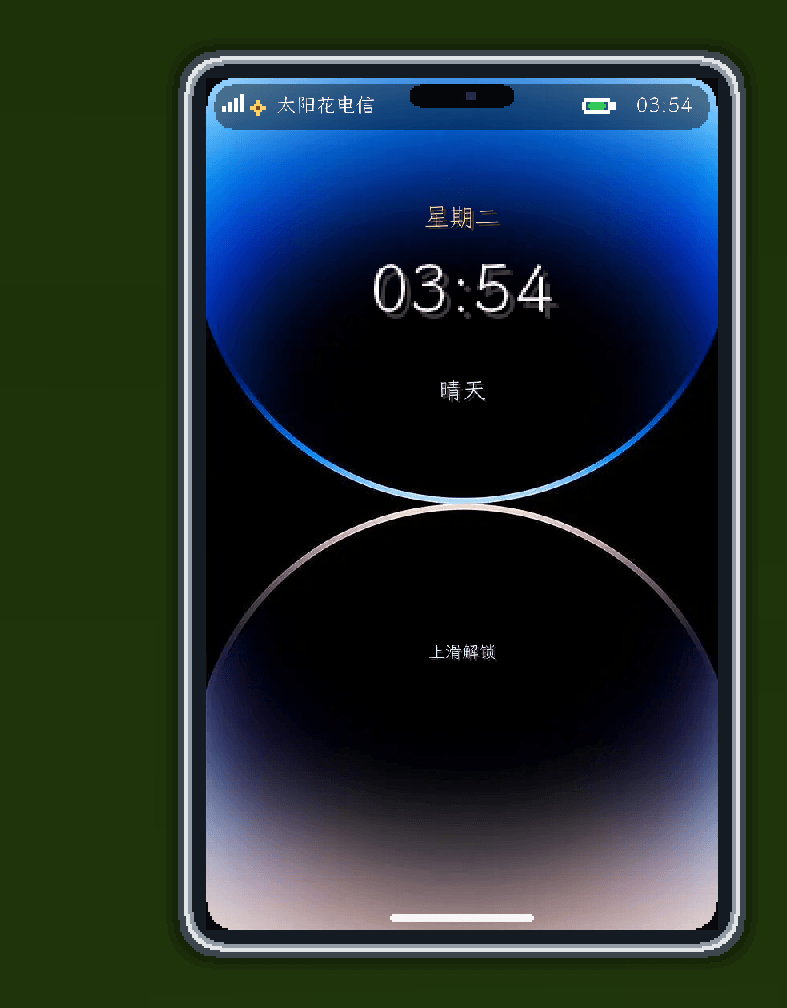
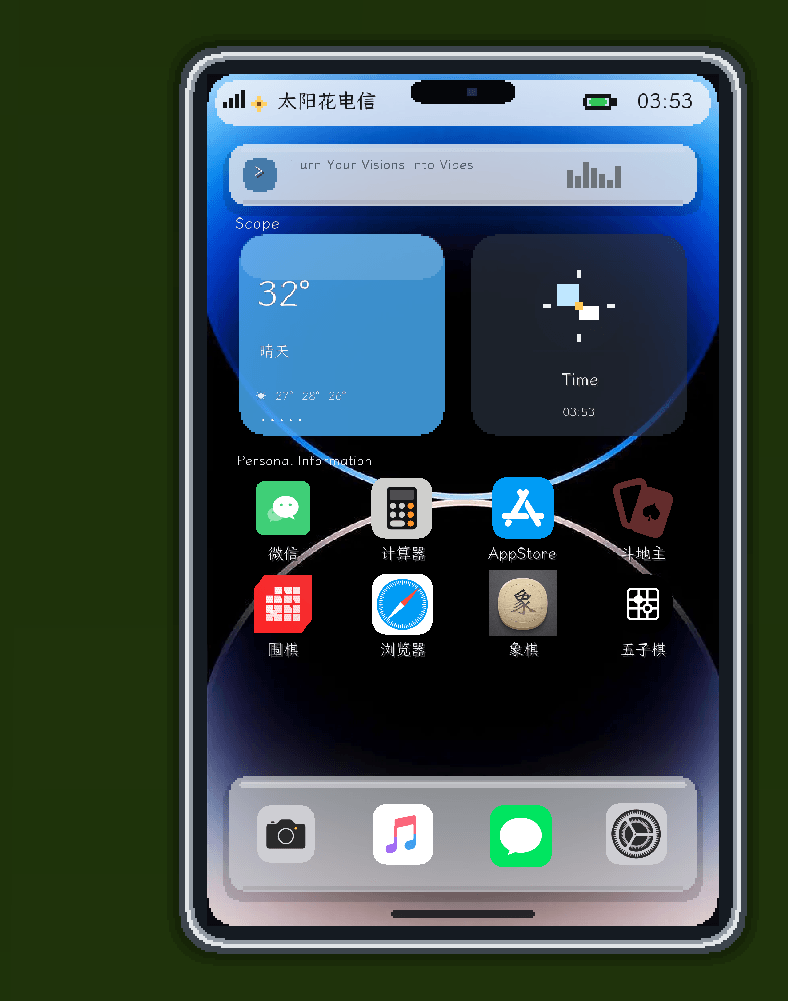
Modern phone UI: lock screen, home screen, app icons, status bar, wallpaper, animated transitions, and touch‑like interactions.

Camera: open the camera interface and take photos in‑game; pictures are saved to the screenshots folder in the game directory.

Calculator: supports basic digits and arithmetic operations – handy for quick in‑game calculations.

Weather: view the current world's weather conditions and related info.

Chat: see online players, select a chat partner, and send private messages.

Music Player: play the built‑in Phone Waves theme track, or load custom local songs.

App Store: access built‑in apps and mini‑games from the phone's store.

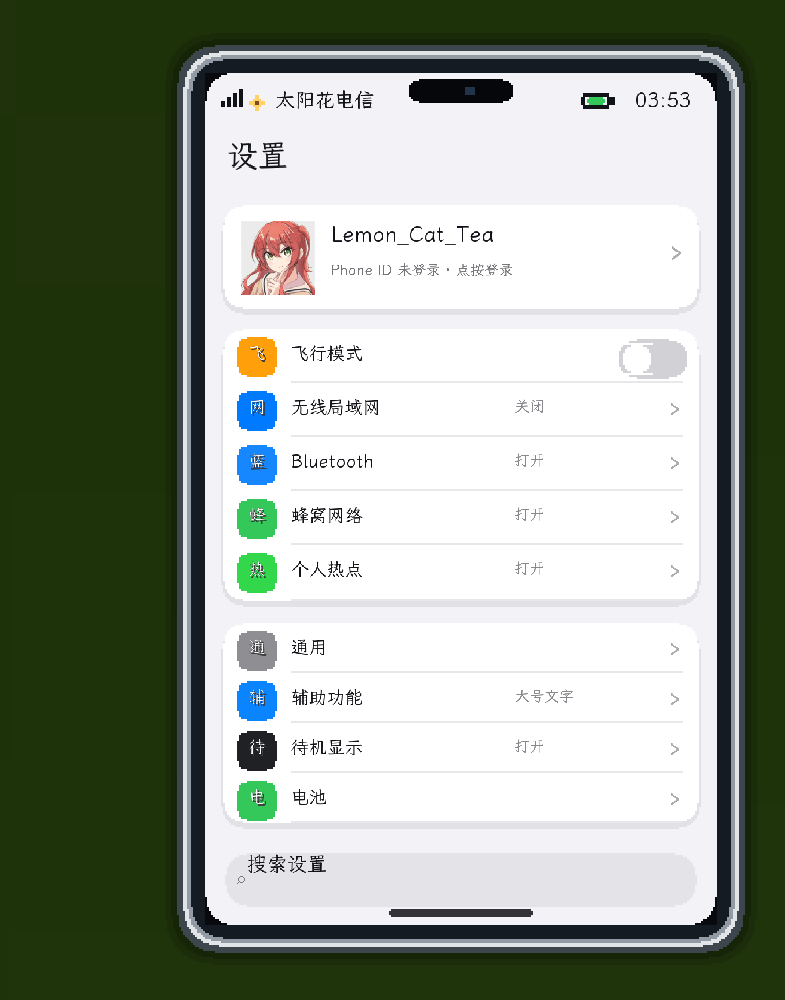
Settings: manage virtual account, general settings, accessibility, standby display, battery info, and screen password.

Standby Display: shows time, date, weather, and status on the phone's standby screen.

Screen Password: set a password to prevent other players from directly opening your phone.

WeChat‑style interface: an in‑game login interface styled like WeChat, with related interactive entry points.

Edge Browser entry: launch web browsing from the phone.

QQ Music entry: enter a QQ‑Music‑style music interface from the phone; playback status appears on the game HUD.

Music System The phone comes with one built‑in track, Phone Waves, and also supports loading your own music files:

Launch the game and open the phone's "Music" app.

Place your music files into the phone_music folder inside the game directory.

In the music app, tap "Rescan".

Select a track to play, or use the search box to filter local tracks.

Supported formats:

WAV

AIFF

AU

The music app supports play, stop, search, favourites, and loop playback. The currently playing track is shown in the in‑game music HUD.

Multiplayer Mini‑Games The phone includes three mini‑games that support both local play and server online battles:

Chinese Chess: full board with turn validation.

Gomoku (Five‑in‑a‑Row): 15×15 board with win detection.

Ludo (Flight Chess): supports dice rolling, piece movement, and end‑game detection.

You can enter games from the phone's home screen and also invite online players to join a match. The server validates board state, turns, and player sides to prevent invalid states from affecting multiplayer games.

Web Display Place a "Web Display" block and open a browsing interface:

Enter a URL and navigate to web pages.

Click links inside the page.


Support mouse movement, clicking, and scrolling.

Support keyboard input and text entry.

Support basic interactive content on web pages.

Two display sizes: 4×5 and 7×4.

The display is connected and controlled by one player at a time to avoid conflicts from simultaneous operations.

Other players can see the synchronised state of the display.

The Web Display is great for in‑game bulletin boards, info terminals, server lobby screens, or decorative electronic devices.

Items & Blocks Phone

Item name: Phone

Max stack size: 1

Has durability

Default open key: G

Can also be opened by right‑clicking while holding the phone

If G conflicts with other mods, you can change the keybinding in Minecraft's controls settings.

Web Display

Item name: Web Display

When placed, becomes an interactive display block

Right‑click the display to open the browsing interface

Use the size buttons in the display interface to switch between 4×5 and 7×4

Controls Phone

Right‑click while holding the phone: open the phone

G: open the phone

Left‑click: tap apps and interface controls

Back button or Esc: go back one level or exit the phone

Input fields inside the phone: type directly with your keyboard

Web Display

Right‑click the display: open the browsing interface

Left‑click: click on web content

Mouse movement: move the web cursor

Mouse scroll: scroll the page

Keyboard: type text and use web shortcuts

Address bar: enter a URL and navigate

Crafting & Obtaining Both the Phone and Web Display are registered in the mod's creative‑mode item tab for easy testing and creative use. In survival mode, you can craft them according to the mod's recipes. If your modpack changes recipes, you can use JEI, EMI, or similar recipe viewers to check the required materials.

Runtime Environment Minecraft: 1.21.1

Mod Loader: NeoForge

NeoForge: 21.1.244 or compatible 21.1.x versions

Mod ID: generated_mod

Notes Web content on the Web Display requires a working web rendering environment on the client. Access to external websites may be affected by network conditions, site compatibility, or security policies.

Local music files must be placed in the phone_music folder in the game directory and use the supported audio formats.

Multiplayer mini‑games require both the server and clients to have this mod installed, with versions kept as consistent as possible.

The phone, Web Display, and web input features are client‑server cooperative functions. Make sure your network connection is stable during multiplayer.

Feedback & Suggestions If you encounter display issues, web compatibility problems, audio loading failures, multiplayer game anomalies, or have new app ideas, feel free to submit issues and suggestions on the project page.

License This project is currently under the All Rights Reserved license. Redistribution, republishing, or repackaging for other projects without the author's permission is not allowed.


手机 Mod
一个把现代智能手机、网页显示器和休闲娱乐带进 Minecraft 的 NeoForge 模组。你可以在游戏里使用手机应用、播放音乐、与服务器玩家聊天、进行多人棋类游戏,也可以放置一台可交互的网页显示器浏览网页。
主要功能
手机
手持手机即可打开完整的手机界面。手机包含以下功能:
现代化手机界面:锁屏、主屏幕、应用图标、状态栏、壁纸、动画过渡和触控式交互。
相机:打开相机界面并在游戏中拍摄照片,照片会保存到游戏目录的 screenshots 文件夹。
计算器:支持基础数字和算术运算,适合在游戏中快速计算。
天气:查看当前世界的天气状态和相关信息。
聊天:查看当前在线玩家、选择聊天对象并发送私聊消息。
音乐播放器:播放内置的 Phone Waves 主题音乐,也可以读取自定义本地曲目。
应用商店:从手机应用商店进入内置应用和小游戏。
设置中心:管理虚拟账号、通用设置、辅助功能、待机显示、电池信息和屏幕密码。
待机显示:在手机待机界面显示时间、日期、天气和状态信息。
屏幕密码:为手机设置密码,防止其他玩家直接打开手机内容。
微信界面:提供游戏内的微信登录风格界面和相关交互入口。
Edge 浏览器入口:从手机启动网页浏览功能。
QQ音乐入口:从手机进入 QQ音乐 风格的音乐界面;播放状态会显示在游戏 HUD 上。
音乐系统
手机自带一首 Phone Waves 主题曲,也支持读取玩家自己的音乐文件:
启动游戏并打开手机的“音乐”应用。
将音乐文件放入游戏目录下的 phone_music 文件夹。
在音乐应用中点击“重新扫描”。
选择曲目播放,或使用搜索框筛选本地曲目。
支持的文件格式为:
WAV
AIFF
AU
音乐应用支持播放、停止、搜索、收藏和循环播放。当前曲目还会显示在游戏内的音乐 HUD 中。
多人小游戏
手机内置三种小游戏,并支持本地游玩和服务器联机对战:
中国象棋:完整棋盘和回合校验。
五子棋:15×15 棋盘,支持胜负判断。
飞行棋:支持投骰子、移动棋子和终局判断。
你可以从手机主屏幕进入游戏,也可以邀请在线玩家加入对局。服务器会校验棋盘、回合和玩家阵营,避免无效状态影响联机游戏。
网页显示器
放置“网页显示器”方块后,可以打开一个网页浏览界面:
支持输入网址并导航到网页。
支持点击网页中的 <a> 链接。
支持鼠标移动、点击、滚轮操作。
支持键盘按键和文字输入。
支持网页中的基础交互内容。
支持两种显示规格:4x5 和 7x4。
显示器由一名玩家连接和操控,避免多人同时操作造成冲突。
其他玩家可以看到显示器同步后的状态。
网页显示器适合用来制作游戏内公告屏、信息终端、服务器大厅屏幕或装饰性的电子设备。
物品与方块
手机
物品名称:手机
最大堆叠数量:1
具有耐久度
默认打开按键:G
也可以直接手持手机右键打开
如果 G 与其他模组按键冲突,可以在 Minecraft 的按键设置中修改。
网页显示器
物品名称:网页显示器
放置后变为可交互的显示器方块
右键显示器即可打开浏览界面
使用显示器界面中的规格按钮可以在 4x5 和 7x4 之间切换
操作说明
手机
手持手机右键:打开手机
G:打开手机
鼠标左键:点击应用和界面控件
返回按钮或 Esc:返回上一级界面或退出手机
手机内的输入框:直接使用键盘输入
网页显示器
右键显示器:打开网页浏览界面
鼠标左键:点击网页内容
鼠标移动:移动网页光标
鼠标滚轮:滚动网页
键盘:输入文字和网页快捷键
地址栏:输入网址后执行导航
合成与获取
手机和网页显示器均注册在模组的创造模式物品栏中,方便测试和创造模式使用。生存模式下可按照模组提供的配方制作对应物品;如果整合包调整了配方,也可以通过 JEI、EMI 等配方查看模组确认具体材料。
运行环境
Minecraft:1.21.1
Mod Loader:NeoForge
NeoForge:21.1.244 或兼容的 21.1.x 版本
模组 ID:generated_mod
注意事项
网页显示器的网页内容需要客户端具备可用的网页渲染环境,并且访问外部网站可能受到网络环境、网站兼容性或安全策略影响。
本地音乐文件必须放在游戏目录的 phone_music 文件夹中,并使用支持的音频格式。
多人小游戏需要服务器和客户端都安装本模组,且双方版本尽量保持一致。
手机、网页显示器和网页输入功能属于客户端与服务器协同功能,联机时请确保网络连接稳定。
反馈与建议
如果发现显示问题、网页兼容性问题、音频无法读取、联机对局异常或有新的应用创意,欢迎在项目页面提交问题和建议。
许可证
本项目当前使用 All Rights Reserved 许可。未经作者许可,请勿重新发布、转载或用于其他项目的打包分发。

The [EM]Electronics Mod Team

profile avatar
  • 1
    Projects
  • 47
    Downloads