Durability HUD | Tools & Armor
- By
See the remaining durability of your held item, armor, and off-hand gear in a compact on-screen panel.
Description
Durability HUD | Tools & Armor
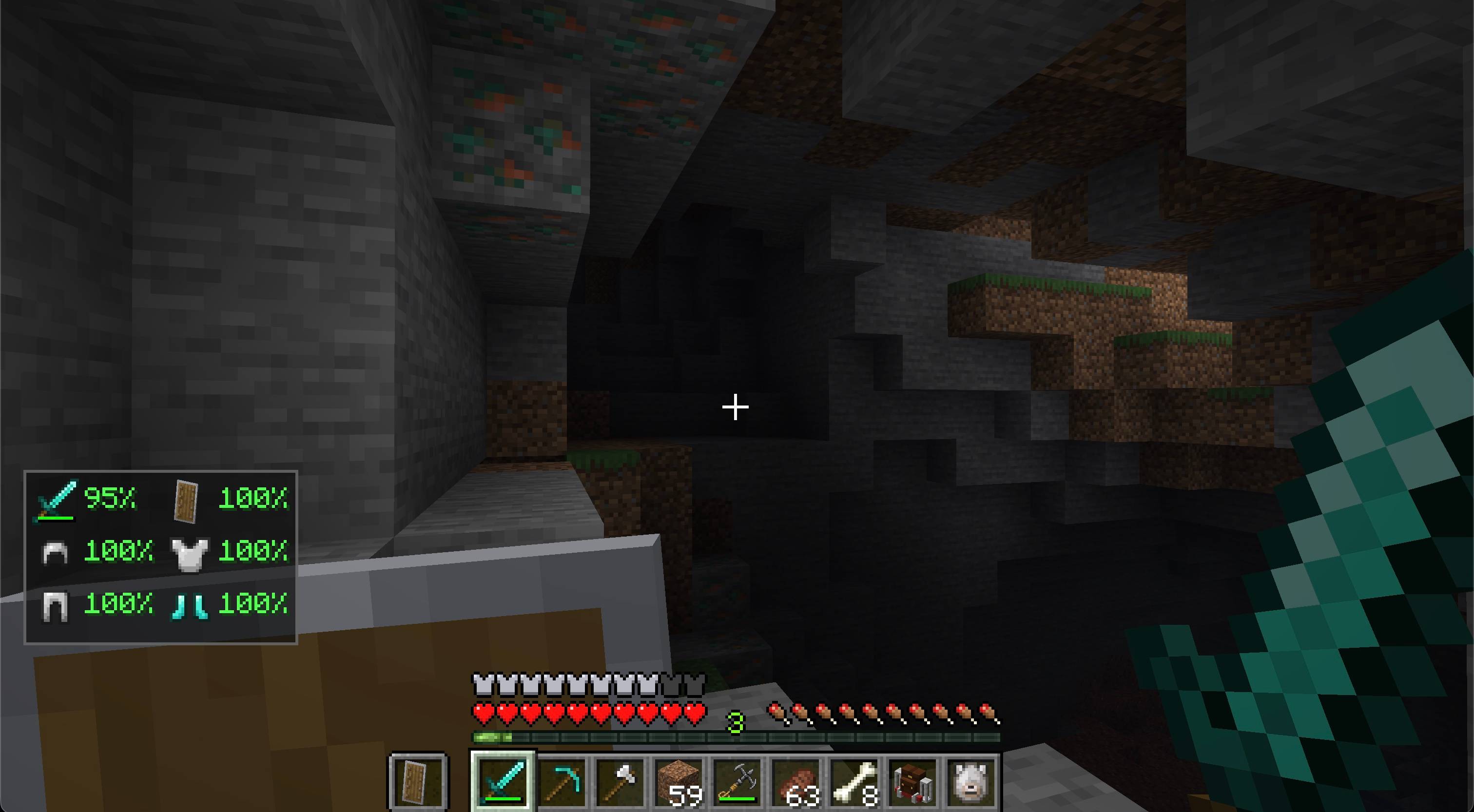
Durability HUD keeps the condition of your equipped gear visible without opening the inventory.
Features
- Shows remaining durability as a percentage in a compact two-column layout
- Keeps every equipment slot in a stable position as items are changed
- Tracks the main-hand item, helmet, chestplate, leggings, boots, and off-hand item
- Uses each item's real icon and vanilla durability bar
- Smoothly shifts durability text from green through yellow and orange to red as equipment wears out
- Updates immediately as equipment changes or takes damage
- Hides slots that do not contain a damageable item
- Supports compatible modded items that use standard durability
- Can be toggled with H by default and remembers the setting
- Dedicated Fabric and NeoForge builds
How to use
Equip a damageable item in your main hand or off hand, or wear damageable armor. The panel appears automatically and shows the remaining durability of each item as a percentage. Empty and non-damageable slots stay blank. Press H to hide or show the panel; you can change this key in Minecraft's Controls menu. Your choice is saved between sessions.
Installation
Install matching Durability HUD and Zero Lib builds on the client. Installing both on a server is safe but not required for the HUD. Architectury API is also required; Fabric installations additionally require Fabric API.
Requirements
- Minecraft Java Edition 26.2
- Java 25 or newer
- Zero Lib 1.0.3 or newer
- Architectury API
- Fabric API on Fabric
License
Copyright © 2026 Zero Team. All rights reserved. Personal play, multiplayer servers, and free modpacks distributed through CurseForge or Modrinth are permitted under the license included with the mod. Rehosting or redistributing the files elsewhere requires prior written permission.
Durability HUD | Tools & Armor Team


Owner