Double Coords
- By
A second coordinates line in F3 showing the same spot in the other dimension. Overworld to Nether and back, colour-coded.
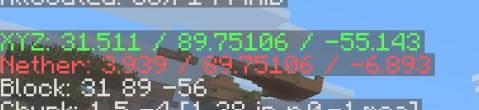
photo_2026-09-15_15-04-18 (2).jpg
Description
Double coords
Every Nether hub starts the same way: stand at a portal, read the coordinates, divide by eight in your head, get it wrong, dig in the wrong direction. Double coords does the arithmetic for you and puts the answer on screen.
What it does
Directly under the usual XYZ line in F3, the mod adds a second line with the same spot in the other dimension:
- In the Overworld — where that position lands in the Nether (X and Z divided by 8)
- In the Nether — where that position lands in the Overworld (X and Z multiplied by 8)
- Y is left alone, because Minecraft does not scale height between dimensions. If you never look at it, it can be hidden.
Colours belong to dimensions rather than to lines. Overworld coordinates are always green and Nether coordinates are always red, so in the Nether the XYZ line turns red and the mirrored line is green. One glance tells you which number is which.
Pin it on screen
The mod is registered inside the debug entry system added in 1.21.9, so it behaves like any vanilla line rather than sitting on top of the overlay. Press F3+F6 and you will find Double coordinates with the usual three states: OFF, In Overlay, Always.
Options
- Mod Menu — master on/off switch, and whether the mirrored line includes Y.
- Or edit
config/doublecoords.jsonby hand.
Good to know
- Nothing is shown in the End or in custom dimensions, where the 8:1 ratio does not apply.
- Respects
reducedDebugInfo: when the server hides coordinates, the mirrored line is hidden with them.
Bug reports and suggestions are welcome in the comments.
The Double Coords Team