Discord Player Status (NeoForge)
- By
A sleek server-side mod that seamlessly syncs player stats, playtime, dimensions, and FTB Quests progression directly to an always-updated Discord embed. Keep your community connected in real-time!
atm10_discord_status_logo.jpg
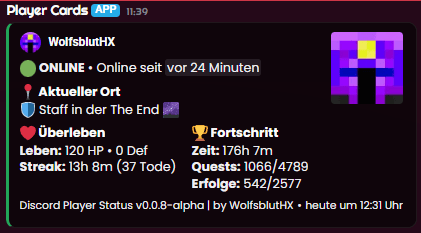
player-cards.png
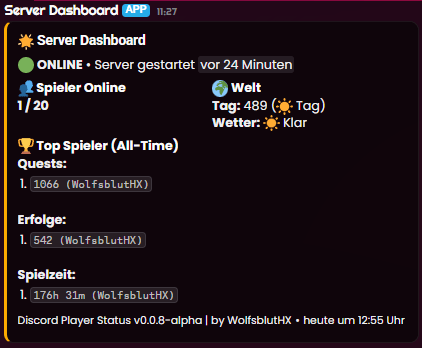
server-dashboard.png
Description
🟢 Discord Player Status
Discord Player Status is a lightweight, server-side only NeoForge mod designed to keep your community connected. It seamlessly tracks your server's status and players' in-game progress, displaying everything in beautiful, constantly updating Discord embeds!
Perfectly suited for modpacks like ATM10, this mod integrates directly with FTB Quests and Vanilla advancements to show exactly what your players are up to.
✨ Features
- Global Server Dashboard: A central, live-updating embed showing the server's uptime, total online players, current in-game day/time, and weather.
- 🏆 All-Time Leaderboards: Automatically tracks and ranks the Top 3 players of all time (even when they are offline!) in three categories: Completed Quests, Advancements, and Total Playtime.
- Live Player Cards: Automatically updates a clean Discord embed message for every player online. No spam, no mess – just one live-updating message per player.
- Player Progression: Displays current health, armor, death streak, and total playtime for individual players.
- FTB Quests Integration: Natively supports FTB Quests! See exactly how many quests a player has completed out of the total modpack quests.
- Advancements Tracking: Tracks native Minecraft advancements as a secondary progression metric.
- Dimension & Role Tracking: Shows whether a player is in the Overworld, Nether, End, or a custom Modded Dimension (like the Mining Dimension). Also displays server roles (Staff / Member).
- Server-Side Only: Your players don't need to install this! Just drop it into your server's
modsfolder and you're good to go.
🛠️ Installation & Setup
- Drop the mod into your server's
modsfolder. - Start the server once to generate the config file.
- Open
config/discord_player_status. - Paste your Discord Webhook URL into the
webhook_urlfield. - Restart your server.
undefined
📦 Dependencies
- Minecraft: 1.21.1
- Modloader: NeoForge
- (Optional but recommended): FTB Quests and FTB Library for quest tracking.
Discord Player Status (NeoForge) Team