DeskMate
- By
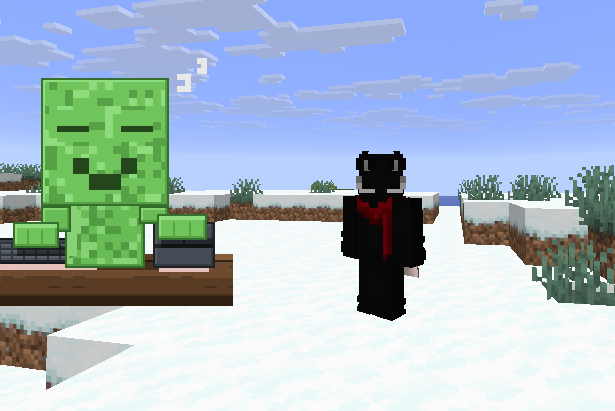
A Bongo Cat style desk buddy for Minecraft Steve, a creeper, or your own drawing sits on your HUD, hands hitting the keyboard as you move and the mouse as you click.
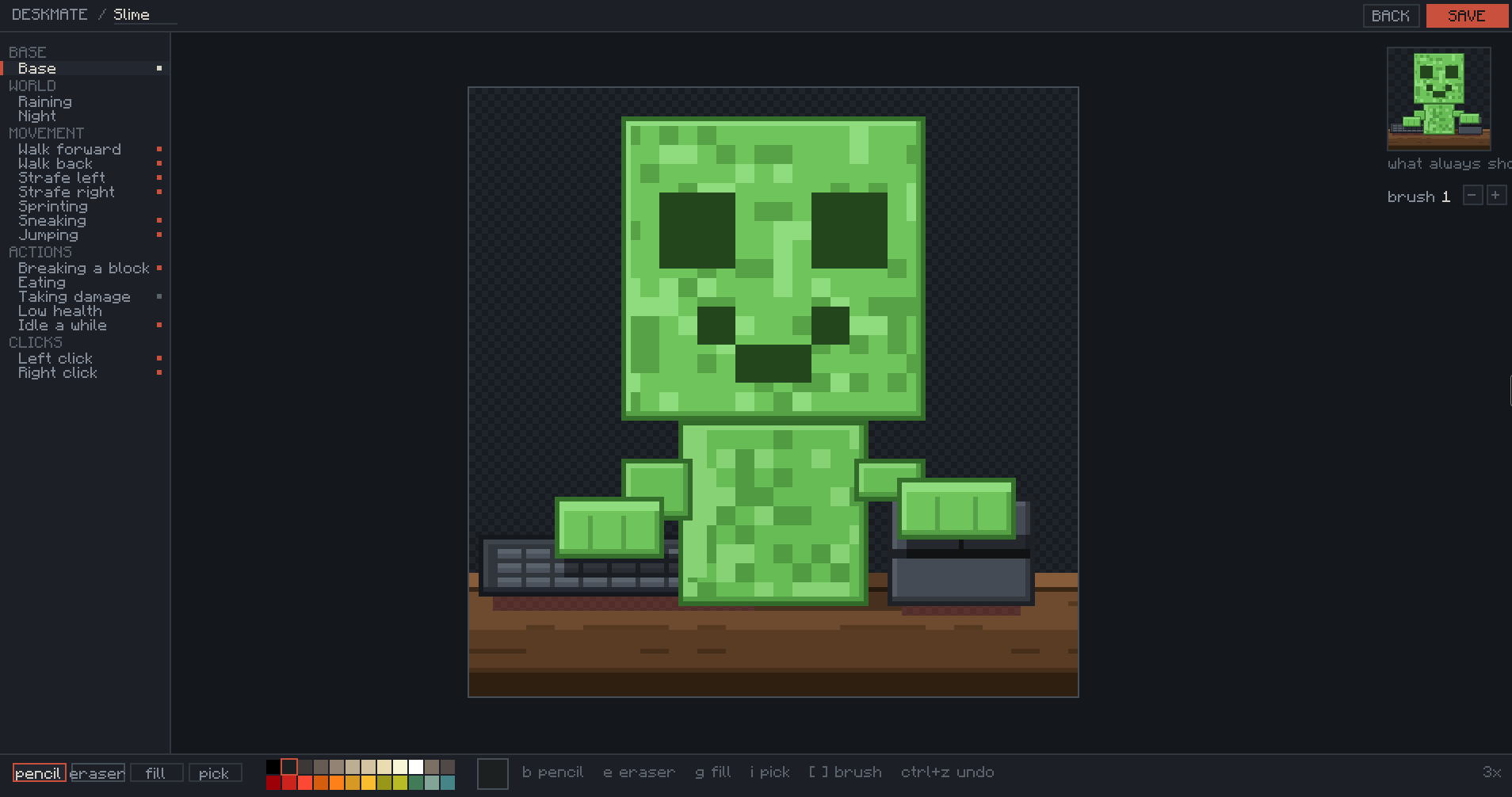
example.PNG
slime.PNG
Description
# Deskmate
**A little character sits at the corner of your screen, at a desk, with a keyboard and a mouse — and plays along with you.**
Move, and the hand on the keyboard presses down. Click, and the hand on the mouse presses. Take a hit and they flinch red. Stand still long enough and they fall asleep on the desk.
Client-side only. Doesn't touch the server, doesn't need to be on the server, works on any multiplayer world you can already join.
---
## Inspired by Bongo Cat
This is a Minecraft take on **Bongo Cat** — the little cat that slaps its paws down when you press keys. Full credit to that idea; Deskmate is that concept rebuilt around Minecraft characters, tied to what you're actually doing in game rather than just raw keypresses.
If you've used a keystrokes HUD before, this does the same job. It's just a character doing it instead of grey boxes with letters in them.
---
## Eight characters included
**Steve · Alex · Creeper · Skeleton · Zombie · Enderman · Slime · Pig**
Every one of them is drawn at 128×128 with a full desk setup — keyboard with individual keycaps, a mouse with a lit scroll wheel, wood grain on the desk, and contact shadows so they sit on the surface instead of floating above it.
---
## What they react to
| You do this | They do this |
| --- | --- |
| W A S D, jump, sneak | Left hand presses the keyboard |
| Left click, right click, mining | Right hand presses the mouse |
| Take damage | Flash red |
| Stand still for 10 seconds | Head drops, eyes shut, `zZ` |
---
## Draw your own, in game
Press the Deskmate key, hit **NEW**, and pick a canvas size — 16, 32, 64 or 128.
You get a proper little pixel editor without leaving Minecraft:
- Pencil, eraser, flood fill, eyedropper
- Brush size 1 to 16 — `[` and `]` to change it, and the cursor shows exactly what your stroke will cover
- `Ctrl+Z` undo, `Ctrl+S` save
- Right-drag erases whatever tool you're holding
- Scroll to zoom, middle-drag to pan
- 24-colour palette
Every reaction is its own layer. Pick `attack` in the list on the left and draw what your character looks like while clicking. Layers you leave empty simply never draw, so you can do just a base and a click pose and stop there.
**Two things that make it much faster:**
- While you're drawing any layer, the base shows underneath at quarter opacity so you can line hands up exactly.
- **copy base in** fills the layer you're on with your base drawing so you only have to move the part that changes.
---
## A pet is one PNG
Not a folder. Not a zip. **One `.png` file** that carries its own name, canvas size and layer setup inside it.
That means sharing is just sending the file. Drop someone's pet into `config/deskmate/pets/` and it appears in your list. Post yours in a Discord and it works on their game.
They're small — the built-in ones are about 13 KB each.
---
## Setup
1. Install **Fabric Loader** for your Minecraft version
2. Install **Fabric API** — Deskmate needs it
3. Drop the Deskmate `.jar` into your `mods` folder
4. Launch the game and press **`'`** (apostrophe)
That's it. The eight characters are written to `config/deskmate/pets/` the first time you launch.
**Make sure you download the jar that matches your Minecraft version.** There are two, and they are not interchangeable:
| Jar | Works on | Needs |
| --- | --- | --- |
| Deskmate for 26.x | 26.1, 26.1.1, 26.1.2, 26.2 | Java 25 |
| Deskmate for 1.21.11 | 1.21.11 | Java 21 |
Minecraft changed how mods are built between these, so one file genuinely cannot cover both.
---
## Using it
Press **`'`** to open the Deskmate panel. It doesn't pause the game, so you can see your character reacting while you set it up.
- **`<` `>`** — switch character
- **Drag the character** — move it anywhere on screen
- **size** — 1x to 8x
- **fade** — 10% to 100% opacity
- **DRAW** — edit the selected character
- **NEW** — start a fresh one
- **FOLDER** — opens your pets folder
The key is rebindable in **Options → Controls → Key Binds → Miscellaneous → "Open Deskmate"**, and the panel always shows whichever key you've actually got bound.
Settings live in `config/deskmate/settings.json`.
---
## Requirements
- Fabric Loader
- Fabric API
- Client side only — **no server install needed**
---
## Notes
Character size snaps to whole-number multiples on purpose. Pixel art scaled to 2.5x turns to mush, so it doesn't let you do that. Large characters also cap their own scale so a 128 pet can't take over your screen.
Deleting `config/deskmate/.starters` brings the eight built-in characters back if you've overwritten them.
---
## Licence
MIT. Do what you like with it, including the built-in characters.
Made by **mishka**.
The DeskMate Team