DemonCore OPT
- By


DemonCore ☢️
DemonCore is a chunk loading and full-spectrum client/server performance suite.
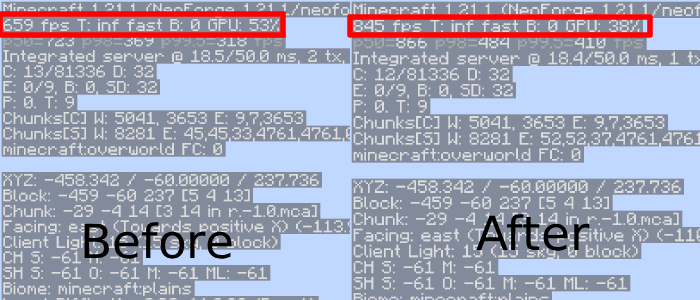
Whether you're pushing a Create contraption across the map, flying an Aeronautics plane at full throttle, or just trying to keep your frame time steady in a busy base, DemonCore predicts what you need before you need it — loading chunks ahead of fast movement, trimming rendering work adaptively, and reacting to your hardware in real time so you don't hit lag spikes or empty voids.
🚀 Key Features
🧭 Predictive Chunk Loading
DemonCore watches the speed and heading of fast-moving entities and pre-loads the chunks ahead of them through vanilla's own ticket system, widening its lookahead cone the further out it predicts (to cover turns and drift). Duplicate requests are deduped against a rolling cache, the per-tick loading budget automatically scales down when the server is under load, and an overflow queue drops the oldest pending request rather than piling up unbounded.
🧠 Live Performance Diagnostics
- Bottleneck detector tells you, in plain English, whether you're currently GPU bound, CPU bound (rendering), CPU bound (game logic), memory/GC bound, frame-cap limited, or balanced — plus one concrete setting to change.
- Frame spike protector tracks how often and how long your frame time spikes, and applies suppression to soften the impact.
- Predictive frame scheduler looks at your recent frame-time history and preemptively micro-sleeps when it predicts an overrun, smoothing out your 1% lows instead of just reacting after the fact.
- GC Stutter Guard samples the JVM garbage collector directly; when GC time or heap usage climbs too high, it automatically trims DemonCore's own caches to relieve the pressure before it turns into a freeze.
⚖️ Smart Hardware Balancing
A feedback controller continuously compares your GPU wait time against your RAM headroom and adjusts how aggressively DemonCore caches geometry and chunk data.
🌋 VULCAN MODE
A dedicated override toggle for maximum performance. Vulcan Mode disables adaptive backpressure and multiplies chunk-loading budgets to their absolute maximum, using every bit of hardware you can throw at it.
⚠️ CRITICAL WARNING (READ CAREFULLY)
Much like the nuclear core it's named after: this mod is incredibly powerful, but it requires careful handling.
- Vulcan Mode Risks: When Vulcan Mode is active, all adaptive safety constraints are disabled. This can lead to game crashes, system instability, or thermal throttling if your PC cannot handle the load.
- Use at your own risk!
🧩 Requirements & Compatibility
- Mod Loader: NeoForge, Fabric
- Minecraft Version: 1.21.1
- Compatibility: Works great with any vehicle or physics mod, particularly
💻 Minimum System Requirements
DemonCore leans on RAM instead of raw GPU or CPU power, and its live diagnostics adapt everything else to whatever hardware you actually have. That means it does not need a dedicated graphics card, a modern GPU, or up-to-date drivers — this optimization suite is built to work on old "potato" PCs too, not just gaming rigs. The main trade-off is memory usage, so make sure you have RAM to spare.
| Component | Minimum | Recommended |
|---|---|---|
| RAM | 8 GB system RAM (4 GB allocated to Minecraft) | 16 GB system RAM (8 GB allocated) |
| GPU (Intel) | HD Graphics 2000 (integrated) | UHD 630 / Intel Arc |
| GPU (AMD) | Radeon HD 5450 | Radeon RX 500 series or newer |
| GPU (Nvidia) | GeForce 210 / GT 220 | GeForce GTX 1050 or newer |
ℹ️ If your PC can run vanilla Minecraft with OpenGL 3.2 support at all, it can run DemonCore — no special drivers or dedicated graphics card required. The mod's real cost is RAM, not GPU horsepower. On very low-end machines, avoid Vulcan Mode and let the adaptive systems (bottleneck detector, GC Stutter Guard, block entity culler) do their job instead.
🐛 How to Report Issues
Found a bug, crash, or unexpected behavior? Help us fix it faster by following these steps:
- Check existing reports first — go the issues link here (or the linked GitHub repo, if available) to see if someone already reported it.
- Open a new report including:
- Minecraft version, NeoForge version, and DemonCore version
- A clear description of what happened vs. what you expected
- Steps to reproduce the problem
- Your
latest.log(and the crash report file, if the game crashed) - Whether Vulcan Mode was enabled at the time
- What the Bottleneck Detector was reporting, if you have it
- List your other installed mods if you're using a modpack — this makes conflicts much easier to diagnose.
⚠️ Please don't report issues that only occur when Vulcan Mode is enabled on hardware below the minimum spec — that mode intentionally disables all safety limits.
DemonCore OPT Team