TW's Decorative Food
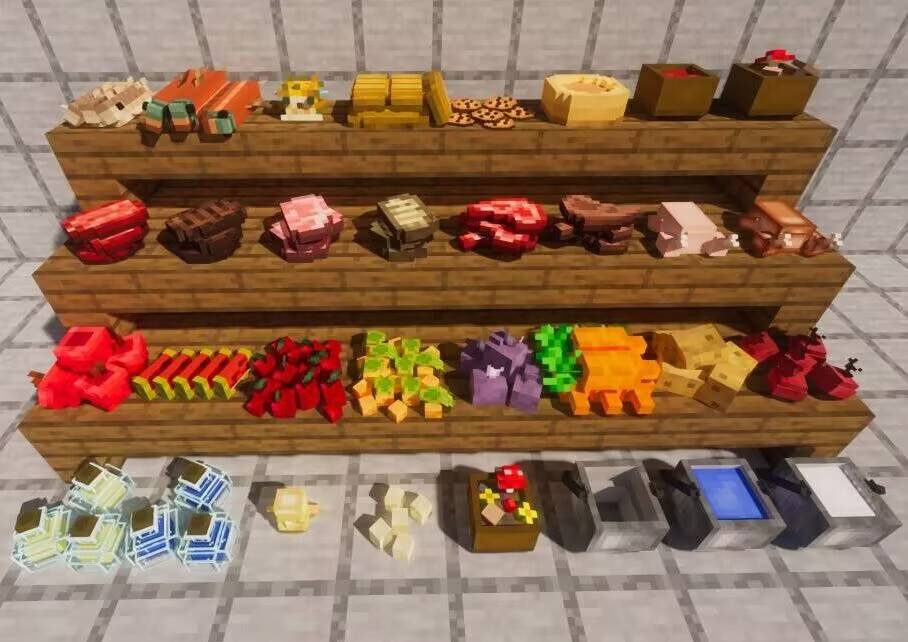
Make your food placeable. Decorate your world with edible blocks — stack your snacks, line up your stews and bottles, and turn a kitchen corner into a proper food display.
Overview
Decorative Food is a lightweight, vanilla-flavored mod that lets food items be placed in the world as 3D blocks. Drop an apple on the table, pile up some bread, or leave a bowl of stew at the counter — everything keeps the original Minecraft pixel-art look and fits right into your builds.
It adds no new game rules and doesn't disturb existing gameplay. The original food items are still real items; they're simply made placeable and stackable on top of one another.
Features
- Place any food as a block — hold the item and right-click a surface, just like placing a normal block.
- Stackable food — sneak-right-click a placed pile with the same food to add one more; each food has its own maximum stack size (apples up to 5, cookies up to 7, etc.).
- Sneak-to-interact — you can still add to / take from a food block while sneaking, so stacking never fights with placing.
- Vanilla art style — models and textures deliberately match the original Minecraft look.
Supported food
The following vanilla items can be placed and stacked (over 45 food types in total):
- Snacks: Cookie, Apple, Melon Slice, Bread, Dried Kelp
- Vegetables: Beetroot, Potato, Baked Potato, Poisonous Potato, Carrot, Sweet Berries, Glow Berries
- Golden foods: Golden Apple, Enchanted Golden Apple, Golden Carrot, Glistering Melon Slice
- Meats: Chicken, Cooked Chicken, Beef, Cooked Beef, Mutton, Cooked Mutton, Porkchop, Cooked Porkchop, Rabbit, Cooked Rabbit
- Fish: Cod, Cooked Cod, Salmon, Cooked Salmon, Pufferfish, Tropical Fish
- Stews & bowls: Rabbit Stew, Mushroom Stew, Beetroot Soup, Suspicious Stew, Bowl
- Buckets: Bucket, Water Bucket, Milk Bucket, Lava Bucket
- Other: Pumpkin Pie, Chorus Fruit, Egg, Spider Eye, Totem of Undying, Potion, Glass Bottle, Honey Bottle
How to use
- Place — hold a food item and right-click on a surface (e.g. the ground or a table).
- Stack — sneak-right-click the placed food with the same item to add one more, up to that food's max.
- Take — sneak-right-click the pile with any other item or an empty hand to pull one food back out.
TW’s Decorative Food Team