DebugBridge
- By
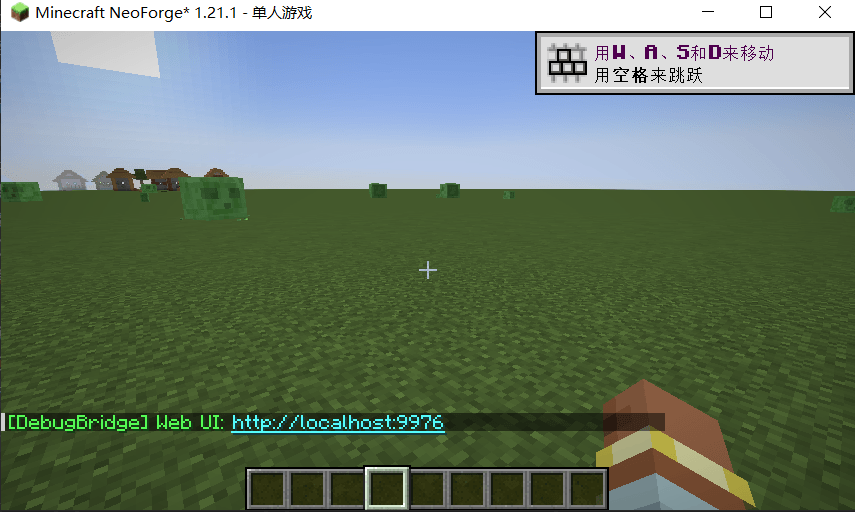
A Forge client mod for Minecraft (1.20.1 and 1.21.1 development snapshots) that exposes game state over a local WebSocket server, plus a Vue web UI for visual inspection. Built for AI-assisted Minecraft development and debugging.
å±å¹æªå¾ 2026-06-14 235722.png
å±å¹æªå¾ 2026-06-14 235757.png
Description
# DebugBridge
A Fabric client mod for Minecraft (1.19, 1.21.11, and 26.2 development snapshots) that exposes game state over a local WebSocket server, plus a Vue web UI for visual inspection. Built for AI-assisted Minecraft development and debugging.
## What It Does
## What It Does / 功能说明
DebugBridge runs a localhost-only WebSocket server (default port 9876, scans 9876–9886) inside Minecraft. External tools — CLI scripts, the bundled Vue web UI, or MCP clients like Claude Code — can inspect and interact with the running game through two complementary APIs:
DebugBridge runs a localhost-only WebSocket server inside Minecraft. External tools — CLI scripts, the bundled Vue web UI, or MCP clients like Claude Code — can inspect and interact with the running game through fast native endpoints and a Groovy scripting bridge.
### Native endpoints (fast, high-level)
DebugBridge 在 Minecraft 内部运行一个仅限本地回环访问的 WebSocket 服务器。外部工具——命令行脚本、内置的 Vue 网页界面、或 Claude Code 等 MCP 客户端——可以通过高速原生端点和 Groovy 脚本桥接来检查和操控运行中的游戏。
Purpose-built Java endpoints that return structured JSON in a single round-trip — no Lua overhead:
### Native endpoints / 原生端点
| Endpoint | What it returns |
|---|---|
| `snapshot` | Player position, health, food, dimension, gamemode, time, weather |
| `nearbyEntities` | Entities within range: type, position, equipment, distance (with optional `includeIcons` for item textures) |
| `entityDetails` | Full entity info: equipment slots with damage/custom names, vehicle, passengers, attributes, frame contents |
| `lookedAtEntity` | The entity the player is aiming at (raycast) |
| `nearbyBlocks` | Block-entities within range: signs, chests, banners, beacons, furnaces, etc. |
| `blockDetails` | Block-entity contents: sign lines, chest inventory, skull profile, beacon level |
| `screenInspect` | Current open screen/gui: type, title, container slots with item stacks (with optional `includeIcons`) |
| `chatHistory` | Recent client-side chat messages (with optional `includeJson` for styled components) |
| `screenshot` | Capture the framebuffer as JPEG |
| `getItemTexture` / `getItemTextureById` / `getEntityItemTexture` | Render item icons as PNG (honors damage, custom model data, dyed leather, player heads) |
| `setEntityGlow` / `setBlockGlow` / `clearBlockGlow` | Highlight entities or blocks with an in-world outline |
| `search` | Search loaded classes by name pattern |
| `status` | Server health and connection info |
这些由 Java 直接实现的端点在一次往返中返回结构化 JSON,没有脚本层开销:
- **`snapshot`** — 获取玩家位置、生命值、饥饿值、所在维度、游戏模式、时间、天气等完整状态快照。 / Player position, health, food, dimension, gamemode, time, weather and more.
- **`nearbyEntities`** — 查询范围内的实体:类型、位置、手持物品、距离(可开启 `includeIcons` 附带物品图标)。 / Entities within range: type, position, equipment, distance.
- **`entityDetails`** — 单个实体的完整信息:所有装备栏位(含损害值和自定义名称),骑乘的载具,乘客列表,属性,展示框内容等。 / Full entity info: equipment slots, vehicle, passengers, attributes.
- **`lookedAtEntity`** — 玩家准星瞄准的实体(射线检测)。 / The entity the player is aiming at (raycast).
- **`nearbyBlocks`** — 附近的方块实体:告示牌、箱子、旗帜、信标、熔炉等。 / Block-entities within range: signs, chests, banners, beacons, furnaces.
- **`blockDetails`** — 方块实体具体内容:告示牌文字、箱子物品栏、头颅皮肤、信标等级。 / Block-entity contents: sign lines, chest inventory, skull profile, beacon level.
- **`screenInspect`** — 当前打开的界面:类型、标题、容器栏位及其中物品(可开启 `includeIcons`)。 / Current GUI: type, title, container slots with items.
- **`chatHistory`** — 客户端最近聊天消息(可开启 `includeJson` 获取含样式的组件)。 / Recent client-side chat messages.
- **`screenshot`** — 将游戏窗口截取为 JPEG 图片。 / Capture the framebuffer as JPEG.
- **`record_video`** — 连续截取多帧画面,输出为 JPEG 联系表网格或单帧文件,用于调试动画和渲染问题。 / Capture multiple frames as a contact-sheet grid or per-frame files for debugging animation/rendering issues.
- **`getItemTexture` / `getItemTextureById` / `getEntityItemTexture`** — 将物品图标渲染为 PNG 图片(支持损害值、自定义模型数据、染色皮革、玩家头颅)。 / Render item icons as PNG.
- **`setEntityGlow` / `setBlockGlow` / `clearBlockGlow`** — 在游戏内高亮标记实体或方块。 / Highlight entities or blocks with an in-world outline.
- **`search`** — 按名称模式搜索已加载的类。 / Search loaded classes by name pattern.
- **`status`** — 服务器健康检查和连接信息。 / Server health and connection info.
Two endpoint families are **gated off by default** in `config/debugbridge.json`: `runCommand` (`run_command_enabled`) sends commands as the player, and the session-control trio `disconnect` / `joinServer` / `quit` (`session_control_enabled`) lets an automation loop leave a world, join a server, or shut the client down. `joinServer` pre-accepts the server resource pack and defers the connect until the client has settled (no loading overlay — joining during the startup resource reload would silently drop the server pack), acking only once the connect attempt has actually started; it's safe to fire the moment the bridge port answers after a launch.
### Groovy execution (`execute` endpoint)
Run Groovy scripts inside the Minecraft JVM with full access to Minecraft APIs via a mapping-aware Java bridge — write Mojang names and they resolve to the runtime (intermediary) names automatically, even on obfuscated builds. Convenience globals `mc`, `player`, and `level` are pre-bound. The sandbox allows file I/O for reading/writing data. Each request has a configurable timeout (default 10s, max 5 min).
```groovy
// Convenience globals already available
println "Player at: " + player.blockPosition().toShortString()
println "Dimension: " + mc.level.dimension().location()
// Load anything else by Mojang name (works on obfuscated builds too).
// Prefer single quotes: double-quoted GStrings interpolate the $ in
// inner-class names like Display$TextDisplay.
def Vec3 = java.type('net.minecraft.world.phys.Vec3')
// Iterate Java collections. Wrap a bulk loop in sync { } so the per-call
// reflective dispatch batches into a single game-thread hop.
sync {
java.list(level.entitiesForRendering()).each { entity ->
if (entity.distanceTo(player) < 10) {
println "Nearby: " + java.typeName(entity)
}
}
}
```
## Vue Web UI
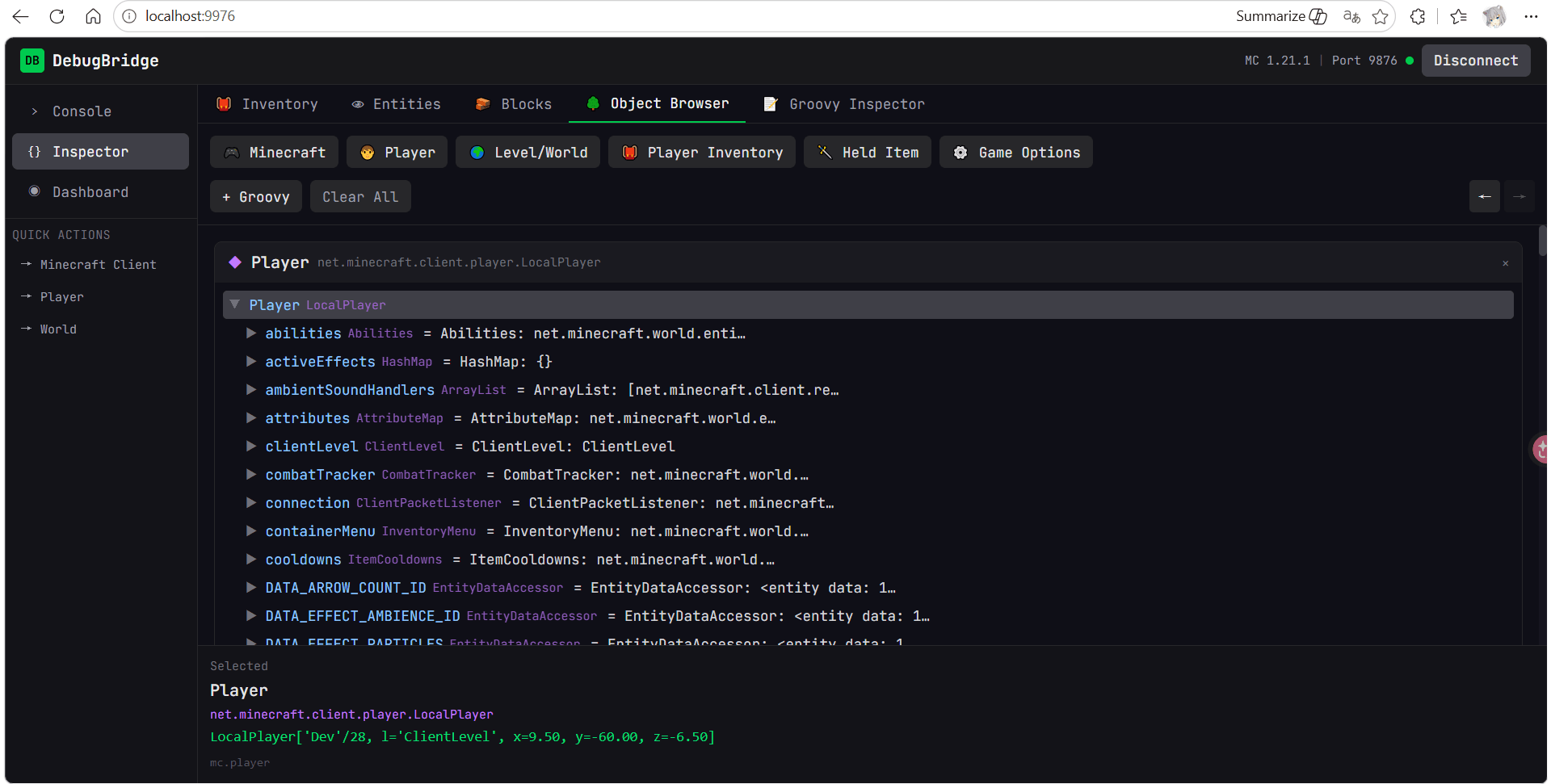
The `web-ui/` directory contains a Vue 3 + Pinia + Tailwind app for visual inspection of game state:
- **Dashboard** — Player snapshot overview
- **Entities panel** — Nearby entity list with detail drill-down, equipment icons, glow toggling
- **Blocks panel** — Nearby block-entity browser (signs, chests, etc.)
- **Screen inspector** — Current GUI/inventory slot viewer
- **Groovy inspector** — Drill-down object browser for Java objects
- **Console** — Interactive Groovy REPL connected to the running client
- **Chat history** — Recent client-side messages
**Bundled since v2.0.0** — the mod serves the built UI itself at
`http://localhost:<bridge port + 100>` (default **http://localhost:9976**;
the join-time chat message prints the exact URL as a clickable link).
Loopback-only, static
assets only, and the served page connects to the bridge instance that served
it, so side-by-side game instances each get their own UI. Disable with
`"web_ui_enabled": false` in `config/debugbridge.json`.
For UI development, the dev server still works (with HMR):
```bash
cd web-ui
npm run dev # → http://localhost:5173
```
The web UI connects directly to the WebSocket server — no MCP layer required.
## Architecture
```
+-----------------------------------+
| MCP Client (Claude Code, etc.) |
+---------------+-------------------+
| MCP Protocol (stdio)
+---------------v-------------------+
| mcdev-mcp Server (TypeScript) |
| Runtime + static analysis tools |
| github.com/use-ai-for-mc/mcdev-mcp|
+---------------+-------------------+
| WebSocket (localhost:9876–9886)
+---------------v-------------------+
| DebugBridge Mod [THIS REPO] |
| +-----------------------------+ |
| | BridgeServer (WebSocket) | |
| | Native endpoints + execute | |
| | Groovy runtime + Java bridge | |
| | Mojang mapping resolver | |
| +-----------------------------+ |
+-----------------------------------+
^
| WebSocket (same port)
+---------------+-------------------+
| Vue Web UI (bundled, :9976; |
| npm dev server :5173) |
+-----------------------------------+
```
## Mojang Mapping Support
The mod automatically downloads official Mojang mappings at startup and uses them to translate human-readable names (`net.minecraft.client.Minecraft`) to the obfuscated names used at runtime. In 1.21.11+, Mojang ships unobfuscated names and mapping is a no-op.
The 26.2 development build targets Mojang-named snapshot classes directly and skips mapping download/remap entirely.
## Security Model
**DebugBridge binds exclusively to localhost (127.0.0.1).** Only processes running on the same machine can connect. The debug port is never exposed to the network.
This is a **development and debugging tool**, not a remote administration system. Anyone with localhost access already has full control over the Minecraft process, so the bridge does not introduce new attack surface.
- **Client-side only** — runs entirely on the client, cannot affect servers or other players
- **No outbound connections** — only startup mapping downloads from Mojang's official APIs
- **Gated features** — `runCommand` and session control are disabled by default (opt-in via config)
- **Developer warning** — first-launch screen informs the user the mod is active; nothing serves until accepted
- **Web UI server** — same loopback-only posture; serves only the static assets bundled in the jar (GET-only, no directory listing, path-traversal rejected)
## Repo Layout
```
mod/
core/ — Shared Java: BridgeServer, Groovy runtime, mapping resolver, provider interfaces
fabric-1.19/ — Fabric mod for Minecraft 1.19.x (provider impls + mixins)
fabric-1.21.11/— Fabric mod for Minecraft 1.21.11 (provider impls + mixins)
fabric-26.2-dev/— Fabric mod for Minecraft 26.2 development snapshots
web-ui/ — Vue 3 + Pinia + Tailwind inspection app
```
## Installation
Grab the jar for your Minecraft version from the
[GitHub releases](https://github.com/use-ai-for-mc/debugbridge/releases)
(`debugbridge-1.19-*.jar` or `debugbridge-1.21.11-*.jar`), drop it into your
instance's `mods/` folder, and launch with Fabric Loader. Client-side only —
nothing to install on a server. On first run the mod shows a developer
warning in-game and stays inactive until you accept it; the same gate writes
`developer_mode_accepted` into `config/debugbridge.json`. Once accepted, the
bundled web UI is at **http://localhost:9976** (the in-game startup message
prints the exact URL).
## Building
Requires **JDK 21+** for the stable Fabric modules, **JDK 25** for `fabric-26.2-dev` (matches the runtime declared by the snapshot's own version manifest), and **Node ≥20.19** for the web UI.
```bash
# Fabric mods
cd mod
JAVA_HOME=/opt/homebrew/opt/openjdk@21/libexec/openjdk.jdk/Contents/Home ./gradlew build
# JARs -> mod/fabric-*/build/libs/
# 26.2 development snapshot bridge
cd mod
JAVA_HOME=/opt/homebrew/opt/openjdk@25/libexec/openjdk.jdk/Contents/Home ./gradlew :core:test :fabric-26.2-dev:jar
# Web UI
cd web-ui
npm install
npm run dev # dev server at http://localhost:5173
npm run build # production build → web-ui/dist/
```
## Testing
Three layers, automated where it pays off:
**1. Core unit tests** — pure JVM, no Minecraft. Runs every PR via `.github/workflows/build.yml`.
```bash
cd mod
JAVA_HOME=/opt/homebrew/opt/openjdk@21/libexec/openjdk.jdk/Contents/Home ./gradlew :core:test
```
Covers the Groovy bridge runtime, mapping resolver kernel (with stubbed Fabric SPI), and wire-contract tests for every endpoint (using stub providers).
**2. Smoke test against a live mod** — `tools/smoke-test.mjs`. Connects via WebSocket, hits each kernel-candidate endpoint, validates the response. ~30 seconds. Requires Node 22+ for the built-in `WebSocket` global.
```bash
# Smoke test against running 1.21.11 mod
node tools/smoke-test.mjs --port 9876 --version 1.21.11
# 1.19 alongside (default ports: 1.21.11=9876, 1.19=9877)
node tools/smoke-test.mjs --port 9877 --version 1.19
```
**3. Wire-shape regression mode** — same script with `--regression DIR`. Compares each live response's structural shape (key sets at every level, value types) against a captured fixture; fails on drift.
```bash
# Capture baselines once after a known-good build
node tools/smoke-test.mjs --port 9876 --version 1.21.11 \
--fixtures tools/fixtures/1.21.11
# Later, after deploying a new build, check for drift
node tools/smoke-test.mjs --port 9876 --version 1.21.11 \
--regression tools/fixtures/1.21.11
```
The shape comparator tolerates value differences (transient game state) but flags any structural change — added/removed keys, type mismatches. **Conditional fields can produce false positives:** `snapshot.target` is only present when the player is aiming at something; `nearbyEntities[].primaryEquipment` only when the closest entity wears something. Capture fixtures from a richly-populated state, or treat conditional-field diffs as expected.
## Usage
### With Claude Code / MCP
Install [mcdev-mcp](https://github.com/use-ai-for-mc/mcdev-mcp) and configure it in your MCP client. The MCP server auto-connects to DebugBridge (scans ports 9876–9886). Tools include:
- **Runtime** (requires this mod): `mc_execute`, `mc_snapshot`, `mc_nearby_entities`, `mc_entity_details`, `mc_looked_at_entity`, `mc_nearby_blocks`, `mc_block_details`, `mc_screen_inspect`, `mc_chat_history`, `mc_screenshot`, `mc_record_video`, `mc_get_item_texture`, `mc_set_entity_glow`, `mc_set_block_glow`, `mc_clear_block_glow`
- **Session control / dev loop** (requires `session_control_enabled`): `mc_join_server`, `mc_leave_server`, `mc_quit_client`, plus `mc_wait_for_bridge` / `mc_wait_until_in_world` for driving rebuild → relaunch → rejoin loops
- **Static** (works offline): `mc_get_class`, `mc_get_method`, `mc_search`, `mc_find_refs`, `mc_find_hierarchy`
### Direct WebSocket
Connect to `ws://127.0.0.1:9876` and send JSON:
```json
{
"id": "1",
"type": "execute",
"payload": {
"code": "return player.blockPosition().toShortString()"
}
}
```
Each request gets a matching `{id, type, payload}` response.
## Dependencies Bundled in JAR
- **Apache Groovy 5.0.6** — JVM scripting runtime (Apache-2.0)
- **Java-WebSocket 1.6.0** — WebSocket server (MIT)
- **Gson 2.14.0** — JSON parsing (Apache 2.0)
## License
MIT License — see LICENSE file for details.
DebugBridge Team