Data dumper (A exports in-game data to a text file tool)
- By
A mod that exports in-game data to a text file
Data Dumper
A lightweight utility mod for modpack developers, datapack authors, and anyone who needs to know exactly what IDs exist in their instance.
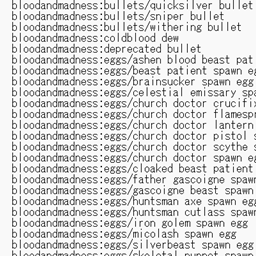
Run a single command in-game and Data Dumper writes a plain text file listing every registered ID — items, entities, structures, attributes, enchantments, and more — grouped by mod and sorted alphabetically.
No config, no GUI, no performance impact. It does nothing until you run a command.
Where files are saved
All output goes to a data_dumps folder inside your game directory (the same folder that holds mods, config, and saves).
.minecraft/
└── data_dumps/
    ├── item_dump_all.txt
    ├── entity_dump_all.txt
    ├── item_dump_irons_spellbooks.txt
    └── ...
On a dedicated server, the folder is created next to the server jar.
The full path is printed in chat every time a dump completes, so you can always confirm where the file landed.
Commands
All commands require permission level 2 (operator / cheats enabled).
ID dumps
Every command below accepts an optional mod ID. Omit it to dump every mod at once, or supply one to dump only that mod. Tab completion suggests all available mod IDs.
| Command | What it lists |
|---|---|
/datadump item [modid] |
Every registered item ID |
/datadump entity [modid] |
Every registered entity type ID |
/datadump structure [modid] |
Every worldgen structure ID, including datapack-added ones |
/datadump attribute [modid] |
Every registered attribute ID (useful for gear AttributeModifiers) |
/datadump enchantment [modid] |
Every registered enchantment ID |
/datadump spell [modid] |
Every spell ID from Iron's Spells 'n Spellbooks |
/datadump gun [modid] |
Every gun ID from Timeless and Classics Zero (TACZ) |
Output format — entries are grouped by mod namespace, each group sorted alphabetically, with a count per group:
=== minecraft (1425 items) ===
minecraft:acacia_boat
minecraft:acacia_button
...

=== irons_spellbooks (312 items) ===
irons_spellbooks:arcane_boots
irons_spellbooks:arcane_helmet
...
File name — <category>_dump_all.txt when no mod is specified, or <category>_dump_<modid>.txt when one is.
Any other registry
/datadump custom <registry_name> [modid]Dumps any registry by name, vanilla or modded. Tab completion lists every registry currently loaded, so you can browse what is available.
/datadump custom irons_spellbooks:spells
/datadump custom tacz:gun cataclysm
/datadump custom minecraft:potion
Saved as <registry_path>_dump_all.txt or <registry_path>_dump_<modid>.txt.
Instance information
| Command | Output file | Contents |
|---|---|---|
/datadump registries |
registries_list.txt |
Every registry name currently loaded — use this to find the exact name for /datadump custom |
/datadump mods |
mods_list.txt |
Every loaded mod as mod id | display name | version |
/datadump datapacks |
datapacks_list.txt |
Every enabled datapack |
/datadump resourcepacks |
resourcepacks_list.txt |
Every enabled resource pack (client only — not available on a dedicated server) |
Everything at once
/datadump allRuns every dump listed above with no mod filter and writes all files to data_dumps in one go.
Notes
/datadump spelland/datadump gunare convenience shortcuts for theirons_spellbooks:spellsandtacz:gunregistries. If the matching mod is not installed, the command reports that the registry was not found. If a future version of either mod renames its registry, run/datadump registriesto find the current name and use/datadump custominstead.- An attribute appearing in the dump does not guarantee it applies to players. Mob-specific attributes such as
minecraft:horse.jump_strengthexist in the registry but have no effect on player gear. Use/attribute @s <id> base getto check whether an attribute is actually present on your player. - Structures are read from the loaded world's registry, so datapack-added structures are included.
- Server-side only in effect. Installing it on the client alone works for singleplayer; on a server, install it on the server to use the commands there.
The Data dumper (A exports in-game data to a text file tool) Team


Owner


![[TACZ] The mob got his gun project image](https://media.forgecdn.net/avatars/thumbnails/2045/35/256/256/639249059161587506.jpg)