Mine and Slash Damage Tracker
- By
Damage Tracker (Mine and Slash)
===============
What It Is
===============
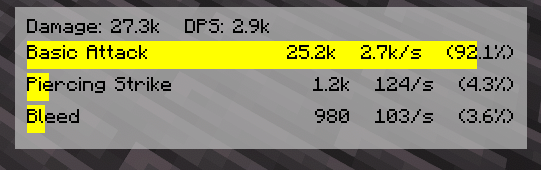
A client-side DPS overlay for Mine and Slash. It parses the combat log in real time and renders a compact, movable HUD showing Total, DPS, and your top abilities with element-colored bars.
===============
Features
===============
> Live overlay HUD
> Measure by rolling time frame or manually cleared sample (configurable)
> Per-ability data rows show Total, DPS, % of Overall damage, and a progress bar tinted to the damage element.
> Draggable (Move/Edit key) with snap + bounds clamp; configurable position and padding.
> Background panel with configurable color + opacity; optional per-row bar backgrounds.
> Smart parsing:
-Regex-driven capture (configurable profile) for Mine and Slash output lines
-Heuristics to normalize skill names/elements and pick up common variants (“applied” vs “dealt”, multi-element, etc.).
-Duplicate suppression (prevents repeated lines from double counting).
-Target Dummy filtering (prevents Target Dummy display outputs from polluting the meter data).
-Idle Freeze (optional): pauses the rolling window timer after X ms of no new damage.
>Details & reporting
-Quick Report screen (keybind) with a 15-row breakdown and last-hit details per skill.
-Tooltip/details API for future expansion (e.g., crit rate, avg hit, etc., as chat exposes it).
>Cosmetics & Colors
-Defaults (editable):
-Physical = Orange
-Lightning = Yellow
-Cold = Light Blue
-Fire = Red
-Chaos/Shadow = Purple
-Multi-Element = Violet
*You can theme every element color in config.
>Keybinds (defaults)
-Toggle Overlay: /
-Move/Edit Overlay: - (also Shift+- to reset position to center)
-Clear Data: * (Numpad Multiply)
-Report: Unbound (set your favorite)
>Using the overlay
-Press / to toggle the HUD.
-Press - to enter Move/Edit mode, then drag the window; Esc to exit.
-(Hold Shift while pressing - to reset position to screen center.)
Press * to clear the current sample (if you set manual clear mode).
===============
Permissions
===============
Modpacks: Allowed. Please credit and link the project page.
Redistribution: Link the CurseForge or GitHub release; don’t rehost binaries.
===============
Links
===============
Source & Issues: GitHub (Damage Tracker)
Mine and Slash Damage Tracker Team