Custom Music Player
- By
It provides NetEase Cloud Music search, song requests, shared queue playback, playlist playback, custom music discs, and URL-based jukebox playback.
Minecraft Music Player
Minecraft Music Player is a Fabric music mod for Minecraft 1.21.11. It provides NetEase Cloud Music search, song requests, shared queue playback, playlist playback, custom music discs, and URL-based jukebox playback.
The server handles commands, queue logic, search requests, sync, random loot disc injection, and jukebox control. The client handles actual audio download, playback, and jukebox cover rendering. This is a dual-side mod, not a pure server-side audio mod.





Features
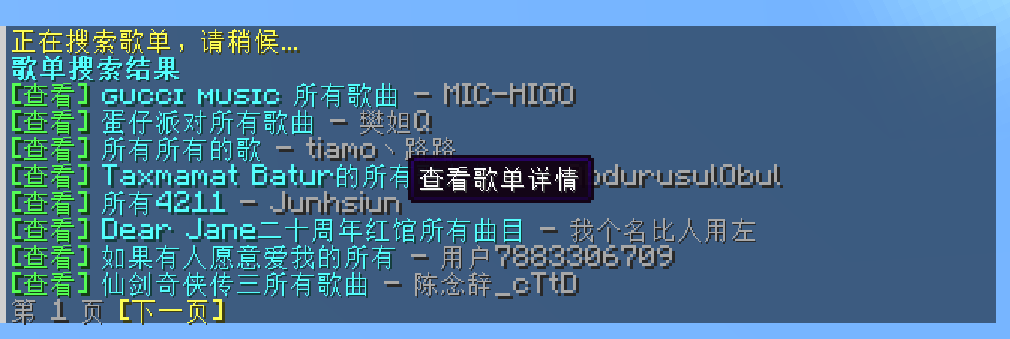
- Search songs, artists, playlists, and users
- View artist top songs, playlist details, and user playlists
- Unified paging and clickable navigation for all major list pages
- Clickable actions for request, burn, detail view, and download
- Shared song requests, queue playback, auto-advance, and vote skip
- Duplicate request deduplication and move-queued-track-to-next support
- Server-side queue prefetching to reduce delay between tracks
- Burn songs into vanilla music discs and play URL-based music from jukeboxes
/music randomgenerates 10 random hot songs each time- All loot-table-backed containers can spawn random hot music discs based on admin settings
How It Works
- The server handles command execution, search requests, playback queue, loot disc generation, and jukebox synchronization
- The client handles actual audio playback and jukebox cover rendering
- If only the server installs the mod, commands and queue logic work, but clients cannot hear music
- Players who want to hear music must install the mod on the client
Recommended setup:
- Install
Minecraft Music Playeron the server - Install
Minecraft Music Playeron clients that should hear music - Make sure the server or clients can access a working music API endpoint
Requirements
- Minecraft
1.21.11 - Fabric Loader
0.18.4or newer - Fabric API
0.141.3+1.21.11or a compatible version - Java
21 - A reachable NetEase-related music API service, defaulting to
https://mycelis.dpdns.org/
Installation
Server
Put the mod jar and Fabric API into the server mods folder.
Client
Put the mod jar and Fabric API into the client mods folder.
Default API Address
Default configuration uses:
https://mycelis.dpdns.org/Admins can override it by command and restore the default later.
Music Discs
Burn flow
- Hold any vanilla music disc in the main hand
- Run
/music burn song <song_id> - Or click
[Burn]in supported list pages - Receive a custom music disc storing the track metadata and URLs
Disc metadata
A burned disc stores:
- song ID
- song title
- artist name
- artist ID
- cover URL
- duration
- available source URLs
Jukebox playback
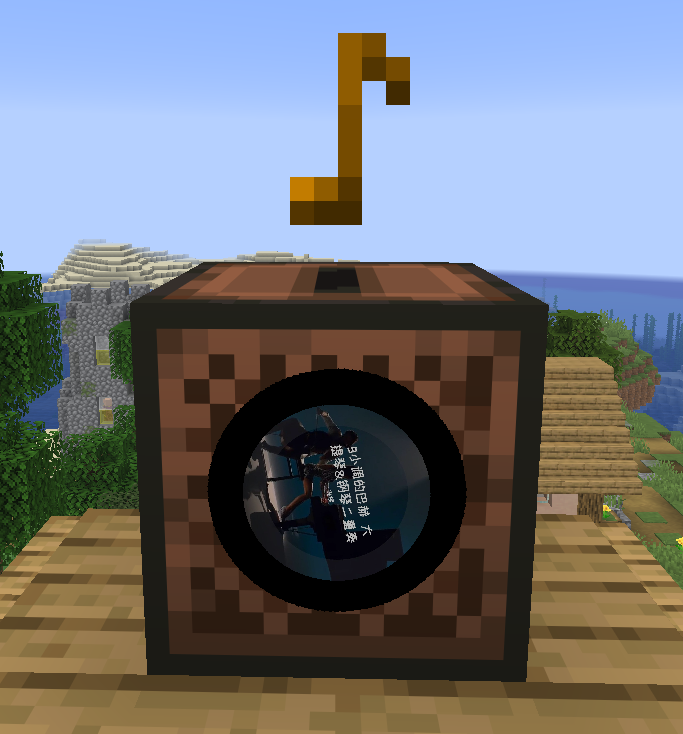
- Inserting a burned disc into a jukebox automatically plays the stored URL music
- Playback is spatialized around the jukebox instead of acting like a global background track
- The four sides of the jukebox render a rotating disc-style cover effect
- Playback stops when the disc is ejected, replaced, the jukebox is broken, the chunk unloads, or the player leaves audible range
- Pending placeholder discs cannot be inserted into jukeboxes and will do nothing if used on one
Burn entry points
When the player holds a burnable disc in the main hand, a [Burn] action is shown automatically in these views:
/music now/music queue/music random/music search song .../music view playlist .../music view artist .../music view author ...
Random Hot Music
Use:
/music randomBehavior:
- Generates 10 random hot songs each time
- The source is hot playlists selected from hot playlist categories
- Each refresh produces a different list
- Every entry supports:
- request song
- burn to disc
- view artist details
- open the direct download URL
Loot Container Random Music Discs
The mod can inject random hot music discs into all loot-table-backed containers when they are opened for the first time.
Behavior:
- Applies to both block containers and entity containers backed by loot tables
- Each container is decided only once
- On first open, a temporary "generating" placeholder disc is inserted first and the real disc is resolved asynchronously in the background
- If the player takes the placeholder disc out early, it will still resolve later inside the player's inventory or the currently open container
- The original vanilla disc item type is preserved after resolution, so the color and appearance do not change
- Generated discs come from random hot songs selected from hot playlists
- Admins can configure whether this is enabled, the generation chance, and how many discs may be generated per container
Player Commands
| Command | Description |
|---|---|
/music |
Show help |
/music now |
Show the current track with a clickable download entry |
/music queue [page] |
Show the current queue |
/music queue next <song_id> |
Move a queued song to the next position |
/music join |
Join current playback |
/music leave |
Leave current playback |
/music mute once |
Stop receiving only the current song |
/music vote next |
Vote to skip to the next track |
/music play song <song_id> |
Request a single song |
/music play playlist <playlist_id> |
Switch into playlist playback mode |
/music burn song <song_id> |
Burn the held disc into a music disc |
/music random |
Generate 10 random hot songs |
/music random refresh |
Generate another random hot song list |
/music search song <keyword> |
Search songs |
/music search song page <page> <keyword> |
View a specific page of song search results |
/music search artist <keyword> |
Search artists |
/music search artist page <page> <keyword> |
View a specific page of artist search results |
/music search author <keyword> |
Alias of artist |
/music search playlist <keyword> |
Search playlists |
/music search playlist page <page> <keyword> |
View a specific page of playlist search results |
/music search user <keyword> |
Search users |
/music search user page <page> <keyword> |
View a specific page of user search results |
/music view artist <artist_id> |
View artist top songs |
/music view artist page <page> <artist_id> |
View a specific page of artist details |
/music view author <artist_id> |
Alias of artist |
/music view playlist <playlist_id> |
View playlist details |
/music view playlist page <page> <playlist_id> |
View a specific page of playlist details |
/music view user <user_id> |
View user playlists |
/music view user page <page> <user_id> |
View a specific page of user playlists |
Admin Commands
| Command | Description |
|---|---|
/music admin reload |
Reload config |
/music admin status |
Show current config status |
/music admin clearqueue |
Clear queued tracks |
/music next |
Skip immediately to the next track |
/music stop |
Stop playback |
/music admin set baseUrl <url> |
Set the music API base URL, or use default to restore the default |
/music admin set allowCustomServer <true|false> |
Allow custom API URL or not |
/music admin set allowSongRequest <true|false> |
Allow song requests or not |
/music admin set allowPlaylistRequest <true|false> |
Allow playlist import or not |
/music admin set autoAdvance <true|false> |
Enable auto-advance or not |
/music admin set announceQueueChanges <true|false> |
Broadcast queue changes or not |
/music admin set showLoadingHints <true|false> |
Show search and resolve hints or not |
/music admin set useSystemProxy <true|false> |
Enable system proxy discovery or not |
/music admin set preferIpv4 <true|false> |
Prefer IPv4 or not |
/music admin set proxy <host:port> |
Set HTTP proxy |
/music admin set proxy none |
Clear proxy |
/music admin set connectTimeoutSeconds <3-60> |
Set connect timeout |
/music admin set readTimeoutSeconds <3-120> |
Set read timeout |
/music admin set searchLimit <3-20> |
Set list page size |
/music admin set maxQueueSize <1-200> |
Set queue size limit |
/music admin set playlistQueueLimit <1-100> |
Set maximum imported songs per playlist |
/music admin set queueCacheSize <0-20> |
Set server-side queue prefetch size |
/music admin set enableLootMusicDiscs <true|false> |
Enable random music discs in loot containers |
/music admin set lootMusicDiscChance <0.0-1.0> |
Set the generation chance for random loot music discs |
/music admin set lootMusicDiscCount <0-5> |
Set how many random music discs a loot container may generate |
/music admin set voteSkipPercent <0.1-1.0> |
Set vote skip ratio |
Configuration
Configuration file path:
config/minecraft-music-player.jsonDefault config example:
{
  "neteaseBaseUrl": "https://mycelis.dpdns.org/",
  "proxy": "",
  "useSystemProxy": true,
  "preferIpv4": true,
  "allowCustomServer": true,
  "allowSongRequest": true,
  "allowPlaylistRequest": true,
  "autoAdvance": true,
  "announceQueueChanges": true,
  "showLoadingHints": true,
  "connectTimeoutSeconds": 10,
  "readTimeoutSeconds": 20,
  "searchLimit": 8,
  "maxQueueSize": 40,
  "playlistQueueLimit": 20,
  "queueCacheSize": 3,
  "enableLootMusicDiscs": true,
  "lootMusicDiscChance": 0.3,
  "lootMusicDiscCount": 1,
  "voteSkipPercent": 0.6
}
Custom Music Player Team