

Custom Block Outline
- By
A simple yet highly useful client-side mod that replaces Minecraft's default, boring black block selection outline with a vibrant, fully customizable colored highlight!
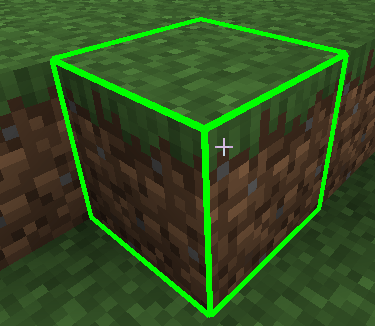
Снимок ÑкÑана 2026-06-04 220225.png
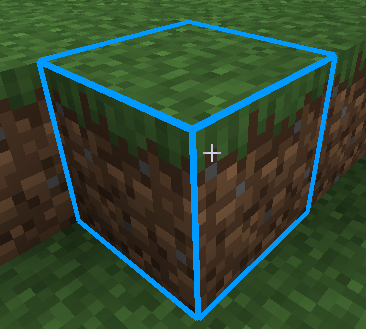
Снимок ÑкÑана 2026-06-04 220208.png
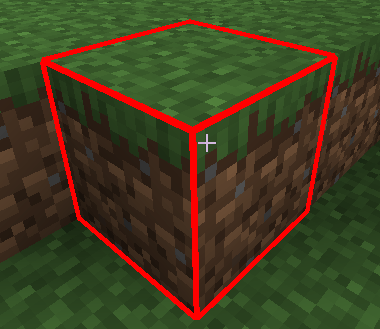
Снимок ÑкÑана 2026-06-04 220155.png
Description
A simple yet highly useful client-side mod that replaces Minecraft's default, boring black block selection outline with a vibrant, fully customizable colored highlight!
Now you can perfectly see which block you are targeting, even in the deepest, darkest caves or while building complex structures.
🌟 Features:
- Color Selection on the Fly: Toggle between Cyan (Blue), Red, Green, or default Black directly in-game.
- Thickness Adjustment: Make the outline ultra-thin or thick and bold for maximum visibility.
- No Restarts Needed: All changes are applied instantly without reloading the world or restarting the game.
🎮 How to Use:
- Look at any block in the world.
- Press the K key on your keyboard to open the configuration menu.
- Select your preferred color or adjust the line thickness using the
+0.5/-0.5buttons. - Click Done to save and return to the game.
📌 Requirements:
- Minecraft Version: 1.20.1
- Mod Loader: Forge
- This is a Client-Side mod. You can safely use it on multiplayer servers without needing it installed on the server side.
The Custom Block Outline Team
