Custer Stack
- By
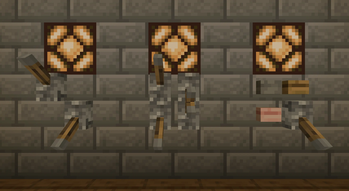
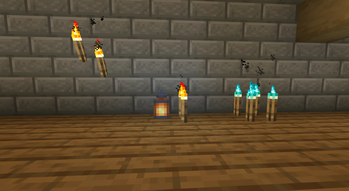
Place several levers, buttons, torches and lanterns on the same block space, leaf-litter style.
32c0822ee044676f9bb021876f091ebc5dfa6ab4_350.webp
e33069715ad6805f5ee1a9bae5569c5f02048298_350.webp
Description
Ever wanted two levers on one wall, or a button right next to a lever, without building a whole panel out of separate blocks? Cluster Attach changes how small attached blocks are placed so they can share a block space, the same way leaf litter lets you stack more into one spot.
How it works Hold a lever, button, torch or lantern and right-click the wall or floor face right next to one you already placed. Instead of failing, the new item is added to that same space and shifts into the corner closest to where you clicked. The original one slides over to make room. Keep clicking to add more.
How many fit? Each space has four units of room, and bigger items take more:
Lever, button, torch: 1 unit each (up to 4) Lantern: 2 units each (up to 2, or one lantern plus two small things) You can mix types and faces, for example a wall lever and a floor button in one space.
Redstone still works Every lever and button in a cluster keeps its own on/off state and signal, and they all work at the same time. Click the one you want and it toggles (levers) or pulses (buttons) independently of its neighbours. Buttons release on their own timers, and stone and wood buttons keep their vanilla press lengths and sounds. Torches in a cluster still glow and give off flames, and a cluster lights up the area just like the torches would on their own.
Details Works with all vanilla lever, button, torch (including soul variants) and lantern types. If the block an item is attached to is removed, that item pops off as a drop. Nothing changes for single placements: a lone lever is still a normal lever until you add a second item to its space.
Custer Stack Team