Curseforge Sync
- By
Point your server at a CurseForge modpack and it keeps itself in sync every boot — before Forge scans for mods. Old versions deleted, new ones installed, client-only mods filtered out automatically.
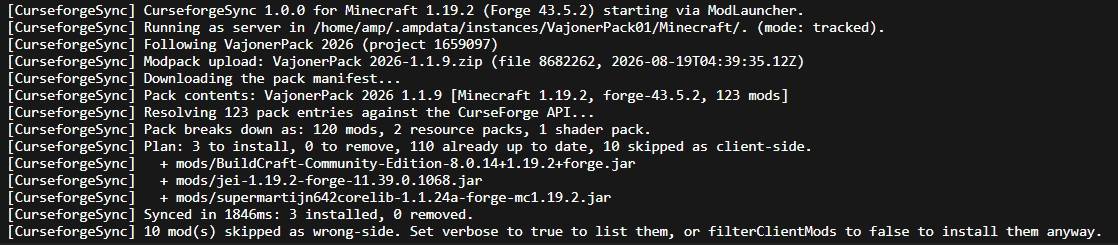
You can see it checked my modpack, found 3 mods missing, and put them in the correct place!
Description
What it does
Keeping a Forge server in step with a modpack is manual work. Every pack update means diffing the mods folder by hand, deleting stale jars, downloading replacements, and remembering which entries are client-only and will crash a server or waste memory.
CurseforgeSync does all of it at start-up. Drop one jar in mods/, put your pack's project ID in a config file, and every boot the server reconciles its own mods folder against the latest release of that pack.
- Downloads and installs everything the pack lists
- Deletes the old version of a mod when the pack moves to a new one
- Skips client-only mods like Rubidium, Oculus, Mouse Tweaks and Xaero's minimaps
- Sorts resource packs and shaders into their own folders instead of dumping them in
mods/ - Leaves jars you added by hand exactly where they are
Setup
- Put the jar for your Minecraft version in
mods/. - Start the server once. It writes
config/curseforgesync.json. - Copy the number from the Project ID box on your pack's CurseForge page into
modpackProjectId. - Restart.
{
  "modpackProjectId": 885460
}
That is the entire setup. Everything else has a sensible default.
It runs before Forge scans for mods
An ordinary mod is far too late to be useful here. By the time a normal mod's setup event fires, every jar in mods/ has already been scanned and loaded, and changing the folder does nothing until the next restart.
So CurseforgeSync does not register as a mod at all — it registers as part of the loader. On 1.16.5 and newer it is a ModLauncher transformation service; on 1.7.10 and 1.12.2 it is an FML coremod. Both run before the mod scanner exists, so a sync takes effect in the same start-up that performed it.
This means CurseforgeSync will not appear in your server's mod list, and that is expected. Forge deliberately skips mod-scanning any jar that provides a transformation service — which is exactly the mechanism that lets it run this early.
Choosing what stays and what goes
A CurseForge pack manifest is just a flat list of project IDs. It does not say what each entry is or which side it belongs on, because the launcher that reads it is always a client. Two things are worked out for you.
What the file actually is
Packs routinely mix resource packs and shaders in with mods — All of Create is 230 mods, 42 resource packs and 2 shader packs. Those go to resourcepacks/ and shaderpacks/, never mods/, and on a server they are skipped entirely. Worlds and Bukkit plugins are never installed.
Which side a mod belongs on
Decided in this order, with the reason for every decision written to the log:
- Your own
clientOnlyModsandserverOnlyModslists - A curated list of ~100 well-known client-only projects — renderers, shader loaders, zoom and input mods, HUD and tooltip mods, sound and cosmetic mods, Discord presence
- The author's own Client/Server tags on the uploaded file
Anything unrecognised is installed. That asymmetry is deliberate: guessing "client-only" wrongly costs you a missing dependency and a crash, while guessing "both" wrongly costs a few megabytes of RAM. Mods with even a partial server-side component — JEI, Jade, JourneyMap, FerriteCore, ModernFix — are deliberately left off the list.
Two cleanup modes
| Mode | Behaviour |
|---|---|
| tracked (default) | Only removes jars CurseforgeSync installed itself. Updating a mod still deletes the old version, but anything you added by hand is never touched. |
| strict | Makes mods/ an exact mirror of the pack and deletes everything else, apart from names you list in protectedFiles. |
Try it before you trust it
Every jar is also a runnable command-line tool, so you can see exactly what a sync would do without going near a live server:
java -jar curseforgesync-1.19.2-1.0.0.jar --dir ./myserver --pack 885460 --dry-run --verboseIt is also the quickest way to pre-seed a brand new server before its first boot.
Supported versions
Minecraft 1.7.10, 1.12.2, 1.16.5, 1.19.2, 1.20.6, 1.21.11, 26.1.2 and 26.2. Each build targets the newest Forge for its version. If a pack turns out to target a different Minecraft version than your server, the sync refuses to run rather than filling mods/ with jars that cannot load.
Other things worth knowing
- Coremods need a restart. If a sync installs another coremod or loader plugin, that one cannot take effect in the same boot, because the loader swept for coremods before we ran. CurseforgeSync detects this and restarts the server — configurable, and off if you prefer.
- A CurseForge outage will not keep your server down. If the sync fails, start-up continues with the mods already installed. Set
failOnErrorif you would rather it stop. - Authors who opt out of third-party distribution are handled. Affected files are listed in a text file for you to install by hand.
- It ships with a working API key, so there is nothing to sign up for. Rate limits are per key, so busy hosts can drop in their own free one.
- Full logging to
logs/curseforgesync.log, written before Minecraft's own logging exists.
Curseforge Sync Team


Owner