Cue My Music
- By
A music player for Minecraft's soundtrack, with a queue, pitch, speed and an equalizer.
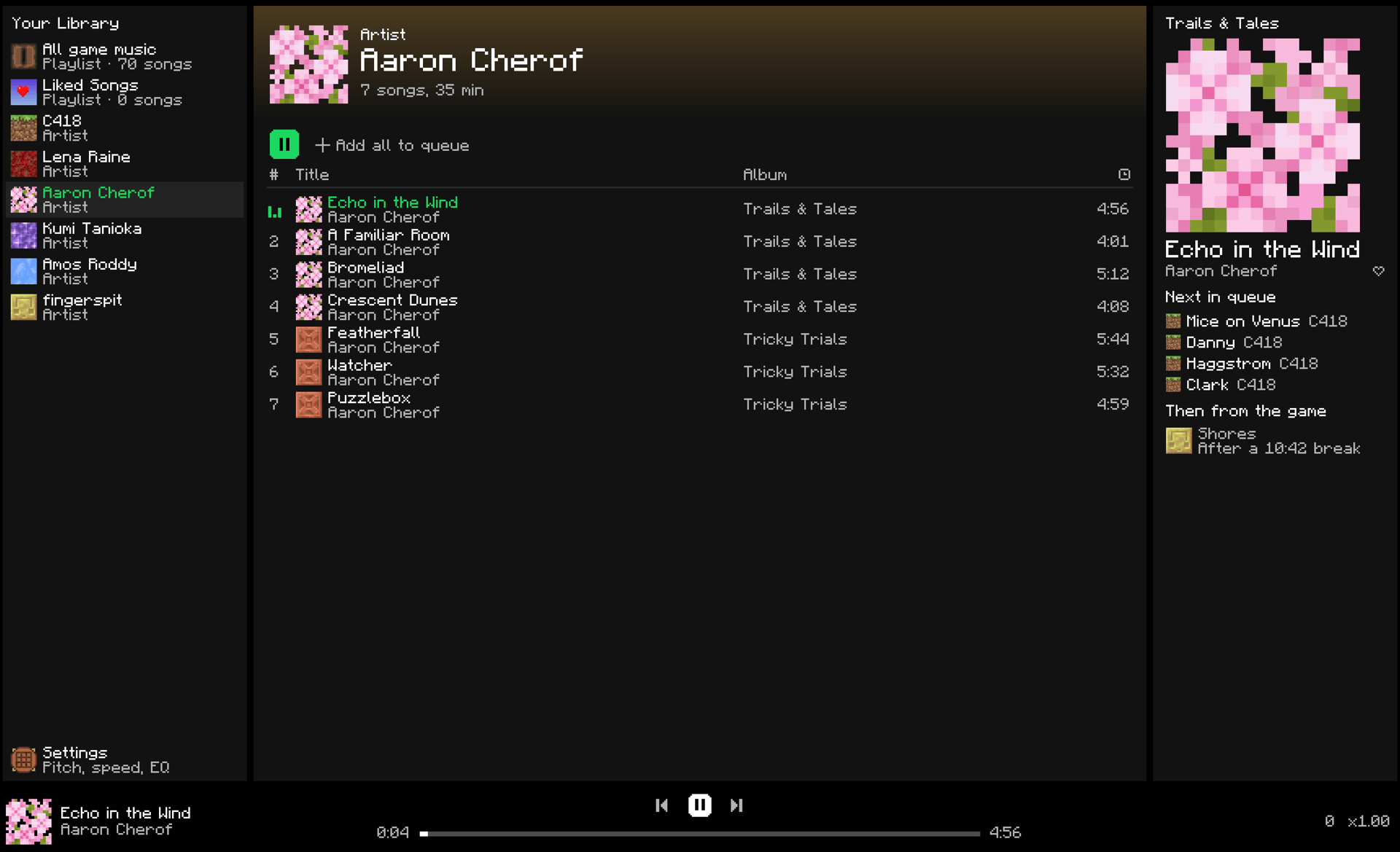
An artist page playing through, with the queue and the game's next song on the right.
Description
A music player for Minecraft's own soundtrack.
Browse every song in the game by artist or resource pack. Play one and the rest of its page follows, queue up what's next, or like it for later. When you're done, the game takes over exactly as it would without the mod, and the queue shows which song it picked and when it plays.
Pitch, speed, and a 6-band equalizer apply to every song. Pitch and speed are separate: drop the music 2 semitones without slowing it down, or play it at 1.2× without raising it.
Features
- Player: opens from a music button on the title screen or pause menu, from Mod Menu, or with a key.
- Pages: all game music, Liked Songs, each artist, and each resource pack that adds music, in a library with folding sections.
- Playlists: make your own; right-click any song to add it.
- Play-through: a song plays the rest of its page after it.
- Queue: add a song or a whole page, drag to reorder. It shows the game's next song and the break before it.
- Repeat: off, all, or one.
- Dislike: thumbs down a song and the game never picks it for its own music. You can still play it.
- Select several: shift-click, shift-drag, or Cmd/Ctrl-click songs, then queue, like, dislike, or add them to a playlist at once.
- Your Stats: top songs and artists, a 24-hour listening clock, a calendar of every day you listened, streaks, and where you listen.
- Vanilla timing: the game still picks its songs and breaks exactly as usual.
- Pitch: −12 to +12 semitones, same speed.
- Speed: 0.5× to 2.0×, same pitch.
- Equalizer: 6 bands with presets.
- Commands:
/cmm play,queue,next,prev,pause,repeat, anddislike. - Keys: play/pause, next, and previous, on any screen. F7–F9 by default on macOS.
- Travel: your song keeps playing through dimension changes, or pauses until the new one loads.
- Resource packs: each gets its own page, with its name, icon, and author. A pack can name its songs with a
cuemymusic.json.
Installation
- Install Fabric Loader (or Quilt Loader), Fabric API, and Mod Menu for 26.3.
- Put the jar in
mods.
Compatibility
- Minecraft: 26.3 on Fabric and Quilt. Java 25.
- Client-side only. Servers don't need it.
- Background music only. Jukeboxes and sound effects aren't touched.
- Other music mods that replace the music stream may bypass it.
Full settings and troubleshooting are on GitHub.
License
MIT, see the LICENSE. Minecraft is a trademark of Mojang Studios.
Cue My Music Team